> ## Documentation Index
> Fetch the complete documentation index at: https://docs.apinizer.com/llms.txt
> Use this file to discover all available pages before exploring further.
# Login Log Connector Configuration
> Writing login audit records to MongoDB and forwarding them to external systems (Elasticsearch, Kafka, Webhook, etc.) via connectors. Configuration, event types, and JSON payload format for API Manager (system users) and API Portal (portal users).
This feature forwards user sign-in/sign-out events to external systems (Elasticsearch, Kafka, Webhook, etc.) through connectors. It applies to **API Manager** (system users) and **API Portal** (portal users).
## Overview
Apinizer tracks user sign-in/sign-out events in two layers:
| Source | Who | Settings Location |
| --------------- | ----------------------------- | ------------------------------------------ |
| **API Manager** | Administrators / system users | System Settings > Log Settings > Login Log |
| **API Portal** | Portal end users (developers) | Portal Settings > Login Log tab |
For both layers:
* You can configure whether records are **written to MongoDB**.
* You can define one or more **connector targets** to send logs to external systems.
***
## 1. API Manager – System User Login Log
### 1.1 Where to Configure
`System Settings → Log Settings → Login Log`
### 1.2 Screen Fields
| Field | Description |
| --------------------- | ------------------------------------------------------------------------------------------------ |
| **Save to Database** | When enabled, login log records are written to the MongoDB `persistent_audit_events` collection. |
| **Connector Targets** | List of external connection configurations to which login logs are sent. |
To view Management Console login records, see [Login Records](/en/admin/audit-compliance/login-records).
### 1.3 Adding a Connector
1. In the **Login Log** section, click the `+` button in the top-right corner of the connector table.
2. In the dialog, select a connection configuration (ConnectionConfig) previously defined for the environment.
3. Use the toggle to set the connection **Active** or **Inactive**.
Connectors are defined per **environment**. A connection configuration must first be created on the **Connection Configuration** screen and assigned to the relevant **environment**.
### 1.4 Events Emitted
| Event | eventType | Description |
| ---------------- | --------------- | ------------------------------------- |
| Successful login | `LOGIN_SUCCESS` | Username and password verified |
| Failed login | `LOGIN_FAILURE` | Invalid credentials or locked account |
Sign-out (logout) events are **not** logged at this time.
### 1.5 JSON Payload Sent to Connectors
```json theme={null}
{
"source": "API_MANAGER",
"principal": "username",
"email": null,
"displayName": null,
"eventDate": "2026-03-31T10:00:00Z",
"eventType": "LOGIN_SUCCESS",
"remoteAddress": "1.2.3.4",
"message": null,
"errorType": null,
"portalId": null,
"accountId": null
}
```
### 1.6 Failed Login Example
```json theme={null}
{
"source": "API_MANAGER",
"principal": "username",
"email": null,
"displayName": null,
"eventDate": "2026-03-31T10:01:00Z",
"eventType": "LOGIN_FAILURE",
"remoteAddress": "1.2.3.4",
"message": "Bad credentials",
"errorType": "org.springframework.security.authentication.BadCredentialsException",
"portalId": null,
"accountId": null
}
```
***
## 2. API Portal – Portal User Login Log
### 2.1 Where to Configure
`Portal Management → [Select Portal] → Settings → Login Log tab`
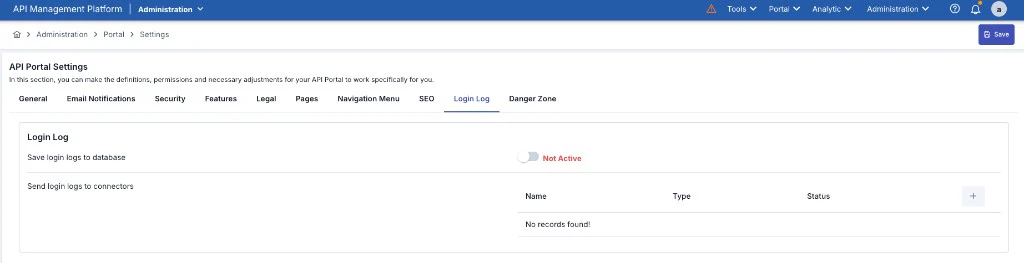 ### 2.2 Screen Fields
| Field | Description |
| --------------------- | ------------------------------------------------------------------------------------------ |
| **Save to Database** | When enabled, login log records are written to the MongoDB `portal_login_logs` collection. |
| **Connector Targets** | List of external connection configurations to which login logs are sent. |
Portal login log settings are **independent per portal**. Each portal can have its own connectors.
To view and filter portal login records, see [API Portal Login Logs](/en/api-portal/login-logs).
### 2.3 Adding a Connector
The steps match API Manager:
1. On the Login Log tab, click `+` in the connector table.
2. Select the appropriate connection configuration and save.
### 2.4 Events Emitted
| Event | loginStatus → eventType | Description |
| ---------------- | --------------------------- | --------------------- |
| Successful login | `SUCCESS` → `LOGIN_SUCCESS` | Portal user signed in |
| Failed login | `FAILURE` → `LOGIN_FAILURE` | Invalid credentials |
### 2.5 JSON Payload Sent to Connectors
```json theme={null}
{
"source": "API_PORTAL",
"principal": null,
"email": "user@example.com",
"displayName": "Full Name",
"eventDate": "2026-03-31T10:05:00Z",
"eventType": "LOGIN_SUCCESS",
"remoteAddress": "5.6.7.8",
"message": null,
"errorType": null,
"portalId": "portal-abc123",
"accountId": "account-xyz789"
}
```
***
## 3. Supported Connector Types
All Apinizer connector types can be used for login logs. Common scenarios:
| Connector Type | Typical Use |
| ------------------------------- | ------------------------------------------------------------------- |
| **Elasticsearch** | Centralized log search and dashboards (Kibana, etc.) |
| **Kafka / RabbitMQ / ActiveMQ** | Real-time event streaming / SIEM integration |
| **Webhook** | HTTP POST to any REST endpoint |
| **Database** | External relational database (JDBC), writes to `log_LoginLog` table |
| **Syslog / Graylog** | Traditional syslog infrastructure |
When the **Database** connector type is selected, login log records are written to the `log_LoginLog` table. This table is **not created automatically** — you must create it manually before enabling the connector. See [Apinizer Log Table Creation Commands](/en/operations/administrator-guides/apinizer-log-table-creation-commands#login-log) for the CREATE TABLE statement for each supported database type (Oracle, MySQL/MariaDB, PostgreSQL, SQL Server).
***
## 4. Multiple Connectors
You can define multiple connectors for both Manager and Portal. Each connector can be toggled **Active** or **Inactive** independently.
When a connector is inactive, nothing is sent to that connector even if a log event occurs.
***
## 5. Turning Off Database Persistence
When the **Save to Database** toggle is off, Apinizer does **not** write login log records to **MongoDB**. Logs are only forwarded to the configured connectors.
If **Save to Database** is off and **all** connectors are inactive, login log records may be **lost**. At least one active target is recommended.
***
## 6. Related Technical Components (Developer Reference)
| Component | File | Description |
| --------------- | ------------------------------------ | ----------------------------------------------------------- |
| Manager entity | `GeneralSettings.java` | Fields `saveLoginLogToDatabase`, `recipientLoginLogList` |
| Manager service | `UserLoginService.logLoginAttempt()` | Routes login/failure events to DB and connectors |
| Portal entity | `PortalLoginLogSettings.java` | Per-portal settings, `portal_login_log_settings` collection |
| Portal service | `PortalLoginLogService.save()` | Routes portal login events to DB and connectors |
| Event model | `LoginLogConnectorEvent.java` | Shared JSON model sent to connectors |
| Enum | `EnumLoginLogSource` | `API_MANAGER` / `API_PORTAL` |
***
## 7. Known Limitations / Roadmap
* **Logout not logged:** Only `LOGIN_SUCCESS` and `LOGIN_FAILURE` are supported. User sign-out (`LOGOUT`) is not logged yet.
* **Portal logout:** Portal user sign-out is also not logged.
* **Source code:** A `LOGOUT` event type could be added by updating `UserLoginService.logout()` and the portal logout flow.
### 2.2 Screen Fields
| Field | Description |
| --------------------- | ------------------------------------------------------------------------------------------ |
| **Save to Database** | When enabled, login log records are written to the MongoDB `portal_login_logs` collection. |
| **Connector Targets** | List of external connection configurations to which login logs are sent. |
Portal login log settings are **independent per portal**. Each portal can have its own connectors.
To view and filter portal login records, see [API Portal Login Logs](/en/api-portal/login-logs).
### 2.3 Adding a Connector
The steps match API Manager:
1. On the Login Log tab, click `+` in the connector table.
2. Select the appropriate connection configuration and save.
### 2.4 Events Emitted
| Event | loginStatus → eventType | Description |
| ---------------- | --------------------------- | --------------------- |
| Successful login | `SUCCESS` → `LOGIN_SUCCESS` | Portal user signed in |
| Failed login | `FAILURE` → `LOGIN_FAILURE` | Invalid credentials |
### 2.5 JSON Payload Sent to Connectors
```json theme={null}
{
"source": "API_PORTAL",
"principal": null,
"email": "user@example.com",
"displayName": "Full Name",
"eventDate": "2026-03-31T10:05:00Z",
"eventType": "LOGIN_SUCCESS",
"remoteAddress": "5.6.7.8",
"message": null,
"errorType": null,
"portalId": "portal-abc123",
"accountId": "account-xyz789"
}
```
***
## 3. Supported Connector Types
All Apinizer connector types can be used for login logs. Common scenarios:
| Connector Type | Typical Use |
| ------------------------------- | ------------------------------------------------------------------- |
| **Elasticsearch** | Centralized log search and dashboards (Kibana, etc.) |
| **Kafka / RabbitMQ / ActiveMQ** | Real-time event streaming / SIEM integration |
| **Webhook** | HTTP POST to any REST endpoint |
| **Database** | External relational database (JDBC), writes to `log_LoginLog` table |
| **Syslog / Graylog** | Traditional syslog infrastructure |
When the **Database** connector type is selected, login log records are written to the `log_LoginLog` table. This table is **not created automatically** — you must create it manually before enabling the connector. See [Apinizer Log Table Creation Commands](/en/operations/administrator-guides/apinizer-log-table-creation-commands#login-log) for the CREATE TABLE statement for each supported database type (Oracle, MySQL/MariaDB, PostgreSQL, SQL Server).
***
## 4. Multiple Connectors
You can define multiple connectors for both Manager and Portal. Each connector can be toggled **Active** or **Inactive** independently.
When a connector is inactive, nothing is sent to that connector even if a log event occurs.
***
## 5. Turning Off Database Persistence
When the **Save to Database** toggle is off, Apinizer does **not** write login log records to **MongoDB**. Logs are only forwarded to the configured connectors.
If **Save to Database** is off and **all** connectors are inactive, login log records may be **lost**. At least one active target is recommended.
***
## 6. Related Technical Components (Developer Reference)
| Component | File | Description |
| --------------- | ------------------------------------ | ----------------------------------------------------------- |
| Manager entity | `GeneralSettings.java` | Fields `saveLoginLogToDatabase`, `recipientLoginLogList` |
| Manager service | `UserLoginService.logLoginAttempt()` | Routes login/failure events to DB and connectors |
| Portal entity | `PortalLoginLogSettings.java` | Per-portal settings, `portal_login_log_settings` collection |
| Portal service | `PortalLoginLogService.save()` | Routes portal login events to DB and connectors |
| Event model | `LoginLogConnectorEvent.java` | Shared JSON model sent to connectors |
| Enum | `EnumLoginLogSource` | `API_MANAGER` / `API_PORTAL` |
***
## 7. Known Limitations / Roadmap
* **Logout not logged:** Only `LOGIN_SUCCESS` and `LOGIN_FAILURE` are supported. User sign-out (`LOGOUT`) is not logged yet.
* **Portal logout:** Portal user sign-out is also not logged.
* **Source code:** A `LOGOUT` event type could be added by updating `UserLoginService.logout()` and the portal logout flow.