> ## Documentation Index
> Fetch the complete documentation index at: https://docs.apinizer.com/llms.txt
> Use this file to discover all available pages before exploring further.
# Roles
> You can manage user roles, use default roles and create new roles. You can configure role-based authorization and assign necessary roles for users to perform operations in projects.
In Apinizer, it is not possible for a user to access a project they do not have permission for, or even perform an action that is not within their authority within the same project. Users need to have role/roles to perform operations in any project.
When the system is first installed, commonly used roles (API Developer, API Analytics, API Manager, API Creator, Project Owner) come ready. Default roles can be used to authorize users or teams, or new roles can be defined.
In Apinizer; there are 5 default roles: API Developer, API Analytics, API Manager, API Creator and Project Owner.
These roles and the permissions of the roles are explained in detail below:
## Default Roles and Permissions
**Permissions:**
* API Spec
* API Proxy
* Deploy/Undeploy
* API Proxy Group
* Global Policy
* Task Flows
**Permissions:**
* API Tester
**Permissions:**
* Analytics
**Permissions:**
* API Proxy
* Deploy/Undeploy
* API Spec
* API Proxy Group
* Global Policy
* Task Flows
**Permissions:**
* API Creation
**Permissions:**
* API Security
**Permissions:**
* API Creation
* API Spec
* API Proxy
* Deploy/Undeploy
* API Proxy Group
* Global Policy
* Analytics
* Project
* Project Members
* API Security
* Audit
* Import/Export
* API Portal Plans
* Activate/Deactivate API Products
* Publish on Portal
* API Products
* Task Flows
When a new project is opened, the user who creates the project automatically acquires the **Project Owner** role.
If it is desired for a user or team to have more or less than the permissions in the default roles, a new role can be created that can be completely customized accordingly.
## Creating a New Role
An image containing role creation settings is shown below:
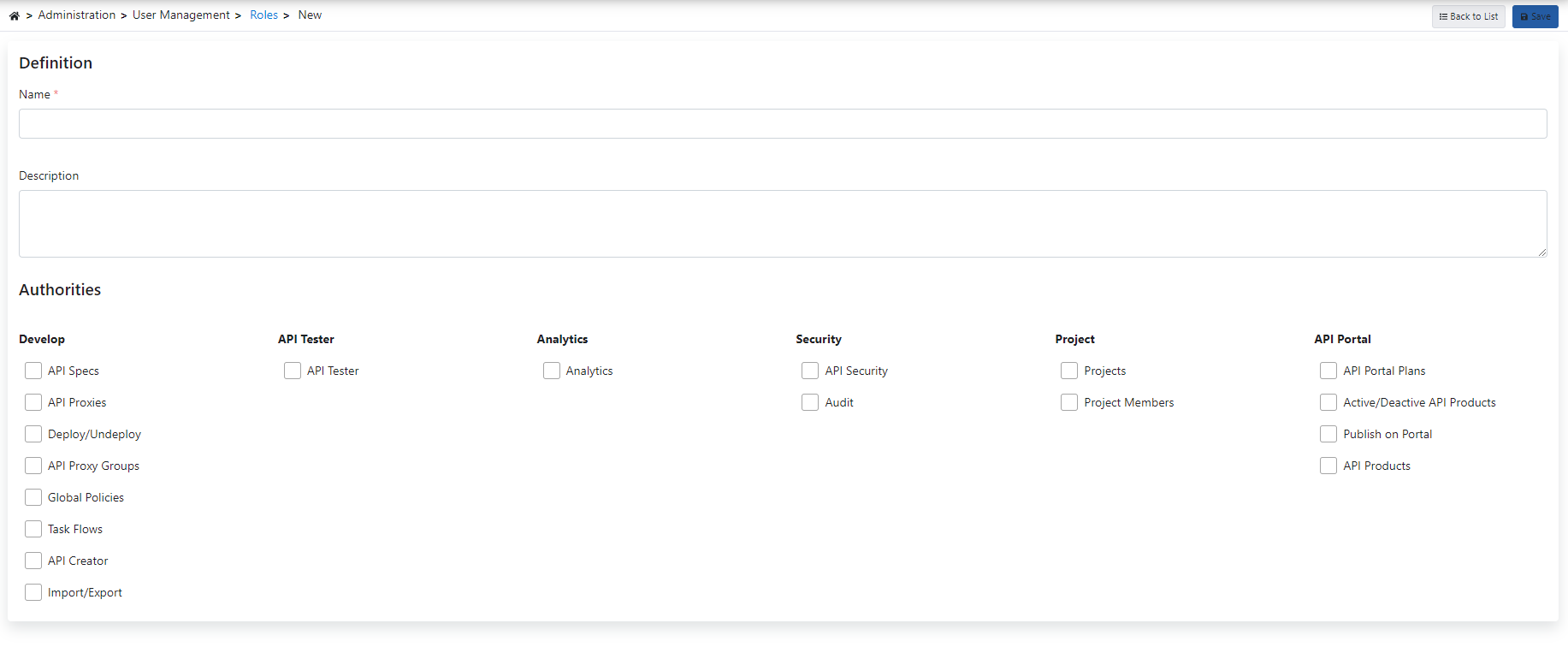 The fields used for role creation configuration are shown in the table below.
| Field | Description |
| ------------------------------- | -------------------------------------------------------------------------------------------------------------------------------------------------------------------- |
| **Name** | Role name information for the created role. |
| **Description** | A description can be written to facilitate management related to the created role. |
| **Authorities** *(Authorities)* | Field where the permissions that the created role will have are selected. Role permissions are added by selecting the checkbox belonging to the relevant permission. |
Deleted roles are also deleted from projects and teams by the system.
The fields used for role creation configuration are shown in the table below.
| Field | Description |
| ------------------------------- | -------------------------------------------------------------------------------------------------------------------------------------------------------------------- |
| **Name** | Role name information for the created role. |
| **Description** | A description can be written to facilitate management related to the created role. |
| **Authorities** *(Authorities)* | Field where the permissions that the created role will have are selected. Role permissions are added by selecting the checkbox belonging to the relevant permission. |
Deleted roles are also deleted from projects and teams by the system.