> ## Documentation Index
> Fetch the complete documentation index at: https://docs.apinizer.com/llms.txt
> Use this file to discover all available pages before exploring further.
# Users
> You can create users who will work in roles such as API Developer, API Analytics, Project Owner, System Administrator, assign roles and perform user management. You can perform user addition, deletion, update, password management and user status control.
In Apinizer, users who will work in roles such as API Developer, API Analytics, Project Owner (Project Owner), System Administrator (System Admin) or manage the platform need to be defined in Apinizer.
## Importance of User Management
User management plays a critical role for the Apinizer platform to work securely and efficiently. With correct user definitions and role assignments:
* **Security**: Each user can only perform operations they are authorized for
* **Efficiency**: Users can focus on their areas of responsibility
* **Traceability**: User-based operations can be tracked and reported
* **Scalability**: Centralized user management is provided in large organizations
## User Types
There are two types of user types system-wide; **User** and **System Administrator (Admin)**.
User only has login permission in Apinizer and is authorized to perform operations within the scope of their role/roles in the project they are added as a member. These users can use the platform within the scope of their assigned projects and roles.
Users with System Administrator role have permission to perform all operations in Apinizer. They can perform all management operations in the Administration menu and have full control authority platform-wide.
## User Roles and Project Membership
A user can have different roles in different projects. For example, while having the API Developer role in project A, they can be API Analytics in project B, and API Developer and API Analytics in project C.
Similarly, different roles can be defined for a user in different teams.
### Flexible Role Management
There is a flexible role management system for users in Apinizer:
* **Project-Based Roles**: Each user can work with different roles in different projects
* **Team-Based Roles**: Users can be in different teams with different roles
* **Multiple Role Support**: A user can have more than one role in the same project
* **Dynamic Authorization**: Roles can be managed dynamically on a project and team basis
### Usage Scenarios
Users are added as members to projects and roles are assigned on a project basis. For example:
* API Developer in E-Commerce project
* API Analytics in Payment project
* Both Developer and Analytics in Reporting project
Users are added as members to teams and roles are assigned on a team basis. When a team is added to projects, team members are automatically added to the project.
To learn how to add a user as a member to any project, [click here](/en/admin/project-management/project-members)
.
## User Roles Details
The roles that can be assigned to users in Apinizer and the permissions of these roles are explained in detail below:
Can manage all operations that can be performed on the Apinizer Management Console. Especially, only users with this permission can perform management-based operations of the application in the Administration menu. This role:
* Has full authority in all projects
* Can manage system settings
* Can perform user and team management
* Can access all API Proxies
Users with this permission can perform operations related to API creation, accounts, credentials and portal settings on the Portal Management basis on the console. Has all necessary permissions for portal management.
Users with this permission manage operations such as creating graphs, usage summaries, queries and preparing reports in the Analytics module. Can view analytics data, create custom queries and prepare reports.
Users with this permission are authorized in all projects and can manage all operations. Can perform all project-based operations and manage project settings.
Users with this permission can view APIs on the Portal, manage operations related to users, and perform operations related to organizations. Has portal user management and organization management permissions.
Users with this permission can perform operations related to API creation and portal settings on the Portal Management basis on the console. Has API development and publishing permissions on the Portal.
## Creating a New User
**An image containing user creation settings is shown below:**
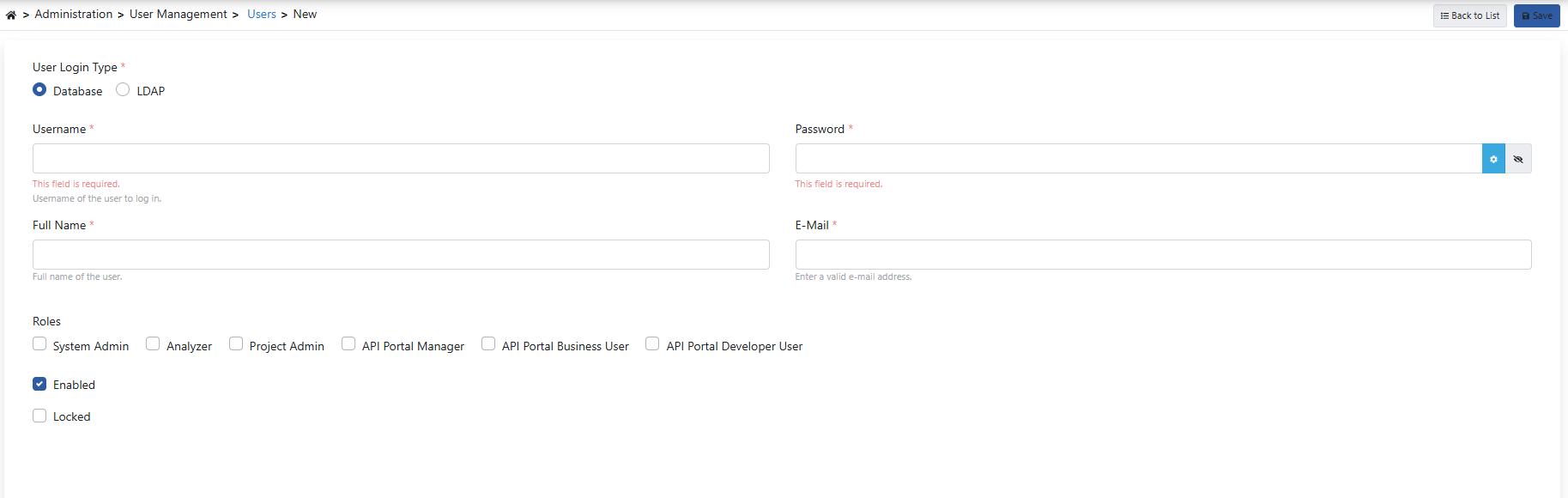 The fields used for user creation configuration are shown in the table below.
| Field | Description |
| --------------------------------------- | ------------------------------------------------------------------------------------------------------------------------------------------------------------------------------------------------------------------------------------------------------------------------------------------------------------------------------------------------------------------------------------------------------------------------------------------------------------------------------------------------------------------------------------------------------------------------------------------------------------------------------------------------------------------------------------------------------------------------------------------------------------------------------------------------------------------------------------------------------------------------------------------------------------------------------------------------------------------------------------------------------------------------------------------------------------------------------------------------------------------------------------------------------------------------------------------------------------------------------------------------------------------- |
| **User Login Type** *(User Login Type)* | Selection of the source where the user will log in.
The fields used for user creation configuration are shown in the table below.
| Field | Description |
| --------------------------------------- | ------------------------------------------------------------------------------------------------------------------------------------------------------------------------------------------------------------------------------------------------------------------------------------------------------------------------------------------------------------------------------------------------------------------------------------------------------------------------------------------------------------------------------------------------------------------------------------------------------------------------------------------------------------------------------------------------------------------------------------------------------------------------------------------------------------------------------------------------------------------------------------------------------------------------------------------------------------------------------------------------------------------------------------------------------------------------------------------------------------------------------------------------------------------------------------------------------------------------------------------------------------------- |
| **User Login Type** *(User Login Type)* | Selection of the source where the user will log in.
If the value is "Database", it means that all information will be defined in the Apinizer user pool.
If the value is "LDAP", it means that the "username and password" information will be verified through the selected LDAP connection during login, and other information will be kept in the database.
The fact that LDAP-type users are also kept in the Apinizer database, even partially, is necessary to be able to define roles for the user and give project access permission. Users in this situation must be registered in this list with their username in the LDAP pool.
For detailed information on how LDAP login settings are activated, [click here](/en/admin/system-settings/ldap-login-settings). |
| **Username** *(Username)* | Username information used to log in. |
| **Password** *(Password)* | This field becomes visible when User Login Type is database.
Password defined for the user. |
| **Search in LDAP** *(Search in LDAP)* | This field becomes visible when User Login Type is LDAP.
Matching user information is automatically retrieved by searching in LDAP according to the entered username value. |
| **Full Name** *(Full Name)* | User's first and last name information. |
| **E-Mail** *(E-Mail)* | User's e-mail address. |
| **Roles** *(Roles)* | Selection of roles to be given to the user. Checkbox must be checked to give system administrator permission to the user.
**System Administrator**: Can manage all operations that can be performed on the Apinizer Management Console. Especially, only users with this permission can perform management-based operations of the application in the Administration menu.
**Portal Administrator**: Users with this permission can perform operations related to API creation, accounts, credentials and portal settings on the Portal Management basis on the console.
**Analyzer**: Users with this permission manage operations such as creating graphs, usage summaries, queries and preparing reports in the Analytics module.
**Project Manager**: Users with this permission are authorized in all projects and can manage all operations.
**Portal Business User**: Users with this permission can view APIs on the Portal, manage operations related to users, and perform operations related to organizations.
**Portal Developer User**: Users with this permission can perform operations related to API creation and portal settings on the Portal Management basis on the console. |
| **Locked** *(Locked)* | Information about whether the user's login is locked. The lock of a user who is locked when the limit of the determined Captcha verification count is reached can be opened again from here. |
Deleted users are also deleted from the teams they are in and the projects they are members of by the system. This operation cannot be undone, so care should be taken before the deletion operation.