> ## Documentation Index
> Fetch the complete documentation index at: https://docs.apinizer.com/llms.txt
> Use this file to discover all available pages before exploring further.
# Queries
> You can create and manage query and filter definitions on log records with Query Editor. You can create queries from combinations of expected conditions from fields such as HTTP Method, HTTP Status Code, Error Type, Client IP and criteria types of and (must), or (should), not (must not). You can test queries, view their results, and use them in Anomaly Detector, Report Generator, and Chart Builder screens.
## Query Editor Features
You can create and manage query and filter definitions to analyze log records with Query Editor.
You can create and manage query definitions to analyze log records.
You can create filter definitions according to criteria such as time range, API Proxy, and result type.
You can test created queries and view their results.
You can make query definitions available for use in all projects by moving them to the Admin page.
## Use Cases
Definitions made in Query Editor can be used in the following screens:
* **Anomaly Detector**: Uses query definitions to detect abnormal situations
* **Report Generator**: Uses query and filter definitions to create customized reports
* **Chart Builder**: Uses query results for data visualizations
All query definitions can be moved to the Admin page with the **"Globalize"** option. Globalized queries are removed from this list, become available for use in all projects, and their management is left to the Admin user.
## Query Creation and Testing
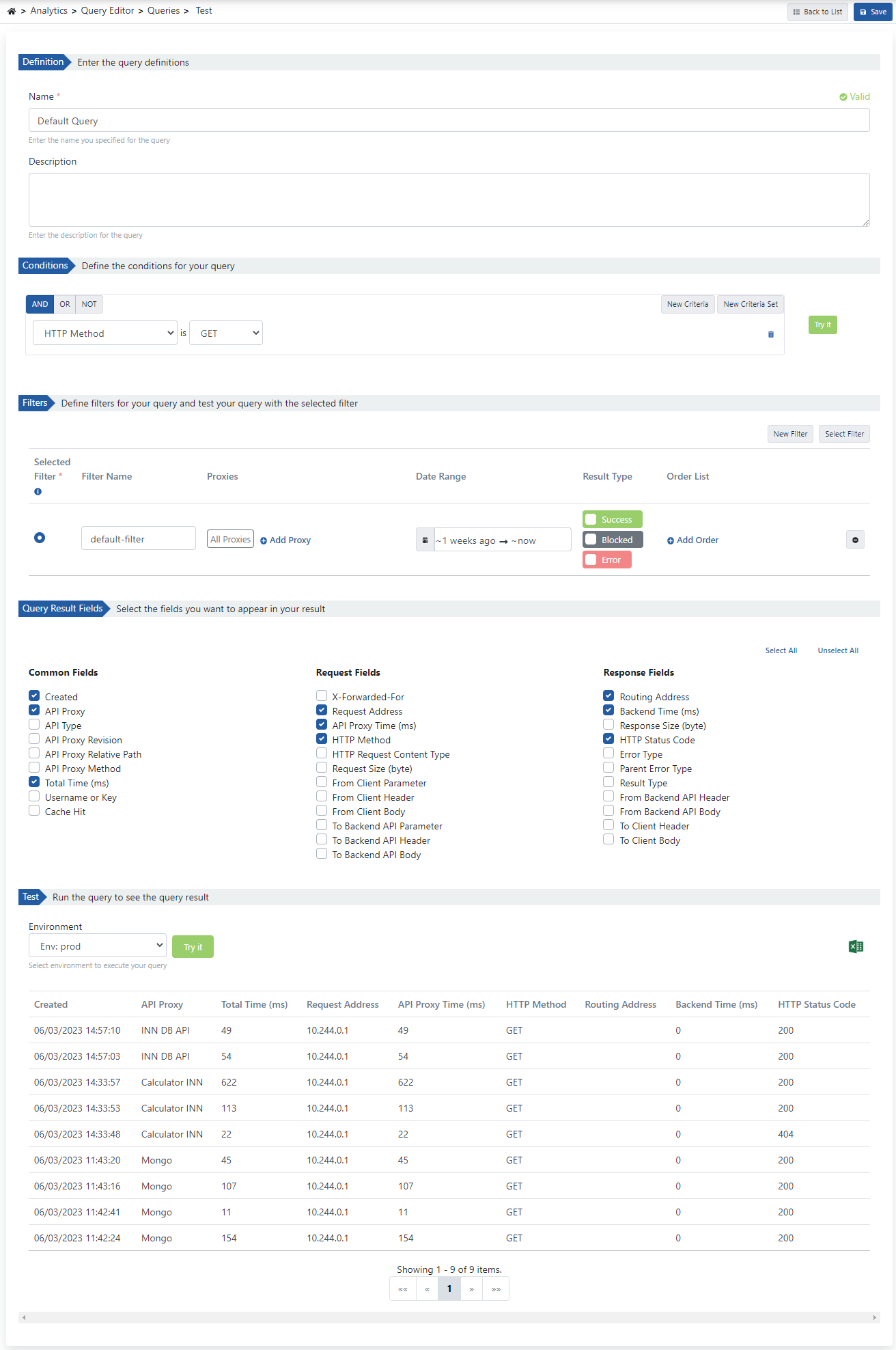
After a query is created, it can be tested and its results can be viewed by adding a new filter or selecting from predefined filters.
 ## Configuration Fields
Fields used for query configuration are shown in the table below.
| Field | Description |
| ----------------------------------------------- | ------------------------------------------------------------------------------------------------------------------------------------------------------------- |
| **Name** | Name is written for the created query. |
| **Description** | Description can be written to facilitate management related to the created query. |
| **Conditions** *(Conditions)* | Conditions that the query must match in log data are created. |
| **Filters** *(Filters)* | Filter information to be added to the created query. It is only used for testing purposes. For detailed information [see](/en/analytic/query-editor/filters). |
| **Query Result Fields** *(Query Result Fields)* | Selection is made for which fields will be displayed in the test query result. |
| **Test** | To test the created query and see the query result, environment information is selected and the **Execute Query** button is clicked. |
## Query Criteria
Query definition consists of a combination of expected conditions from specific fields that will match log records and the following criteria types:
Criteria where all conditions must be met
Criteria where at least one condition must be met
Criteria where conditions must not be met
## Related Topics
Learn about filter creation and management
Using queries for anomaly detection
Using queries for report creation
General information about Analytics module
## Configuration Fields
Fields used for query configuration are shown in the table below.
| Field | Description |
| ----------------------------------------------- | ------------------------------------------------------------------------------------------------------------------------------------------------------------- |
| **Name** | Name is written for the created query. |
| **Description** | Description can be written to facilitate management related to the created query. |
| **Conditions** *(Conditions)* | Conditions that the query must match in log data are created. |
| **Filters** *(Filters)* | Filter information to be added to the created query. It is only used for testing purposes. For detailed information [see](/en/analytic/query-editor/filters). |
| **Query Result Fields** *(Query Result Fields)* | Selection is made for which fields will be displayed in the test query result. |
| **Test** | To test the created query and see the query result, environment information is selected and the **Execute Query** button is clicked. |
## Query Criteria
Query definition consists of a combination of expected conditions from specific fields that will match log records and the following criteria types:
Criteria where all conditions must be met
Criteria where at least one condition must be met
Criteria where conditions must not be met
## Related Topics
Learn about filter creation and management
Using queries for anomaly detection
Using queries for report creation
General information about Analytics module