> ## Documentation Index
> Fetch the complete documentation index at: https://docs.apinizer.com/llms.txt
> Use this file to discover all available pages before exploring further.
# Multiple Schema Port WSDL
> You can create SOAP Web Service. You can upload WSDL files containing multiple schemas and multiple ports
## Uploading WSDL as File
A common problem in SOAP services is that even though the WSDL is accessible via an https address, the XSD files inside it remain accessible via an http address, which causes file resolution problems.
In cases where such SOAP Services need to be added to Apinizer, especially when there is no option to fix the service definition file, the file upload feature enables us to add the service to Apinizer.
If the method of defining the service to Apinizer with the WSDL file upload option is selected, there are points to be noted that differ from other upload options.
Due to WSDL structure, it can reference different XSD files, and these references also need to be uploaded to the system.
It is necessary to find which XSD files need to be uploaded together with the WSDL.
The contents of these XSD files need to be downloaded as files.
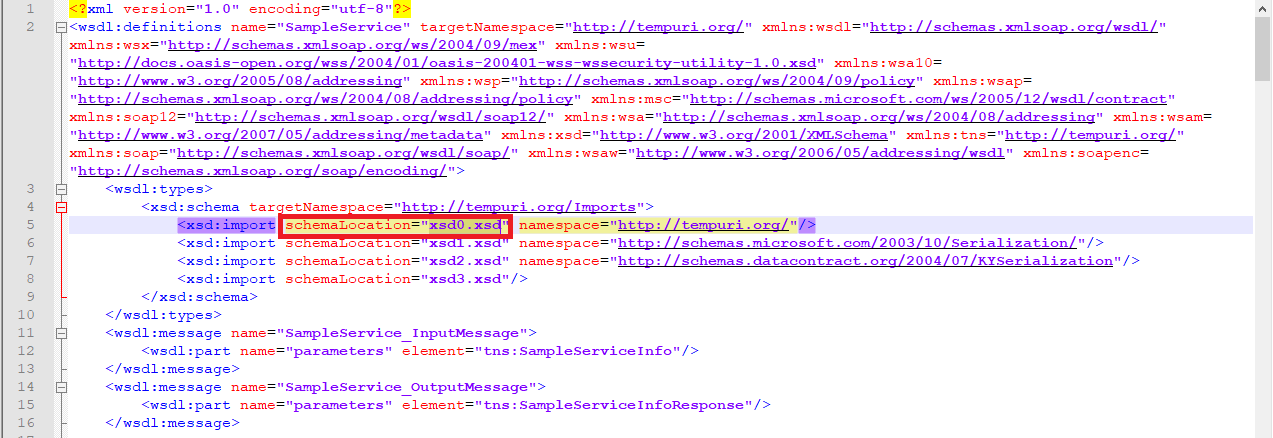
After the files are downloaded, each one's location within the WSDL must be updated.
**Updating WSDL alone may not be sufficient, if there are places in XSD that reference another XSD, these must also be updated.**
**Updating WSDL alone may not be sufficient, if there are places in XSD that reference another XSD, these must also be updated.**
**Visual showing the updating of locations within WSDL is shown below:**
 For XSD files shown as references to be uploaded to the system together with the WSDL, Apinizer requires the files to be "zipped" together.
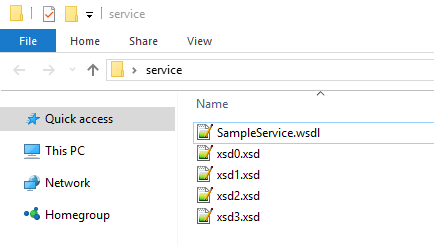
For files to be zipped, all files must be at the same file path level. If files are placed in a folder and the folder is zipped, the WSDL cannot be parsed properly.
**Example visual showing file directory paths is shown below:**
For XSD files shown as references to be uploaded to the system together with the WSDL, Apinizer requires the files to be "zipped" together.
For files to be zipped, all files must be at the same file path level. If files are placed in a folder and the folder is zipped, the WSDL cannot be parsed properly.
**Example visual showing file directory paths is shown below:**
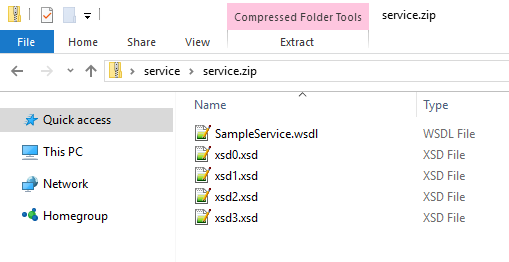
 The visual of these files in zipped form is as follows:
 ## Multiple Ports in SOAP Service
SOAP services can have multiple ports as shown in the following visual.
## Multiple Ports in SOAP Service
SOAP services can have multiple ports as shown in the following visual.
 In this case, Apinizer uses the first of these ports.
If API Proxy is also desired to be created for other ports, for each port for which an API Proxy is desired to be created, the service's definition file (WSDL) must be updated so that only the relevant port remains in it and uploaded to Apinizer.
Create a separate WSDL file for each port. Edit the WSDL so that only the relevant port remains in it.
Upload the edited WSDL file to Apinizer.
Create a separate API Proxy for each port.
In this case, Apinizer uses the first of these ports.
If API Proxy is also desired to be created for other ports, for each port for which an API Proxy is desired to be created, the service's definition file (WSDL) must be updated so that only the relevant port remains in it and uploaded to Apinizer.
Create a separate WSDL file for each port. Edit the WSDL so that only the relevant port remains in it.
Upload the edited WSDL file to Apinizer.
Create a separate API Proxy for each port.