> ## Documentation Index
> Fetch the complete documentation index at: https://docs.apinizer.com/llms.txt
> Use this file to discover all available pages before exploring further.
# Deployment and Version Management
> You can deploy API Proxies to environments, redeploy them, and remove them. You can view deployment history, roll back to previous versions, and manage revisions. You can track deployment results in detail on a Pod basis and check deployment statuses.
When an [API Proxy](/en/concepts/core-concepts/what-is-api-proxy) is created, it does not yet have an access address and is not accessible by clients. When an API Proxy is deployed to an [Environment](/en/concepts/core-concepts/what-is-environment), a URL is created that includes the access address of the Environment where it is deployed, and clients can now access the API Proxy's methods/endpoints through this URL.
This section covers deploying, redeploying, undeploying an API Proxy, viewing deployment history, and rolling back an API Proxy.
## Deployment Status and Deployment History Information
When an API Proxy is selected, the deployment status and deployment history of that API Proxy appear in the upper middle section of the screen.
 Deployment and rollback operations are performed through these elements.
## Deploy
An API Proxy must be deployed to an [Environment](/en/concepts/core-concepts/what-is-environment) to be accessible by clients.
Click the **Deploy** button next to Deployment History.
Deployment and rollback operations are performed through these elements.
## Deploy
An API Proxy must be deployed to an [Environment](/en/concepts/core-concepts/what-is-environment) to be accessible by clients.
Click the **Deploy** button next to Deployment History.
 When this button is clicked, Environments, the deployment status of the active revision in each Environment, and depending on this status, the **Deploy** button or **Redeploy** and **Undeploy** buttons are displayed.
In the following example, there is a single Environment named **prod**, the active revision is not deployed (or has been deployed and removed) in this Environment, and the **Deploy** button is visible.
When this button is clicked, Environments, the deployment status of the active revision in each Environment, and depending on this status, the **Deploy** button or **Redeploy** and **Undeploy** buttons are displayed.
In the following example, there is a single Environment named **prod**, the active revision is not deployed (or has been deployed and removed) in this Environment, and the **Deploy** button is visible.
 * A revision can be deployed to one or more [Environments](/en/concepts/core-concepts/what-is-environment).
* Different revisions of an [API Proxy](/en/concepts/core-concepts/what-is-api-proxy) can be deployed to different Environments.
When the **Deploy** button is clicked, a window appears. Here, optional description notes related to the deployment can be entered, and since these notes will be visible in the deployment history, it is beneficial to enter a note for each deployment. With the **Never delete this deploy history** option, it can be ensured that the version to be deployed is never deleted from the version history.
* A revision can be deployed to one or more [Environments](/en/concepts/core-concepts/what-is-environment).
* Different revisions of an [API Proxy](/en/concepts/core-concepts/what-is-api-proxy) can be deployed to different Environments.
When the **Deploy** button is clicked, a window appears. Here, optional description notes related to the deployment can be entered, and since these notes will be visible in the deployment history, it is beneficial to enter a note for each deployment. With the **Never delete this deploy history** option, it can be ensured that the version to be deployed is never deleted from the version history.
 When the Deploy button is pressed in this window, the active revision is deployed to the selected Environment and its status is updated to **Deployed**. With this update, a separate access address is created for each Environment where the deployment has been made for this API Proxy, and the API Proxy becomes accessible to clients.
 The access addresses of the API Proxy can be viewed in the **Deployment** section of the [Overview](/en/develop/api-proxy-configuration/overview) tab. In this area, access addresses are displayed in separate rows for each Environment where the API Proxy is deployed, and the API Definition File content at that address can be accessed by clicking the link in the Specs column.
 The access address displayed in the URL column for the API Proxy is the root address. The method/endpoint address to be accessed must be appended after this root address to send the request.
## Redeploy
Changes made to a deployed revision are not reflected to clients until that revision is redeployed. This feature gives developers the ability to work without stopping client traffic. When an update is made to a deployed revision, the button next to the revision displays **Redeploy**. This indicates that redeployment is required for the updates to take effect.
The access address displayed in the URL column for the API Proxy is the root address. The method/endpoint address to be accessed must be appended after this root address to send the request.
## Redeploy
Changes made to a deployed revision are not reflected to clients until that revision is redeployed. This feature gives developers the ability to work without stopping client traffic. When an update is made to a deployed revision, the button next to the revision displays **Redeploy**. This indicates that redeployment is required for the updates to take effect.
 It is not mandatory for changes to be made for an [API Proxy](/en/concepts/core-concepts/what-is-api-proxy) to be redeployed. Redeployment can also be performed from the revision list.
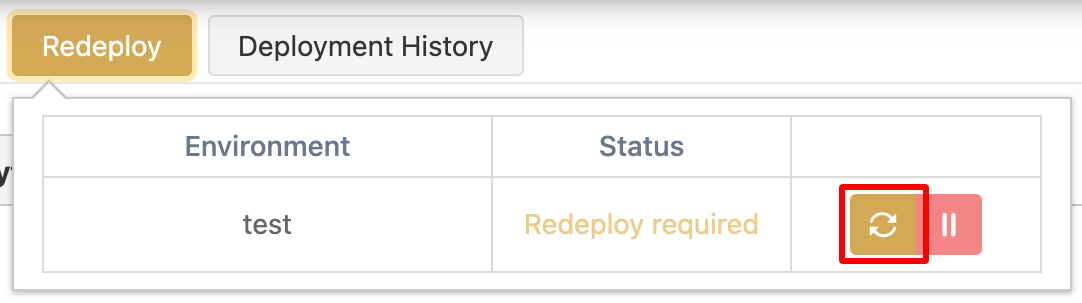 When the **Redeploy** button is clicked, the process flow is the same as in deployment.
The redeployment process is performed seamlessly. The settings made for the redeployed revision replace the previous settings at runtime, and from that moment on, incoming requests are answered according to the new settings.
## Undeploy
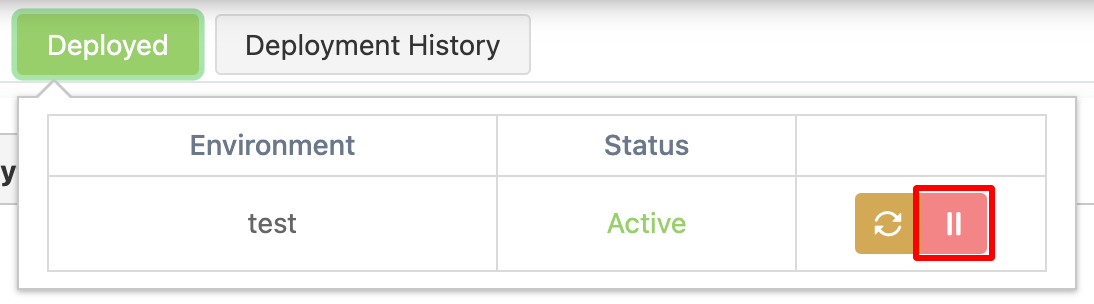
If a deployed revision needs to be closed to access for some reason, it is first selected as the active revision. Then, the **Deployed** button is clicked to open the window displaying the Environments where it is deployed.
Click the **Undeploy** button in the row of the Environment from which the revision is to be removed in the list in this window. After confirmation in the confirmation window that appears, this revision can no longer be accessed in the selected Environment.
When the **Redeploy** button is clicked, the process flow is the same as in deployment.
The redeployment process is performed seamlessly. The settings made for the redeployed revision replace the previous settings at runtime, and from that moment on, incoming requests are answered according to the new settings.
## Undeploy
If a deployed revision needs to be closed to access for some reason, it is first selected as the active revision. Then, the **Deployed** button is clicked to open the window displaying the Environments where it is deployed.
Click the **Undeploy** button in the row of the Environment from which the revision is to be removed in the list in this window. After confirmation in the confirmation window that appears, this revision can no longer be accessed in the selected Environment.
 ## Deployment History
An [API Proxy](/en/concepts/core-concepts/what-is-api-proxy) can be deployed, redeployed, or removed many times during its lifetime. It is also possible to enter a description note for each deployment operation.
The deployment history displays information such as who deployed or removed this API Proxy, when, to which environment, and if written, its description. Click the **Deployment History** button to open this window.
## Deployment History
An [API Proxy](/en/concepts/core-concepts/what-is-api-proxy) can be deployed, redeployed, or removed many times during its lifetime. It is also possible to enter a description note for each deployment operation.
The deployment history displays information such as who deployed or removed this API Proxy, when, to which environment, and if written, its description. Click the **Deployment History** button to open this window.
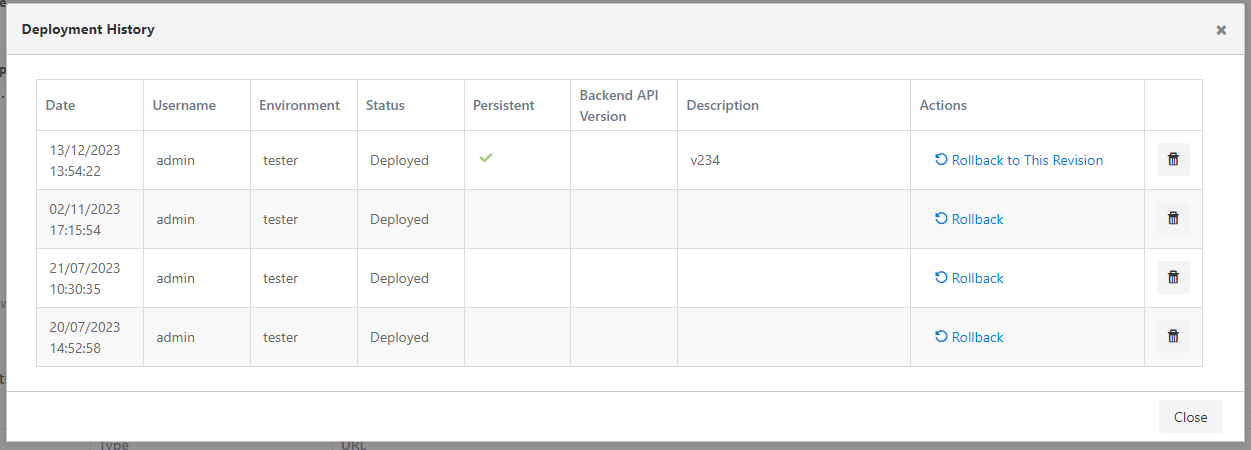 The total number of history records to be kept is configured from the [System Global Settings](/en/admin/system-settings/global-configuration) screen.
## Rollback
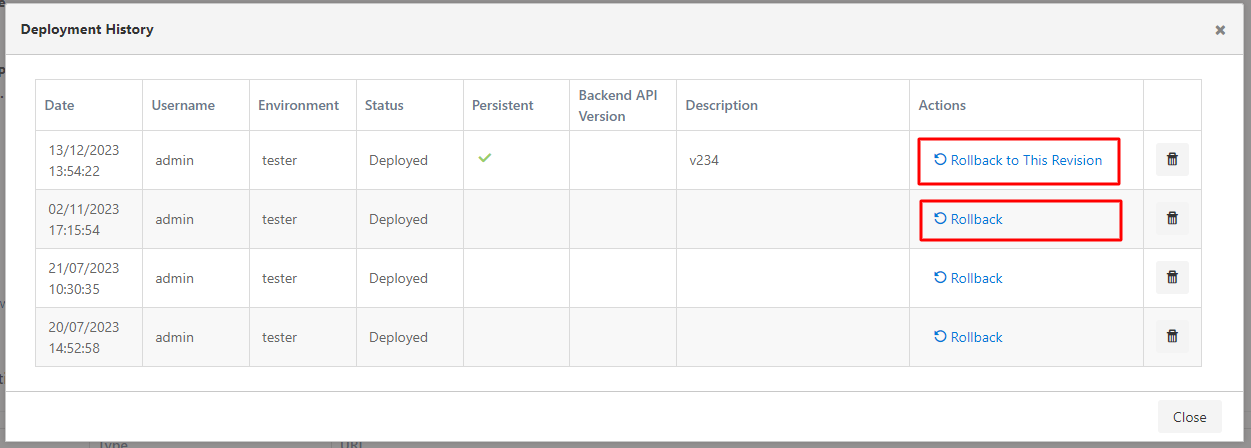
If a problem is encountered while updating the [API Proxy](/en/concepts/core-concepts/what-is-api-proxy), the API Proxy can be rolled back to the last stable working revision through the deployment history.
To deploy a previous version of the API Proxy, click the **Rollback** link in the **Deployment History** dialog.
The total number of history records to be kept is configured from the [System Global Settings](/en/admin/system-settings/global-configuration) screen.
## Rollback
If a problem is encountered while updating the [API Proxy](/en/concepts/core-concepts/what-is-api-proxy), the API Proxy can be rolled back to the last stable working revision through the deployment history.
To deploy a previous version of the API Proxy, click the **Rollback** link in the **Deployment History** dialog.
 ## Revision Deletion
Revisions can be deleted through the deployment history. To do this, click the trash button for the relevant revision.
## Revision Deletion
Revisions can be deleted through the deployment history. To do this, click the trash button for the relevant revision.
 ## Deployment Results
When a configuration is deployed to or removed from a specific [Environment](/en/concepts/core-concepts/what-is-environment) or all environments, the operation results are displayed on a detailed results page. Since there can be multiple Pods within an Environment, it is important to ensure that the configuration is successfully deployed to all Pods for the system to work consistently. In case of any Pod crash or becoming inaccessible, this situation is displayed on the results screen, enabling necessary intervention.
**The visual containing the Deployment Results screen is shown below:**
## Deployment Results
When a configuration is deployed to or removed from a specific [Environment](/en/concepts/core-concepts/what-is-environment) or all environments, the operation results are displayed on a detailed results page. Since there can be multiple Pods within an Environment, it is important to ensure that the configuration is successfully deployed to all Pods for the system to work consistently. In case of any Pod crash or becoming inaccessible, this situation is displayed on the results screen, enabling necessary intervention.
**The visual containing the Deployment Results screen is shown below:**
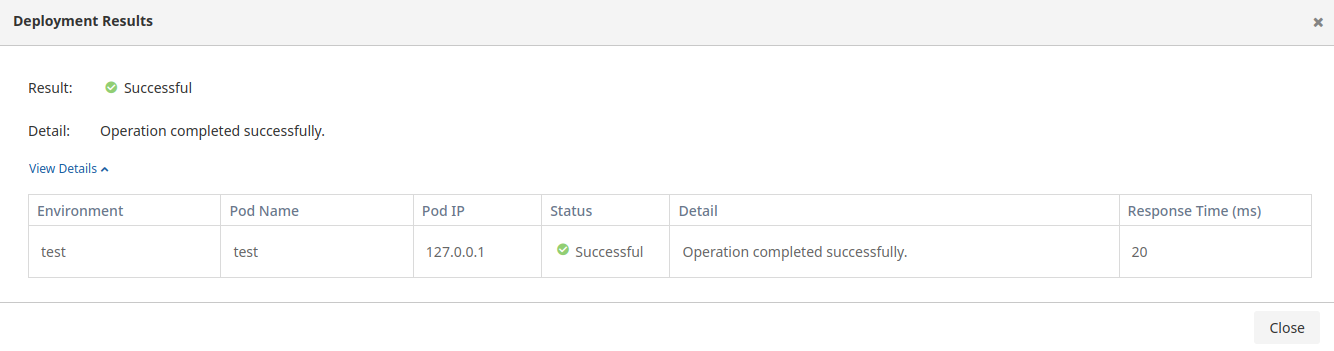 The fields used for the Deployment Results information screen are shown in the table below.
| Field | Description |
| --------------------- | --------------------------------------------------------------------- |
| **Environment** | Indicates the working environment where the operation was performed. |
| **Pod Name** | Specifies the name of the pod used during the operation. |
| **Pod IP** | Shows the IP address of the pod where the operation was performed. |
| **Status** | Indicates the general status of the operation. |
| **Detail** | Field containing detailed explanation about the operation result. |
| **Result** | Contains information summarizing the general status of the operation. |
| **Response Time(ms)** | Expresses the completion time of the operation in milliseconds (ms). |
## Related Pages
Learn about the API Proxy concept and basic features.
Review the Environment concept and deployment processes.
Manage general information and settings of the API Proxy.
Configure deployment history retention settings.
The fields used for the Deployment Results information screen are shown in the table below.
| Field | Description |
| --------------------- | --------------------------------------------------------------------- |
| **Environment** | Indicates the working environment where the operation was performed. |
| **Pod Name** | Specifies the name of the pod used during the operation. |
| **Pod IP** | Shows the IP address of the pod where the operation was performed. |
| **Status** | Indicates the general status of the operation. |
| **Detail** | Field containing detailed explanation about the operation result. |
| **Result** | Contains information summarizing the general status of the operation. |
| **Response Time(ms)** | Expresses the completion time of the operation in milliseconds (ms). |
## Related Pages
Learn about the API Proxy concept and basic features.
Review the Environment concept and deployment processes.
Manage general information and settings of the API Proxy.
Configure deployment history retention settings.