> ## Documentation Index
> Fetch the complete documentation index at: https://docs.apinizer.com/llms.txt
> Use this file to discover all available pages before exploring further.
# Blocked IP List
> You can evaluate incoming requests by source IP address and block those on the blacklist
This document explains the detailed usage of a specific policy. If you are using Apinizer policies for the first time or want to learn the general working principles of policies, we recommend reading the [What is Policy?](/en/concepts/core-concepts/what-is-policy) page first.
## Overview
### What is its Purpose?
* Blocks passage of blacklisted clients through API Proxy by evaluating all incoming clients by source IP address.
* Facilitates centralized blacklist management and provides reusability with corporately defined IP Group records.
* Enables client blocking by country or city using geographical location data.
* Makes blacklist applications fed from external systems possible with variable-based dynamic IP sets.
### Working Principle
1. **Request Arrival**: For each HTTP/HTTPS request arriving at the API Gateway, the source IP address of the request is identified.
2. **Policy Check**: If the Blocked IP List policy is active, the system checks in the following order:
* Is a Condition defined? If so, is the condition met?
* Is the policy active (active=true)?
* Is a Variable used or is Apinizer default used?
3. **Blacklist Evaluation**: Request IP is compared with defined IP list, connected IP Groups or selected geographical location entries; if needed, IP set obtained from dynamic variable source is used.
4. **Decision Making**:
* **Match Found**: Request is rejected, customized error message and determined HTTP code are returned, operation is logged.
* **No Match**: Request flow is routed to next Policy or target service.
5. **Error Handling**: Customizable HTTP status code and error message are returned for requests that do not comply with the policy rule.
## Features and Capabilities
### Basic Features
* **Blacklist IP Management**: Provides ability to add, edit and delete IP addresses in IPv4 / CIDR format; includes validation that prevents typos.
* **IP Group Integration**: Includes many IP records in blacklist at once by selecting existing IP Groups and provides group-based updates.
* **Geographical Location Filters**: Manages large-scale blocking scenarios with country and optional city selection, can create records covering all cities.
* **Active/Passive Status Control**: Easily change the active or passive status of the policy (active/passive toggle). In passive state, the policy is not applied but its configuration is preserved.
* **Condition-Based Application**: Determine when the policy will be applied by creating complex conditions with Query Builder (e.g., only for specific endpoints or header values).
### Advanced Features
* **Variable-Based Blacklist**: Dynamically applies IP lists fed from external systems by selecting Apinizer Variable.
* **Geolocation-Data Blend**: Defines multi-layer blocking strategies in combination of selected countries and cities with IP list.
* **Policy Usage Visualization**: Facilitates impact analysis by tracking API Proxy and Policy Group information where it is used.
* **Export/Import Feature**: Export policy configuration as a ZIP file. Import to different environments (Development, Test, Production). Version control and backup capability.
* **Policy Group and Proxy Group Support**: Manage multiple policies within Policy Group. Bulk policy assignment to Proxy Groups. Centralized update and deploy operations.
* **Deploy and Versioning**: Deploy policy changes to live environment. See which API Proxies use it (Policy Usage). Proxy Group and Policy Group usage reports.
## Usage Scenarios
| Scenario | Status | Solution (Policy Application) | Expected Behavior / Result |
| ---------------------------------- | -------------------------------------------------------------- | ---------------------------------------------------------------- | ------------------------------------------------------------------------ |
| Off-Office Access Block | Access to internal systems desired only from corporate network | Add external IP blocks to IP list. | Requests from outside corporate IPs return 403 Forbidden. |
| Suspicious Traffic Source | Heavy attacks detected from certain countries | All cities blocked by selecting relevant country in Geolocation. | All requests from selected country are blocked, logged. |
| Temporary Blacklist | IPs performing attacks will be blocked for short period | Add time-limited record to IP list, note in Description. | Relevant IP access is cut; list can be updated after period ends. |
| Partner API Protection | Unauthorized partner attempts exist | Include set excluding only authorized partner IPs from IP Group. | Partner-outside IP attempts are rejected, partner IPs are not affected. |
| Dynamic DLP-Based Blocking | SIEM system shares blacklist with variable | Close `useApinizerDefault` and select Variable. | IPs in Variable are used before each check. |
| Regional Maintenance Process | Temporary access cut from certain cities | Added to list by selecting country+city with Geolocation. | All requests from selected cities are blocked during maintenance period. |
| Multiple API Security *(Optional)* | Multiple APIs use same blacklist | Create Policy Group and add this policy. | All APIs benefit from current blacklist simultaneously. |
## Configuring Policy Parameters
In this section, you can create a new **Blocked IP List** policy or configure existing policy parameters to define access rules.
### Creating a New Blocked IP List Policy
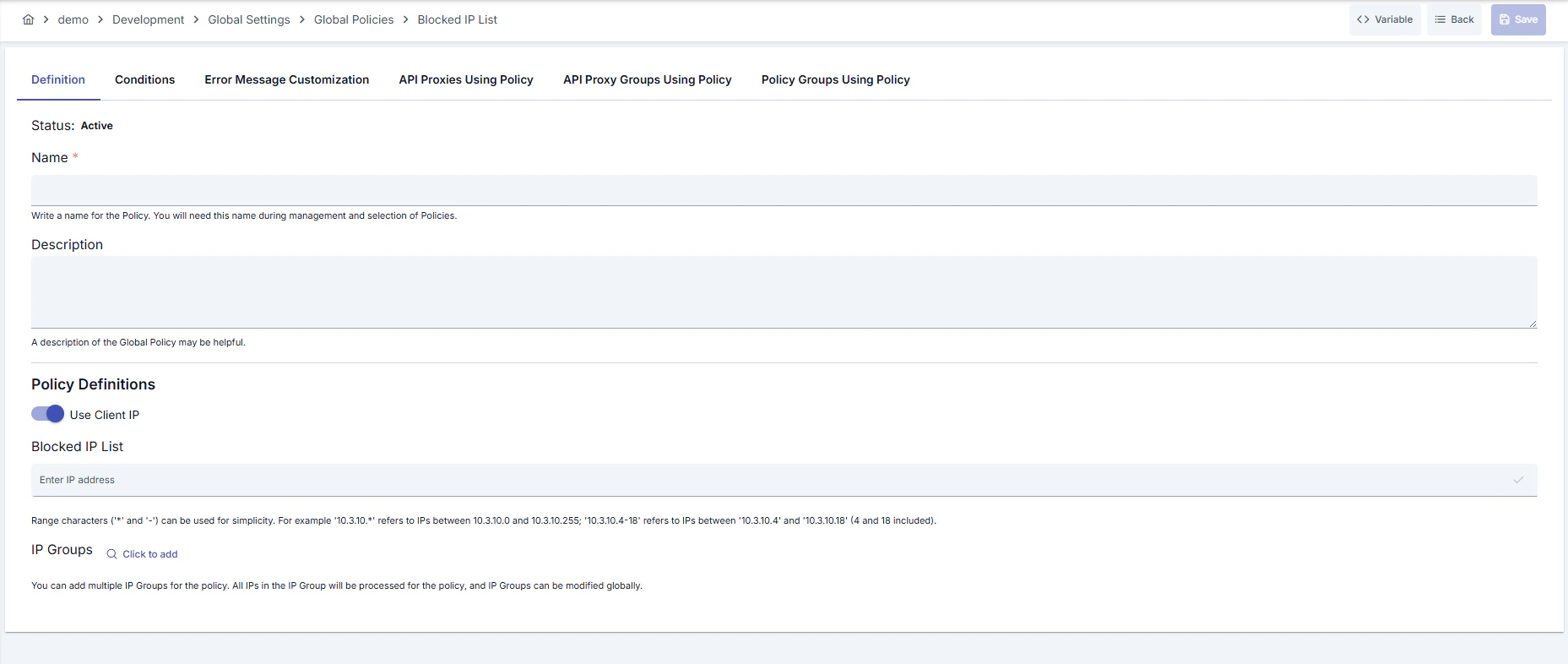 ### Configuration Steps
| Step | Description / Operation |
| -------------------------------------------------------------- | ----------------------------------------------------------------------------------------------------------------------------------------------------------------------------------------------------------------------------------------------------------------------------------------------------------------------------------------------------------------------------------------------------------------------------------------------------------------------------------------- |
| **Step 1: Going to Creation Page** | - Go to **Development → Global Settings → Global Policies → Blocked IP List** from the left menu.
### Configuration Steps
| Step | Description / Operation |
| -------------------------------------------------------------- | ----------------------------------------------------------------------------------------------------------------------------------------------------------------------------------------------------------------------------------------------------------------------------------------------------------------------------------------------------------------------------------------------------------------------------------------------------------------------------------------- |
| **Step 1: Going to Creation Page** | - Go to **Development → Global Settings → Global Policies → Blocked IP List** from the left menu.
- Click the **\[+ Create]** button at the top right. |
| **Step 2: Entering Basic Information** | **Policy Status (Policy Status):** Shows Active/Passive status. New policies are active by default.
**Name (Name) Required:** Example: `Production_IPBlackList`
- Enter a unique name, does not start with space.
- System automatically checks: Green checkmark: available Red X: existing name.
**Description (Description):** Example: "Blocks IPs from global attack sources."
- Max. 1000 characters.
- Explain the purpose of the policy. |
| **Step 3: Variable Usage** | - In the action button area at the top of the page, you can use the **\[\<> Variable]** button to select dynamic values.
- Using context/global variable expressions, you can manage policy parameters with variable-based values instead of fixed values.
- This reduces manual update effort when values change and provides operational convenience.
- For detailed information, review [Dynamic Variables](/en/concepts/core-concepts/dynamic-variables). |
| **Step 4: Defining Blacklist Sources** | - When **Use Apinizer Default** is open, IP blacklist management is done through policy.
- Add IPv4/CIDR entries to **IP Address List** field; wrong formats are rejected.
- Select centralized IP Groups with **IP Groups** button and add to list. |
| **Step 5: Dynamic Variable Configuration** *(If applicable)* | - Use variable-based blacklist by closing default.
- Select Apinizer Variable with **Select Variable**; variable JSON data must return IP list.
- Use clear button to remove variable. |
| **Step 6: Adding Geographical Restrictions** *(If applicable)* | - If Geolocation is active, select country/city and click **Add** button.
- If country is selected and city is left empty, all cities are blocked.
- You can delete added records individually or in bulk from table. |
| **Step 7: Defining Condition (Optional)** | **Examples:**
- Environment-based: `Header = X-Environment, Operator = Equals, Value = production`
- API Key-based: `Header = X-API-Key, Starts With = PROD-`
- Endpoint-based: `Path = /api/admin/*`
If no condition is defined, the policy is always active |
| **Step 8: Error Message Customization (Optional)** | - Go to the **Error Message Customization** tab.
- Customize the message to be returned when access is denied.
**Default:**
`{ "statusCode": 403, "message": "[Default error message]" }`
**Custom:**
`{ "statusCode": 403, "errorCode": "[CUSTOM_ERROR_CODE]", "message": "[Custom message]" }` |
| **Step 9: Saving** | - Click the **\[Save]** button at the top right.
**Checklist:** Unique name Required fields filled At least one IP or group exists
**Result:**
- Policy is added to the list.
- Can be connected to APIs.
- If global policy, automatically applied. |
For the description of **Conditions** and **Error Message Customization** panels, you can review the [Conditions](/en/concepts/core-concepts/what-is-policy#conditions) and [Error Message Customization](/en/concepts/core-concepts/what-is-policy#error-message-customization) sections on the [What is Policy?](/en/concepts/core-concepts/what-is-policy) page.
For a complete guide on all layers, priority order and scenario examples of the error message configuration system, see the [Error Message Configuration Guide](/en/concepts/core-concepts/error-message-configuration) page.
## Deleting the Policy
For the deletion steps of this policy and the operations to be applied while in use, you can refer to the [Removing Policy from Flow](/en/develop/api-proxy-configuration/policy-management#removing-policy-from-flow) section on the [Policy Management](/en/develop/api-proxy-configuration/policy-management) page.
## Exporting/Importing the Policy
For the export and import steps of this policy, you can refer to the [Export/Import](/en/admin/secrets-management/export-import) page.
## Connecting the Policy to API
For the process of how this policy will be connected to APIs, you can refer to the [Connecting Policy to API](/en/develop/api-proxy-configuration/policy-management#adding-policy-to-flow) section on the [Policy Management](/en/develop/api-proxy-configuration/policy-management) page.
## Advanced Features
| Feature | Description and Usage Steps |
| ------------------------------------ | ----------------------------------------------------------------------------------------------------------------------------------------------------------------------------------------------------------- |
| **Dynamic Variable Synchronization** | - Select Variable providing IP list from external system.
- Track Event Manager notifications to monitor Variable updates.
- Verify that policy is deployed in relevant API Proxies after change. |
| **Multi-Layer Geolocation Blocking** | - Ensure Geolocation settings are active.
- Select country and add cities with multi-select if needed.
- Regularly review list and clean unnecessary records. |
| **Hybrid IP Source Strategy** | - Configure both IP list and IP Groups.
- Check that policy automatically updates when Group changes.
- Define conditions that will trigger only on certain endpoints with Query Builder. |
## Best Practices
### Things to Do and Best Practices
| Category | Description / Recommendations |
| ----------------------- | -------------------------------------------------------------------------------------------------------------------------------------------------------------------------------------------------------- |
| **IP List Maintenance** | **Bad:** Repeating same IP in different formats.
**Good:** Adding clusters collectively with CIDR blocks.
**Best:** Regularly getting reports and removing unnecessary records. |
| **IP Group Management** | **Bad:** Adding common IPs individually to each policy.
**Good:** Using shared IP Groups.
**Best:** Mapping IP Group contents with CMDB or IAM processes. |
| **Geolocation Usage** | **Bad:** Blocking entire country and leaving critical users outside.
**Good:** Verifying geographical block with periodic reports.
**Best:** Making targeted blocking with city-based records. |
| **Variable Management** | **Bad:** Variable format returns invalid JSON.
**Good:** Testing variable at regular intervals.
**Best:** Connecting Variable updates to CI/CD pipeline. |
| **Condition Design** | **Bad:** Allowing policy to trigger on every request.
**Good:** Excluding management endpoints.
**Best:** Defining conditions according to environment and user type with Query Builder. |
### Security Best Practices
| Security Area | Description / Warnings |
| ------------------------- | -------------------------------------------------------------------------------------------------- |
| **IP Record Accuracy** | Use IP/CIDR validation effectively; faulty records may cause attacker passage. |
| **Authorization Control** | Give policy editing permissions only to trusted roles; changes must be logged to centralized logs. |
| **Variable Security** | Audit Variable content against unauthorized changes, restrict source system access. |
| **Geolocation Matches** | Wrong blocks may occur if Geolocation provider is not current; verify data currency. |
| **Log Monitoring** | Automatically add repeating IPs to blacklist by routing error message responses to SIEM. |
### Things to Avoid
| Category | Description / Warnings |
| ---------------------------------- | -------------------------------------------------------------------------------------------------------------------------------------------- |
| **Overly Comprehensive Blacklist** | **Why avoid:** Legitimate users are accidentally blocked.
**Alternative:** Use conditional application and geolocation filters. |
| **Forgetting Passive Policy** | **Why avoid:** You may leave policy passive and create security vulnerability.
**Alternative:** Verify active status after deploy. |
| **Variable Format Errors** | **Why avoid:** Policy does not work at all if JSON structure is corrupted.
**Alternative:** Perform format validation with automation. |
| **Unconditional Global Change** | **Why avoid:** May create service interruption for many APIs.
**Alternative:** Validate in test environment first and deploy gradually. |
### Performance Tips
| Criterion | Recommendation / Impact |
| --------------------------- | ------------------------------------------------------------------------------------------------------------------------------------------------------------------------- |
| **IP List Size** | **Recommendation:** Reduce record count with CIDR blocks.
**Impact:** Decision time shortens, memory usage decreases. |
| **Variable Read Frequency** | **Recommendation:** Use services that cache Variable value.
**Impact:** Remote call is not made for every request, delay decreases. |
| **Geolocation Queries** | **Recommendation:** Clean unnecessary records in country/city additions.
**Impact:** Comparison count decreases, processing time shortens. |
| **Policy Group Usage** | **Recommendation:** Manage through Policy Group when using same policy in multiple APIs.
**Impact:** Deploy operations are done in bulk, operational load decreases. |
| **Log Level** | **Recommendation:** Focus error logs only on rejected requests.
**Impact:** Log volume is controlled, analysis processes speed up. |
## Frequently Asked Questions
| Category | Question | Answer |
| ------------- | -------------------------------------------------- | ----------------------------------------------------------------------------------------------------- |
| **General** | What does IP Blacklist Policy block? | Provides security by blocking API Proxy access of clients whose source IP is in the list. |
| **General** | Is Geolocation data mandatory? | No, country/city records should only be added if additional restriction is needed. |
| **Technical** | What format should Variable be in? | Should contain IP or CIDR string values in JSON array format; e.g., `["10.0.0.0/24","192.168.1.10"]`. |
| **Technical** | What happens if same IP is both in list and group? | Policy evaluates IP once; duplicate records do not change behavior. |
| **Usage** | How do I apply policy only to certain endpoints? | Select relevant endpoint patterns by defining Path condition in Query Builder. |
| **Usage** | What does Deploy button on detail page do? | Allows you to transfer policy changes to selected API Proxies to live environment. |