> ## Documentation Index
> Fetch the complete documentation index at: https://docs.apinizer.com/llms.txt
> Use this file to discover all available pages before exploring further.
# Decryption
> You can decrypt encrypted fields in request/response messages with defined algorithm, key, and IV combinations and transmit as plain data to application flow
This document explains the detailed usage of a specific policy. If you are using Apinizer policy structure for the first time or want to learn the general working principles of policies, we recommend reading the [What is Policy?](/en/concepts/core-concepts/what-is-policy) page first.
## Overview
### What is its Purpose?
* Enables backend services to remain independent of encryption details by automating decryption of encrypted payload segments on API Proxy (API Proxy Server).
* Provides flexibility in complex integration scenarios by controlling which part of the message will be decrypted and where the result will be written with variables.
* Strengthens centralized key management and facilitates compliance with security standards with Crypto Key Info or certificate objects through Secret Manager.
* Supports dynamic encryption scenarios from different clients by making algorithm name readable from request content.
### Working Principle
1. **Request Arrival**: For each HTTP/HTTPS request arriving at the API Gateway, the source IP address of the request is identified.
2. **Policy Check**: If the Decryption policy is active, the system checks in the following order:
* Is a Condition defined? If so, is the condition met?
* Is the policy active (active=true)?
* Is a Variable used or is Apinizer default?
3. **Decryption Definitions**: The policy processes each registered decryption definition in order; reads encrypted content from target variable, collects IV information if necessary, determines algorithm from fixed definition or variable in message, and retrieves relevant key/certificate from Secret Manager.
4. **Decision Making**:
* **Match Found**: If definition requirements are met, content is decrypted, result is written to determined variable, and flow continues to next Policy stage.
* **No Match**: Decryption is skipped or customized error message is triggered for content that does not match definition or contains missing parameters.
5. **Error Handling**: Customizable HTTP status code and error message are returned for requests that do not comply with the policy rule.
## Features and Capabilities
### Basic Features
* **Multiple Decryption Definitions**: Separate algorithm and key combinations can be defined for different message segments under the same policy.
* **Algorithm Flexibility**: Supports common decryption algorithms including AES, DES, DESede, and RSA variations.
* **Secret Manager Integration**: Provides secure key access through Crypto Key Info records or certificates.
* **Active/Passive Status Control**: Easily change the active or passive status of the policy (active/passive toggle). In passive state, the policy is not applied but its configuration is preserved.
* **Condition-Based Application**: Determine when the policy will be applied by creating complex conditions with Query Builder (e.g., only for specific endpoints or header values).
### Advanced Features
* **Dynamic Algorithm Resolution**: Adapts to client-based encryption differences by reading algorithm name from variable in request.
* **IV Management Automation**: Automatically determines IV requirement according to algorithm and validates IV variable/encoding.
* **Variable Update Dialogs**: Provides quick editing windows for source, target, IV, and algorithm variables.
* **Export/Import Feature**: Export policy configuration as a ZIP file. Import to different environments (Development, Test, Production). Version control and backup capability.
* **Policy Group and Proxy Group Support**: Manage multiple policies within Policy Group. Bulk policy assignment to Proxy Groups. Centralized update and deployment operations.
* **Deploy and Versioning**: Deploy policy changes to live environment. See which API Proxies use it (Policy Usage). Proxy Group and Policy Group usage reports.
## Usage Scenarios
| Scenario | Situation | Solution (Policy Application) | Expected Behavior / Result |
| --------------------------------- | -------------------------------------------------------------------------------- | ----------------------------------------------------------------------------------------------------------------------------------------------------------------------------- | ---------------------------------------------------------------------------------------------- |
| Payment Response Decryption | Card data encrypted with 3DES returns as Base64 in SOAP response. | Target var is selected as `CardData` in response body, source var is selected as masking variable; algorithm `DESede_CBC_PKCS5Padding`, Crypto Key Info reference is defined. | Card data is decrypted and transmitted to backend service with masked field. |
| Request with Dynamic Algorithm | Client sends algorithm name to be used in header. | `sourceOfAlgorithm = FIND`, `cipherAlgorithmVar` is set as header variable, key is read from certificate. | Algorithm is read from header, correct key is selected, and content is successfully decrypted. |
| JWT Payload Decryption | Special claim in JWT is encrypted with AES in Hex format. | `inputEncodingType = HEXADECIMAL`, algorithm `AES_CBC_PKCS5Padding`, IV existence is checked and IV variable is defined. | Claim is decrypted and transmitted to verification step through API Gateway. |
| Inter-Microservice Secret Sharing | IV information in message between microservices comes in separate field in body. | IV variable is linked to message sub-field, `ivEncodingType = BASE64`, key is taken from shared key in Crypto Key Info. | Message interface is decrypted with IV + payload, logging is not done with plain text. |
| Revoked Certificate Warning | Certificate used is revoked but policy should still work. | Certificate is selected, revoked list is tracked, user is informed with error message. | Policy continues to work, certificate warning is in logs. |
| Test with Local Policy | Need to use different key for specific API in development environment. | Global policy is `Localized` and local policy with changed key is linked. | API works only with local policy, other APIs are not affected by global configuration. |
## Configuring Policy Parameters
At this step, users can **create a new policy** or **configure existing policy parameters** to define access rules.
### Creating a New Decryption Policy
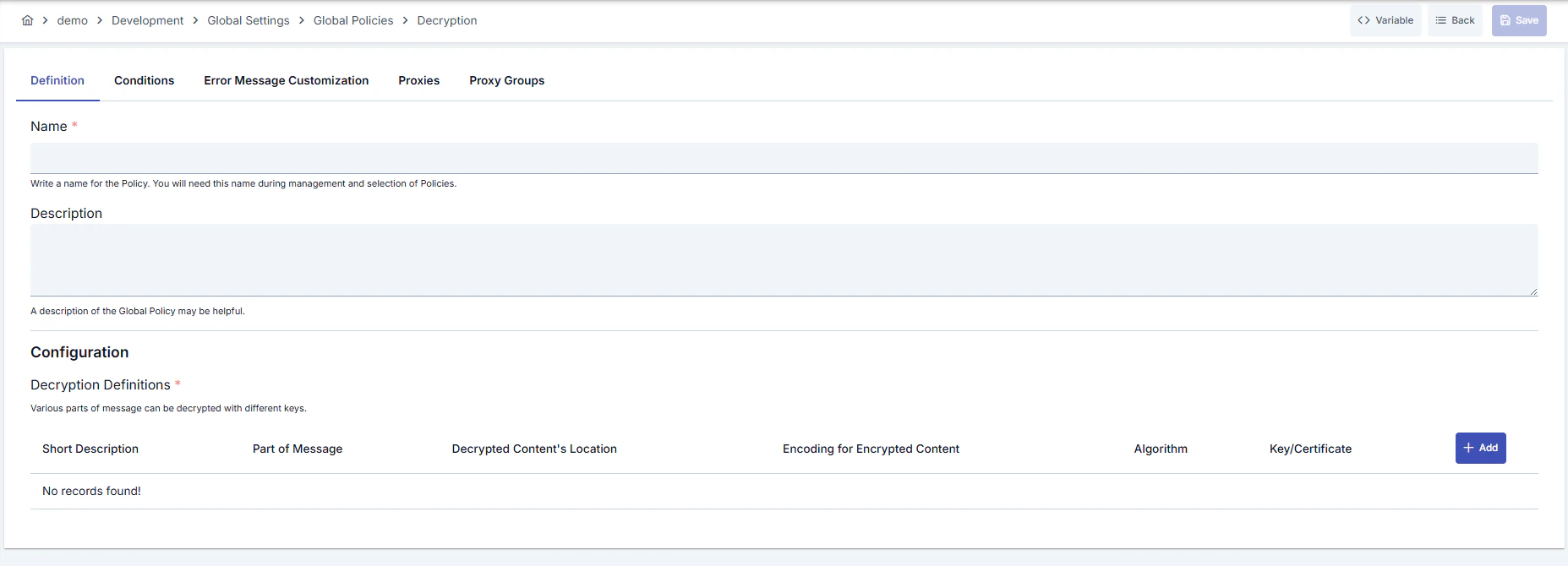 ### Configuration Steps
| Step | Description / Operation |
| ------------------------------------------------ | ---------------------------------------------------------------------------------------------------------------------------------------------------------------------------------------------------------------------------------------------------------------------------------------------------------------------------------------------------------------------------------------------------------------------------------------------------------------------------- |
| **Step 1: Going to Creation Page** | - Go to **Development → Global Settings → Global Policies → Decryption** section from the left menu.
### Configuration Steps
| Step | Description / Operation |
| ------------------------------------------------ | ---------------------------------------------------------------------------------------------------------------------------------------------------------------------------------------------------------------------------------------------------------------------------------------------------------------------------------------------------------------------------------------------------------------------------------------------------------------------------- |
| **Step 1: Going to Creation Page** | - Go to **Development → Global Settings → Global Policies → Decryption** section from the left menu.
- Click the **\[+ Create]** button at the top right. |
| **Step 2: Entering Basic Information** | **Policy Status:** Shows Active/Passive status. New policies are active by default.
**Name (Required):** Example: `Production_Decryption`
- Enter a unique name, it cannot start with a space.
- System automatically checks. Green checkmark: available. Red cross: existing name.
**Description:** Example: "Card data decryption for payment services"
- Max. 1000 characters.
- Explain the purpose of the policy. |
| **Step 3: Variable Usage** | - In the action button area at the top of the page, you can use the **\[\<> Variable]** button to select dynamic values.
- Using context/global variable expressions, you can manage policy parameters with variable-based values instead of fixed values.
- This reduces manual update effort when values change and provides operational convenience.
- For detailed information, review [Dynamic Variables](/en/concepts/core-concepts/dynamic-variables). |
| **Step 4: Managing Decryption Definitions** | - Click the **\[+ Add]** button in the **Decryption Definitions** section to add a new definition.
- For each definition, specify short description, message part (source variable), location of decrypted content (target variable).
- You can decrypt different message segments separately by adding multiple definitions. |
| **Step 5: Determining Algorithm and Key Source** | If you select **SPECIFY** in the `Source of Algorithm` field, determine the algorithm from the list and select Crypto Key Info or certificate. With **FIND** selection, you can have the algorithm name read from the `cipherAlgorithmVar` variable in the message.
**! Registration cannot be completed without key or certificate selection.** |
| **Step 6: Making IV and Encoding Settings** | If algorithm requires IV, `ivExists` is automatically checked; select IV variable and `ivEncodingType` value. Specify encrypted content format with `inputEncodingType` (BASE64/HEXADECIMAL).
**! Wrong encoding selection produces data that cannot be decrypted.** |
| **Step 7: Defining Condition (Optional)** | - Go to the **Condition** tab.
- Conditions determine when the policy will be active.
**Examples:**
- Environment-based: `Header = X-Environment, Operator = Equals, Value = production`
- API Key-based: `Header = X-API-Key, Starts With = PROD-`
- Endpoint-based: `Path = /api/admin/*`
If no condition is defined, the policy is always active
|
| **Step 8: Customizing Error Message (Optional)** | - Go to the **Error Message Customization** tab.
- Customize the message to be returned when access is denied.
**Default:**
`{ "statusCode": 403, "message": "[Default error message]" }`
**Custom:**
`{ "statusCode": 403, "errorCode": "[CUSTOM_ERROR_CODE]", "message": "[Custom message]" }` |
| **Step 9: Saving** | - Click the **\[Save]** button at the top right.
**Checklist:** Unique name. Required fields filled. At least one decryption definition exists
**Result:**
- Policy is added to the list.
- Can be linked to APIs.
- If it's a global policy, it is automatically applied. |
For the description of **Conditions** and **Error Message Customization** panels, you can review the [Conditions](/en/concepts/core-concepts/what-is-policy#conditions) and [Error Message Customization](/en/concepts/core-concepts/what-is-policy#error-message-customization) sections on the [What is Policy?](/en/concepts/core-concepts/what-is-policy) page.
For a complete guide on all layers, priority order and scenario examples of the error message configuration system, see the [Error Message Configuration Guide](/en/concepts/core-concepts/error-message-configuration) page.
## Deleting the Policy
For the deletion steps of this policy and the operations to be applied when it is in use, you can refer to the [Removing Policy from Flow](/en/develop/api-proxy-configuration/policy-management#removing-policy-from-flow) section on the [Policy Management](/en/develop/api-proxy-configuration/policy-management) page.
## Exporting/Importing the Policy
For the export and import steps of this policy, you can refer to the [Export/Import](/en/admin/secrets-management/export-import) page.
## Linking the Policy to API
For the process of how this policy will be linked to APIs, you can refer to the [Linking Policy to API](/en/develop/api-proxy-configuration/policy-management#adding-policy-to-flow) section on the [Policy Management](/en/develop/api-proxy-configuration/policy-management) page.
## Advanced Features
| Feature | Description and Usage Steps |
| --------------------------------------- | ------------------------------------------------------------------------------------------------------------------------------------------------------------------------------------------------------------------------------------------------------------------------------- |
| **Dynamic Algorithm Source Management** | - Set `sourceOfAlgorithm` field as FIND.
- Map the variable to be read from request with `cipherAlgorithmVar`.
- Ensure supported algorithm names are agreed with client. |
| **Certificate Revocation Tracking** | - Check red-marked (revoked) records in certificate selection list.
- Inform user in error message if working with revoked certificate.
- If needed, create new certificate and update policy. |
| **Automating IV Management** | - After algorithm selection, if `ivExists` is automatically checked, determine IV variable.
- Select encoding compatible with format in message for `ivEncodingType`.
- Prevent unnecessary workload by clearing `ivVar` field for algorithms that do not produce IV. |
## Best Practices
### Things to Do and Best Practices
| Category | Description / Recommendations |
| ----------------------- | ----------------------------------------------------------------------------------------------------------------------------------------------------------------------------------------------------------------------- |
| **Algorithm Selection** | **Bad:** Using default algorithm in every definition.
**Good:** Manually selecting the needed algorithm.
**Best:** Providing client-based flexibility by reading algorithm names from message. |
| **Key Management** | **Bad:** Storing keys as manual files.
**Good:** Using Crypto Key Info records.
**Best:** Performing key rotation with Secret Manager automation. |
| **IV Usage** | **Bad:** Leaving IV field for algorithms that do not require IV.
**Good:** Using fixed IV in algorithms that require IV.
**Best:** Reading IV dynamically from message and mapping with appropriate encoding. |
| **Variable Management** | **Bad:** Hardcoding message fields.
**Good:** Selecting existing variables with Variable dialog.
**Best:** Reducing maintenance cost with layered variable naming and descriptions. |
| **Error Messages** | **Bad:** Returning default 500 error.
**Good:** Adding meaningful message in decryption failures.
**Best:** Designing messages containing situation-specific error codes and routing information. |
### Security Best Practices
| Security Area | Description / Warnings |
| ------------------------ | ---------------------------------------------------------------------------------------------------------- |
| **Key Rotation** | Plan periodic rotation of keys according to SLA, update policies after rotation. |
| **Certificate Validity** | Check certificate expiration and revocation status, create emergency action plan for revoked certificates. |
| **Access Logs** | Collect access logs in centralized SIEM for services accessing decryption results. |
| **Condition Management** | Define policy conditions according to minimization principle; avoid unnecessarily broad conditions. |
| **Error Content** | Do not share sensitive key or algorithm details in error messages; use general expressions. |
### Things to Avoid
| Category | Description / Warnings |
| ------------------------------- | -------------------------------------------------------------------------------------------------------------------------------------------------------- |
| **Wrong Encoding Selection** | **Why avoid:** Encoding incompatibility leads to decryption failure.
**Alternative:** Verify message format and select correct `inputEncodingType`. |
| **Shared Fixed IV** | **Why avoid:** Creates security vulnerability.
**Alternative:** Take IV from message or generate dynamically for each request. |
| **Revoked Certificate Usage** | **Why avoid:** Increases risk of security breach.
**Alternative:** Use active certificates, quickly replace revoked ones. |
| **Unconditional Global Impact** | **Why avoid:** Causes unexpected behaviors in all API Proxies.
**Alternative:** Narrow conditions or create local policy. |
### Performance Tips
| Criterion | Recommendation / Impact |
| ------------------------- | ------------------------------------------------------------------------------------------------------------------------------------------------- |
| **Number of Definitions** | **Recommendation:** Clean unnecessary definitions.
**Impact:** Processing time in decryption loop shortens. |
| **Algorithm Selection** | **Recommendation:** Prefer symmetric options instead of unnecessarily heavy algorithms (RSA).
**Impact:** CPU load decreases, latency drops. |
| **IV Source** | **Recommendation:** Prevent unnecessary queries instead of reading IV from message.
**Impact:** IO costs decrease. |
| **Secret Manager Calls** | **Recommendation:** Group definitions using the same key.
**Impact:** Key retrieval calls decrease. |
| **Error Logging** | **Recommendation:** Close debug log level in successful operations.
**Impact:** Log volume and disk usage decrease. |
## Frequently Asked Questions (FAQ)
| Category | Question | Answer |
| ------------- | ----------------------------------------------------- | ------------------------------------------------------------------------------------------------------------------------------------------ |
| **General** | Can Decryption Policy be used in a single API? | Can be defined both globally and locally; you can share global policy with multiple API Proxies, customize with local copies. |
| **General** | How many definitions can I create in the same policy? | There is no limit; you can create a reasonable number of definitions according to your performance requirements. |
| **Technical** | How should I send algorithm name in request? | If `sourceOfAlgorithm = FIND` is selected, you should write the algorithm name to the variable you specified (e.g., header or body field). |
| **Technical** | What format should IV information be in? | IV value should be compatible with the `ivEncodingType` (BASE64 or HEXADECIMAL) you selected; otherwise decryption errors. |
| **Usage** | Does policy work if certificate appears revoked? | It works but revoked certificate creates security risk; update with a valid certificate as soon as possible. |
| **Usage** | Do I have to customize error message? | No, but it is recommended to define customized error code/message for user experience and traceability. |