> ## Documentation Index
> Fetch the complete documentation index at: https://docs.apinizer.com/llms.txt
> Use this file to discover all available pages before exploring further.
# Message Builder
> You can assign variable values to target variables through template and form-based message building. You can perform conditional row execution, JEXL expression support, and error management operations
This document explains the detailed usage of a specific policy. If you are using Apinizer policies for the first time or want to learn the general working principles of policies, we recommend reading the [What is Policy?](/en/concepts/core-concepts/what-is-policy) page first.
## Overview
### What is its Purpose?
* Assign variable values to target variables through template and form-based message building.
* Read data from sources such as body, header, and query parameters in the request or response to create new variables.
* Generate dynamic content with JEXL expressions and merge data from multiple sources.
* Perform variable assignment only in specific conditions with row-level conditional execution.
### Working Principle
1. **Request Arrival**: A MessageContext is created for each HTTP/HTTPS request arriving at the API Gateway.
2. **Policy Check**: If the Message Builder policy is active, the system checks in the following order:
* Is a Condition defined? If so, is the condition met?
* Is the policy active (active=true)?
3. **Row Chain Execution**: The row list is evaluated sequentially. For each row:
* Row condition is checked (if defined).
* **Form** mode: Value is read from the source variable.
* **Template** mode: Template is processed with `#{variable}` syntax, JEXL expressions are evaluated.
* Result is written to the target variable.
4. **Empty Value Handling**:
* If value is empty and `Required=true`, an error is thrown.
* If value is empty, the default value is used.
5. **Error Handling**: If `Continue on Error` is active, the row is skipped and processing moves to the next row. If inactive, the policy terminates with an error.
## Features and Capabilities
### Basic Features
* **Two Build Modes**: Form mode (simple variable copy) and Template mode (dynamic content creation with JEXL expression support).
* **Row-Based Processing**: Each row can be configured independently; source, target, condition, and default value are set separately.
* **Drag-and-Drop Ordering**: Row order can be easily changed with drag-and-drop.
* **Active/Passive Status Control**: Easily change the active or passive status of the policy. In passive mode, the policy is not applied but its configuration is preserved.
* **Condition-Based Application**: Conditions can be defined at both policy level and row level using Query Builder.
### Advanced Features
* **JEXL Expression Support**: Mathematical, logical, and string operators can be used with `#{expression}` syntax in Template mode.
* **Multiple Variable Sources**: Data can be read from Body (JSON/XML path), Header, Query/Path/Form parameters, and Context Variables.
* **Row-Level Error Management**: `Continue on Error` and `Required` flags can be set independently for each row.
* **Export/Import Feature**: Export policy configuration as a ZIP file. Import to different environments (Development, Test, Production). Version control and backup capability.
* **Policy Group and Proxy Group Support**: Manage multiple policies within Policy Group. Bulk policy assignment to Proxy Groups. Centralized update and deploy operations.
* **Deploy and Versioning**: Deploy policy changes to live environment. See which API Proxies use it (Policy Usage). Proxy Group and Policy Group usage reports.
## Usage Scenarios
| Scenario | Status | Solution (Policy Application) | Expected Behavior / Result |
| ------------------------- | ------------------------------------------------------------------------------- | ------------------------------------------------------------------------------------------------------- | ----------------------------------------------------------------------------------- |
| Dynamic Header Creation | Custom header needs to be created from information from different sources. | Template mode: `User: #{body.$.userName}, Time: #{dateTime.formattedText}` → target: `X-Custom-Header`. | Header is populated with current username and time on each request. |
| Variable Copy | A field in the request body needs to be assigned to another variable. | Form mode: Source=`body.$.userId` → Target=`customUserId`. | userId value is copied to customUserId variable, available for subsequent policies. |
| Conditional Enrichment | Data should only be extracted from body on POST requests. | Row condition: `request.method = POST`. Extract data from body using Template mode. | Row is skipped for GET requests, data is extracted for POST. |
| Default Value Assignment | Fallback needs to be provided for a missing header value. | Form mode: Source=`header.X-Tenant-Id`, Default Value=`default-tenant`, Required=No. | If header exists, its value is used; otherwise `default-tenant` is assigned. |
| Multiple Source Merging | Information from different sources needs to be combined into a single variable. | Template mode: `#{header.X-User-Id}-#{dateTime.timestamp}-#{apiProxy.name}`. | Combined value is written to the target variable. |
| Required Field Validation | A specific variable must not be empty. | Form mode: Source=`body.$.orderId`, Required=Yes, Continue on Error=No. | If orderId is empty, the policy throws an error and the flow stops. |
## Configuring Policy Parameters
In this section, you can create a new **Message Builder** policy or configure existing policy parameters to define message building rules.
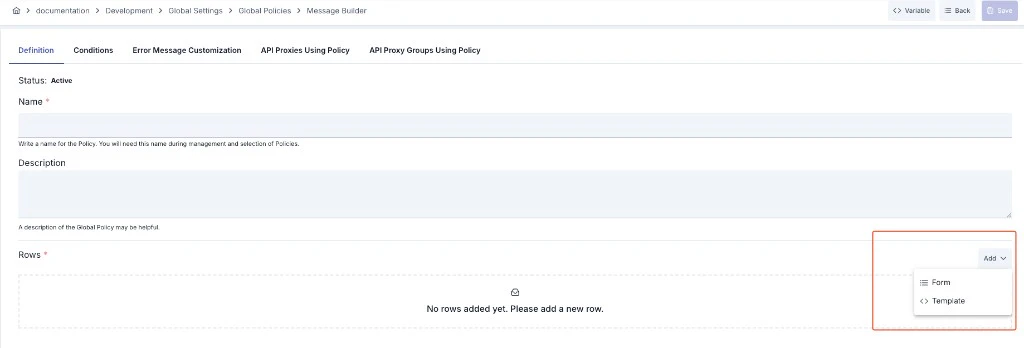
The screenshot below shows the **Definition** tab: policy status, name, and description; the **Rows** section and example **Form** and **Template** rows added via **Add** (source/target variables, default value, required, continue on error for Form; template editor and target variable for Template). Along the top, the **Conditions**, **Error Message Customization**, **API Proxies Using Policy**, and **API Proxy Groups Using Policy** tabs are also available.
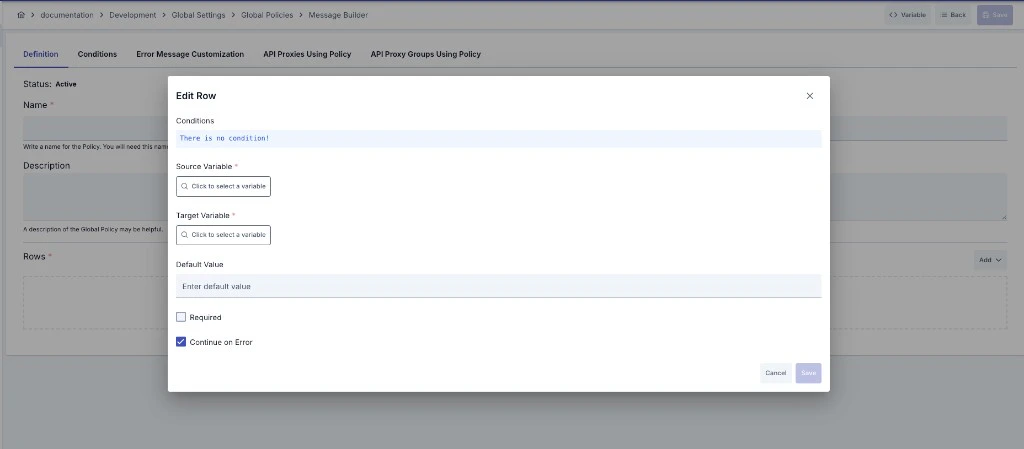
 **In Form mode**, the row edit dialog shows source and target variables, default value, required, and continue on error.
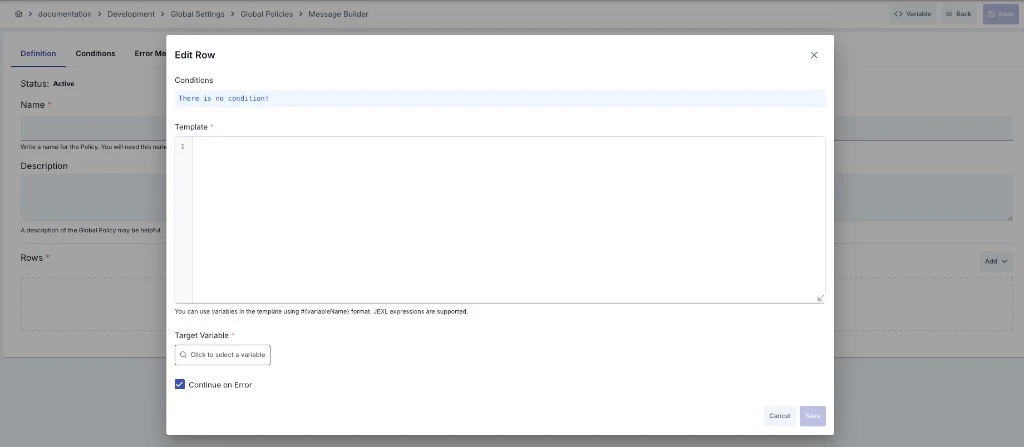
 **In Template mode**, the template field (code editor), variable placeholders in the `#{variableName}` form, and target variable are shown; **Continue on Error** is also available.
 ### Creating a New Message Builder Policy
#### Configuration Steps
| Step | Description / Operation |
| ---------------------------------------------- | ----------------------------------------------------------------------------------------------------------------------------------------------------------------------------------------------------------------------------------------------------------------------------------------------------------------------------------------------------------------------------------------------------------------------------------------------------------------------------------------------------------------------------------------------------------------------------------------------------------------------------------------------------------------------------------------------------------------------------------------------------------------------------------------------------------------------------------------------------------------------------------------------- |
| **Step 1: Go to Creation Page** | - Go to **Development → Global Settings → Global Policies → Message Builder** from the left menu.
### Creating a New Message Builder Policy
#### Configuration Steps
| Step | Description / Operation |
| ---------------------------------------------- | ----------------------------------------------------------------------------------------------------------------------------------------------------------------------------------------------------------------------------------------------------------------------------------------------------------------------------------------------------------------------------------------------------------------------------------------------------------------------------------------------------------------------------------------------------------------------------------------------------------------------------------------------------------------------------------------------------------------------------------------------------------------------------------------------------------------------------------------------------------------------------------------------- |
| **Step 1: Go to Creation Page** | - Go to **Development → Global Settings → Global Policies → Message Builder** from the left menu.
- Click the **\[+ Create]** button at the top right. |
| **Step 2: Enter Basic Information** | **Policy Status:** Shows Active/Passive status. New policies are active by default.
**Name (Required):**
Example: `Request_Enrichment_Builder`
- Enter a unique name, does not start with space.
- System automatically checks: Green checkmark: available, Red X: existing name.
**Description:**
Example: "Extracts user information from request body and adds them to headers."
- Max. 1000 characters.
- Explain the purpose of the policy. |
| **Step 3: Variable Usage** | - In the action button area at the top of the page, you can use the **\[\<> Variable]** button to select dynamic values.
- Using context/global variable expressions, you can manage policy parameters with variable-based values instead of fixed values.
- This reduces manual update effort when values change and provides operational convenience.
- For detailed information, review [Dynamic Variables](/en/concepts/core-concepts/dynamic-variables). |
| **Step 4: Add Rows** | - Click the **Add Row** button.
- Select the build mode from the dropdown:
- **Form**: Simple variable copy.
- **Template**: Template-based creation with JEXL expression support.
- A new row is added to the list. |
| **Step 5: Edit Row** | - Click **Edit** from the row menu or double-click the row.
- Configure the following fields in the dialog:
**Build Mode:** Select Form or Template.
**Source Variable** *(Form mode):*
Select the source variable from the variable selection dialog (body, header, query param, etc.).
**Template** *(Template mode):*
Write a template in the code editor using `#{variable}` syntax.
JEXL expressions are supported.
**Target Variable (Required):**
Select the variable where the result will be written.
**Default Value:**
Value to use when the source is empty.
**Required:**
If checked, an error is thrown when the source value is empty. Default: No.
**Continue on Error:**
If checked, processing moves to the next row when an error occurs. Default: Yes. |
| **Step 6: Define Row Condition (Optional)** | - Define a row-level condition using Query Builder in the row editing dialog's **Condition** section.
- When the condition is not met, the row is skipped. |
| **Step 7: Order Rows** | - You can reorder rows using drag-and-drop.
- Rows execute in the order they appear in the list. |
| **Step 8: Define Condition (Optional)** | - Go to the **Condition** tab.
- Define a policy-level condition to determine when the policy will be active.
For details: [Conditions](/en/concepts/core-concepts/what-is-policy#conditions) |
| **Step 9: Customize Error Message (Optional)** | - Go to the **Error Message Customization** tab.
- Customize the message returned when the policy throws an error.
- Placeholders such as `#{error.defaultErrorCode}`, `#{message.correlationId}` can be used.
For details: [Template-Based Error Messages](/en/concepts/core-concepts/what-is-policy#template-based-dynamic-error-messages) |
| **Step 10: Save** | - Click the **\[Save]** button at the top right.
**Checklist:**
- Unique name
- At least one row exists
- Target variable selected in each row
- Source variable selected in Form mode
- Template filled in Template mode
**Result:**
- Policy is added to the list.
- Can be connected to APIs.
- If global policy, automatically applied. |
For descriptions of **Conditions** and **Error Message Customization** panels, you can review the [Conditions](/en/concepts/core-concepts/what-is-policy#conditions) and [Error Message Customization](/en/concepts/core-concepts/what-is-policy#error-message-customization-error-message-customization) sections on the [What is Policy?](/en/concepts/core-concepts/what-is-policy) page.
For a complete guide on all layers, priority order and scenario examples of the error message configuration system, see the [Error Message Configuration Guide](/en/concepts/core-concepts/error-message-configuration) page.
### Row Parameters
| Parameter | Description | Required | Default |
| --------------------- | ----------------------------------------------------------------------------------------------------------------------------------- | -------------------- | ------- |
| **Build Mode** | `Form`: Simple copy from source variable to target variable.
`Template`: Template-based creation with JEXL expression support. | Yes | — |
| **Source Variable** | Source variable to read the value from in Form mode. Body, header, query param, etc. | Yes in Form mode | — |
| **Template** | Template string written with `#{variable}` syntax in Template mode. | Yes in Template mode | — |
| **Target Variable** | Target variable where the result will be written. | Yes | — |
| **Default Value** | Value to use when the source is empty. | No | — |
| **Required** | If true, an error is thrown when the source is empty. | No | `false` |
| **Continue on Error** | If true, processing moves to the next row when an error occurs. | No | `true` |
| **Condition** | Row-level condition. If not met, the row is skipped. | No | — |
### Template Syntax
In Template mode, variables and JEXL expressions are accessed using `#{...}` syntax:
**Simple Variable Access:**
```
#{body.$.userName} → userName field from JSON body
#{body.$[0].name} → name field of first element from JSON array body
#{body./root/name} → Value from XML body via XPath
#{header.Authorization} → Authorization header value
#{query.page} → Query parameter
#{form.username} → Form parameter
#{path.id} → Path parameter
#{credential.clientId} → Authenticated credential key/username
#{request.remoteAddress} → Client IP address (reflects forwarded IP if configured)
#{dateTime.formattedText} → Formatted date/time (UTC, yyyy-MM-dd HH:mm:ss)
```
**Region-Aware Variable Access (Request/Response):**
```
#{request.body.$.field} → Request body field (explicit region)
#{request.header.Name} → Request header (explicit region)
#{response.body.$.data.id} → Response body field (explicit region)
#{response.header.Name} → Response header (explicit region)
#{request.body./root/name} → Request body XPath (explicit region)
#{response.body./root/name} → Response body XPath (explicit region)
```
**Custom Variable Path (JSONPath/XPath on variable content):**
```
#{myVar.$.user.name} → JSONPath on custom variable's JSON content
#{myVar./root/element} → XPath on custom variable's XML content
#{myVar./bookstore/book[1]/title} → XPath with predicate on custom variable
```
**Context Variables:**
| Syntax | Description |
| ---------------------------------- | ----------------------------------------------- |
| `#{context.request.httpMethod}` | HTTP method (GET, POST, etc.) |
| `#{context.request.remoteAddress}` | Client IP address |
| `#{context.response.statusCode}` | Response status code |
| `#{context.message.correlationId}` | Correlation ID |
| `#{context.apiProxy.name}` | API Proxy name |
| `#{context.apiProxy.id}` | API Proxy ID |
| `#{context.apiMethod.name}` | API Method name |
| `#{context.apiMethod.httpMethod}` | API Method HTTP method |
| `#{context.system.year}` | Current year (integer) |
| `#{context.system.dateTime}` | Date-time in UTC (yyyy-MM-dd'T'HH:mm:ss.SSS'Z') |
| `#{context.credential.username}` | Authenticated username |
| `#{context.credential.email}` | Authenticated user email |
| `#{context.credential.clientId}` | Authenticated credential key/username |
| `#{context.environment.name}` | Environment name |
| `#{context.environment.id}` | Environment ID |
**JEXL Expression (Single Line):**
```
#{body.$.price * 1.18} → Add tax to price
#{body.$.firstName + ' ' + body.$.lastName} → Merge first and last name
#{body.$.age >= 18 ? 'adult' : 'minor'} → Conditional value
#{context.request.httpMethod == 'POST' ? 'create' : 'read'} → Operation type by HTTP method
#{body.$.status == 'available' ? '{"label":"Available"}' : null} → JSON string generation
```
**JEXL Script (Multi-Line, Loop):**
Multi-line scripts can be written inside `#{...}` blocks using `for`, `while`, `var`, `if/else` statements. JSON array values extracted via JSONPath from the body are automatically converted to lists and can be iterated with `for (item : collection)`.
*Array Iteration:*
```
#{
var out = '[';
var first = true;
for (item : body.$.tags) {
if (!first) { out = out + ','; }
out = out + '{"id":' + item.id + ',"name":"' + item.name + '"}';
first = false;
}
out + ']'
}
```
*Aggregation / Counter:*
```
#{
var total = 0;
for (item : body.$.items) {
total = total + item.price;
}
total
}
```
*Conditional Value with if/else:*
```
#{
var role = body.$.user.role;
if (role == 'admin') {
'FULL_ACCESS'
} else if (role == 'manager') {
'LIMITED_ACCESS'
} else {
'READ_ONLY'
}
}
```
**Timezone-Aware Date Formatting (dtf helper):**
In JEXL expressions, `dtf.format()` can be used to format dates with a specific timezone. By default, `#{dateTime.formattedText}` returns UTC time. To get time in a specific timezone:
```
#{dtf.format('+03:00')} → 2026-03-02 15:30:45
#{dtf.format('UTC')} → 2026-03-02 12:30:45
#{dtf.format('+03:00', 'dd/MM/yyyy HH:mm:ss')} → 02/03/2026 15:30:45
#{dtf.format('+03:00', 'yyyy-MM-dd HH:mm:ssXXX')} → 2026-03-02 15:30:45+03:00
#{dtf.format('Europe/Istanbul')} → 2026-03-02 15:30:45
#{dtf.epochMillis()} → 1740912645000
```
In JEXL Script, the value of the last evaluated expression is returned. The `return` keyword is not used.
This policy can only be used in HTTP API Proxies. It is not supported in gRPC API Proxies.
## Deleting the Policy
For deletion steps of this policy and operations to be applied when in use, you can refer to the [Remove Policy from Flow](/en/develop/api-proxy-configuration/policy-management#remove-policy-from-flow) section on the [Policy Management](/en/develop/api-proxy-configuration/policy-management) page.
## Exporting/Importing the Policy
For export (Export) and import (Import) steps of this policy, you can refer to the [Export/Import](/en/admin/secrets-management/export-import) page.
## Connecting the Policy to API
For the process of how this policy will be connected to APIs, you can refer to the [Connect Policy to API](/en/develop/api-proxy-configuration/policy-management#adding-policy-to-flow) section on the [Policy Management](/en/develop/api-proxy-configuration/policy-management) page.
## Advanced Features
| Feature | Description and Usage Steps |
| --------------------------------------- | ----------------------------------------------------------------------------------------------------------------------------------------------------------------------------------------------------------------------------------------------------------------------------------------------------------------------------------------------------------------------------------------------------------------------------------------------------------------------------------------------------------------------------------- |
| **JEXL Expression Chain** | - Select Template mode.
- Write complex expressions using `#{expression}` syntax in the template.
- Mathematical (`+`, `-`, `*`, `/`), logical (`&&`, `\|\|`, `!`), comparison (`==`, `!=`, `<`, `>`) and conditional (`? :`) operators can be used. |
| **JEXL Script with Loop and Condition** | - Write multi-line scripts inside `#{...}` blocks in Template mode.
- `for`, `while`, `var`, `if/else` statements are supported.
- JSON array values extracted from body are automatically converted to lists; iterate with `for (item : body.$.list)`.
- The value of the last evaluated expression is returned; `return` is not used. |
| **Multiple Source Merging** | - Use multiple sources in Template mode.
- Example: `ID: #{body.$.id}, Name: #{header.X-User-Name}, Time: #{context.system.dateTime}`
- The combined value is written to a single target variable. |
| **Conditional Row Execution** | - Define a condition using Query Builder in the row edit dialog.
- Example: Only parse body for requests with `Content-Type = application/json`.
- When condition is not met, the row is skipped, other rows continue to execute. |
| **Intermediate Variable Chain** | - Use a custom variable created in one row in subsequent row templates.
- Example: Assign a value to `petName` in the first row, use `#{petName}` in later rows.
- This pattern enables building complex JSON outputs in stages. |
| **Custom Variable with JSONPath/XPath** | - Run JSONPath or XPath directly on a custom variable's content to extract a specific value.
- **In Template mode:** Use `#{myVar.$.user.name}` for JSONPath or `#{myVar./root/element}` for XPath on the variable's content.
- **In Form mode:** Select a custom variable as source, then specify the content type (JSON or XML) and provide the path expression.
- Example: A custom variable `fullResponse` contains a JSON body; use `#{fullResponse.$.user.name}` in a template to extract just the name field. |
## Best Practices
### Things to Do and Best Practices
| Category | Description / Recommendations |
| -------------------- | -------------------------------------------------------------------------------------------------------------------------------------------------------------------------------------------------------------------------------------------------------- |
| **Row Ordering** | **Bad:** Ordering dependent rows randomly.
**Good:** Ordering independent rows first, dependent rows after.
**Best:** Putting frequently used and light rows at the beginning, leaving heavy template operations at the end. |
| **Mode Selection** | **Bad:** Using Template mode for simple copying.
**Good:** Using Form for simple copies, Template for complex creation.
**Best:** Preferring Form mode by default, switching to Template only when multiple sources or expressions are needed. |
| **Error Management** | **Bad:** Leaving `Continue on Error=No` for all rows.
**Good:** Using No for critical rows, Yes for optional rows.
**Best:** Configuring `Required` and `Continue on Error` flags separately based on row importance. |
| **Default Values** | **Bad:** Leaving non-required rows without a default value.
**Good:** Setting meaningful default values for optional rows.
**Best:** Setting default values according to downstream service expectations. |
### Security Best Practices
| Security Area | Description / Warnings |
| --------------------------- | ------------------------------------------------------------------------------------------------------------------------------ |
| **Sensitive Data Handling** | Be careful when using sensitive data (passwords, tokens) in templates. Choose target variable names that won't appear in logs. |
| **JEXL Expression Safety** | Avoid using values coming directly from user input in expressions. |
| **Target Variable Control** | Do not accidentally overwrite security-critical variables (authentication tokens, etc.) as target variables. |
### Things to Avoid
| Category | Description / Warnings |
| ------------------------------- | -------------------------------------------------------------------------------------------------------------------------------------------------------------------------------------- |
| **Empty Row List** | **Why to avoid:** No operation is performed even if policy is saved.
**Alternative:** Define at least one row. |
| **Unnecessary Template Usage** | **Why to avoid:** Using Template mode for simple variable copying creates unnecessary parsing cost.
**Alternative:** Use Form mode for simple copies. |
| **Unconditional Required Rows** | **Why to avoid:** Required check is performed on every request, unnecessary errors may be thrown on some endpoints.
**Alternative:** Add appropriate conditions to required rows. |
### Performance Tips
| Criterion | Recommendation / Impact |
| ----------------------- | --------------------------------------------------------------------------------------------------------------------------------------------------------------------- |
| **Mode Selection** | **Recommendation:** Prefer Form mode whenever possible.
**Impact:** Avoids JEXL parsing cost. |
| **Row Count** | **Recommendation:** Keep row count to a minimum, avoid unnecessary assignments.
**Impact:** Each row is a separate processing cycle, fewer rows = lower latency. |
| **Template Complexity** | **Recommendation:** Use simple expressions in templates, move complex business logic to Script policy.
**Impact:** JEXL engine load is reduced. |
| **Condition Usage** | **Recommendation:** Filter unnecessary rows with conditions.
**Impact:** Rows are skipped for irrelevant requests, throughput increases. |
## Frequently Asked Questions (FAQ)
| Category | Question | Answer |
| ------------- | ------------------------------------------------------------------------------ | ------------------------------------------------------------------------------------------------------------------------------------------------------------------------------------------------------------------------------------------------------------------------------------------------------------------------------------------------------------ |
| **General** | What is the difference between Form and Template mode? | Form mode performs simple copying from a single source variable to target. Template mode generates dynamic content from multiple sources using `#{variable}` syntax and JEXL expressions. |
| **General** | Can this policy be used in gRPC API Proxies? | No, Message Builder policy is only supported in HTTP API Proxies. |
| **Technical** | What types of variables can be used in templates? | Body (JSON path `body.$.path` or XPath `body./path`), Header (`header.Name`), Query (`query.name`), Form (`form.name`), Path (`path.name`) parameters and Context Variables can be used. |
| **Technical** | What operators do JEXL expressions support? | Arithmetic (`+`, `-`, `*`, `/`), comparison (`==`, `!=`, `<`, `>`, `<=`, `>=`), logical (`&&`, `\|\|`, `!`) and ternary (`? :`) operators are supported. |
| **Usage** | Does row order matter? | Yes, rows execute in the order they appear in the list. A row's target variable can be the source of the next row. |
| **Usage** | What happens when the source value is empty? | If `Required=Yes`, an error is thrown. If `Required=No`, the default value is used. If there is no default value either, an empty string is assigned. |
| **Technical** | Can I use a `for` loop inside a template? | Yes, multi-line JEXL Script can be written inside `#{...}` blocks. You can iterate over JSON array elements with `for (item : body.$.items)`. JSON array values are automatically converted to lists. |
| **Technical** | Should I use `return` in JEXL Script? | No, `return` keyword is not used. The value of the last evaluated expression at the end of the block is automatically returned. |
| **Technical** | Can I produce a JSON string containing `{}` inside a template? | Yes, the balanced brace scanner allows `{` and `}` to be used freely inside `#{...}` blocks. Example: `#{status == 'active' ? '{"label":"Active"}' : 'null'}` |
| **Technical** | How do I access an element if the body is a JSON array? | Use `#{body.$[0].field}` syntax to access the first element of the array. Other elements can be reached with `$[1]`, `$[2]`, etc. |
| **Technical** | Can I extract a specific value from a custom variable using JSONPath or XPath? | Yes. **In Template mode:** Use `#{myVar.$.path}` for JSONPath or `#{myVar./xpath}` for XPath directly in the template. **In Form mode:** Select a custom variable as source, choose the content type (JSON or XML), and provide the path expression. This is useful when a custom variable holds a full JSON or XML body and you need only a specific field. |
| **Technical** | Can I specify request or response explicitly in templates? | Yes. Use `#{request.body.$.field}` or `#{response.body.$.field}` to target a specific region. Similarly, `#{request.header.Name}` and `#{response.header.Name}` are supported. Without a prefix, the default region of the policy (request or response pipeline) is used. |
| **Technical** | How can I get date/time in a specific timezone? | All `dateTime.*` variables return UTC values. Use `#{dtf.format('+03:00')}` for a specific timezone, or `#{dtf.format('+03:00', 'dd/MM/yyyy HH:mm:ss')}` for a custom pattern with timezone. Named timezones like `Europe/Istanbul` are also supported. |