> ## Documentation Index
> Fetch the complete documentation index at: https://docs.apinizer.com/llms.txt
> Use this file to discover all available pages before exploring further.
# OAuth2 Authentication
> You can manage OAuth 2 token generation, validation, and authorization from a single point
This document describes the detailed usage of a specific policy. If you are using Apinizer policy structure for the first time or want to learn the general working principles of policies, we recommend that you first read the [What is Policy?](/en/concepts/core-concepts/what-is-policy) page.
## Overview
### What is its Purpose?
* Standardizes authentication in OAuth 2-based access to enterprise services, providing centralized control at the API Proxy (API Gateway) level.
* Manages different grant type needs under a single policy, providing project-based consistency.
* Controls access duration, refresh rights, and security boundaries by managing token and refresh token lifecycles according to organizational policies.
* Integrates identity and role sources with Secret Manager, API, LDAP, or database providers, making authorization processes compatible.
### Working Principle
1. **Request Arrival**: For each HTTP/HTTPS request arriving at the API Gateway, the source IP address of the request is detected.
2. **Policy Check**: If the OAuth 2 Authentication policy is active, the system checks in the following order:
* Is a Condition defined? If so, is the condition met?
* Is the policy active (active=true)?
* Is a Variable used or is Apinizer default?
3. **OAuth 2 Flow Control**: Verifies client credentials according to the selected grant type, retrieves identity or role data from Identity Role Group and Secret Manager information if necessary, and applies token generation/refresh rules.
4. **Decision Making**:
* **Match Found**: An access token is created for the authorized client or the existing token is validated, and header enrichments are applied.
* **No Match**: Token generation or validation is rejected, and unauthorized access is logged.
5. **Error Handling**: Returns customizable HTTP status code and error message for requests that do not comply with the policy rule.
## Features and Capabilities
### Basic Features
* **Grant Type Management**: Provides authentication suitable for different client types by supporting CLIENT\_CREDENTIALS and PASSWORD flows.
* **Token Lifecycle Control**: Defines access token duration, refresh token rights, and refresh count according to project requirements.
* **Identity Provider Integration**: Provides authentication flexibility by working with Secret Manager, Identity Role Group, LDAP, API, or database-based identity sources.
* **Active/Passive Status Control**: Easily change the active or passive status of the policy (active/passive toggle). In passive state, the policy is not applied but its configuration is preserved.
* **Conditional Application**: Determine when the policy will be applied by creating complex conditions with Query Builder (e.g., only for specific endpoints or header values).
### Advanced Features
* **Secret Manager-Based Assurance**: Provides additional security and IP address tracking for passwordless flows by keeping credentials in a secure vault.
* **Header Enrichment**: Writes the authenticated user's identity and role information to customizable header fields.
* **Method-Based Authorization**: Defines special role sets for API methods and applies granular access control.
* **Export/Import Feature**: Export policy configuration as a ZIP file. Import to different environments (Development, Test, Production). Version control and backup capability.
* **Policy Group and Proxy Group Support**: Manage multiple policies within Policy Group. Bulk policy assignment to Proxy Groups. Centralized update and deploy operations.
* **Deploy and Versioning**: Deploy policy changes to live environment. See which API Proxies use it (Policy Usage). Proxy Group and Policy Group usage reports.
## Usage Scenarios
| Scenario | Situation | Solution (Policy Application) | Expected Behavior / Result |
| -------------------------------------- | ------------------------------------------------- | ------------------------------------------------------------------------------------------------------------ | ------------------------------------------------------------------------------------------------------- |
| M2M Service Token Management | Machine user wants to access backend | Grant Type = CLIENT\_CREDENTIALS, Token Never Expires = false, Token Expires In = 15 min | Token is periodically renewed, services access in a controlled manner |
| User Password Authorization | End user logging in from mobile app | Grant Type = PASSWORD, Identity Role Group = RetailUsers, Check Client IP Address = true | Token without IP match is rejected, role-based header is set |
| Refresh Token Cycle | Long-term session needed | Token Never Expires = false, Refresh Token Allowed = true, Refresh Token Count = 5 | Continuous access is provided with refresh token, re-authentication is requested when limit is exceeded |
| Adding Roles to Header | Downstream service expects role information | Add Roles To Header = true, Roles Header Name = X-Authorized-Roles | Role list is carried in request header, target service does not need additional query |
| Secret Manager Integration | Credentials will be kept in Apinizer vault | Grant Type = PASSWORD, Authentication Provider = Secret Manager, Use Secret Manager For Authorization = true | Identity/role data is read from vault, password management becomes independent from application |
| Only Specific Endpoint | Admin API should only be accessed with admin role | Condition: Path = /api/admin/\*, Enable Authorization = true, Method Access = role mapping | Non-admin calls return 403, admin methods are accessible |
| Audit-Focused Token Reset *(optional)* | Old tokens will be invalidated | Delete Previous = true, Clear Auth = true | When new token is generated, old tokens are cancelled, logging becomes easier |
## Configuring Policy Parameters
In this step, users can **create a new policy** or **configure existing policy parameters** to define access rules. The defined parameters directly affect how the policy works (e.g., which IPs will be allowed, geographical restrictions, conditional activations, etc.). This way, the policy can be customized according to organization-specific requirements and managed centrally.
### Creating New OAuth 2 Authentication Policy
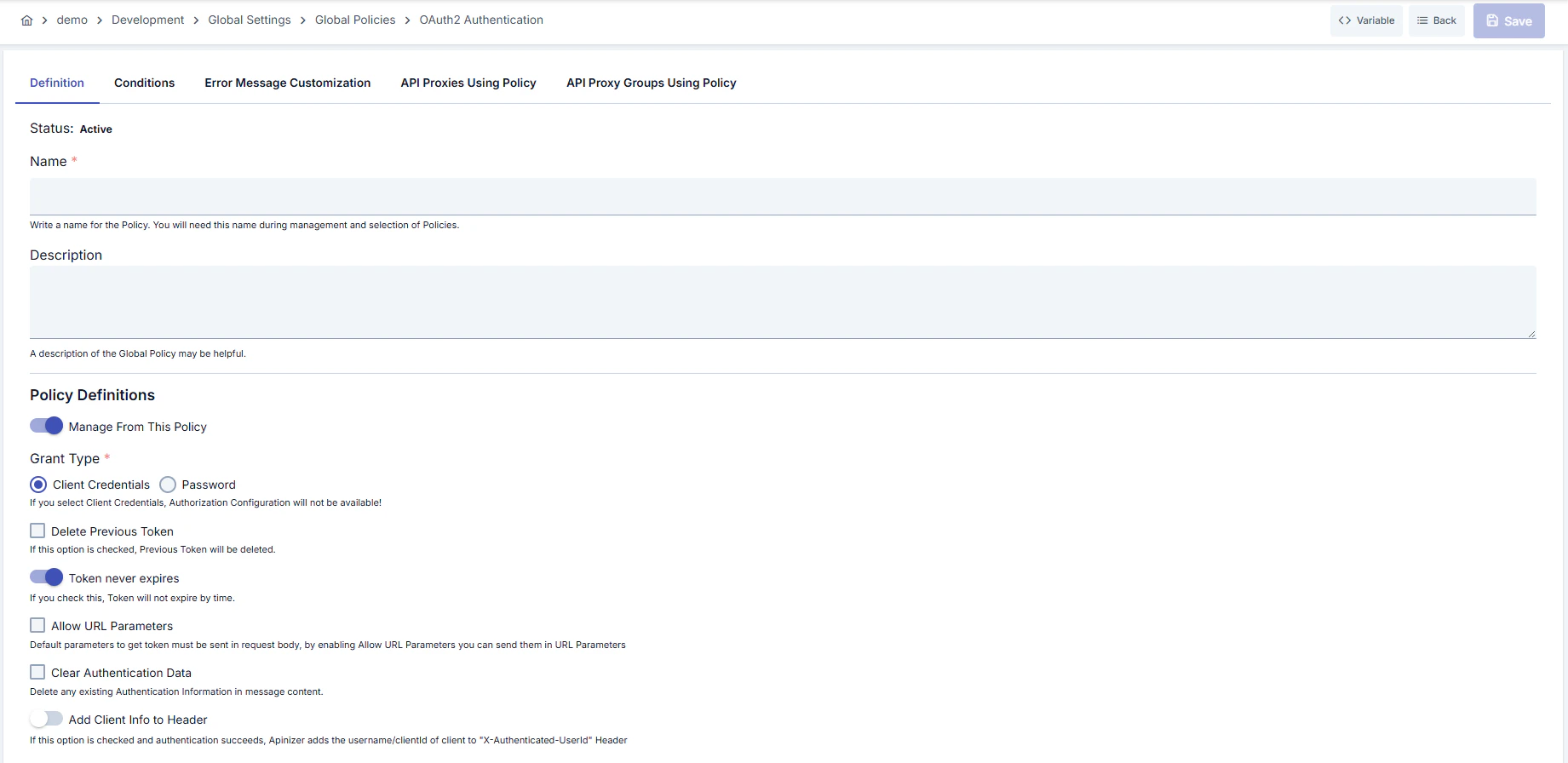 ### Configuration Steps
| Step | Description / Operation |
| --------------------------------------------------------- | ---------------------------------------------------------------------------------------------------------------------------------------------------------------------------------------------------------------------------------------------------------------------------------------------------------------------------------------------------------------------------------------------------------------------------------------------------------------------------- |
| **Step 1: Going to Creation Page** | - Go to **Development → Global Settings → Global Policies → OAuth 2 Authentication Policy** section from the left menu.
### Configuration Steps
| Step | Description / Operation |
| --------------------------------------------------------- | ---------------------------------------------------------------------------------------------------------------------------------------------------------------------------------------------------------------------------------------------------------------------------------------------------------------------------------------------------------------------------------------------------------------------------------------------------------------------------- |
| **Step 1: Going to Creation Page** | - Go to **Development → Global Settings → Global Policies → OAuth 2 Authentication Policy** section from the left menu.
- Click the **\[+ Create]** button at the top right. |
| **Step 2: Entering Basic Information** | **Policy Status:** Shows Active/Passive status. New policies are active by default.
**Name (Required):** Example: `Production_OAuth2Auth`
- Enter a unique name, does not start with space.
- System automatically checks. Green check: available. Red X: existing name.
**Description:** Example: "OAuth 2 CLIENT\_CREDENTIALS flow for M2M services."
- Max. 1000 characters.
- Describe the purpose of the policy. |
| **Step 3: Variable Usage** | - In the action button area at the top of the page, you can use the **\[\<> Variable]** button to select dynamic values.
- Using context/global variable expressions, you can manage policy parameters with variable-based values instead of fixed values.
- This reduces manual update effort when values change and provides operational convenience.
- For detailed information, review [Dynamic Variables](/en/concepts/core-concepts/dynamic-variables). |
| **Step 4: OAuth 2 Flow Parameters** | - **Managed From This Policy:** Determine whether the policy will manage token management.
- **Grant Type:** Select CLIENT\_CREDENTIALS or PASSWORD.
- **Identity Role Group:** In PASSWORD flow, select identity provider from Secret Manager, LDAP, Database, or API.
- **Check Client IP Address:** Make token's source IP match mandatory in Secret Manager flow. |
| **Step 5: Token Lifecycle and Refresh Settings (If Any)** | - **Delete Previous:** Cancel old tokens when new token is generated.
- **Token Never Expires:** Leave open if unlimited token is needed; if closed, define duration and unit.
- **Refresh Token Allowed:** Activate refresh right, determine count and duration.
- **Allow URL Parameters / Clear Auth:** Configure URL parameter acceptance at token endpoint and clearing of old credentials. |
| **Step 6: Header and Authorization Integration (If Any)** | - **Add User To Header / User Header Name:** Add authenticated user information to custom header.
- **Authorization Configuration:** Configure method-based role assignments, authorization source (Secret Manager, API, LDAP, DB), and role header management.
- **Add Roles To Header / Roles Header Name:** Determine header names to be transmitted for roles. |
| **Step 7: Defining Condition (Optional)** | - Go to **Condition** tab.
- Conditions determine when the policy will be active.
**Examples:**
- Environment-based: `Header = X-Environment, Operator = Equals, Value = production`
- API Key-based: `Header = X-API-Key, Starts With = PROD-`
- Endpoint-based: `Path = /api/admin/*`
If no condition is defined, policy is always active
|
| **Step 8: Error Message Customization (Optional)** | - Go to **Error Message Customization** tab.
- Customize the message to be returned when access is denied.
**Default:**
`{ "statusCode": 403, "message": "[Default error message]" }`
**Custom:**
`{ "statusCode": 403, "errorCode": "[CUSTOM_ERROR_CODE]", "message": "[Custom message]" }` |
| **Step 9: Saving** | - Click the **\[Save]** button at the top right.
**Checklist:** Unique name. Required fields filled. At least one OAuth 2 flow selection and required identity provider determined.
**Result:**
- Policy is added to the list.
- Can be connected to APIs.
- If global policy, automatically applied. |
For the description of **Conditions** and **Error Message Customization** panels, you can review the [Conditions](/en/concepts/core-concepts/what-is-policy#conditions) and [Error Message Customization (Error Message Customization)](/en/concepts/core-concepts/what-is-policy#error-message-customization-error-message-customization) sections on the [What is Policy?](/en/concepts/core-concepts/what-is-policy) page.
For a complete guide on all layers, priority order and scenario examples of the error message configuration system, see the [Error Message Configuration Guide](/en/concepts/core-concepts/error-message-configuration) page.
## Deleting Policy
For the deletion steps of this policy and operations to be applied while in use, you can refer to the [Removing Policy from Flow](/en/develop/api-proxy-configuration/policy-management#removing-policy-from-flow) section on the [Policy Management](/en/develop/api-proxy-configuration/policy-management) page.
## Exporting/Importing Policy
For the export and import steps of this policy, you can refer to the [Export/Import](/en/admin/secrets-management/export-import) page.
## Binding Policy to API
For the process of how this policy will be bound to APIs, you can refer to the [Binding Policy to API](/en/develop/api-proxy-configuration/policy-management#adding-policy-to-flow) section on the [Policy Management](/en/develop/api-proxy-configuration/policy-management) page.
## Advanced Features
| Feature | Description and Steps |
| ----------------------------------------- | ----------------------------------------------------------------------------------------------------------------------------------------------------------------------------------------------------------------------------------------------- |
| **Authentication with Secret Manager** | - When PASSWORD grant is selected, mark the Secret Manager provider
- Identities in the secure vault are matched through Identity Role Group dialog
- When Check Client IP Address is active, token is only valid from the defined IP |
| **Method-Based Authorization Mapping** | - Enable Method Access in Authorization Configuration
- All methods are automatically listed and role lists are assigned
- Role-based method limits are reflected in Policy Usage reports |
| **Header Enrichment and SSO Integration** | - When Add User To Header is active, user identity is written to custom header
- Share user role list with Add Roles To Header
- Downstream services provide federation without additional query |
## Best Practices
### Things to Do and Best Practices
| Category | Description / Recommendations |
| ------------------------------- | -------------------------------------------------------------------------------------------------------------------------------------------------------------------------------------------- |
| **Token Lifecycle** | **Bad:** Token Never Expires left open, unlimited access
**Good:** Token duration 24 hours, refresh token closed
**Best:** Token 15 min, refresh token 3 rights, short-term access |
| **Grant Type Selection** | **Bad:** PASSWORD grant forced for every service
**Good:** PASSWORD only in user-interactive APIs
**Best:** CLIENT\_CREDENTIALS in machine access, PASSWORD in mobile app |
| **Header Management** | **Bad:** Header names left as default, usage unclear
**Good:** Header names documented
**Best:** Header values not logged, compatible with downstream contract |
| **Secret Manager Usage** | **Bad:** Credentials entered manually
**Good:** Secret Manager used but audit closed
**Best:** Secret Manager + IP control + regular access log analysis |
| **Authorization Configuration** | **Bad:** Enable Authorization closed, all APIs accessible by everyone
**Good:** Method-based role assignment done
**Best:** Roles versioned with Policy Group and CI/CD pipeline |
### Security Best Practices
| Security Area | Description / Warnings |
| ---------------------------- | ---------------------------------------------------------------------------------------------------------- |
| **Token Expiration** | Use short-lived access tokens, reduce silent attack surface. |
| **Refresh Token Protection** | Limit refresh token count, activate Delete Previous for quick cancellation in case of leakage. |
| **Secret Manager Access** | Give access to identity vault only to authorized operation users, monitor audit logs. |
| **Header Masking** | Mask headers carrying user data in logs, prevent PII leakage. |
| **IP and Condition Control** | Narrow the policy with conditions and IP verification in production environment; do not leave open access. |
### Things to Avoid
| Category | Description / Warnings |
| --------------------------------- | --------------------------------------------------------------------------------------------------------------------------------------------------------------------- |
| **Defining Unlimited Token** | **Why to avoid:** Attack surface increases.
**Alternative:** Short-term token + refresh cycle. |
| **Shared Secret Sharing** | **Why to avoid:** If multiple clients use the same credentials, tracking cannot be done.
**Alternative:** Generate secret per client and keep in Secret Manager. |
| **Unconditional Global Transfer** | **Why to avoid:** All APIs are affected, untested changes spread.
**Alternative:** First try as local policy in test environment. |
| **Breaking Header Standards** | **Why to avoid:** Downstream services return errors.
**Alternative:** Plan header changes together with consumer teams. |
### Performance Tips
| Criterion | Recommendation / Impact |
| ------------------------------ | ---------------------------------------------------------------------------------------------------------------------------------------- |
| **Token Generation Frequency** | **Recommendation:** Do not keep token duration too short (e.g., below 5 min).
**Impact:** Load on authentication service decreases. |
| **Refresh Token Usage** | **Recommendation:** Close unnecessary refresh cycles.
**Impact:** Less reading on database and cache. |
| **Secret Manager Calls** | **Recommendation:** Cache Secret Manager requests.
**Impact:** Delay and cost to secret store decreases. |
| **Role List Size** | **Recommendation:** Add only necessary roles to header.
**Impact:** Response size decreases, network delay decreases. |
| **Condition Usage** | **Recommendation:** Avoid unnecessarily complex conditions, define specific filters.
**Impact:** Policy evaluation time shortens. |
## Client Authentication — Authorization Basic Header Support (RFC 6749 §2.3.1)
### Sending Credentials via Basic Authorization Header
Your client credentials (`client_id` and `client_secret`) can now be transmitted using HTTP Basic Authentication, following RFC 6749 standard compliance:
```bash theme={null}
# With Basic Authorization header (new)
curl -u "my-client-id:my-secret" \
-d "grant_type=client_credentials" \
https://gateway.example.com/credential/token
```
### Backward-Compatible Body Parameters
The legacy method of sending credentials in the request body remains fully supported:
```bash theme={null}
# Via body parameters (backward compatible)
curl -d "grant_type=client_credentials&client_id=my-client-id&client_secret=my-secret" \
https://gateway.example.com/credential/token
```
### Important Rules
* **Mutual exclusivity**: If you send both the Authorization Basic header AND `client_id`/`client_secret` in the request body, the server rejects the request with `invalid_request` (HTTP 400) per RFC 6749 §2.3.1 "MUST NOT".
* **Malformed headers**: Invalid Base64 encoding or missing colon (`:`) in the decoded credentials are rejected with `invalid_client` (HTTP 401).
* **Non-Basic schemes**: Authorization headers with schemes other than Basic (e.g., `Bearer`) are ignored; the server falls back to body parameters.
* **Resource owner password flow**: `username` and `password` (PASSWORD grant type) must always be sent in the request body; the Authorization Basic header is reserved for client credentials only.
## Frequently Asked Questions (FAQ)
| Category | Question | Answer |
| ------------- | -------------------------------------------------------------------- | ------------------------------------------------------------------------------------------------------------------------------- |
| **General** | Which grant types does the OAuth 2 Authentication Policy support? | CLIENT\_CREDENTIALS and PASSWORD flows are supported; separate configuration can be made for each. |
| **General** | What happens if Managed From This Policy is closed? | Token management is kept in external system, policy is only used for condition and header enrichment. |
| **Technical** | What additional settings are needed when Secret Manager is selected? | Identity set in vault should be selected through Identity Role Group, Check Client IP Address should be activated if necessary. |
| **Technical** | How is refresh token limit calculated? | Refresh Token Count field determines the allowed refresh count; new authentication is required when exceeded. |
| **Usage** | Does the change reflect immediately after binding the policy to API? | Deploy is required in global policy; in local policy, it reflects to API flow immediately after saving. |
| **Usage** | Is it safe to change header names? | Yes, but should be coordinated with downstream services; testing before change is recommended. |