> ## Documentation Index
> Fetch the complete documentation index at: https://docs.apinizer.com/llms.txt
> Use this file to discover all available pages before exploring further.
# OIDC Authentication
> You can integrate with OIDC provider and verify user sessions and control API access
This document explains the detailed usage of a specific policy. If you are using Apinizer policies for the first time or want to learn the general working principles of policies, we recommend reading the [What is Policy?](/en/concepts/core-concepts/what-is-policy) page first.
## Overview
### What is its Purpose?
* Standardize end-user authentication by routing API Proxy traffic to external OIDC providers.
* Lighten authentication load of microservices and centralize security with ID token and access token verification.
* Sustain long-term user sessions securely thanks to session, cookie, and cache management.
* Apply fine-grained authorization rules at API layer with role mapping and header injections.
### Working Principle
1. **Request Arrival**: For each HTTP/HTTPS request arriving at the API Gateway, the source IP address of the request is identified.
2. **Policy Check**: If the OIDC Authentication policy is active, the system checks in the following order:
* Is a Condition defined? If so, is the condition met?
* Is the policy active (active=true)?
* Is a Variable being used or is Apinizer default?
3. **OIDC Authorization Flow**: Request is routed according to selected OIDC/OAuth2 flow type; issuer/discovery metadata is fetched, PKCE and nonce/state values are generated, token is validated.
4. **Decision Making**:
* **Match Found**: User information is extracted from verified token, header/cookie is updated, optional authorization service is triggered, and request is allowed.
* **No Match**: Authorization fails, defined error message or redirect rule is applied.
5. **Error Handling**: Customizable HTTP status code and error message are returned for requests that do not comply with the policy rule.
## Features and Capabilities
### Basic Features
* **Dynamic OIDC Discovery**: Reduces manual configuration need by automatically discovering issuer, JWKS, and other metadata information through well-known endpoint.
* **Multiple Flow Support**: Manages Authorization Code, Implicit, Hybrid, and pure OAuth2 Authorization Code flows in the same policy; increases security with PKCE support.
* **Token Verification Controls**: Provides ID/Access token verification, signature algorithm control, user information retrieval, and API-based token verification options.
* **Active/Passive Status Control**: Easily change the active or passive status of the policy. In passive mode, the policy is not applied but its configuration is preserved.
* **Condition-Based Application**: Determine when the policy will be applied by creating complex conditions with Query Builder (e.g., only for specific endpoints or header values).
### Advanced Features
* **Advanced Session Management**: Meets corporate security standards with session cookie name, timeout, state/nonce verification, session encryption, and compression settings.
* **Role and Authorization Integration**: Provides in-depth access management with role mapping, adding role to header, external authorization service, or Credential Role Service.
* **Adaptable Token Carrying**: Can accept token via header, cookie, or both; can make bearer format mandatory, can use custom header names.
* **Export/Import Feature**: Export policy configuration as a ZIP file. Import to different environments (Development, Test, Production). Version control and backup capability.
* **Policy Group and Proxy Group Support**: Manage multiple policies within Policy Group. Bulk policy assignment to Proxy Groups. Centralized update and deploy operations.
* **Deploy and Versioning**: Deploy policy changes to live environment. See which API Proxies use it (Policy Usage). Proxy Group and Policy Group usage reports.
## Usage Scenarios
| Scenario | Status | Solution (Policy Application) | Expected Behavior / Result |
| ------------------------------------- | ---------------------------------------------- | ------------------------------------------------------------- | ------------------------------------------------------------------------ |
| Corporate Portal SSO | Single sign-on is desired | Authorization Code + PKCE, global policy | User is authorized in all API Proxies with single login. |
| Mobile App Security | Token leakage risk exists in mobile clients | PKCE enabled, short token cache duration | Mobile app stores token in secure storage, renews when expired. |
| Legacy API Protection | Old services use Basic Authentication | Token validation + header injection | Authentication is done at gateway, service only reads header. |
| External Business Partner Integration | External systems want cookie-based access | Token is written to cookies, SameSite/secure is set | Business partner browsers carry session without additional config. |
| Multiple OIDC Provider Management | Different tenants use different issuers | Custom condition + discovery URL variable | Each tenant request is routed to its own issuer and verified. |
| High-Security API | Token signature and aud verification mandatory | ValidateJwtSignature + ExpectedAudience list | Tokens containing wrong issuer/audience are rejected with 403. |
| Developer Sandbox *(optional)* | Light verification needed in test environment | Condition with /sandbox/\* path selection, debug logging open | Only sandbox calls pass weak verification, live traffic is not affected. |
## Configuring Policy Parameters
In this step, users can **create a new policy** or **configure existing policy parameters** to define access rules. The defined parameters directly affect how the policy works (e.g., which IPs will be allowed, geographical restrictions, conditional activations, etc.). This allows the policy to be customized according to organization-specific requirements while being centrally manageable.
### Creating a New OIDC Authentication Policy
The sections below walk through the **OIDC (Keycloak, Okta, Azure AD, …)** configuration profile in tab order, with screenshots and field tables for that profile. For how **OAuth2 (External OAuth2 Provider)** differs, finish these OIDC sections first, then read **OIDC vs OAuth2 configuration profile — UI differences** right after them (including **OAuth2 Parameters** and **Session & HTML** screenshots).
#### Connection tab
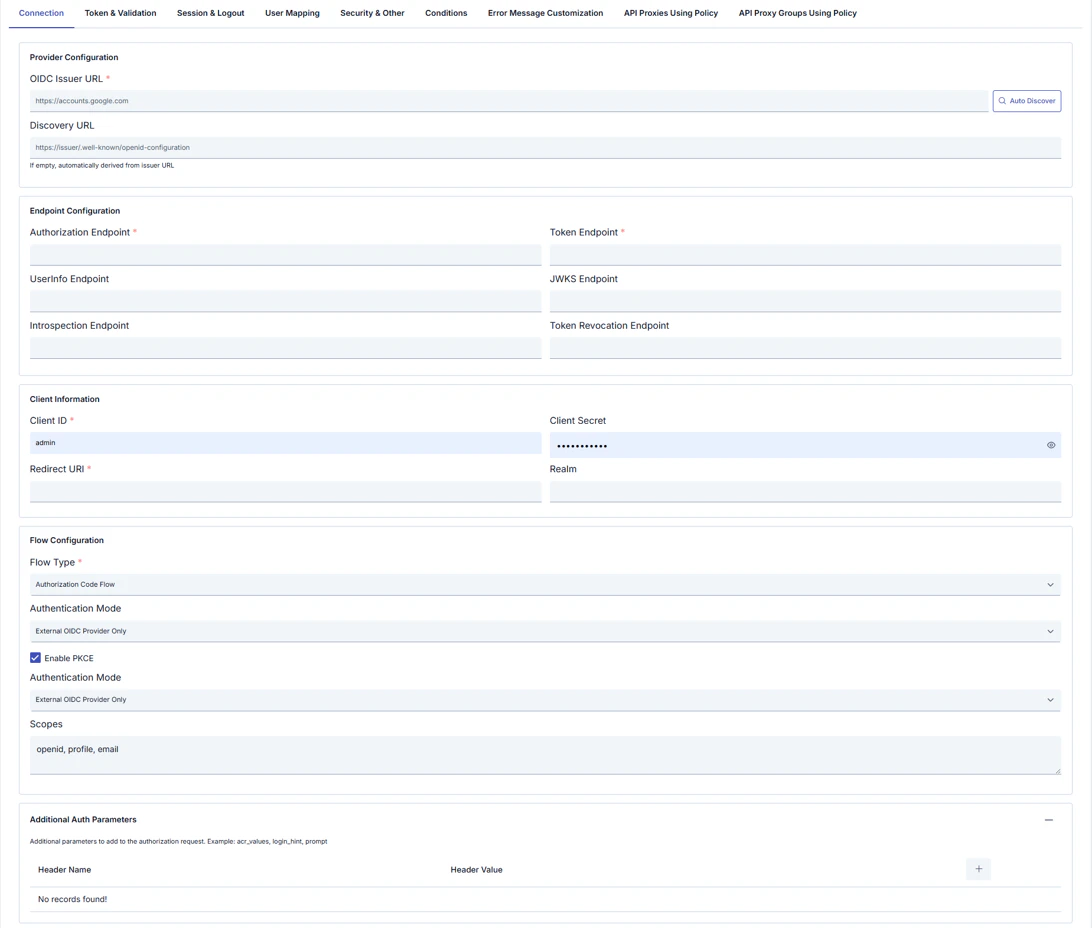 **Configuration Profile:** **OIDC (Keycloak, Okta, Azure AD, …)** or **OAuth2 (External OAuth2 Provider)** — determines flow type, visible tabs, and fields; many fields remain editable after selection.
| Section | Field | Notes |
| ------------------------------ | --------------------------------------- | ------------------------------------------------------------------------------------------------------------------------------------------------------------------------------------ |
| **Provider Configuration** | **OIDC Issuer URL** *(required)* | e.g. `https://accounts.google.com`. Use **Auto Discover** for metadata. |
| | **Discovery URL** | If empty, derived from issuer; or set explicitly (e.g. `…/.well-known/openid-configuration`). Help text: *If empty, automatically derived from Issuer URL*. |
| **Endpoint Configuration** | **Authorization Endpoint** *(required)* | Authorization endpoint URL. |
| | **Token Endpoint** *(required)* | Token endpoint URL. |
| | **UserInfo Endpoint** | UserInfo URL. **OIDC profile only.** |
| | **JWKS Endpoint** | JWKS URL for signature verification. **OIDC profile only.** |
| | **Introspection Endpoint** | Token introspection URL. **OIDC profile only.** |
| | **Token Revocation Endpoint** | Revocation URL. **OIDC profile only.** |
| | **oauth2ResourceEndpoint** *(required)* | **OAuth2 profile only**; replaces the four endpoints above. |
| **Client Information** | **Client ID** *(required)* | OAuth/OIDC client identifier. |
| | **Client Secret** | Client secret (show/hide). |
| | **Redirect URI** *(required)* | OAuth redirect URI. |
| | **Realm** | Provider-specific realm when applicable. **Hidden in OAuth2 profile.** |
| **Flow Configuration** | **Flow Type** *(required)* | OIDC: choose from list (e.g. Authorization Code Flow). OAuth2: **`OAUTH2_AUTHORIZATION_CODE`** is fixed in the backend; **OAuth2 Username Extraction Path** appears on this profile. |
| | **Authentication Mode** | e.g. External OIDC Provider Only. Some builds may show the same label twice; keep values consistent. |
| | **Enable PKCE** | Proof Key for Code Exchange (checkbox). |
| | **Scopes** | Comma-separated scopes, e.g. `openid`, `profile`, `email`. |
| **Additional Auth Parameters** | **+** to add rows | Extra authorization request parameters (`acr_values`, `login_hint`, `prompt`, etc.). **OIDC profile only**; use **OAuth2 Parameters** tab for OAuth2. |
#### Token & Validation tab
**OIDC configuration profile only.** The OAuth2 profile uses the **OAuth2 Parameters** tab instead of this one.
Defines how incoming tokens are validated, forwarded to backends, and cached (JWT checks, UserInfo, header/cookie behavior).
**Configuration Profile:** **OIDC (Keycloak, Okta, Azure AD, …)** or **OAuth2 (External OAuth2 Provider)** — determines flow type, visible tabs, and fields; many fields remain editable after selection.
| Section | Field | Notes |
| ------------------------------ | --------------------------------------- | ------------------------------------------------------------------------------------------------------------------------------------------------------------------------------------ |
| **Provider Configuration** | **OIDC Issuer URL** *(required)* | e.g. `https://accounts.google.com`. Use **Auto Discover** for metadata. |
| | **Discovery URL** | If empty, derived from issuer; or set explicitly (e.g. `…/.well-known/openid-configuration`). Help text: *If empty, automatically derived from Issuer URL*. |
| **Endpoint Configuration** | **Authorization Endpoint** *(required)* | Authorization endpoint URL. |
| | **Token Endpoint** *(required)* | Token endpoint URL. |
| | **UserInfo Endpoint** | UserInfo URL. **OIDC profile only.** |
| | **JWKS Endpoint** | JWKS URL for signature verification. **OIDC profile only.** |
| | **Introspection Endpoint** | Token introspection URL. **OIDC profile only.** |
| | **Token Revocation Endpoint** | Revocation URL. **OIDC profile only.** |
| | **oauth2ResourceEndpoint** *(required)* | **OAuth2 profile only**; replaces the four endpoints above. |
| **Client Information** | **Client ID** *(required)* | OAuth/OIDC client identifier. |
| | **Client Secret** | Client secret (show/hide). |
| | **Redirect URI** *(required)* | OAuth redirect URI. |
| | **Realm** | Provider-specific realm when applicable. **Hidden in OAuth2 profile.** |
| **Flow Configuration** | **Flow Type** *(required)* | OIDC: choose from list (e.g. Authorization Code Flow). OAuth2: **`OAUTH2_AUTHORIZATION_CODE`** is fixed in the backend; **OAuth2 Username Extraction Path** appears on this profile. |
| | **Authentication Mode** | e.g. External OIDC Provider Only. Some builds may show the same label twice; keep values consistent. |
| | **Enable PKCE** | Proof Key for Code Exchange (checkbox). |
| | **Scopes** | Comma-separated scopes, e.g. `openid`, `profile`, `email`. |
| **Additional Auth Parameters** | **+** to add rows | Extra authorization request parameters (`acr_values`, `login_hint`, `prompt`, etc.). **OIDC profile only**; use **OAuth2 Parameters** tab for OAuth2. |
#### Token & Validation tab
**OIDC configuration profile only.** The OAuth2 profile uses the **OAuth2 Parameters** tab instead of this one.
Defines how incoming tokens are validated, forwarded to backends, and cached (JWT checks, UserInfo, header/cookie behavior).
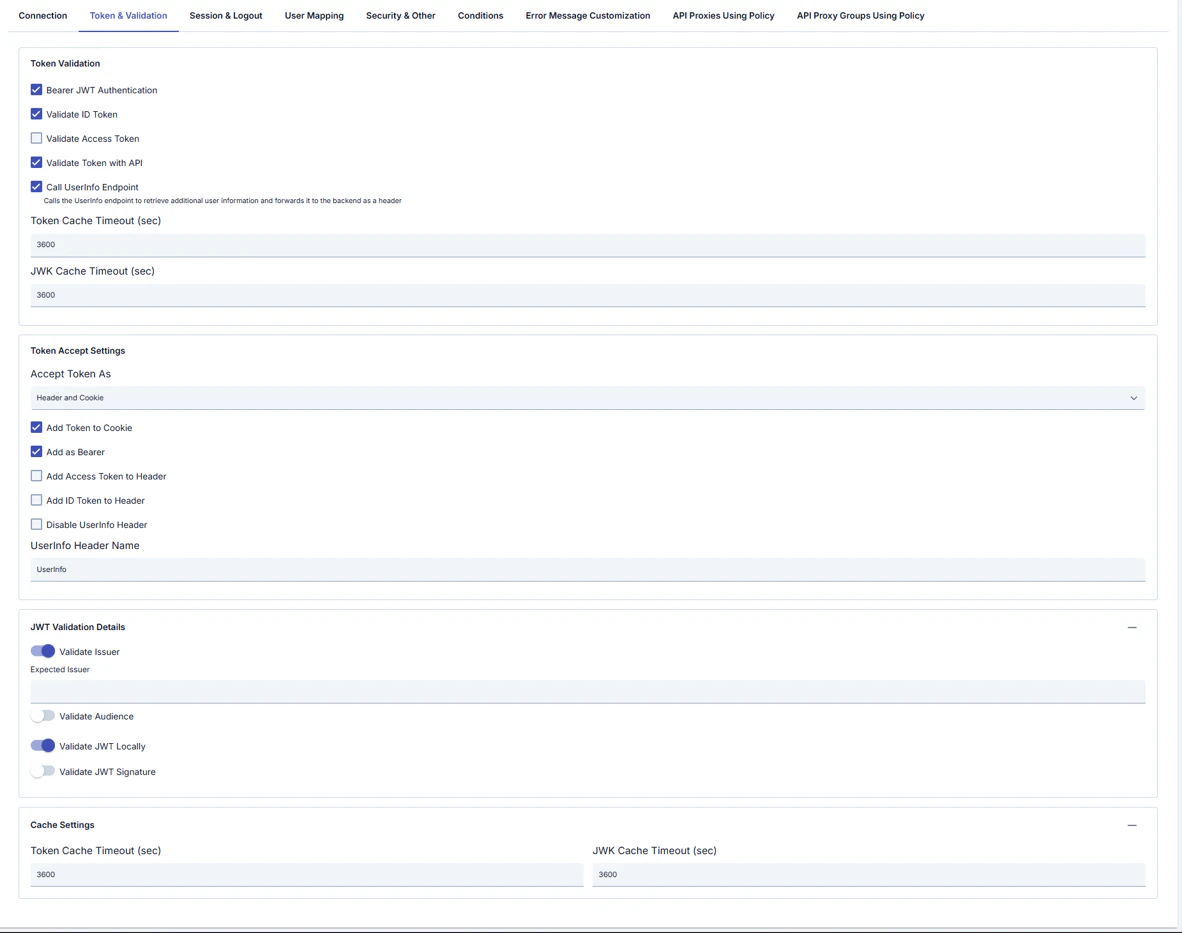 **Token Validation**
| Field | Description |
| ----------------------------- | ----------------------------------------------------------------------------------------------------------------------- |
| **Bearer JWT Authentication** | Authenticate using Bearer JWT. |
| **Validate ID Token** | Validate the ID token. |
| **Validate Access Token** | Validate the access token. |
| **Validate Token with API** | Validate the token via API. |
| **Call UserInfo Endpoint** | Calls the UserInfo endpoint; additional user information can be forwarded to the backend as a header (see inline help). |
| **Token Cache Timeout (sec)** | Token cache TTL (seconds). |
| **JWK Cache Timeout (sec)** | JWKS cache TTL (seconds). |
**Token Accept Settings**
| Field | Description |
| ------------------------------ | ------------------------------------------------------------------------------- |
| **Accept Token As** | e.g. Header and Cookie — where the token is accepted from. |
| **Add Token to Cookie** | Write token to cookie. |
| **Add as Bearer** | Use Bearer format. |
| **Add Access Token to Header** | Forward access token in a header; when enabled, a header name field may appear. |
| **Add ID Token to Header** | Forward ID token in a header; when enabled, a header name field may appear. |
| **Disable UserInfo Header** | Do not add UserInfo payload as a header. |
| **UserInfo Header Name** | e.g. `UserInfo`. |
**JWT Validation Details**
| Field | Description |
| -------------------------- | ---------------------------------------------------------------- |
| **Validate Issuer** | Validate `iss`; when enabled, set **Expected Issuer** if needed. |
| **Validate Audience** | Validate `aud`. |
| **Validate JWT Locally** | Local JWT validation. |
| **Validate JWT Signature** | Signature verification. |
**Cache Settings** (duplicate block in UI)
| Field | Description |
| ----------------------------- | --------------------- |
| **Token Cache Timeout (sec)** | Token cache duration. |
| **JWK Cache Timeout (sec)** | JWK cache duration. |
#### Session & Logout tab
**OIDC configuration profile only** (full session and logout). The OAuth2 profile uses **Session & HTML** instead (simplified session + HTML templates).
Session cookie, token cookies, and logout behavior.
**Token Validation**
| Field | Description |
| ----------------------------- | ----------------------------------------------------------------------------------------------------------------------- |
| **Bearer JWT Authentication** | Authenticate using Bearer JWT. |
| **Validate ID Token** | Validate the ID token. |
| **Validate Access Token** | Validate the access token. |
| **Validate Token with API** | Validate the token via API. |
| **Call UserInfo Endpoint** | Calls the UserInfo endpoint; additional user information can be forwarded to the backend as a header (see inline help). |
| **Token Cache Timeout (sec)** | Token cache TTL (seconds). |
| **JWK Cache Timeout (sec)** | JWKS cache TTL (seconds). |
**Token Accept Settings**
| Field | Description |
| ------------------------------ | ------------------------------------------------------------------------------- |
| **Accept Token As** | e.g. Header and Cookie — where the token is accepted from. |
| **Add Token to Cookie** | Write token to cookie. |
| **Add as Bearer** | Use Bearer format. |
| **Add Access Token to Header** | Forward access token in a header; when enabled, a header name field may appear. |
| **Add ID Token to Header** | Forward ID token in a header; when enabled, a header name field may appear. |
| **Disable UserInfo Header** | Do not add UserInfo payload as a header. |
| **UserInfo Header Name** | e.g. `UserInfo`. |
**JWT Validation Details**
| Field | Description |
| -------------------------- | ---------------------------------------------------------------- |
| **Validate Issuer** | Validate `iss`; when enabled, set **Expected Issuer** if needed. |
| **Validate Audience** | Validate `aud`. |
| **Validate JWT Locally** | Local JWT validation. |
| **Validate JWT Signature** | Signature verification. |
**Cache Settings** (duplicate block in UI)
| Field | Description |
| ----------------------------- | --------------------- |
| **Token Cache Timeout (sec)** | Token cache duration. |
| **JWK Cache Timeout (sec)** | JWK cache duration. |
#### Session & Logout tab
**OIDC configuration profile only** (full session and logout). The OAuth2 profile uses **Session & HTML** instead (simplified session + HTML templates).
Session cookie, token cookies, and logout behavior.
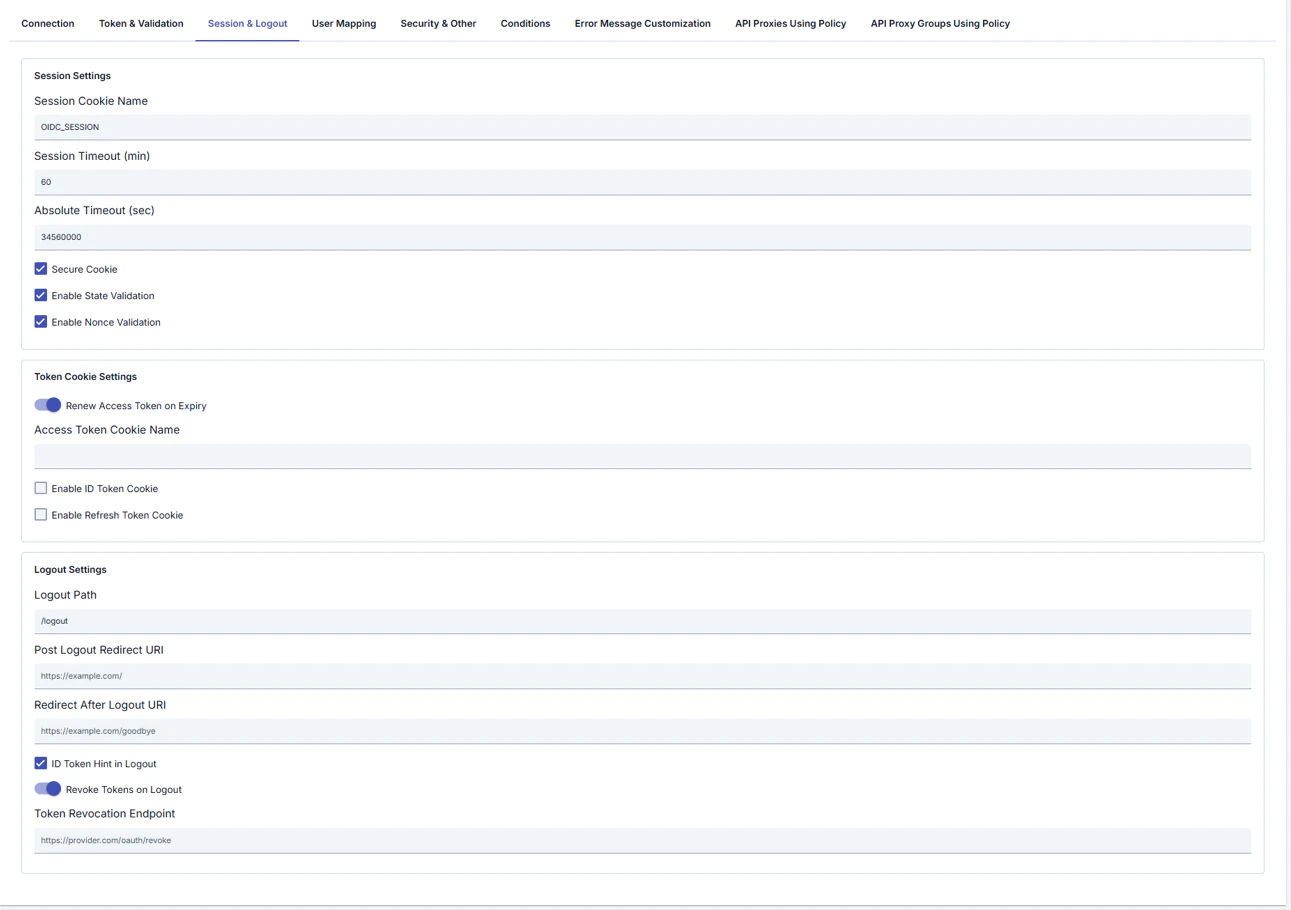 **Session Settings**
| Field | Description |
| --------------------------- | ------------------------------------------ |
| **Session Cookie Name** | Session cookie name (e.g. `OIDC_SESSION`). |
| **Session Timeout (min)** | Session idle timeout (minutes). |
| **Absolute Timeout (sec)** | Absolute session lifetime (seconds). |
| **Secure Cookie** | Send cookie only over HTTPS. |
| **Enable State Validation** | Validate OAuth `state`. |
| **Enable Nonce Validation** | Validate OpenID `nonce`. |
**Token Cookie Settings**
| Field | Description |
| -------------------------------- | ------------------------------------- |
| **Renew Access Token on Expiry** | Refresh access token when it expires. |
| **Access Token Cookie Name** | Cookie name for access token. |
| **Enable ID Token Cookie** | Store ID token in cookie. |
| **Enable Refresh Token Cookie** | Store refresh token in cookie. |
**Logout Settings**
| Field | Description |
| ----------------------------- | ---------------------------------- |
| **Logout Path** | Logout URL path (e.g. `/logout`). |
| **Post Logout Redirect URI** | Redirect after logout at provider. |
| **Redirect After Logout URI** | Redirect after logout in Apinizer. |
| **ID Token Hint in Logout** | Send `id_token_hint` on logout. |
| **Revoke Tokens on Logout** | Revoke tokens when logging out. |
| **Token Revocation Endpoint** | Revocation endpoint URL. |
#### User Mapping tab
**OIDC configuration profile only.** There is no **User Mapping** tab on the OAuth2 profile; use **OAuth2 Username Extraction Path** on Connection and the **OAuth2 Parameters** tab.
Maps OIDC claims to user fields, roles, and backend headers.
**Session Settings**
| Field | Description |
| --------------------------- | ------------------------------------------ |
| **Session Cookie Name** | Session cookie name (e.g. `OIDC_SESSION`). |
| **Session Timeout (min)** | Session idle timeout (minutes). |
| **Absolute Timeout (sec)** | Absolute session lifetime (seconds). |
| **Secure Cookie** | Send cookie only over HTTPS. |
| **Enable State Validation** | Validate OAuth `state`. |
| **Enable Nonce Validation** | Validate OpenID `nonce`. |
**Token Cookie Settings**
| Field | Description |
| -------------------------------- | ------------------------------------- |
| **Renew Access Token on Expiry** | Refresh access token when it expires. |
| **Access Token Cookie Name** | Cookie name for access token. |
| **Enable ID Token Cookie** | Store ID token in cookie. |
| **Enable Refresh Token Cookie** | Store refresh token in cookie. |
**Logout Settings**
| Field | Description |
| ----------------------------- | ---------------------------------- |
| **Logout Path** | Logout URL path (e.g. `/logout`). |
| **Post Logout Redirect URI** | Redirect after logout at provider. |
| **Redirect After Logout URI** | Redirect after logout in Apinizer. |
| **ID Token Hint in Logout** | Send `id_token_hint` on logout. |
| **Revoke Tokens on Logout** | Revoke tokens when logging out. |
| **Token Revocation Endpoint** | Revocation endpoint URL. |
#### User Mapping tab
**OIDC configuration profile only.** There is no **User Mapping** tab on the OAuth2 profile; use **OAuth2 Username Extraction Path** on Connection and the **OAuth2 Parameters** tab.
Maps OIDC claims to user fields, roles, and backend headers.
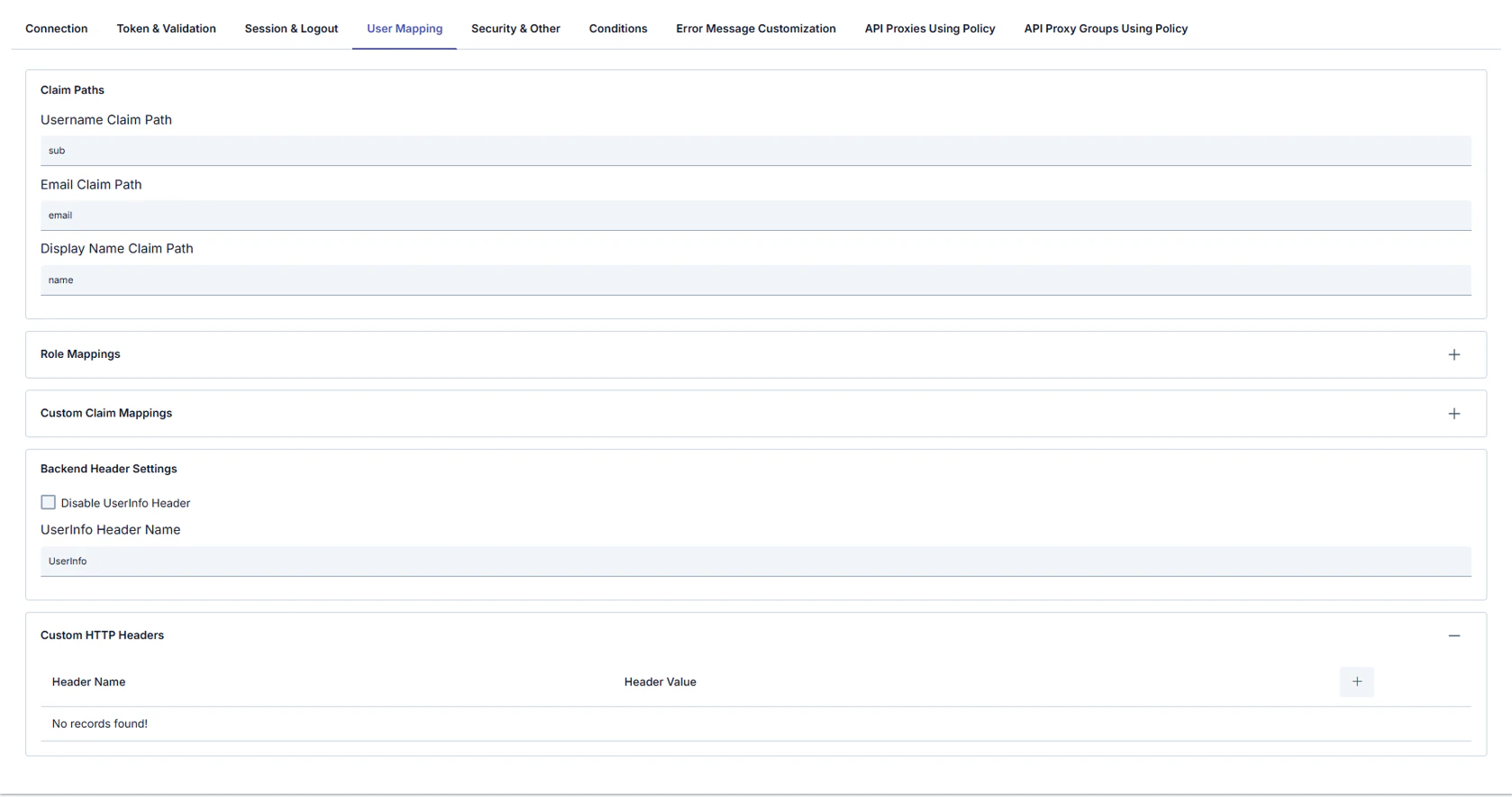 **Claim Paths**
| Field | Description |
| --------------------------- | ------------------------------------- |
| **Username Claim Path** | Claim for username (e.g. `sub`). |
| **Email Claim Path** | Claim for email (e.g. `email`). |
| **Display Name Claim Path** | Claim for display name (e.g. `name`). |
**Role Mappings** (table)
| Column | Description |
| --------------- | --------------- |
| **Claim Path** | Claim to match. |
| **Claim Value** | Expected value. |
| **Target Role** | Role to assign. |
**Custom Claim Mappings** (table: **Header Name** / **Header Value**)
**Backend Header Settings**
| Field | Description |
| --------------------------- | -------------------------------------------- |
| **Disable UserInfo Header** | Do not forward UserInfo as a backend header. |
| **UserInfo Header Name** | Header name for UserInfo (e.g. `UserInfo`). |
**Custom HTTP Headers** (table: **Header Name** / **Header Value**) — additional headers sent to the backend.
#### Security & Other tab
TLS/mTLS to the provider, timeouts, request filtering, error redirects, and debug options.
**Claim Paths**
| Field | Description |
| --------------------------- | ------------------------------------- |
| **Username Claim Path** | Claim for username (e.g. `sub`). |
| **Email Claim Path** | Claim for email (e.g. `email`). |
| **Display Name Claim Path** | Claim for display name (e.g. `name`). |
**Role Mappings** (table)
| Column | Description |
| --------------- | --------------- |
| **Claim Path** | Claim to match. |
| **Claim Value** | Expected value. |
| **Target Role** | Role to assign. |
**Custom Claim Mappings** (table: **Header Name** / **Header Value**)
**Backend Header Settings**
| Field | Description |
| --------------------------- | -------------------------------------------- |
| **Disable UserInfo Header** | Do not forward UserInfo as a backend header. |
| **UserInfo Header Name** | Header name for UserInfo (e.g. `UserInfo`). |
**Custom HTTP Headers** (table: **Header Name** / **Header Value**) — additional headers sent to the backend.
#### Security & Other tab
TLS/mTLS to the provider, timeouts, request filtering, error redirects, and debug options.
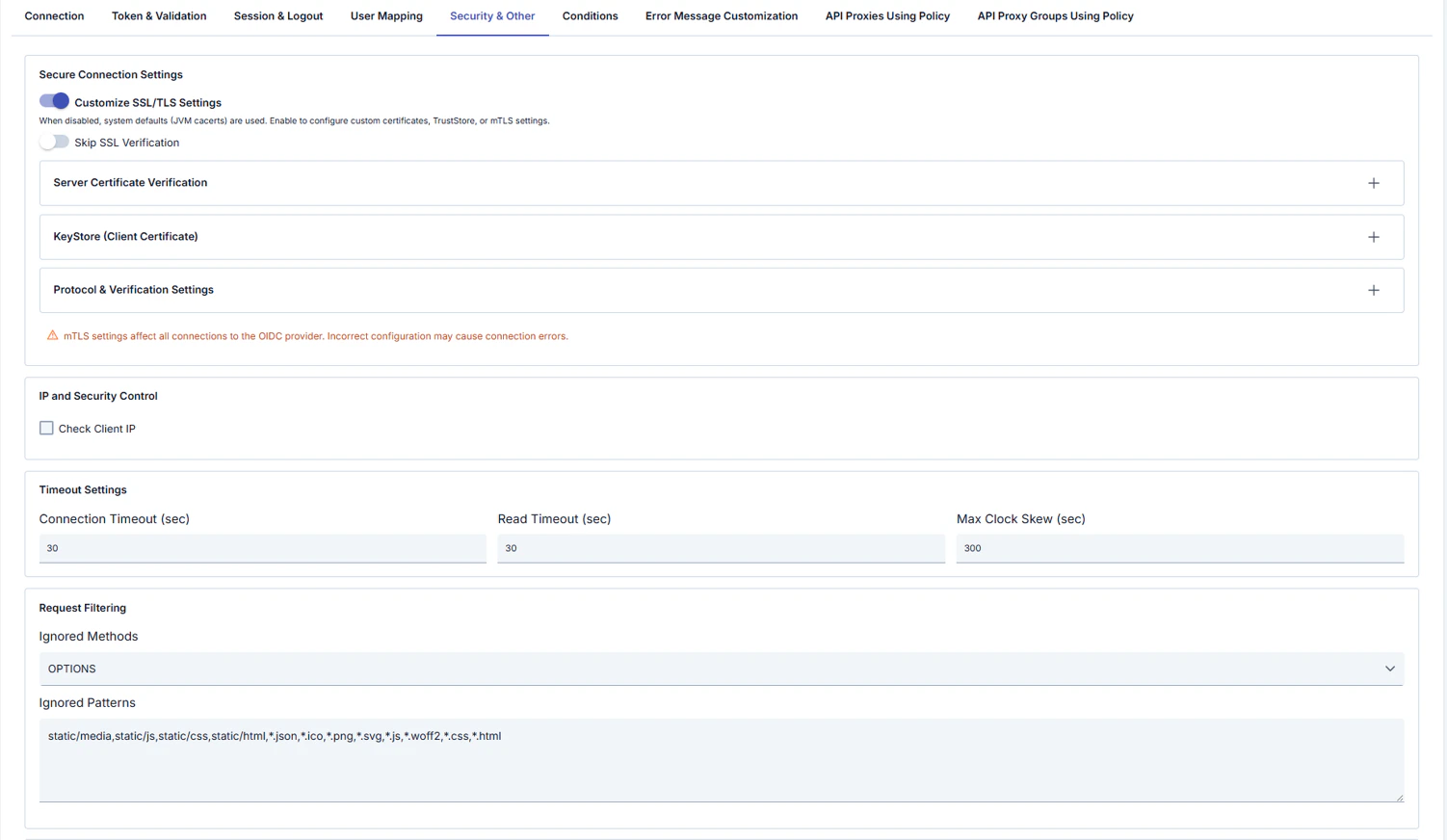
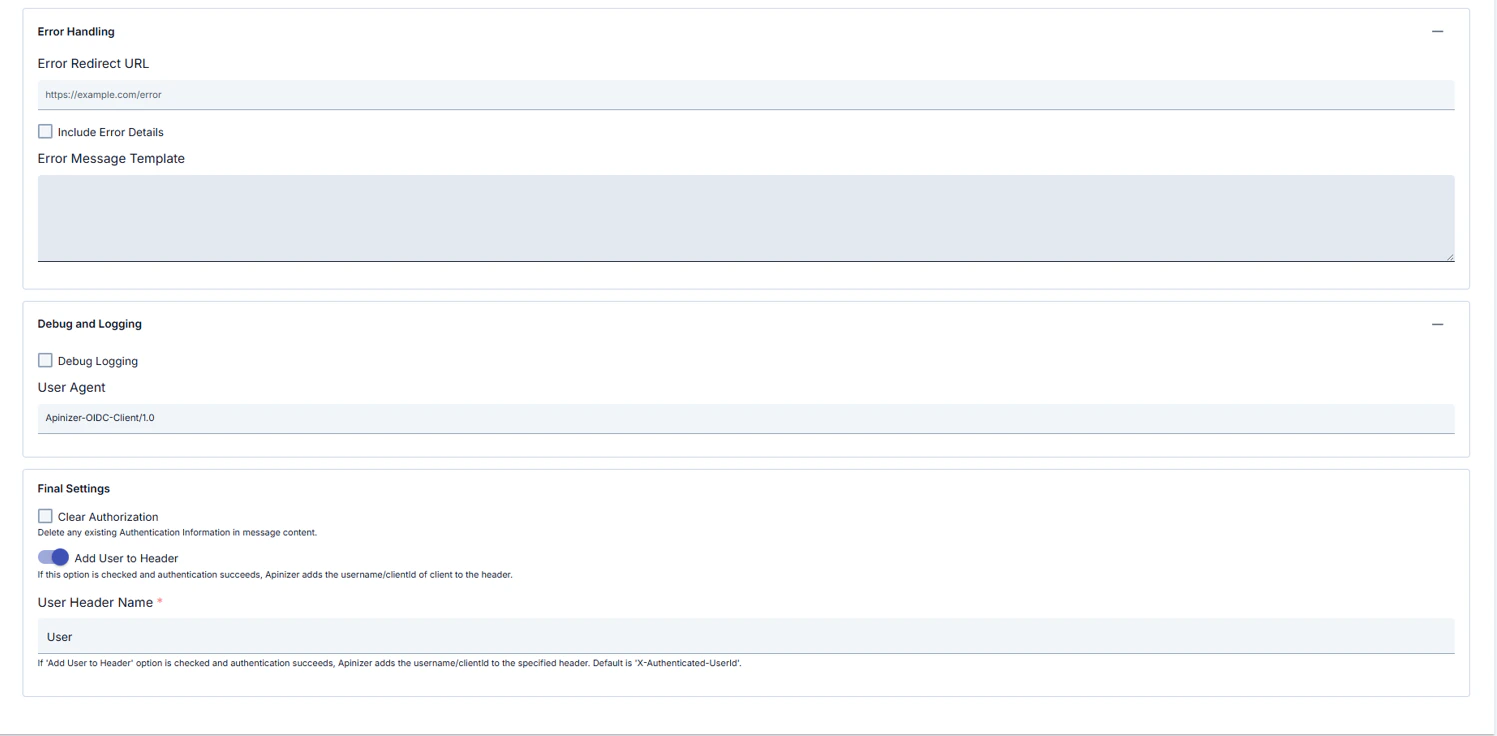 **Secure Connection Settings**
| Field | Description |
| ------------------------------------ | --------------------------------------------------------------------------------------------------------------------------- |
| **Customize SSL/TLS Settings** | When off, system defaults (e.g. JVM **cacerts**) are used; when on, you configure custom certificates, TrustStore, or mTLS. |
| **Skip SSL Verification** | Skip server certificate verification (use only for testing). |
| **Server Certificate Verification** | Server certificate verification details (collapsible panel, opens with **+**). |
| **KeyStore (Client Certificate)** | Client certificate / mTLS (collapsible panel). |
| **Protocol & Verification Settings** | Protocol and verification (collapsible panel). |
UI warning: mTLS settings affect **all** connections to the OIDC provider; incorrect configuration can cause connection errors.
**IP and Security Control**
| Field | Description |
| ------------------- | -------------------------------------------------------- |
| **Check Client IP** | Validate client IP. **OIDC configuration profile only.** |
**Timeout Settings**
| Field | Description |
| ---------------------------- | ---------------------------------------------- |
| **Connection Timeout (sec)** | Connect timeout. |
| **Read Timeout (sec)** | Read timeout. |
| **Max Clock Skew (sec)** | Clock skew tolerance for JWT `iat`/`exp`, etc. |
**Request Filtering**
| Field | Description |
| -------------------- | ------------------------------------------------------------------------------------------------------------- |
| **Ignored Methods** | HTTP methods skipped by the policy (e.g. `OPTIONS`). **OIDC configuration profile only.** |
| **Ignored Patterns** | Comma-separated path/file patterns (e.g. `static/js`, `*.css`, `*.png`). **OIDC configuration profile only.** |
**Error Handling**
| Field | Description |
| -------------------------- | -------------------------------------- |
| **Error Redirect URL** | Redirect URL on error. |
| **Include Error Details** | Include error details in the response. |
| **Error Message Template** | Custom error message template. |
**Debug and Logging**
| Field | Description |
| ----------------- | --------------------------------------------------------------- |
| **Debug Logging** | Verbose logging. |
| **User Agent** | User-Agent for OIDC requests (e.g. `Apinizer-OIDC-Client/1.0`). |
**Other**
| Field | Description |
| --------------------------------- | ----------------------------------------------------------------------------------------------------- |
| **Clear Authorization** | Remove existing authentication information from the message. |
| **Add User to Header** | On success, add username or clientId to a header. |
| **User Header Name** *(required)* | Header name; help text may reference default e.g. `X-Authenticated-UserId` (UI may show e.g. `User`). |
### OIDC vs OAuth2 configuration profile — UI differences
The tables above document the **OIDC** profile tabs in order. When **Configuration Profile** is set to **OAuth2 (External OAuth2 Provider)**, Manager shows or hides **different tabs** and **conditional fields** on the same policy screen; this section summarizes that behavior.
In Apinizer Manager, the **Configuration Profile** radio buttons (**OIDC** / **OAuth2**) control this.
#### Summary table
| | **OIDC (Keycloak, Okta, Azure AD, …)** | **OAuth2 (External OAuth2 Provider)** |
| ---------------------------------- | ----------------------------------------------------------------------------------------------------------- | -------------------------------------------------------------------------------------------- |
| **`flowType` in the background** | Selected from dropdown: Authorization Code, Implicit, Hybrid (pure OAuth2 Authorization Code is not listed) | Fixed: **`OAUTH2_AUTHORIZATION_CODE`** — set in code when the profile changes |
| **Connection — endpoints** | **UserInfo**, **JWKS**, **Introspection**, **Revocation** fields are shown | Those four are hidden; instead the required **`oauth2ResourceEndpoint`** field is shown |
| **Realm** | Shown | Hidden |
| **Extra authorization parameters** | **Additional Auth Params** panel (OIDC) | No panel here; instead **OAuth2 Auth / Token / Resource** parameter tables on a separate tab |
| **Flow panel** | No **Username Extraction Path** (OAuth2-specific) | **OAuth2 Username Extraction Path** is shown |
| **Tab order** | Connection → **Token & Validation** → **Session & Logout** (full) → **User Mapping** → Security & Other | Connection → **OAuth2 Parameters** → **Session & HTML** → Security & Other |
Both profiles typically also include: **Conditions**, **Error Message Customization**, **API Proxies Using Policy**, **API Proxy Groups Using Policy** (logic is largely independent of profile).
#### Hidden or different when OAuth2 profile is selected (vs OIDC)
* **Token & Validation** tab: Bearer JWT, ID/access token checks, UserInfo, JWT issuer/audience/signature, token accept settings, etc.
* Full **Session & Logout** tab (OIDC): state/nonce, absolute timeout, token cookie names, logout path, revoke, post-logout, etc.
* **User Mapping** tab: claim paths, role mappings, custom claim mappings.
* On **Security & Other**, **Check Client IP** and **Ignored Methods / Patterns** — **OIDC profile only**.
#### Additional / different on OAuth2 profile
The following tabs and screenshots appear **only when OAuth2 (External OAuth2 Provider)** is selected. Tables use **Header Name** / **Header Value** pairs or template editors as appropriate.
##### OAuth2 Parameters tab
**Secure Connection Settings**
| Field | Description |
| ------------------------------------ | --------------------------------------------------------------------------------------------------------------------------- |
| **Customize SSL/TLS Settings** | When off, system defaults (e.g. JVM **cacerts**) are used; when on, you configure custom certificates, TrustStore, or mTLS. |
| **Skip SSL Verification** | Skip server certificate verification (use only for testing). |
| **Server Certificate Verification** | Server certificate verification details (collapsible panel, opens with **+**). |
| **KeyStore (Client Certificate)** | Client certificate / mTLS (collapsible panel). |
| **Protocol & Verification Settings** | Protocol and verification (collapsible panel). |
UI warning: mTLS settings affect **all** connections to the OIDC provider; incorrect configuration can cause connection errors.
**IP and Security Control**
| Field | Description |
| ------------------- | -------------------------------------------------------- |
| **Check Client IP** | Validate client IP. **OIDC configuration profile only.** |
**Timeout Settings**
| Field | Description |
| ---------------------------- | ---------------------------------------------- |
| **Connection Timeout (sec)** | Connect timeout. |
| **Read Timeout (sec)** | Read timeout. |
| **Max Clock Skew (sec)** | Clock skew tolerance for JWT `iat`/`exp`, etc. |
**Request Filtering**
| Field | Description |
| -------------------- | ------------------------------------------------------------------------------------------------------------- |
| **Ignored Methods** | HTTP methods skipped by the policy (e.g. `OPTIONS`). **OIDC configuration profile only.** |
| **Ignored Patterns** | Comma-separated path/file patterns (e.g. `static/js`, `*.css`, `*.png`). **OIDC configuration profile only.** |
**Error Handling**
| Field | Description |
| -------------------------- | -------------------------------------- |
| **Error Redirect URL** | Redirect URL on error. |
| **Include Error Details** | Include error details in the response. |
| **Error Message Template** | Custom error message template. |
**Debug and Logging**
| Field | Description |
| ----------------- | --------------------------------------------------------------- |
| **Debug Logging** | Verbose logging. |
| **User Agent** | User-Agent for OIDC requests (e.g. `Apinizer-OIDC-Client/1.0`). |
**Other**
| Field | Description |
| --------------------------------- | ----------------------------------------------------------------------------------------------------- |
| **Clear Authorization** | Remove existing authentication information from the message. |
| **Add User to Header** | On success, add username or clientId to a header. |
| **User Header Name** *(required)* | Header name; help text may reference default e.g. `X-Authenticated-UserId` (UI may show e.g. `User`). |
### OIDC vs OAuth2 configuration profile — UI differences
The tables above document the **OIDC** profile tabs in order. When **Configuration Profile** is set to **OAuth2 (External OAuth2 Provider)**, Manager shows or hides **different tabs** and **conditional fields** on the same policy screen; this section summarizes that behavior.
In Apinizer Manager, the **Configuration Profile** radio buttons (**OIDC** / **OAuth2**) control this.
#### Summary table
| | **OIDC (Keycloak, Okta, Azure AD, …)** | **OAuth2 (External OAuth2 Provider)** |
| ---------------------------------- | ----------------------------------------------------------------------------------------------------------- | -------------------------------------------------------------------------------------------- |
| **`flowType` in the background** | Selected from dropdown: Authorization Code, Implicit, Hybrid (pure OAuth2 Authorization Code is not listed) | Fixed: **`OAUTH2_AUTHORIZATION_CODE`** — set in code when the profile changes |
| **Connection — endpoints** | **UserInfo**, **JWKS**, **Introspection**, **Revocation** fields are shown | Those four are hidden; instead the required **`oauth2ResourceEndpoint`** field is shown |
| **Realm** | Shown | Hidden |
| **Extra authorization parameters** | **Additional Auth Params** panel (OIDC) | No panel here; instead **OAuth2 Auth / Token / Resource** parameter tables on a separate tab |
| **Flow panel** | No **Username Extraction Path** (OAuth2-specific) | **OAuth2 Username Extraction Path** is shown |
| **Tab order** | Connection → **Token & Validation** → **Session & Logout** (full) → **User Mapping** → Security & Other | Connection → **OAuth2 Parameters** → **Session & HTML** → Security & Other |
Both profiles typically also include: **Conditions**, **Error Message Customization**, **API Proxies Using Policy**, **API Proxy Groups Using Policy** (logic is largely independent of profile).
#### Hidden or different when OAuth2 profile is selected (vs OIDC)
* **Token & Validation** tab: Bearer JWT, ID/access token checks, UserInfo, JWT issuer/audience/signature, token accept settings, etc.
* Full **Session & Logout** tab (OIDC): state/nonce, absolute timeout, token cookie names, logout path, revoke, post-logout, etc.
* **User Mapping** tab: claim paths, role mappings, custom claim mappings.
* On **Security & Other**, **Check Client IP** and **Ignored Methods / Patterns** — **OIDC profile only**.
#### Additional / different on OAuth2 profile
The following tabs and screenshots appear **only when OAuth2 (External OAuth2 Provider)** is selected. Tables use **Header Name** / **Header Value** pairs or template editors as appropriate.
##### OAuth2 Parameters tab
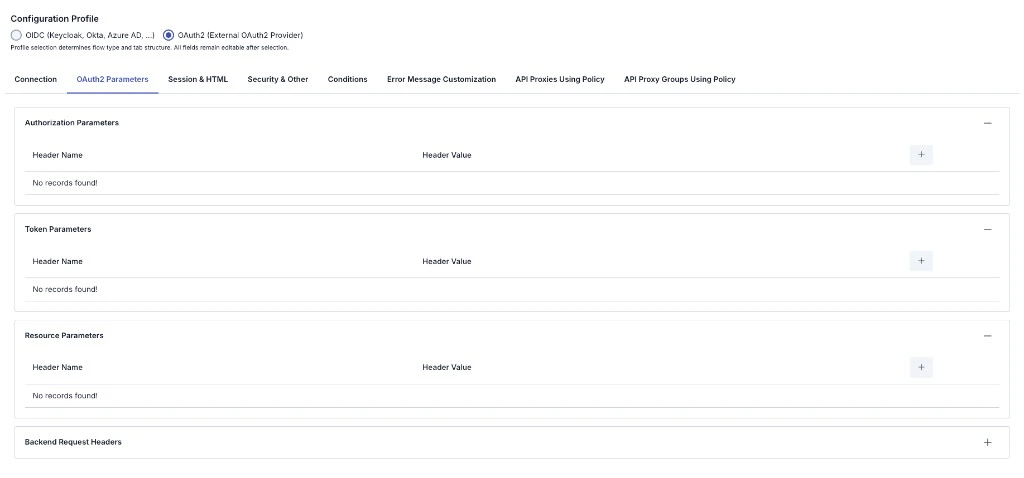 | Section | Description |
| ---------------------------- | -------------------------------------------------------------------------------------------------------------------------------------------- |
| **Authorization Parameters** | Extra HTTP headers for the **authorization** request (`oauth2AuthParams`). Table: **Header Name** / **Header Value**; use **+** to add rows. |
| **Token Parameters** | Extra headers for the **token exchange** request (`oauth2TokenParams`). |
| **Resource Parameters** | Extra headers when calling the **resource** / user-info request (`oauth2ResourceParams`). |
| **Backend Request Headers** | Extra headers sent to the **backend** after successful authentication (collapsible section; **+** to add rows). |
##### Session & HTML tab
| Section | Description |
| ---------------------------- | -------------------------------------------------------------------------------------------------------------------------------------------- |
| **Authorization Parameters** | Extra HTTP headers for the **authorization** request (`oauth2AuthParams`). Table: **Header Name** / **Header Value**; use **+** to add rows. |
| **Token Parameters** | Extra headers for the **token exchange** request (`oauth2TokenParams`). |
| **Resource Parameters** | Extra headers when calling the **resource** / user-info request (`oauth2ResourceParams`). |
| **Backend Request Headers** | Extra headers sent to the **backend** after successful authentication (collapsible section; **+** to add rows). |
##### Session & HTML tab
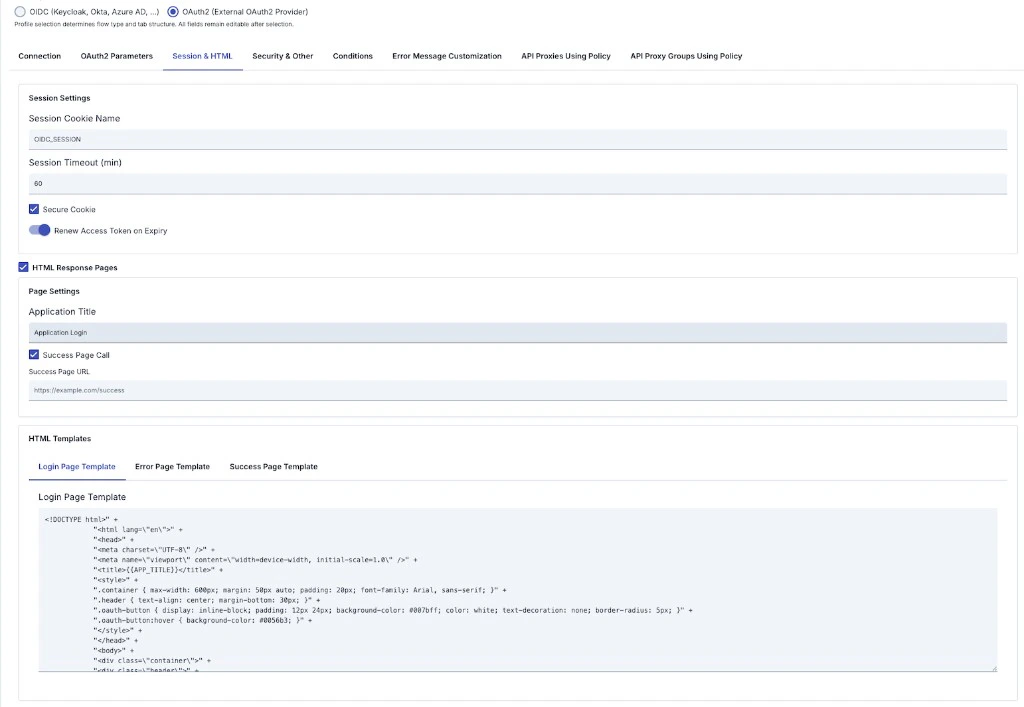 Replaces the full OIDC **Session & Logout** and **User Mapping** tabs for this profile: simplified session fields and optional **HTML Response Pages** for login, error, and success.
**Session Settings**
| Field | Description |
| -------------------------------- | ---------------------------------------------------- |
| **Session Cookie Name** | Session cookie name (e.g. `OIDC_SESSION`). |
| **Session Timeout (min)** | Session lifetime in minutes. |
| **Secure Cookie** | Send cookie only over HTTPS. |
| **Renew Access Token on Expiry** | Attempt to refresh the access token when it expires. |
**HTML Response Pages** *(when enabled)*
| Field | Description |
| ----------------------------------------- | ---------------------------------------------------------------------------- |
| **HTML Response Pages** | Enables custom HTML pages (similar to `enableHtmlResponsePages`). |
| **Application Title** | Title shown on pages (may be referenced in templates, e.g. `{{APP_TITLE}}`). |
| **Success Page Call** | Redirect after successful authentication. |
| **Success Page URL** | Target URL after success. |
| **Login / Error / Success Page Template** | Three sub-tabs for HTML templates for login, error, and success flows. |
#### Common to both profiles
* **Connection** is largely shared: Issuer, Discovery URL, Authorization Endpoint, Token Endpoint, Client ID, Client Secret, Redirect URI, PKCE, Scopes, Authentication Mode (endpoint and flow fields differ per summary table above).
* **Security & Other**: mTLS/SSL, connection/read timeout, max clock skew, error redirect, debug, user headers; **Conditions** and **Error Message Customization** remain profile-independent in behavior.
If documentation states a **single tab order for both profiles**, that does **not** fully match the Manager UI: with **OAuth2** selected, **OAuth2 Parameters** and **Session & HTML** replace **Token & Validation**, full **Session & Logout**, and **User Mapping**.
*Note: UI behavior depends on profile flags such as `isOIDCProfile` / `isOAuth2Profile`; fields may change between Apinizer versions.*
### Configuration Steps
**OIDC profile** recommended order: **Connection** → **Token & Validation** → **Session & Logout** → **User Mapping** → **Security & Other** → optional **Conditions**, **Error Message Customization**, API usage tabs.
**OAuth2 profile** order differs: **Connection** → **OAuth2 Parameters** → **Session & HTML** → **Security & Other** → same optional tabs. This page first documents **OIDC** tabs in tables; **OAuth2** differences are in the **OIDC vs OAuth2 configuration profile — UI differences** section immediately above.
The steps below follow the **OIDC** flow first; if you use **OAuth2**, fill Connection using the summary table in that section, then use **OAuth2 Parameters** and **Session & HTML** instead of Steps 5–6 as written for OIDC.
| Step | Description / Operation |
| ------------------------------------------------------------------ | ------------------------------------------------------------------------------------------------------------------------------------------------------------------------------------------------------------------------------------------------------------------------------------------------------------------------------------------------------------------------------------------------------------------------------------------------------------------------------------------------------------------------------------------------------------------------------------------------------------------------------------------------------------------------------------------------------------------------------------------------------------------------------------------------------------------------------------------------------------------------------------------------------------------------------------------------------------ |
| **Step 1: Go to Creation Page** | - Go to **Development → Global Settings → Global Policies → OIDC Authentication Policy** from the left menu.
Replaces the full OIDC **Session & Logout** and **User Mapping** tabs for this profile: simplified session fields and optional **HTML Response Pages** for login, error, and success.
**Session Settings**
| Field | Description |
| -------------------------------- | ---------------------------------------------------- |
| **Session Cookie Name** | Session cookie name (e.g. `OIDC_SESSION`). |
| **Session Timeout (min)** | Session lifetime in minutes. |
| **Secure Cookie** | Send cookie only over HTTPS. |
| **Renew Access Token on Expiry** | Attempt to refresh the access token when it expires. |
**HTML Response Pages** *(when enabled)*
| Field | Description |
| ----------------------------------------- | ---------------------------------------------------------------------------- |
| **HTML Response Pages** | Enables custom HTML pages (similar to `enableHtmlResponsePages`). |
| **Application Title** | Title shown on pages (may be referenced in templates, e.g. `{{APP_TITLE}}`). |
| **Success Page Call** | Redirect after successful authentication. |
| **Success Page URL** | Target URL after success. |
| **Login / Error / Success Page Template** | Three sub-tabs for HTML templates for login, error, and success flows. |
#### Common to both profiles
* **Connection** is largely shared: Issuer, Discovery URL, Authorization Endpoint, Token Endpoint, Client ID, Client Secret, Redirect URI, PKCE, Scopes, Authentication Mode (endpoint and flow fields differ per summary table above).
* **Security & Other**: mTLS/SSL, connection/read timeout, max clock skew, error redirect, debug, user headers; **Conditions** and **Error Message Customization** remain profile-independent in behavior.
If documentation states a **single tab order for both profiles**, that does **not** fully match the Manager UI: with **OAuth2** selected, **OAuth2 Parameters** and **Session & HTML** replace **Token & Validation**, full **Session & Logout**, and **User Mapping**.
*Note: UI behavior depends on profile flags such as `isOIDCProfile` / `isOAuth2Profile`; fields may change between Apinizer versions.*
### Configuration Steps
**OIDC profile** recommended order: **Connection** → **Token & Validation** → **Session & Logout** → **User Mapping** → **Security & Other** → optional **Conditions**, **Error Message Customization**, API usage tabs.
**OAuth2 profile** order differs: **Connection** → **OAuth2 Parameters** → **Session & HTML** → **Security & Other** → same optional tabs. This page first documents **OIDC** tabs in tables; **OAuth2** differences are in the **OIDC vs OAuth2 configuration profile — UI differences** section immediately above.
The steps below follow the **OIDC** flow first; if you use **OAuth2**, fill Connection using the summary table in that section, then use **OAuth2 Parameters** and **Session & HTML** instead of Steps 5–6 as written for OIDC.
| Step | Description / Operation |
| ------------------------------------------------------------------ | ------------------------------------------------------------------------------------------------------------------------------------------------------------------------------------------------------------------------------------------------------------------------------------------------------------------------------------------------------------------------------------------------------------------------------------------------------------------------------------------------------------------------------------------------------------------------------------------------------------------------------------------------------------------------------------------------------------------------------------------------------------------------------------------------------------------------------------------------------------------------------------------------------------------------------------------------------------ |
| **Step 1: Go to Creation Page** | - Go to **Development → Global Settings → Global Policies → OIDC Authentication Policy** from the left menu.
- Click the **\[+ Create]** button at the top right. |
| **Step 2: Enter Basic Information** | **Policy Status:** Shows Active/Passive status. New policies are active by default.
**Name (Required):** Example: `Production_OIDCAuth`
- Enter a unique name, does not start with space.
- System automatically checks. Green checkmark: available. Red X: existing name.
**Description:** Example: "OIDC SSO for corporate users"
- Max. 1000 characters.
- Explain the purpose of the policy. |
| **Step 3: Variable Usage** | - In the action button area at the top of the page, you can use the **\[\<> Variable]** button to select dynamic values.
- Using context/global variable expressions, you can manage policy parameters with variable-based values instead of fixed values.
- This reduces manual update effort when values change and provides operational convenience.
- For detailed information, review [Dynamic Variables](/en/concepts/core-concepts/dynamic-variables). |
| **Step 4: Connection — provider, endpoints, client, flow** | - Choose **Configuration Profile** (OIDC or OAuth2).
- Enter **OIDC Issuer URL**; use **Auto Discover** or **Discovery URL** as needed.
- **OIDC:** After discovery or manual entry, verify **Authorization**, **Token**, **UserInfo**, **JWKS**, **Introspection**, and **Token Revocation**; use **Realm** and **Additional Auth Parameters** on this profile.
- **OAuth2:** **UserInfo / JWKS / Introspection / Revocation** are not shown; fill required **oauth2ResourceEndpoint**; **Realm** and the Connection **Additional Auth Parameters** panel are absent (use **OAuth2 Parameters** tab). Flow is fixed to **`OAUTH2_AUTHORIZATION_CODE`** in the backend; set **OAuth2 Username Extraction Path** when needed.
- **Client ID**, **Client Secret**, **Redirect URI** are shared. **Redirect URI** must **exactly match** the provider-registered URL.
- Set **Enable PKCE**, **Scopes**, **Authentication Mode**, etc. |
| **Step 5: Token & session tabs or OAuth2 tabs → Security & Other** | **OIDC profile:** In order: **(1) Token & Validation**, **(2) Session & Logout**, **(3) Security & Other** — matches tables above. Token validation, UserInfo, cache; session/logout; no skip-SSL in production; on OIDC, **Check Client IP**, **Ignored Methods** / **Ignored Patterns** live here. Do not confuse **Error Redirect URL** with **Step 8** JSON body; enable **Debug Logging** only briefly.
**OAuth2 profile:** No **Token & Validation** or full **Session & Logout**. Use **OAuth2 Parameters** (`oauth2AuthParams`, `oauth2TokenParams`, `oauth2ResourceParams`, **Backend Request Headers**) and **Session & HTML** (simplified session + HTML login/error/success); then **Security & Other** (shared TLS, timeouts, error redirect, debug, user headers — **Check Client IP** and ignore fields are **not** shown on OAuth2). |
| **Step 6: User Mapping (OIDC) or backend headers** | **OIDC profile:** **Claim Paths**, **Role Mappings**, **Custom Claim Mappings**, **Backend Header Settings**, **Custom HTTP Headers** — keep consistent with **Token & Validation** UserInfo/header behavior.
**OAuth2 profile:** Use **Backend Request Headers** under **OAuth2 Parameters** and username extraction on Connection instead; there is no classic **User Mapping** tab. |
| **Step 7: Define Condition (Optional)** | - Go to **Condition** tab.
- Conditions determine when the policy will be active.
**Examples:**
- Environment-based: `Header = X-Environment, Operator = Equals, Value = production`
- API Key-based: `Header = X-API-Key, Starts With = PROD-`
- Endpoint-based: `Path = /api/admin/*`
If no condition is defined, policy is always active |
| **Step 8: Customize Error Message (Optional)** | - Go to **Error Message Customization** tab.
- Customize the **JSON API response body** when access is denied. This differs from **Error Redirect URL** on **Security & Other** (browser redirect); if you use both, test the combined behavior.
**Default:**
`{ "statusCode": 403, "message": "[Default error message]" }`
**Custom:**
`{ "statusCode": 403, "errorCode": "[CUSTOM_ERROR_CODE]", "message": "[Custom message]" }` |
| **Step 9: Save** | - Click the **\[Save]** button at the top right.
**Checklist (summary):**
- Unique **Name** and required Connection fields: **OIDC Issuer URL**; **Authorization** / **Token**; **Client ID**; **Redirect URI**; OIDC **Flow Type**, OAuth2 **oauth2ResourceEndpoint**.
- **Redirect URI** matches the provider registration.
- **OIDC:** **Token & Validation** / **Session & Logout** / **User Mapping** complete as needed; **OAuth2:** **OAuth2 Parameters** and **Session & HTML** complete.
- Optional **Conditions** / **Error Message Customization** tested.
**Result:** Policy is added to the list; can be connected to APIs; if global, applied automatically. |
For descriptions of **Conditions** and **Error Message Customization** panels, you can review the [Conditions](/en/concepts/core-concepts/what-is-policy#conditions) and [Error Message Customization](/en/concepts/core-concepts/what-is-policy#error-message-customization-error-message-customization) sections on the [What is Policy?](/en/concepts/core-concepts/what-is-policy) page.
For a complete guide on all layers, priority order and scenario examples of the error message configuration system, see the [Error Message Configuration Guide](/en/concepts/core-concepts/error-message-configuration) page.
## Deleting the Policy
For deletion steps of this policy and operations to be applied when in use, you can refer to the [Remove Policy from Flow](/en/develop/api-proxy-configuration/policy-management#remove-policy-from-flow) section on the [Policy Management](/en/develop/api-proxy-configuration/policy-management) page.
## Exporting/Importing the Policy
For export (Export) and import (Import) steps of this policy, you can refer to the [Export/Import](/en/admin/secrets-management/export-import) page.
## Connecting the Policy to API
For the process of how this policy will be connected to APIs, you can refer to the [Connect Policy to API](/en/develop/api-proxy-configuration/policy-management#adding-policy-to-flow) section on the [Policy Management](/en/develop/api-proxy-configuration/policy-management) page.
## Advanced Features
| Feature | Description and Steps |
| ------------------------------------- | --------------------------------------------------------------------------------------------------------------------------------------------------------------------------------------------------------------------------------------- |
| **Dynamic Metadata Discovery** | - Automatically fetches issuer, JWKS, endpoint information when Discovery URL is entered.
- Performance adjustment is made with metadata cache timeout.
- Policy returns error message if discovery fails. |
| **Session Management** | - Session data is stored in distributed cache (mandatory).
- Session encryption key and IV are automatically generated from policy ID.
- Configure with session cookie name, timeout, absolute timeout, and cookie delimiter. |
| **mTLS Configuration** | - mTLS can be used when connecting to OIDC provider.
- KeyStore/TrustStore-based SSL connection and skip SSL verification option are provided. |
| **Token Cookie Configuration** | - Access token cookie name can be customized; ID and refresh token storage in cookies is controlled with checkboxes.
- Use **Renew Access Token on Expiry** to control refresh-on-expiry behavior. |
| **Token Acceptance Path** | - Where token is read from (header, cookie, or both) can be determined. |
| **Logout and Token Revocation** | - Tokens are revoked via revocation endpoint on logout.
- Redirect URL after logout can be defined. |
| **Authentication Mode** | - EXTERNAL\_ONLY (external OIDC), INTERNAL\_ONLY (Bearer only), HYBRID (both).
- Both authentications can be enforced in Hybrid mode. |
| **OAuth 2.0 HTML Pages** | - Custom login, error, and success pages are shown in OAuth 2.0 flow.
- Page templates can be customized.
- Post-authentication redirect can be configured. |
| **Role Mapping and Header Injection** | - Claim path and target role matching is done.
- Roles can be added to header, header names can be customized.
- Role selection is done with Identity Role Group Service. |
## Best Practices
### Things to Do and Best Practices
| Category | Description / Recommendations |
| ---------------------------- | --------------------------------------------------------------------------------------------------------------------------------------------------------------------------------------------------------------------- |
| **OIDC Provider Management** | **Bad:** Using single issuer for all environments.
**Good:** Defining different issuers for test and live.
**Best:** Making environment-based issuer selection with Condition. |
| **Token Security** | **Bad:** Closing signature verification.
**Good:** Performing JWT signature verification.
**Best:** Caching JWKS keys and refreshing periodically. |
| **Session Durations** | **Bad:** Leaving durations at default.
**Good:** Determining timeout according to user profile.
**Best:** Implementing Session absolute timeout + refresh token strategy. |
| **Role Management** | **Bad:** Using single claim for roles.
**Good:** Extracting role with claim path.
**Best:** Making centralized role mapping with Identity Role Group Service. |
| **Error Management** | **Bad:** Transmitting general error message.
**Good:** Specifying OIDC-specific error message.
**Best:** Providing different content that is user-friendly and log-friendly in Error Message Customization. |
### Security Best Practices
| Security Area | Description / Warnings |
| -------------------------- | ----------------------------------------------------------------------------------------------------------------- |
| **TLS Mandatory** | All endpoint addresses must be HTTPS; allowInsecureConnections=true is recommended only for temporary use. |
| **PKCE Usage** | enablePKCE=true should be configured for mobile and SPAs, code verifier should not be logged. |
| **Nonce/State Protection** | Nonce and state verification should not be disabled; mandatory against replay attacks. |
| **Session Security** | Session data is stored in cache; encryption key is automatically generated from policy ID. TLS must be mandatory. |
| **Cookie Security** | Secure, HttpOnly, and SameSite policies should be enabled; token cookies should be sent with minimum permissions. |
### Things to Avoid
| Category | Description / Warnings |
| ----------------------------------- | -------------------------------------------------------------------------------------------------------------------------------------------------------------------------------------------- |
| **Default Key Usage** | **Why to avoid:** Manual session key values may be predictable.
**Alternative:** Session encryption is automatically generated from policy ID; ensure policy ID is unique. |
| **Wide Scope Definitions** | **Why to avoid:** Excessive scope causes privilege escalation.
**Alternative:** Add only necessary scopes with least privilege principle. |
| **Long Cache Durations** | **Why to avoid:** If JWKS/token cache is kept long, compliance with key rotation weakens.
**Alternative:** Select cache duration between 15-60 minutes and establish refresh mechanism. |
| **Keeping Debug Logs Open in Live** | **Why to avoid:** Sensitive token information may fall into logs.
**Alternative:** Open debug logging only briefly during troubleshooting. |
### Performance Tips
| Criterion | Recommendation / Impact |
| ----------------------------- | ---------------------------------------------------------------------------------------------------------------------------------------------------------------------------------- |
| **Metadata Cache** | **Recommendation:** Keep providerMetadataCacheTimeoutSeconds value between 900-1800 seconds.
**Impact:** Discovery endpoint calls decrease, latency drops. |
| **Token Cache Timeout** | **Recommendation:** Adjust tokenCacheTimeoutSeconds according to OIDC access token lifetime.
**Impact:** Unnecessary re-verifications are prevented, back-end load decreases. |
| **JWKS Cache** | **Recommendation:** Do not exceed 3600 seconds upper limit for jwkCacheTimeoutSeconds.
**Impact:** Acceptance of incorrect signatures during key rotation is prevented. |
| **Ignore Patterns** | **Recommendation:** Add static content paths to ignore patterns field.
**Impact:** Static files are freed from unnecessary redirection, response time increases. |
| **Backend Header Management** | **Recommendation:** Remove unnecessary backend header entries.
**Impact:** Request size and processing time going to backend decreases. |
## Frequently Asked Questions (FAQ)
| Category | Question | Answer |
| ------------- | ---------------------------------------------------------------------------- | ------------------------------------------------------------------------------------------------------------------------------------------------------- |
| **General** | What is OIDC authentication? | OpenID Connect (OIDC) is an authentication protocol built on OAuth 2.0. Verifies user identity using ID token and access token. |
| **General** | Which flow types are supported? | Authorization Code, Implicit, Hybrid, and pure OAuth2 Authorization Code flow types are supported. |
| **Technical** | How is token verified? | Gateway receives token, verifies JWT signature with public key obtained from JWKS endpoint, performs audience and issuer check. |
| **Technical** | What is PKCE? | Proof Key for Code Exchange (PKCE) is a security mechanism providing protection against authorization code interception attacks. |
| **Usage** | How are different OIDC providers used for different tenants? | Tenant-based issuer selection can be done with Condition or discovery URL variable can be used. |
| **Usage** | How can I change default error message? | You can edit status code, error code, and message fields from Error Message Customization tab. |
| **General** | Can OIDC policy work together with Basic Authentication policy? | Yes, but Basic Authentication is recommended only as fallback; you can determine which policy will work conditionally. |
| **General** | Does global copy get affected when I convert policy to local? | No, Localize operation creates a new local policy; global policy remains unchanged. |
| **Technical** | Which fields should I fill if I don't use Discovery URL? | You need to manually enter Authorization, Token, UserInfo, JWKS, and Introspection endpoint addresses. |
| **Technical** | Which log messages should I look for when token verification fails? | You can examine error details of validateAccessTokenWithApi and validateJwtSignature steps by opening Policy debug logs. |
| **Usage** | How do I share same policy for multiple API Proxies? | You can create policy globally and assign to relevant API Proxies or use Policy Group. |
| **Usage** | Is PKCE mandatory for mobile applications? | Recommended for strong security; activate enablePKCE=true setting to prevent code interception attacks. |
| **Technical** | What does authentication mode (EXTERNAL\_ONLY, INTERNAL\_ONLY, HYBRID) mean? | EXTERNAL\_ONLY: OIDC redirect only. INTERNAL\_ONLY: Bearer token only (header/cookie). HYBRID: Both; both can be enforced in Hybrid mode. |
| **Technical** | How is token revocation done on logout? | Enable token revocation on logout option and define revocation endpoint. If not set, it is derived from introspection endpoint (/introspect → /revoke). |