> ## Documentation Index
> Fetch the complete documentation index at: https://docs.apinizer.com/llms.txt
> Use this file to discover all available pages before exploring further.
# Logback
> Configures Logback connections. You can manage API traffic and system logs file-based with Logback RollingFileAppender and perform rolling file management
## Overview
Collects high-volume logs file-based for API Proxy traffic on Apinizer Gateway and provides continuous visibility to operations teams.
Controls disk consumption through RollingFileAppender parameters, guarantees separation of logs with daily/hourly cycles.
Environment-based log directories are defined to provide Development/Test/Production separation and speed up incident analysis.
Since incorrect logPath permissions can cause errors, validation of access rights at OS level is critical.
When a Logback connection is requested from within an Integration Flow or Connector, the system reads the configured connection parameters.
Logback RollingFileAppender manages concurrent write needs to the same log file by reusing file handles on worker node.
Worker pod accesses target file system with system user account and file permissions linked to selected Environment; does not require additional Authentication layer.
HTTP request/response headers, bodies, and metadata are formatted with specified logPattern and written to specified logPath/logFileName combination via File I/O.
After operation completes, connection remains open within same worker thread and RollingFileAppender buffer is flushed to wait for new requests.
In case of connection error, timeout, or authentication error, deployment-result dialog activates with detailed error message, user is advised to review log directory and permission checks.
Storing API Proxy traffic logs centrally and preparing for SIEM integration.
Ability to retrospectively analyze detailed request/response traces in business-critical integrations.
Maintaining disk capacity balance by applying environment-based log retention policies.
Filtering and exporting specific pod or endpoint logs during security reviews.
## Technical Features and Capabilities
Directory on worker node is selected with logPath field, invalid folders are actively rejected.
logFileName and logFilenamePattern combination splits logs date/sequence-based, provides easy archiving capability.
Disk consumption is kept under control with maxFileSize, maxHistory, and totalSizeCap values.
Ability to define separate connection parameters for each environment (Development, Test, Production).
Activating or deactivating the Connection (enable/disable toggle). In passive state, connection cannot be used but its configuration is preserved.
Test Connection button triggers logPath access and pattern validation before saving.
Instant uniqueness check is performed for Name field, registration is blocked in case of conflict.
Project-based connections are moved to global area with single click, enabling multi-project usage.
Ability to validate connection parameters before saving with "Test Connection" button.
Export connection configuration as ZIP file. Import to different environments (Development, Test, Production). Version control and backup capability.
Monitoring connection health, pool status, and performance metrics.
## Connection Parameters
**Description:** Connection name (must be unique)\
**Example Value:** `Production_Logback`\
**Notes:** Cannot start with space, special characters should not be used
**Description:** Directory where log files will be written\
**Example Value:** `/var/log/apinizer/`\
**Notes:** Worker pod must have write permission, absolute path recommended
**Description:** RollingFileAppender base file name\
**Example Value:** `ApinizerApiProxyTraffic`\
**Notes:** Use of letters, numbers, and `_` recommended
**Description:** File name pattern containing date and index\
**Example Value:** `%d{yyyy-MM-dd}.%i.log`\
**Notes:** Logback patterns supported, date format required
**Description:** Single-line log format\
**Example Value:** `%d{yyyy-MM-dd HH:mm:ss.SSS}[%t]%n`\
**Notes:** All compatible with Logback conversion patterns
**Description:** Upper limit of single file in MB\
**Example Value:** 25\
**Notes:** Positive integer, 1-1024 MB range recommended
**Description:** Number of rolling files to keep\
**Example Value:** 30\
**Notes:** 0 means unlimited but disk may grow
**Description:** Total MB limit of all rolling files\
**Example Value:** 1024\
**Notes:** If 0, Logback does not apply total limit; >512 MB recommended for Production
**Description:** Purpose or scope of the connection\
**Default Value:** ''\
**Recommended Value:** Short description indicating function and target system
**Description:** Published environment selection\
**Default Value:** null\
**Recommended Value:** Separate value selection recommended for each environment
**Description:** Label to route logs to specific worker pod\
**Default Value:** ''\
**Recommended Value:** Use when need to write only to target pod in multi-node clusters
**Description:** Whether connection will be deployed to worker nodes\
**Default Value:** true\
**Recommended Value:** false if kept for test purposes only on management node
**Description:** Activeness of the connection\
**Default Value:** true\
**Recommended Value:** Always active in Production, can be temporarily closed while resolving issues
### Timeout and Connection Pool Parameters
**Description:** Maximum wait time for connection establishment\
**Default:** Not applicable\
**Min:** - | **Max:** -\
**Unit:** milliseconds
**Description:** Maximum wait time for request response\
**Default:** Not applicable\
**Min:** - | **Max:** -\
**Unit:** milliseconds
**Description:** Maximum number of connections in connection pool\
**Default:** Not applicable\
**Min:** - | **Max:** -\
**Unit:** count
**Description:** Log buffer write interval to disk (Logback internal)\
**Default:** 1000\
**Min:** 250 | **Max:** 5000\
**Unit:** milliseconds
## Use Cases
**Situation:** High-volume traffic analysis required\
**Solution:** logPath=/var/log/apinizer/proxy, maxHistory=30, totalSizeCap=2048\
**Expected Behavior:** All calls stored with 30-day history, readable by SIEM
**Situation:** Specific endpoint logs requested\
**Solution:** logFilenamePattern=`%d{yyyy-MM-dd}-security.%i.log`\
**Expected Behavior:** Date-based files quickly filtered, review performed within incident period
**Situation:** Detailed log required in QA environment\
**Solution:** environmentId=Test, maxFileSize=10\
**Expected Behavior:** Test logs split into small files, developers easily download
**Situation:** Problem exists in specific worker pod\
**Solution:** logPodName=gateway-worker-2\
**Expected Behavior:** Logs taken only from relevant pod, target problem isolated
**Situation:** Log retention under GDPR\
**Solution:** maxHistory=0, totalSizeCap=5120\
**Expected Behavior:** Legal retention period provided with total quota instead of infinite cycle
**Situation:** Copying logs to backup node\
**Solution:** logPath=/mnt/dr/logs, Enable Export All on\
**Expected Behavior:** All logs written to shared storage in failover scenario
## Connection Configuration
### Creating New Logback
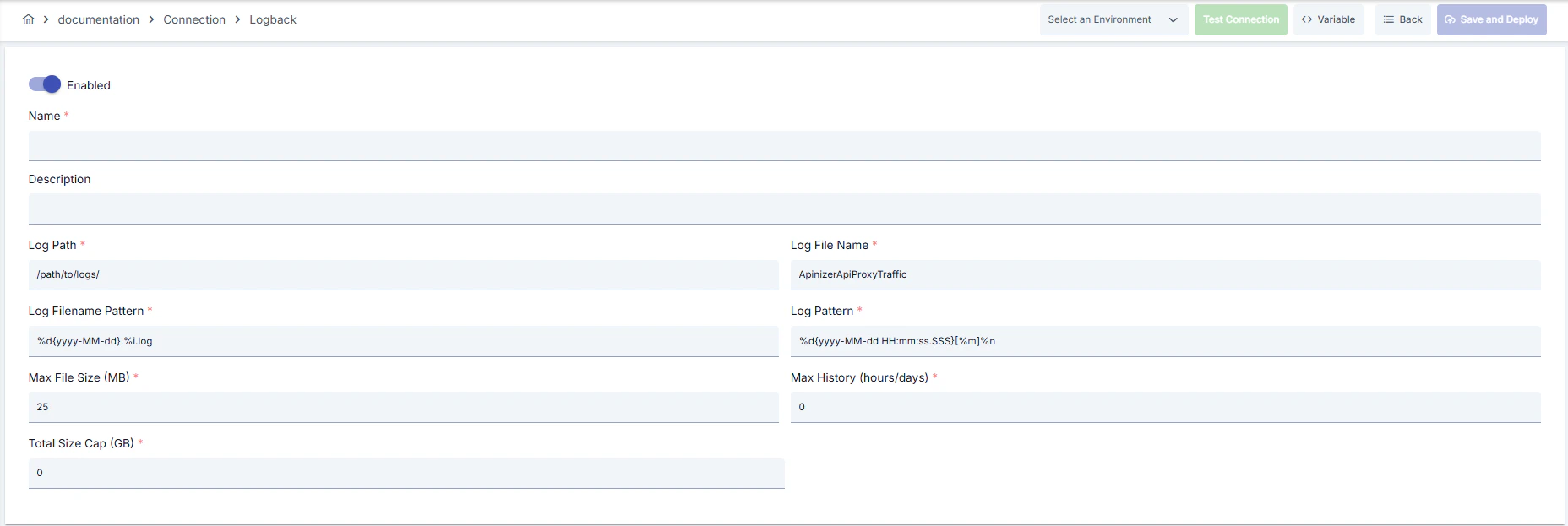 * Go to **Connection → Logback** section from left menu.
* Click **\[+ Create]** button at top right.
**Enable Status (Active Status):** Set active/passive status with toggle. New connections are active by default.
**Name Required:**
Example: `Production_Logback`
* Enter unique name, cannot start with space.
* System automatically checks. Green checkmark: available. Red X: existing name.
**Description:**
Example: "API proxy traffic logs"
* Max. 1000 characters.
* Describe the purpose of the Connection.
In the action button area at the top of the page, you can use the **\[\<> Variable]** button to select dynamic values, and with global variables, you can manage connection parameters with variable-based values instead of fixed values. For detailed information, review the [Dynamic Variables](/en/concepts/core-concepts/dynamic-variables) page.
* Select environment from dropdown menu: **Development**, **Test**, or **Production**.
* Different connection parameters can be defined for each environment.
* Enter absolute directory that worker node can write to in **logPath** field.
* Determine RollingFileAppender file cycle with **logFileName** and **logFilenamePattern** fields; pay attention to containing date and index.
* Unauthorized directories produce errors during deployment.
* Fill **logPattern** field with Logback conversion patterns, add thread name or request-id if needed.
* Use **logPodName** field if routing to specific pod is required.
* Logback file writing has no separate timeout; if needed, update flush interval settings at JVM level through deployment descriptor.
* Set **maxFileSize**, **maxHistory**, **totalSizeCap** values appropriately according to operation policies for disk quotas.
* Ensure worker node user account has write permission on **logPath**.
* Use file system ACLs or Kerberos-supported share points if needed.
* In production environment, allow only authorized service accounts to access shared directories.
* Click **\[Test Connection]** button.
* Test whether connection parameters are correct.
* Success: Green confirmation message, Failed: Error details shown.
* Click **\[Save and Deploy]** button at top right.
**Checklist:** Unique name. Required fields filled. Test connection successful (recommended)
**Result:**
* Connection is added to list.
* Becomes available in Integration Flow and Connector steps.
* Becomes active according to environment.
Connection created successfully! You can now use it in Integration Flow and Connector steps.
### Deleting Connection
Select **Delete** from **⋮** menu at end of row or click **\[Delete]** button on connection detail page
**Check Before Deleting:** May be used in Integration Flow or Connector steps. If necessary, assign an alternative connection. Back up with **Export** before deleting
Use **Disable** option instead of deleting. Connection becomes passive but is not deleted. Can be reactivated when needed
### Exporting/Importing Connection
In this step, users can export existing connections for backup, moving to different environments, or sharing purposes, or import a previously exported connection again. This operation is used to maintain data integrity in version control, transitions between test and production environments, or inter-team sharing processes.
Select **⋮ → Export** from action menu. ZIP file is automatically downloaded.
Click **\[Export]** button on connection detail page. ZIP file is downloaded.
Format: `Date-connection-Logback-export.zip`\
Example: `13 Nov 2025-connection-Production_Logback-export.zip`
* Connection JSON file
* Metadata information
* Dependency information (e.g., certificates, key store)
* Backup
* Moving between environments (Test → Prod)
* Versioning
* Team or project-based sharing
* Click **\[Import Logback]** button on main list.
* Select downloaded ZIP file.
* System checks: Is format valid? Is there name conflict? Are dependencies present?
* Then click **\[Import]** button.
**Scenario 1: Name Conflict** → Overwrite old connection or create with new name.
**Scenario 2: Missing Dependencies** → Create missing certificates or key stores first or exclude during import.
### Connection Usage Areas
**Steps:**
1. Create the connection.
2. Validate connection with **Test Connection**.
3. Save and activate with **Save and Deploy**.
4. Ensure connection is in **Enabled** state
Connection is selected in steps requiring communication with message queue (queue), topic, email, FTP/SFTP, LDAP, or similar external systems. Examples: "Send Message", "Consume Message", "Upload File", "Read Directory" steps. Connection selection is made from **Connection** field in these steps' configuration
In scheduled tasks (e.g., sending messages at certain intervals, file processing, etc.), access to external systems is provided by selecting connection. When connection changes, job execution behavior is updated accordingly
Connection correctness can be checked independently from Integration Flow with Connection Test feature. This test is critical in debugging process
## Best Practices
**Bad:** Using temp directories in Production.\
**Good:** Opening separate `/var/log/apinizer` directory.\
**Best:** Granting permission only to service account on dedicated disk or mount point.
**Bad:** Not using date in pattern.\
**Good:** Using daily dated pattern.\
**Best:** Ensuring SIEM compatibility with pattern containing date + index and application name.
**Bad:** Leaving maxHistory=0 and totalSizeCap=0.\
**Good:** Setting reasonable values according to traffic.\
**Best:** Setting automatic cleanup rules according to disk capacity, regulation, and backup processes.
**Bad:** Writing all pods to single directory.\
**Good:** Using logPodName for problematic pods.\
**Best:** Setting up separate directory for each pod + central collection pipeline.
**Bad:** Using same connection parameters in all environments.\
**Good:** Creating separate connection for each environment.\
**Best:** Managing all environments in single connection using Environment option, only changing environment during transitions between environments
**Bad:** Saving and deploying connection without testing.\
**Good:** Validating with Test Connection before saving.\
**Best:** Testing after every parameter change, performing full integration test in test environment before going to production
Define POSIX permissions that only relevant worker service accounts can write to logPath directory, do not open root shares in Production
Restrict network segment in shares like NFS/Samba, apply IP-based allowlist in accesses
Prevent writing personal data to logPattern, anonymize sensitive fields with privacy setting components if needed
Store sensitive information such as username and password using environment variable or secret manager. Do not hardcode credentials in code or configuration files. Update passwords periodically
Always enable SSL/TLS in production environment. Use self-signed certificates only in development environment. Track certificate expiration dates and renew on time
Allow only authorized users to change connection configuration. Store connection change logs. Apply change approval process for critical connections
**Why avoid:** Keeping logs in root directory leads to incorrect permissions, affects other services\
**Alternative:** Use separately mounted log directory
**Why avoid:** Files without dates are overwritten, log loss occurs\
**Alternative:** Use patterns containing `%d`
**Why avoid:** Gateway may stop when disk is full\
**Alternative:** Set maxFileSize, maxHistory, and totalSizeCap values according to system capacity
**Why avoid:** Test data may be written to production system, real users may be affected, security risk occurs\
**Alternative:** Create separate connection for each environment, use environment parameter, separate connection names by adding prefix according to environment (Test\_, Prod\_)
**Why avoid:** Connection constantly times out in network delays, Integration steps fail\
**Alternative:** Adjust timeout values according to real usage scenarios, measure network latency and set timeouts accordingly
**Why avoid:** New connection opens on every request, performance decreases, resource consumption increases, target system load increases\
**Alternative:** Enable connection pool, adjust pool size according to traffic volume, set up pool monitoring
**Recommendation:** Prefer SSD-based directories, use `noatime` mount option\
**Impact:** Write delays decrease, log recording becomes uninterrupted
**Recommendation:** Include only needed fields in logPattern, avoid expensive JSON serializations\
**Impact:** CPU usage decreases, log throughput increases
**Recommendation:** Match maxHistory and totalSizeCap values with real disk capacity, schedule background cleanup scripts\
**Impact:** Disk fullness risks are eliminated, manual intervention need decreases
**Recommendation:** Set pool size according to peak traffic (recommended: concurrent request count × 1.5), set idle connection timeouts, perform pool health check\
**Impact:** Connection opening cost decreases by 80%, response times decrease, resource usage is optimized
**Recommendation:** Measure real network latency, adjust timeout values accordingly, avoid very low or very high timeouts\
**Impact:** Unnecessary waits are prevented, fast fail-over is provided, user experience improves
**Recommendation:** Monitor connection pool usage, track timeout rates, perform connection health check, set up alerting\
**Impact:** Problems are proactively detected, performance bottlenecks are identified early, downtime decreases
## Troubleshooting
logPath may be incorrect, worker may not have write permission, or connection may be in disable state.
Validate logPath value.
Check worker pod user permissions.
Turn on connection enable status.
maxFileSize may be low, maxHistory=0, or totalSizeCap=0 may exist.
Increase maxFileSize according to traffic.
Set limit to maxHistory.
Define totalSizeCap and redeploy.
Network delay, target system responding slowly, or timeout value may be too low.
Check network connectivity.
Check target system health.
Increase timeout values.
Review connection logs.
Wrong username/password, expired credentials, or permission problem may exist.
Verify credentials.
Check that user is active on target system.
Check that necessary permissions are granted.
Check SSL/TLS certificates.
Pool size may be too low, connection leak may exist, or traffic may be too high.
Increase pool size.
Check that connections are properly closed.
Set idle connection timeouts.
Monitor connection usage metrics.
Different connection may be selected in Integration/Connector step, step may be misconfigured, or Flow/Job may not be redeployed.
Check that connection's enable toggle is active.
Verify that correct connection is selected in Integration Flow.
Redeploy connection.
Redeploy Integration Flow or Job.
Check Gateway logs.
## Frequently Asked Questions (FAQ)
Name, logPath, logFileName, logFilenamePattern, logPattern, and all limit fields must be filled; others are optional but recommended.
Yes, while Logback Connection writes to file, REST API or Message Queue outputs can be defined with parallel Connector steps in Integration Flow.
When left empty, all worker pods rotate under same logPath; safe to leave empty if you won't track specific pods.
Logback first cleans according to maxHistory value, then continues deleting oldest files if totalSizeCap overflow continues.
When rolling files complete, external agents or cron jobs can read logPath and push to SIEM; keep file pattern compatible with SIEM expectations.
Yes, the same connection can be used in multiple Integration Flow or Connector steps. This provides centralized management and guarantees configuration consistency. However, changes made to the connection will affect all usage locations, so care should be taken.
Connection pool usage is not mandatory but strongly recommended in high-traffic systems. Reusing existing connections instead of opening new connection on every request significantly increases performance.
Yes, it is recommended to create separate connection for each environment. Alternatively, you can manage all environments in a single connection using environment parameter. This approach provides easier management and less error risk.
Several reasons may exist:
1. Connection enable toggle may be passive
2. Different connection may be selected in Integration step
3. Connection may not be deployed
4. Integration Flow may not be redeployed yet
## Next Steps
Learn Logback Connector usage
Connection types overview
Send Syslog messages
* Go to **Connection → Logback** section from left menu.
* Click **\[+ Create]** button at top right.
**Enable Status (Active Status):** Set active/passive status with toggle. New connections are active by default.
**Name Required:**
Example: `Production_Logback`
* Enter unique name, cannot start with space.
* System automatically checks. Green checkmark: available. Red X: existing name.
**Description:**
Example: "API proxy traffic logs"
* Max. 1000 characters.
* Describe the purpose of the Connection.
In the action button area at the top of the page, you can use the **\[\<> Variable]** button to select dynamic values, and with global variables, you can manage connection parameters with variable-based values instead of fixed values. For detailed information, review the [Dynamic Variables](/en/concepts/core-concepts/dynamic-variables) page.
* Select environment from dropdown menu: **Development**, **Test**, or **Production**.
* Different connection parameters can be defined for each environment.
* Enter absolute directory that worker node can write to in **logPath** field.
* Determine RollingFileAppender file cycle with **logFileName** and **logFilenamePattern** fields; pay attention to containing date and index.
* Unauthorized directories produce errors during deployment.
* Fill **logPattern** field with Logback conversion patterns, add thread name or request-id if needed.
* Use **logPodName** field if routing to specific pod is required.
* Logback file writing has no separate timeout; if needed, update flush interval settings at JVM level through deployment descriptor.
* Set **maxFileSize**, **maxHistory**, **totalSizeCap** values appropriately according to operation policies for disk quotas.
* Ensure worker node user account has write permission on **logPath**.
* Use file system ACLs or Kerberos-supported share points if needed.
* In production environment, allow only authorized service accounts to access shared directories.
* Click **\[Test Connection]** button.
* Test whether connection parameters are correct.
* Success: Green confirmation message, Failed: Error details shown.
* Click **\[Save and Deploy]** button at top right.
**Checklist:** Unique name. Required fields filled. Test connection successful (recommended)
**Result:**
* Connection is added to list.
* Becomes available in Integration Flow and Connector steps.
* Becomes active according to environment.
Connection created successfully! You can now use it in Integration Flow and Connector steps.
### Deleting Connection
Select **Delete** from **⋮** menu at end of row or click **\[Delete]** button on connection detail page
**Check Before Deleting:** May be used in Integration Flow or Connector steps. If necessary, assign an alternative connection. Back up with **Export** before deleting
Use **Disable** option instead of deleting. Connection becomes passive but is not deleted. Can be reactivated when needed
### Exporting/Importing Connection
In this step, users can export existing connections for backup, moving to different environments, or sharing purposes, or import a previously exported connection again. This operation is used to maintain data integrity in version control, transitions between test and production environments, or inter-team sharing processes.
Select **⋮ → Export** from action menu. ZIP file is automatically downloaded.
Click **\[Export]** button on connection detail page. ZIP file is downloaded.
Format: `Date-connection-Logback-export.zip`\
Example: `13 Nov 2025-connection-Production_Logback-export.zip`
* Connection JSON file
* Metadata information
* Dependency information (e.g., certificates, key store)
* Backup
* Moving between environments (Test → Prod)
* Versioning
* Team or project-based sharing
* Click **\[Import Logback]** button on main list.
* Select downloaded ZIP file.
* System checks: Is format valid? Is there name conflict? Are dependencies present?
* Then click **\[Import]** button.
**Scenario 1: Name Conflict** → Overwrite old connection or create with new name.
**Scenario 2: Missing Dependencies** → Create missing certificates or key stores first or exclude during import.
### Connection Usage Areas
**Steps:**
1. Create the connection.
2. Validate connection with **Test Connection**.
3. Save and activate with **Save and Deploy**.
4. Ensure connection is in **Enabled** state
Connection is selected in steps requiring communication with message queue (queue), topic, email, FTP/SFTP, LDAP, or similar external systems. Examples: "Send Message", "Consume Message", "Upload File", "Read Directory" steps. Connection selection is made from **Connection** field in these steps' configuration
In scheduled tasks (e.g., sending messages at certain intervals, file processing, etc.), access to external systems is provided by selecting connection. When connection changes, job execution behavior is updated accordingly
Connection correctness can be checked independently from Integration Flow with Connection Test feature. This test is critical in debugging process
## Best Practices
**Bad:** Using temp directories in Production.\
**Good:** Opening separate `/var/log/apinizer` directory.\
**Best:** Granting permission only to service account on dedicated disk or mount point.
**Bad:** Not using date in pattern.\
**Good:** Using daily dated pattern.\
**Best:** Ensuring SIEM compatibility with pattern containing date + index and application name.
**Bad:** Leaving maxHistory=0 and totalSizeCap=0.\
**Good:** Setting reasonable values according to traffic.\
**Best:** Setting automatic cleanup rules according to disk capacity, regulation, and backup processes.
**Bad:** Writing all pods to single directory.\
**Good:** Using logPodName for problematic pods.\
**Best:** Setting up separate directory for each pod + central collection pipeline.
**Bad:** Using same connection parameters in all environments.\
**Good:** Creating separate connection for each environment.\
**Best:** Managing all environments in single connection using Environment option, only changing environment during transitions between environments
**Bad:** Saving and deploying connection without testing.\
**Good:** Validating with Test Connection before saving.\
**Best:** Testing after every parameter change, performing full integration test in test environment before going to production
Define POSIX permissions that only relevant worker service accounts can write to logPath directory, do not open root shares in Production
Restrict network segment in shares like NFS/Samba, apply IP-based allowlist in accesses
Prevent writing personal data to logPattern, anonymize sensitive fields with privacy setting components if needed
Store sensitive information such as username and password using environment variable or secret manager. Do not hardcode credentials in code or configuration files. Update passwords periodically
Always enable SSL/TLS in production environment. Use self-signed certificates only in development environment. Track certificate expiration dates and renew on time
Allow only authorized users to change connection configuration. Store connection change logs. Apply change approval process for critical connections
**Why avoid:** Keeping logs in root directory leads to incorrect permissions, affects other services\
**Alternative:** Use separately mounted log directory
**Why avoid:** Files without dates are overwritten, log loss occurs\
**Alternative:** Use patterns containing `%d`
**Why avoid:** Gateway may stop when disk is full\
**Alternative:** Set maxFileSize, maxHistory, and totalSizeCap values according to system capacity
**Why avoid:** Test data may be written to production system, real users may be affected, security risk occurs\
**Alternative:** Create separate connection for each environment, use environment parameter, separate connection names by adding prefix according to environment (Test\_, Prod\_)
**Why avoid:** Connection constantly times out in network delays, Integration steps fail\
**Alternative:** Adjust timeout values according to real usage scenarios, measure network latency and set timeouts accordingly
**Why avoid:** New connection opens on every request, performance decreases, resource consumption increases, target system load increases\
**Alternative:** Enable connection pool, adjust pool size according to traffic volume, set up pool monitoring
**Recommendation:** Prefer SSD-based directories, use `noatime` mount option\
**Impact:** Write delays decrease, log recording becomes uninterrupted
**Recommendation:** Include only needed fields in logPattern, avoid expensive JSON serializations\
**Impact:** CPU usage decreases, log throughput increases
**Recommendation:** Match maxHistory and totalSizeCap values with real disk capacity, schedule background cleanup scripts\
**Impact:** Disk fullness risks are eliminated, manual intervention need decreases
**Recommendation:** Set pool size according to peak traffic (recommended: concurrent request count × 1.5), set idle connection timeouts, perform pool health check\
**Impact:** Connection opening cost decreases by 80%, response times decrease, resource usage is optimized
**Recommendation:** Measure real network latency, adjust timeout values accordingly, avoid very low or very high timeouts\
**Impact:** Unnecessary waits are prevented, fast fail-over is provided, user experience improves
**Recommendation:** Monitor connection pool usage, track timeout rates, perform connection health check, set up alerting\
**Impact:** Problems are proactively detected, performance bottlenecks are identified early, downtime decreases
## Troubleshooting
logPath may be incorrect, worker may not have write permission, or connection may be in disable state.
Validate logPath value.
Check worker pod user permissions.
Turn on connection enable status.
maxFileSize may be low, maxHistory=0, or totalSizeCap=0 may exist.
Increase maxFileSize according to traffic.
Set limit to maxHistory.
Define totalSizeCap and redeploy.
Network delay, target system responding slowly, or timeout value may be too low.
Check network connectivity.
Check target system health.
Increase timeout values.
Review connection logs.
Wrong username/password, expired credentials, or permission problem may exist.
Verify credentials.
Check that user is active on target system.
Check that necessary permissions are granted.
Check SSL/TLS certificates.
Pool size may be too low, connection leak may exist, or traffic may be too high.
Increase pool size.
Check that connections are properly closed.
Set idle connection timeouts.
Monitor connection usage metrics.
Different connection may be selected in Integration/Connector step, step may be misconfigured, or Flow/Job may not be redeployed.
Check that connection's enable toggle is active.
Verify that correct connection is selected in Integration Flow.
Redeploy connection.
Redeploy Integration Flow or Job.
Check Gateway logs.
## Frequently Asked Questions (FAQ)
Name, logPath, logFileName, logFilenamePattern, logPattern, and all limit fields must be filled; others are optional but recommended.
Yes, while Logback Connection writes to file, REST API or Message Queue outputs can be defined with parallel Connector steps in Integration Flow.
When left empty, all worker pods rotate under same logPath; safe to leave empty if you won't track specific pods.
Logback first cleans according to maxHistory value, then continues deleting oldest files if totalSizeCap overflow continues.
When rolling files complete, external agents or cron jobs can read logPath and push to SIEM; keep file pattern compatible with SIEM expectations.
Yes, the same connection can be used in multiple Integration Flow or Connector steps. This provides centralized management and guarantees configuration consistency. However, changes made to the connection will affect all usage locations, so care should be taken.
Connection pool usage is not mandatory but strongly recommended in high-traffic systems. Reusing existing connections instead of opening new connection on every request significantly increases performance.
Yes, it is recommended to create separate connection for each environment. Alternatively, you can manage all environments in a single connection using environment parameter. This approach provides easier management and less error risk.
Several reasons may exist:
1. Connection enable toggle may be passive
2. Different connection may be selected in Integration step
3. Connection may not be deployed
4. Integration Flow may not be redeployed yet
## Next Steps
Learn Logback Connector usage
Connection types overview
Send Syslog messages