> ## Documentation Index
> Fetch the complete documentation index at: https://docs.apinizer.com/llms.txt
> Use this file to discover all available pages before exploring further.
# SNMP
> Creates a connection definition that securely sends SNMP trap and inform messages. You can receive trap/inform messages from network devices and perform secure monitoring with v1/v2c/v3 protocols
## Overview
Used to match SNMP trap/inform messages from network and infrastructure devices with Apinizer Integration Flow components
Facilitates alarm management for operations teams by routing multiple message types over the same connection
Ensures consistent communication with devices having different security levels through SNMP v1, v2c, and v3 support
Accelerates migration of connection configurations to environments through project-based authorization and export/import support
When an SNMP connection is requested from Integration Flow or Connector, the system reads the configured connection parameters
A logical connection pool is maintained for lightweight UDP sessions; if an active socket exists, it is reused, otherwise a new SNMP session is opened
Community string for SNMP v1/v2c, USM-based Authentication mechanism for SNMP v3 is activated
Trap, inform, or get requests are sent over UDP ports 161/162 according to the defined message type, and responses are read
After the operation is completed, the connection returns to the pool; the socket is kept open for continuous trap listening
In case of connection error, timeout, or authentication error, retry is attempted up to the retryCount value, then the error is logged and transmitted to the user
Forwarding traps from network devices to the event management system
Monitoring energy and climate control equipment in the data center with SNMP OID values
Routing SNMP inform messages from security devices to SIEM integration
Communicating with SNMP-based REST API bridges provided by hardware manufacturers
## Technical Features and Capabilities
Can connect to both legacy and secure USM-based devices with V1, V2c, and V3 selections.
Different alarm scenarios are managed from a single connection by selecting Trap, Inform, or Get requests.
Device-specific fields are easily mapped through PDU OID for Message/Time fields and PDU Variable Map.
Ability to define separate connection parameters for each environment (Development, Test, Production).
Activating or deactivating the connection (enable/disable toggle). In passive state, the connection cannot be used but its configuration is preserved.
OIDs in the SNMP payload are renamed according to business rules using a key/value table.
Required authentication/privilege fields automatically become mandatory based on Security Level selection.
Connection can be migrated to the global area through Project Operations services and reused across multiple projects.
Ability to validate connection parameters before saving through the "Test Connection" button.
Exporting connection configuration as a ZIP file. Importing to different environments (Development, Test, Production). Version control and backup capability.
Monitoring connection health, pool status, and performance metrics.
## Connection Parameters
**Description:** Connection name (must be unique)\
**Example Value:** `Production_SNMP`\
**Notes:** Cannot start with space, special characters should not be used
**Description:** SNMP version to use (V1, V2c, V3)\
**Example Value:** `V3`\
**Notes:** It is recommended to select the highest version supported by the device
**Description:** UDP address and port of the SNMP target\
**Example Value:** `udp:10.10.10.5/162`\
**Notes:** Port 162 is used for trap, 161 for get/inform
**Description:** Community string or security name according to version\
**Example Value:** `public`\
**Notes:** Used as security name in V3, community is required in v1/v2c
**Description:** Number of retry attempts for failed messages\
**Example Value:** `2`\
**Notes:** A value of 0 means no retry will be performed
**Description:** Maximum wait time for SNMP request response\
**Example Value:** `30`\
**Notes:** Very low durations can cause packet loss
**Description:** Trap, Inform, or Get selections\
**Example Value:** `TRAP`\
**Notes:** The selected type triggers Integration Flow steps
**Description:** OID from which the alarm message will be read\
**Example Value:** `.1.3.6.1.2.1.1.6`\
**Notes:** Should be updated according to device documentation
**Description:** USM security level to be used only in V3\
**Example Value:** `AUTH_PRIV`\
**Notes:** Additional authentication/priv fields become mandatory based on selection
**Description:** Description about the purpose of the connection\
**Default Value:** (Empty)\
**Recommended Value:** DC Trap Forwarder
**Description:** OID to read for message timestamp\
**Default Value:** `.1.3.6.1.2.1.1.3.0`\
**Recommended Value:** Match with the device's sysUpTime OID
**Description:** Additional OID field name mappings\
**Default Value:** (Empty)\
**Recommended Value:** Add key/value pairs for critical fields
**Description:** Privacy algorithms supported for V3\
**Default Value:** (AES128)\
**Recommended Value:** Select all algorithms compatible with the device
**Description:** User-based USM authorization\
**Default Value:** false\
**Recommended Value:** Set to true for V3 and critical devices
**Description:** Name to use when user auth is enabled\
**Default Value:** (Empty)\
**Recommended Value:** Using the same value as Community is consistent
**Description:** Authentication algorithm such as MD5/SHA\
**Default Value:** (Empty)\
**Recommended Value:** Select a strong algorithm (e.g., SHA256)
**Description:** Password for authentication\
**Default Value:** (Empty)\
**Recommended Value:** Provide at least 8 characters + complexity
**Description:** Privacy algorithm such as DES/AES\
**Default Value:** (Empty)\
**Recommended Value:** Prefer AES256 if supported
**Description:** Privacy password\
**Default Value:** (Empty)\
**Recommended Value:** Manage passwords through secret manager
### Timeout and Connection Pool Parameters
**Description:** Maximum wait time for establishing connection\
**Default:** 30000 ms\
**Min:** 1000 ms | **Max:** 120000 ms
**Description:** Maximum wait time for request response\
**Default:** 30000 ms\
**Min:** 1000 ms | **Max:** 120000 ms
**Description:** Maximum number of connections in connection pool\
**Default:** 5\
**Min:** 1 | **Max:** 50
**Description:** Wait time between retry attempts\
**Default:** 5000 ms\
**Min:** 1000 ms | **Max:** 30000 ms
## Usage Scenarios
**Situation:** Hundreds of traps coming from core switches\
**Solution:** Version V2c, message type TRAP, retry count 1, label interface OIDs in PDU map\
**Expected Result:** All traps are collected over a single connection and routed to the relevant queue within Flow
**Situation:** UTM device port 162 is closed\
**Solution:** Message type INFORM, connection string udp:utm01/161, timeout 45, enable user authentication true\
**Expected Result:** Connection automatically uses port 161, inform response is awaited
**Situation:** UPS devices sending sysUpTime information\
**Solution:** PDU OID for Time .1.3.6.1.2.1.1.3.0, define batteryStatus OID in variable map\
**Expected Result:** Flow generates alerts based on batteryStatus value
**Situation:** Unauthorized access attempts detected\
**Solution:** Version V3, security level AUTH\_PRIV, select SHA256 + AES128, read passphrase from secret manager\
**Expected Result:** Traps arrive encrypted, authentication errors are logged
**Situation:** Fake traps from lab devices will be used in testing\
**Solution:** Connection string udp:lab-simulator/162, parameters are set while enable is false, then enabled\
**Expected Result:** Trap flow is validated in test scenarios without affecting the real production configuration
## Connection Configuration
### Creating a New SNMP Connection
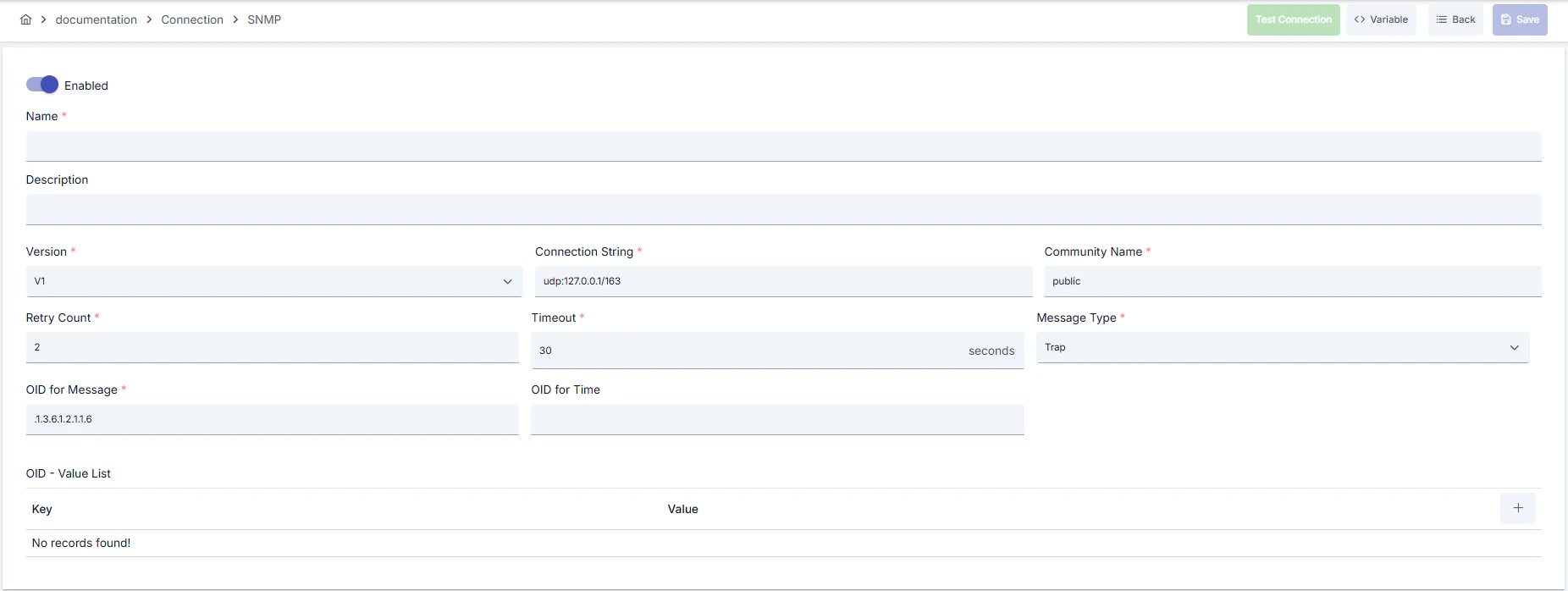 #### Configuration Steps
* Go to **Connection → SNMP** section from the left menu.
* Click the **\[+ Create]** button at the top right.
**Enable Status (Active Status):**
* Set active/passive status with toggle. New connections are active by default.
**Name - Required:**
* Example: `Production_SNMP`
* Enter a unique name, cannot start with space.
* System automatically checks. Green checkmark: available. Red cross: existing name.
**Description:**
* Example: "SNMP trap collector"
* Max. 1000 characters.
* Describe the purpose of the connection.
In the action button area at the top of the page, you can use the **\[\<> Variable]** button to select dynamic values, and with global variables, you can manage connection parameters with variable-based values instead of fixed values. For detailed information, review the [Dynamic Variables](/en/concepts/core-concepts/dynamic-variables) page.
* Select environment from dropdown menu: **Development**, **Test**, or **Production**.
* Different connection parameters can be defined for each environment.
* Fill in **Version**, **Connection String**, **Message Type**, **Retry Count**, and **Timeout** fields.
* Write the correct port according to device documentation, adjust retryCount value according to network quality, remember that timeout value is in seconds.
* Determine **PDU OID for Message/Time** fields according to your device's MIB files.
* If additional fields are needed, add OID and the field name to be read as key/value to the **PDU Variable Map** table.
* Review connection/request timeout values in milliseconds in the advanced section.
* Determine concurrent trap processing capacity with **Pool Size** and enter a value appropriate for network delay for **SNMP Retry Interval**.
* If you selected SNMPv3, determine **Security Level**.
* When **Enable User Authentication** is enabled, select USM Authentication/Privacy protocols, set passphrase fields to at least 8 characters, and use secret manager information.
* Click the **\[Test Connection]** button.
* Test whether connection parameters are correct.
* **Success:** Green confirmation message
* **Failed:** Error details are shown
* Click the **\[Save and Deploy]** button at the top right.
**Checklist:**
* Unique name
* Required fields filled
* Test connection successful (recommended)
**Result:**
* Connection is added to the list
* Becomes available in Integration Flow and Connector steps
* Becomes active according to environment
Connection created successfully! You can now use it in Integration Flow and Connector steps.
### Deleting a Connection
Select **Delete** from the **⋮** menu at the end of the row or click the **\[Delete]** button on the connection detail page
**Check Before Deleting:** It may be used in Integration Flow or Connector steps. If necessary, assign an alternative connection. Take a backup with **Export** before deleting
Use the **Disable** option instead of deleting. Connection becomes passive but is not deleted. Can be reactivated when needed
### Exporting/Importing Connections
In this step, users can export existing connections for backup, migration to different environments, or sharing purposes, or import a previously exported connection again. This operation is used to maintain data integrity in version management, transitions between test and production environments, or inter-team sharing processes.
Select **⋮ → Export** from the action menu. ZIP file is automatically downloaded.
Click the **\[Export]** button on the connection detail page. ZIP file is downloaded.
Format: `Date-connection-SNMP-export.zip`\
Example: `13 Nov 2025-connection-Production_SNMP-export.zip`
* Connection JSON file
* Metadata information
* Dependency information (e.g., certificates, key store)
* Backup
* Migration between environments (Test → Prod)
* Versioning
* Team or project-based sharing
* Click the **\[Import SNMP]** button on the main list.
* Select the downloaded ZIP file.
* System checks: Is format valid? Is there a name conflict? Are dependencies available?
* Then click the **\[Import]** button.
**Scenario 1: Name Conflict** → Overwrite the old connection or create with a new name.
**Scenario 2: Missing Dependencies** → Create missing certificates or key stores first or remove them during import.
### Connection Usage Areas
**Steps:**
1. Create the connection
2. Validate the connection with **Test Connection**
3. Save and activate with **Save and Deploy**
4. Ensure the connection is in **Enabled** status
Connection is selected in steps that require communication with external systems such as message queue (queue), topic, email, FTP/SFTP, LDAP, or similar. Example: Steps like "Send Message", "Consume Message", "Upload File", "Read Directory". Connection selection is made from the Connection field in the configuration of these steps
Access to external systems is provided by selecting the connection in scheduled tasks (e.g., sending messages at certain intervals, file processing, etc.). When the connection changes, the job execution behavior is updated accordingly
The correctness of the connection can be checked independently from Integration Flow with the Connection Test feature. This test is critical in the debugging process
## Best Practices
**Bad:** Leaving all devices with a single community\
**Good:** Defining separate community for each device class\
**Best:** Assigning different security names to each device group using SNMPv3 USM users
**Bad:** Leaving PDU Variable Map empty\
**Good:** Adding only critical OIDs\
**Best:** Mapping all OIDs to be used in business rules with meaningful names and versioning
**Bad:** Leaving default retryCount and timeout values in every environment\
**Good:** Updating retryCount according to network quality\
**Best:** Measuring latency in Prod environment and optimizing timeout/interval values with data
**Bad:** Using the same connection in independent flows without version control\
**Good:** Documenting the connection version used per flow\
**Best:** Versioning the exported connection with Git repository or artifact management and matching with flow changes
**Bad:** Using the same connection parameters in all environments\
**Good:** Creating separate connection for each environment\
**Best:** Managing all environments in a single connection using Environment option, only changing environment during inter-environment transitions
**Bad:** Saving and deploying connection without testing\
**Good:** Validating with Test Connection before saving\
**Best:** Testing after every parameter change, performing full integration test in test environment before moving to production
Do not use default public/private strings in production environment. Determine unique string per device and store in secret manager
Passwords shorter than 8 characters carry brute-force risk. Make auth/priv passphrase fields complex and change them at regular intervals
Open traffic only to management VLANs, allow only necessary source IPs in firewall, drop the rest
Store sensitive information such as usernames and passwords using environment variables or secret manager. Do not hardcode credentials in code or configuration files. Update passwords periodically
Always enable SSL/TLS in production environment. Use self-signed certificates only in development environment. Track certificate expiration dates and renew them on time
Allow only authorized users to change connection configuration. Store connection change logs. Implement change approval process for critical connections
**Why avoid:** OID changes are not noticed when new devices are added\
**Alternative:** Regularly review and version PDU Variable Map
**Why avoid:** Infinite retry unnecessarily loads devices and network\
**Alternative:** Keep retryCount value low, manage errors with Flow logic
**Why avoid:** Connection constantly times out when UDP 161/162 is closed\
**Alternative:** Coordinate port opening with network teams and automate access tests
**Why avoid:** Test data can be written to production system, real users can be affected, security risk occurs\
**Alternative:** Create separate connection for each environment, use environment parameter, separate connection names by adding prefix according to environment (Test\_, Prod\_)
**Why avoid:** Connection constantly times out in network delays, Integration steps fail\
**Alternative:** Adjust timeout values according to real usage scenarios, measure network latency and determine timeouts accordingly
**Why avoid:** New connection is opened for each request, performance decreases, resource consumption increases, target system load increases\
**Alternative:** Enable connection pool, adjust pool size according to traffic volume, set up pool monitoring
**Recommendation:** Define separate connection or higher pool size for critical devices\
**Impact:** Prevents delay of vital alarms
**Recommendation:** Adjust retry and interval values according to latency measurements\
**Impact:** Unnecessary packet transmission decreases, network efficiency increases
**Recommendation:** Cache frequently used OID results within Flow\
**Impact:** PDU processing time shortens, CPU consumption decreases
**Recommendation:** Adjust pool size according to peak traffic (recommended: concurrent request count × 1.5), set idle connection timeouts, perform pool health check\
**Impact:** Connection opening cost decreases by 80%, response times decrease, resource usage is optimized
**Recommendation:** Measure real network latency, adjust timeout values accordingly, avoid very low or very high timeouts\
**Impact:** Unnecessary waits are prevented, fast fail-over is provided, user experience improves
**Recommendation:** Monitor connection pool usage, track timeout rates, perform connection health check, set up alerting\
**Impact:** Problems are detected proactively, performance bottlenecks are identified early, downtime decreases
## Troubleshooting
Connection string may be incorrect, firewall blocking UDP 162, or device not sending traps.
Verify IP/port in connection string.
Test UDP 162 access with network team.
Send manual trap from device and examine logs.
Security level may be incorrect, auth/priv passphrase may be wrong, or time synchronization may be missing.
Match security level and protocols with device.
Re-enter passwords in secret manager.
Align device and Apinizer clocks with NTP.
Network delay, target system responding slowly, or timeout value may be too low.
Check network connectivity.
Check target system health.
Increase timeout values.
Review connection logs.
Wrong username/password, expired credentials, or permission problem may exist.
Verify credentials.
Check that user is active in target system.
Check that necessary permissions are granted.
Check SSL/TLS certificates.
Pool size may be too low, connection leak may exist, or traffic may be too high.
Increase pool size.
Check that connections are properly closed.
Set idle connection timeouts.
Monitor connection usage metrics.
Different connection may be selected in Integration/Connector step, step may be misconfigured, or Flow/Job may not be redeployed.
Check that connection's enable toggle is active.
Verify that correct connection is selected in Integration Flow.
Redeploy the connection.
Redeploy Integration Flow or Job.
Check Gateway logs.
## Frequently Asked Questions (FAQ)
V1, V2c, and V3 are supported; USM security options open when V3 is selected.
No, message type takes a single value. You need to create two connections for two different types or duplicate with export/import.
Provides readable field names on the Integration Flow side by mapping OID field names and allows you to easily add new OIDs.
AUTH\_PRIV is recommended if device supports it; in this case, you need to select authentication and privacy protocols and enter passwords.
If UDP 162 is blocked, connection falls to timeout. Request firewall rule opening from network team and run Test Connection.
Yes, the same connection can be used in multiple Integration Flow or Connector steps. This provides centralized management and guarantees configuration consistency. However, changes made to the connection will affect all usage locations, so care should be taken.
Using connection pool is not mandatory but strongly recommended in high-traffic systems. Reusing existing connections instead of opening new connection for each request significantly increases performance.
Yes, it is recommended to create separate connection for each environment. Alternatively, you can manage all environments within a single connection using the environment parameter. This approach provides easier management and less error risk.
Several reasons may exist:
1. Connection enable toggle may be passive
2. Different connection may be selected in Integration step
3. Connection may not be deployed
4. Integration Flow may not be redeployed yet
#### Configuration Steps
* Go to **Connection → SNMP** section from the left menu.
* Click the **\[+ Create]** button at the top right.
**Enable Status (Active Status):**
* Set active/passive status with toggle. New connections are active by default.
**Name - Required:**
* Example: `Production_SNMP`
* Enter a unique name, cannot start with space.
* System automatically checks. Green checkmark: available. Red cross: existing name.
**Description:**
* Example: "SNMP trap collector"
* Max. 1000 characters.
* Describe the purpose of the connection.
In the action button area at the top of the page, you can use the **\[\<> Variable]** button to select dynamic values, and with global variables, you can manage connection parameters with variable-based values instead of fixed values. For detailed information, review the [Dynamic Variables](/en/concepts/core-concepts/dynamic-variables) page.
* Select environment from dropdown menu: **Development**, **Test**, or **Production**.
* Different connection parameters can be defined for each environment.
* Fill in **Version**, **Connection String**, **Message Type**, **Retry Count**, and **Timeout** fields.
* Write the correct port according to device documentation, adjust retryCount value according to network quality, remember that timeout value is in seconds.
* Determine **PDU OID for Message/Time** fields according to your device's MIB files.
* If additional fields are needed, add OID and the field name to be read as key/value to the **PDU Variable Map** table.
* Review connection/request timeout values in milliseconds in the advanced section.
* Determine concurrent trap processing capacity with **Pool Size** and enter a value appropriate for network delay for **SNMP Retry Interval**.
* If you selected SNMPv3, determine **Security Level**.
* When **Enable User Authentication** is enabled, select USM Authentication/Privacy protocols, set passphrase fields to at least 8 characters, and use secret manager information.
* Click the **\[Test Connection]** button.
* Test whether connection parameters are correct.
* **Success:** Green confirmation message
* **Failed:** Error details are shown
* Click the **\[Save and Deploy]** button at the top right.
**Checklist:**
* Unique name
* Required fields filled
* Test connection successful (recommended)
**Result:**
* Connection is added to the list
* Becomes available in Integration Flow and Connector steps
* Becomes active according to environment
Connection created successfully! You can now use it in Integration Flow and Connector steps.
### Deleting a Connection
Select **Delete** from the **⋮** menu at the end of the row or click the **\[Delete]** button on the connection detail page
**Check Before Deleting:** It may be used in Integration Flow or Connector steps. If necessary, assign an alternative connection. Take a backup with **Export** before deleting
Use the **Disable** option instead of deleting. Connection becomes passive but is not deleted. Can be reactivated when needed
### Exporting/Importing Connections
In this step, users can export existing connections for backup, migration to different environments, or sharing purposes, or import a previously exported connection again. This operation is used to maintain data integrity in version management, transitions between test and production environments, or inter-team sharing processes.
Select **⋮ → Export** from the action menu. ZIP file is automatically downloaded.
Click the **\[Export]** button on the connection detail page. ZIP file is downloaded.
Format: `Date-connection-SNMP-export.zip`\
Example: `13 Nov 2025-connection-Production_SNMP-export.zip`
* Connection JSON file
* Metadata information
* Dependency information (e.g., certificates, key store)
* Backup
* Migration between environments (Test → Prod)
* Versioning
* Team or project-based sharing
* Click the **\[Import SNMP]** button on the main list.
* Select the downloaded ZIP file.
* System checks: Is format valid? Is there a name conflict? Are dependencies available?
* Then click the **\[Import]** button.
**Scenario 1: Name Conflict** → Overwrite the old connection or create with a new name.
**Scenario 2: Missing Dependencies** → Create missing certificates or key stores first or remove them during import.
### Connection Usage Areas
**Steps:**
1. Create the connection
2. Validate the connection with **Test Connection**
3. Save and activate with **Save and Deploy**
4. Ensure the connection is in **Enabled** status
Connection is selected in steps that require communication with external systems such as message queue (queue), topic, email, FTP/SFTP, LDAP, or similar. Example: Steps like "Send Message", "Consume Message", "Upload File", "Read Directory". Connection selection is made from the Connection field in the configuration of these steps
Access to external systems is provided by selecting the connection in scheduled tasks (e.g., sending messages at certain intervals, file processing, etc.). When the connection changes, the job execution behavior is updated accordingly
The correctness of the connection can be checked independently from Integration Flow with the Connection Test feature. This test is critical in the debugging process
## Best Practices
**Bad:** Leaving all devices with a single community\
**Good:** Defining separate community for each device class\
**Best:** Assigning different security names to each device group using SNMPv3 USM users
**Bad:** Leaving PDU Variable Map empty\
**Good:** Adding only critical OIDs\
**Best:** Mapping all OIDs to be used in business rules with meaningful names and versioning
**Bad:** Leaving default retryCount and timeout values in every environment\
**Good:** Updating retryCount according to network quality\
**Best:** Measuring latency in Prod environment and optimizing timeout/interval values with data
**Bad:** Using the same connection in independent flows without version control\
**Good:** Documenting the connection version used per flow\
**Best:** Versioning the exported connection with Git repository or artifact management and matching with flow changes
**Bad:** Using the same connection parameters in all environments\
**Good:** Creating separate connection for each environment\
**Best:** Managing all environments in a single connection using Environment option, only changing environment during inter-environment transitions
**Bad:** Saving and deploying connection without testing\
**Good:** Validating with Test Connection before saving\
**Best:** Testing after every parameter change, performing full integration test in test environment before moving to production
Do not use default public/private strings in production environment. Determine unique string per device and store in secret manager
Passwords shorter than 8 characters carry brute-force risk. Make auth/priv passphrase fields complex and change them at regular intervals
Open traffic only to management VLANs, allow only necessary source IPs in firewall, drop the rest
Store sensitive information such as usernames and passwords using environment variables or secret manager. Do not hardcode credentials in code or configuration files. Update passwords periodically
Always enable SSL/TLS in production environment. Use self-signed certificates only in development environment. Track certificate expiration dates and renew them on time
Allow only authorized users to change connection configuration. Store connection change logs. Implement change approval process for critical connections
**Why avoid:** OID changes are not noticed when new devices are added\
**Alternative:** Regularly review and version PDU Variable Map
**Why avoid:** Infinite retry unnecessarily loads devices and network\
**Alternative:** Keep retryCount value low, manage errors with Flow logic
**Why avoid:** Connection constantly times out when UDP 161/162 is closed\
**Alternative:** Coordinate port opening with network teams and automate access tests
**Why avoid:** Test data can be written to production system, real users can be affected, security risk occurs\
**Alternative:** Create separate connection for each environment, use environment parameter, separate connection names by adding prefix according to environment (Test\_, Prod\_)
**Why avoid:** Connection constantly times out in network delays, Integration steps fail\
**Alternative:** Adjust timeout values according to real usage scenarios, measure network latency and determine timeouts accordingly
**Why avoid:** New connection is opened for each request, performance decreases, resource consumption increases, target system load increases\
**Alternative:** Enable connection pool, adjust pool size according to traffic volume, set up pool monitoring
**Recommendation:** Define separate connection or higher pool size for critical devices\
**Impact:** Prevents delay of vital alarms
**Recommendation:** Adjust retry and interval values according to latency measurements\
**Impact:** Unnecessary packet transmission decreases, network efficiency increases
**Recommendation:** Cache frequently used OID results within Flow\
**Impact:** PDU processing time shortens, CPU consumption decreases
**Recommendation:** Adjust pool size according to peak traffic (recommended: concurrent request count × 1.5), set idle connection timeouts, perform pool health check\
**Impact:** Connection opening cost decreases by 80%, response times decrease, resource usage is optimized
**Recommendation:** Measure real network latency, adjust timeout values accordingly, avoid very low or very high timeouts\
**Impact:** Unnecessary waits are prevented, fast fail-over is provided, user experience improves
**Recommendation:** Monitor connection pool usage, track timeout rates, perform connection health check, set up alerting\
**Impact:** Problems are detected proactively, performance bottlenecks are identified early, downtime decreases
## Troubleshooting
Connection string may be incorrect, firewall blocking UDP 162, or device not sending traps.
Verify IP/port in connection string.
Test UDP 162 access with network team.
Send manual trap from device and examine logs.
Security level may be incorrect, auth/priv passphrase may be wrong, or time synchronization may be missing.
Match security level and protocols with device.
Re-enter passwords in secret manager.
Align device and Apinizer clocks with NTP.
Network delay, target system responding slowly, or timeout value may be too low.
Check network connectivity.
Check target system health.
Increase timeout values.
Review connection logs.
Wrong username/password, expired credentials, or permission problem may exist.
Verify credentials.
Check that user is active in target system.
Check that necessary permissions are granted.
Check SSL/TLS certificates.
Pool size may be too low, connection leak may exist, or traffic may be too high.
Increase pool size.
Check that connections are properly closed.
Set idle connection timeouts.
Monitor connection usage metrics.
Different connection may be selected in Integration/Connector step, step may be misconfigured, or Flow/Job may not be redeployed.
Check that connection's enable toggle is active.
Verify that correct connection is selected in Integration Flow.
Redeploy the connection.
Redeploy Integration Flow or Job.
Check Gateway logs.
## Frequently Asked Questions (FAQ)
V1, V2c, and V3 are supported; USM security options open when V3 is selected.
No, message type takes a single value. You need to create two connections for two different types or duplicate with export/import.
Provides readable field names on the Integration Flow side by mapping OID field names and allows you to easily add new OIDs.
AUTH\_PRIV is recommended if device supports it; in this case, you need to select authentication and privacy protocols and enter passwords.
If UDP 162 is blocked, connection falls to timeout. Request firewall rule opening from network team and run Test Connection.
Yes, the same connection can be used in multiple Integration Flow or Connector steps. This provides centralized management and guarantees configuration consistency. However, changes made to the connection will affect all usage locations, so care should be taken.
Using connection pool is not mandatory but strongly recommended in high-traffic systems. Reusing existing connections instead of opening new connection for each request significantly increases performance.
Yes, it is recommended to create separate connection for each environment. Alternatively, you can manage all environments within a single connection using the environment parameter. This approach provides easier management and less error risk.
Several reasons may exist:
1. Connection enable toggle may be passive
2. Different connection may be selected in Integration step
3. Connection may not be deployed
4. Integration Flow may not be redeployed yet