> ## Documentation Index
> Fetch the complete documentation index at: https://docs.apinizer.com/llms.txt
> Use this file to discover all available pages before exploring further.
# Notification Connector
> You can send notifications to users when job definitions run and manage notifications from the application interface. You can send notifications to all or selected users each time a job definition runs.
## Configuration
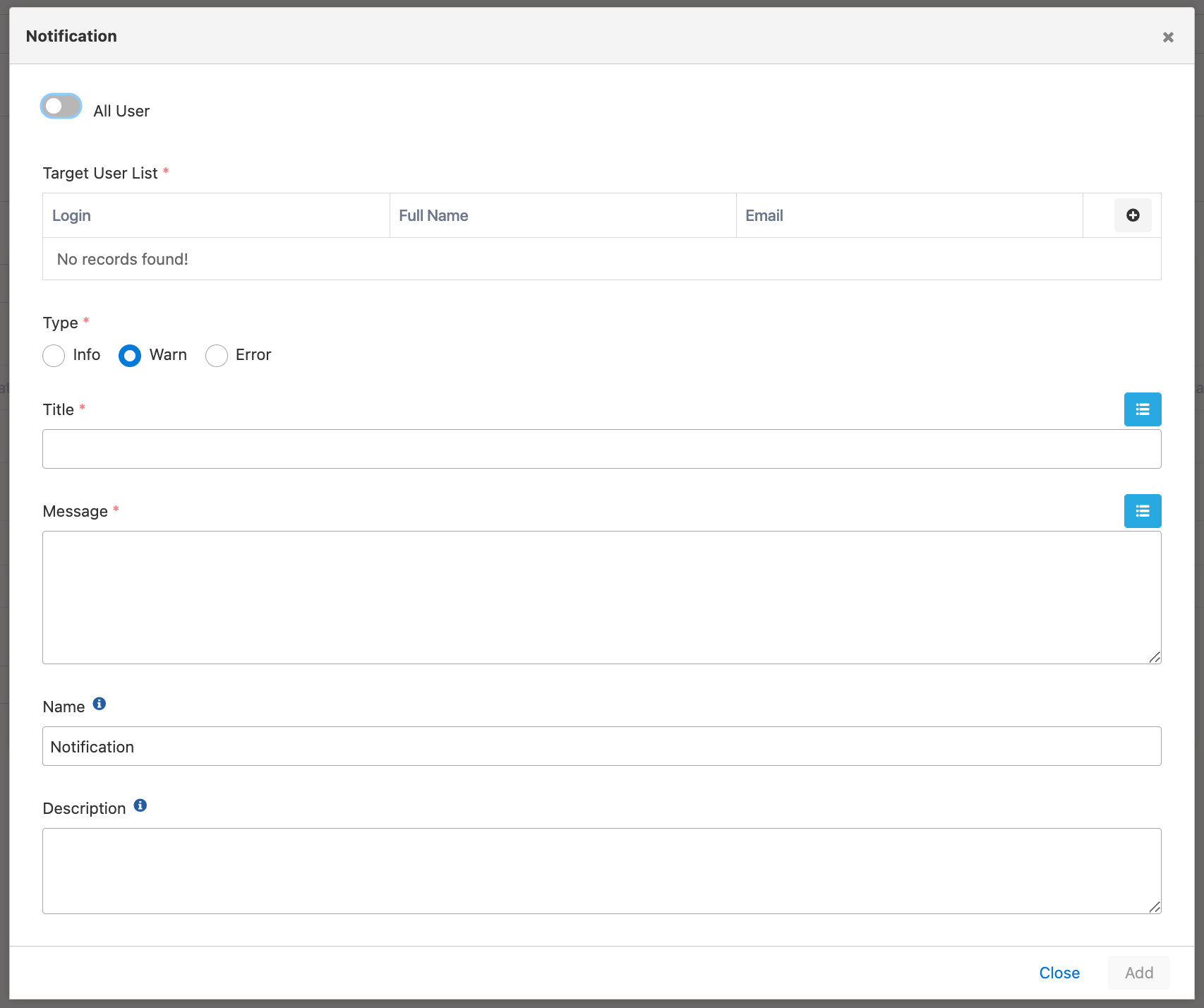 Configuration fields:
**Field:** All User
Target user type to whom the notification will be sent is selected. Can be sent to all users or selected users.
**Field:** Target User List
If the notification is not desired to be sent to all users, desired users are added to this list.
**Field:** Type
Type of the notification is selected.
**Field:** Title
General description summarizing the notification is entered.
Variables can be used in the Title field.
**Field:** Message
Detail of the notification is written.
Variables can be used in the Message field.
Configuration fields:
**Field:** All User
Target user type to whom the notification will be sent is selected. Can be sent to all users or selected users.
**Field:** Target User List
If the notification is not desired to be sent to all users, desired users are added to this list.
**Field:** Type
Type of the notification is selected.
**Field:** Title
General description summarizing the notification is entered.
Variables can be used in the Title field.
**Field:** Message
Detail of the notification is written.
Variables can be used in the Message field.