> ## Documentation Index
> Fetch the complete documentation index at: https://docs.apinizer.com/llms.txt
> Use this file to discover all available pages before exploring further.
# Transferring System Logs to Syslog
> Transfers Apinizer system logs (Application Log, Token Log, Audit Log) to external SIEM systems via syslog protocol and provides centralized log management.
Go to Administration > Connection Configurations > Syslog page and create a Syslog connection definition. For detailed information, see the relevant documentation.
## Transferring Application Logs via Syslog
Go to Administration > System Settings > General Settings page and select Syslog Connector for application logs.
 Select the previously created Syslog connection definition.
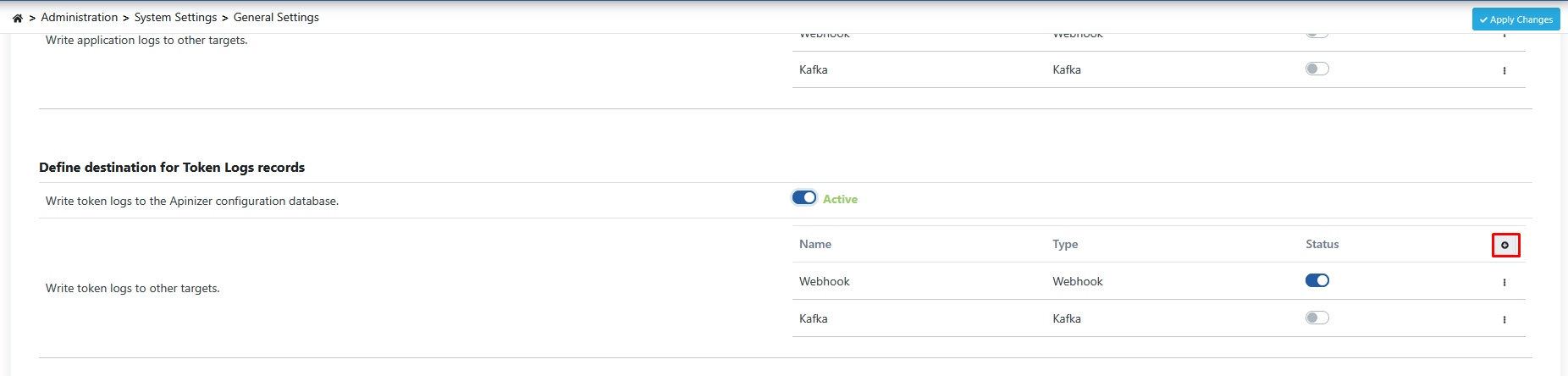 The data structure for application logs to be sent will be as follows.
* **id:** Unique identifier of the log record.
* **date:** Date and time when the log was created.
* **level:** Log importance level (e.g., "INFO", "WARN", "ERROR", "DEBUG").
* **message:** Main message of the log, text describing the event.
* **stackTrace:** In error cases, detailed stack trace showing the code path where the error occurred. Usually very long and critical for troubleshooting.
* **hostName:** Name of the machine where the Apinizer component that generated the log is running.
* **enumApplicationLog:** Specifies which Apinizer module the log came from (e.g., "MANAGER", "GATEWAY").
Example appearance of an error message in syslog:
```text theme={null}
2025-06-11T08:52:02.824Z apinizer_demo Apinizer_demo {"id":"684943b280f5de2a3c29d28b","date":"2025-06-11T08:52:02.810Z","level":"ERROR","message":"Connector response status code is 429","stackTrace":"java.lang.Exception: Connector response status code is 429\n\tat com.apinizer.common.executable.connector.webhook.ConnectorWebhookSend.sendWithFailover(ConnectorWebhookSend.java:185)\n\tat com.apinizer.common.executable.connector.webhook.ConnectorWebhookSend.executeAuditLog(ConnectorWebhookSend.java:119)\n\tat com.apinizer.manager.aop.auditing.AuditingAspectDatabaseOperationsService.saveAuditLog(AuditingAspectDatabaseOperationsService.java:104)\n... ...\n\tat java.lang.Thread.run(Thread.java:750)\n","hostName":"manager-58b4d4784d-sm47j","enumApplicationLog":"MANAGER"}
```
## Transferring Token Logs via Syslog
Go to Administration > System Settings > General Settings page and select Syslog Connector for token logs.
The data structure for application logs to be sent will be as follows.
* **id:** Unique identifier of the log record.
* **date:** Date and time when the log was created.
* **level:** Log importance level (e.g., "INFO", "WARN", "ERROR", "DEBUG").
* **message:** Main message of the log, text describing the event.
* **stackTrace:** In error cases, detailed stack trace showing the code path where the error occurred. Usually very long and critical for troubleshooting.
* **hostName:** Name of the machine where the Apinizer component that generated the log is running.
* **enumApplicationLog:** Specifies which Apinizer module the log came from (e.g., "MANAGER", "GATEWAY").
Example appearance of an error message in syslog:
```text theme={null}
2025-06-11T08:52:02.824Z apinizer_demo Apinizer_demo {"id":"684943b280f5de2a3c29d28b","date":"2025-06-11T08:52:02.810Z","level":"ERROR","message":"Connector response status code is 429","stackTrace":"java.lang.Exception: Connector response status code is 429\n\tat com.apinizer.common.executable.connector.webhook.ConnectorWebhookSend.sendWithFailover(ConnectorWebhookSend.java:185)\n\tat com.apinizer.common.executable.connector.webhook.ConnectorWebhookSend.executeAuditLog(ConnectorWebhookSend.java:119)\n\tat com.apinizer.manager.aop.auditing.AuditingAspectDatabaseOperationsService.saveAuditLog(AuditingAspectDatabaseOperationsService.java:104)\n... ...\n\tat java.lang.Thread.run(Thread.java:750)\n","hostName":"manager-58b4d4784d-sm47j","enumApplicationLog":"MANAGER"}
```
## Transferring Token Logs via Syslog
Go to Administration > System Settings > General Settings page and select Syslog Connector for token logs.
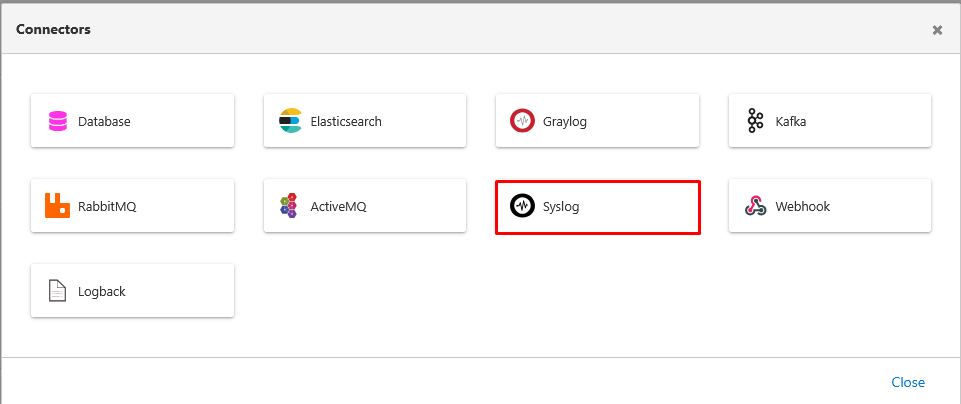 Select the previously created Syslog connection definition.
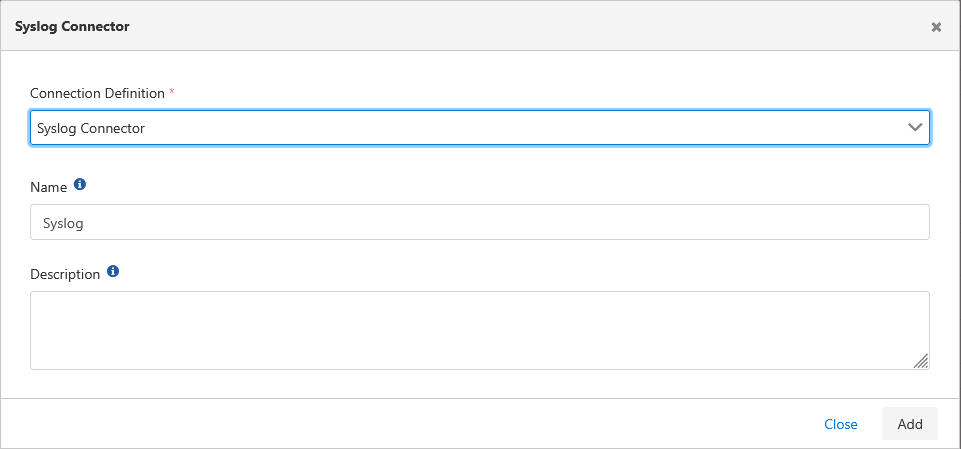 The data structure for token logs to be sent will be as follows.
* **id:** Unique identifier of the log record.
* **timestamp:** Timestamp when the token event occurred.
* **apinizerCorrelationId:** Unique correlation ID used to track all operations related to this token request within Apinizer.
* **environmentId:** Unique identifier of the environment where the request was made.
* **projectId:** Unique identifier of the project to which the request belongs.
* **applicationName:** Name of the application related to the request (e.g., "Swagger Petstore Documentation").
* **apiProxyId:** Unique identifier of the API Proxy associated with the token request.
* **apiProxyName:** Name of the associated API Proxy.
* **httpRequestRemoteAddress:** IP address of the client making the token request.
* **httpRequestHttpMethod:** HTTP method of the token request (usually "POST").
* **httpRequestContentType:** Content type of the request (e.g., "application/x-www-form-urlencoded").
* **usernameOrKey:** Username or client key requesting the token.
* **timeTotal:** Total duration of the token operation (ms).
* **statusCode:** HTTP status code of the token request (e.g., 200 Success).
* **resultType:** Result of the token operation (e.g., "SUCCESS", "ERROR").
* **audience:** Target audience or resource for which the token is valid.
* **clientInfo:** Additional information about the client requesting the token (usually similar to usernameOrKey).
* **issuedAt:** Timestamp when the token was issued.
* **refreshTokenAllowed:** Whether refresh token is allowed for this operation (boolean).
* **refreshTokenIssuedAt:** Timestamp when the refresh token was issued.
* **refreshCount:** Number of times the refresh token has been used.
Example appearance of a token log record in syslog:
```text theme={null}
2025-06-11T08:49:15.970Z apinizer_demo Apinizer_demo {"id":"6849430bfec3ea5f01ed3989","timestamp":"2025-06-11T08:49:15.229Z","apinizerCorrelationId":"dccababd-16e3-415e-b801-9f6a52b6a28c","environmentId":"63ca7ed05c8e155862d99e88","projectId":"68493b6e80f5de2a3c29c5ee","applicationName":"Swagger Petstore Documentation","apiProxyId":"68493bb680f5de2a3c29c609","apiProxyName":"Swagger Petstore Documentation","httpRequestRemoteAddress":"10.244.0.1","httpRequestHttpMethod":"POST","httpRequestContentType":"application/x-www-form-urlencoded","usernameOrKey":"documentation","timeTotal":19,"statusCode":200,"resultType":"SUCCESS","audience":"#GW#90c33df5f81e-4717-95f8-1ea76228a7d5","clientInfo":"documentation","issuedAt":"2025-06-11T08:49:15.220Z","refreshTokenAllowed":false,"refreshTokenIssuedAt":"2025-06-11T08:49:15.220Z","refreshCount":0}
```
## Transferring Audit Logs to Syslog
Go to Administration > System Settings > General Settings page and select Syslog Connector for application logs.
The data structure for token logs to be sent will be as follows.
* **id:** Unique identifier of the log record.
* **timestamp:** Timestamp when the token event occurred.
* **apinizerCorrelationId:** Unique correlation ID used to track all operations related to this token request within Apinizer.
* **environmentId:** Unique identifier of the environment where the request was made.
* **projectId:** Unique identifier of the project to which the request belongs.
* **applicationName:** Name of the application related to the request (e.g., "Swagger Petstore Documentation").
* **apiProxyId:** Unique identifier of the API Proxy associated with the token request.
* **apiProxyName:** Name of the associated API Proxy.
* **httpRequestRemoteAddress:** IP address of the client making the token request.
* **httpRequestHttpMethod:** HTTP method of the token request (usually "POST").
* **httpRequestContentType:** Content type of the request (e.g., "application/x-www-form-urlencoded").
* **usernameOrKey:** Username or client key requesting the token.
* **timeTotal:** Total duration of the token operation (ms).
* **statusCode:** HTTP status code of the token request (e.g., 200 Success).
* **resultType:** Result of the token operation (e.g., "SUCCESS", "ERROR").
* **audience:** Target audience or resource for which the token is valid.
* **clientInfo:** Additional information about the client requesting the token (usually similar to usernameOrKey).
* **issuedAt:** Timestamp when the token was issued.
* **refreshTokenAllowed:** Whether refresh token is allowed for this operation (boolean).
* **refreshTokenIssuedAt:** Timestamp when the refresh token was issued.
* **refreshCount:** Number of times the refresh token has been used.
Example appearance of a token log record in syslog:
```text theme={null}
2025-06-11T08:49:15.970Z apinizer_demo Apinizer_demo {"id":"6849430bfec3ea5f01ed3989","timestamp":"2025-06-11T08:49:15.229Z","apinizerCorrelationId":"dccababd-16e3-415e-b801-9f6a52b6a28c","environmentId":"63ca7ed05c8e155862d99e88","projectId":"68493b6e80f5de2a3c29c5ee","applicationName":"Swagger Petstore Documentation","apiProxyId":"68493bb680f5de2a3c29c609","apiProxyName":"Swagger Petstore Documentation","httpRequestRemoteAddress":"10.244.0.1","httpRequestHttpMethod":"POST","httpRequestContentType":"application/x-www-form-urlencoded","usernameOrKey":"documentation","timeTotal":19,"statusCode":200,"resultType":"SUCCESS","audience":"#GW#90c33df5f81e-4717-95f8-1ea76228a7d5","clientInfo":"documentation","issuedAt":"2025-06-11T08:49:15.220Z","refreshTokenAllowed":false,"refreshTokenIssuedAt":"2025-06-11T08:49:15.220Z","refreshCount":0}
```
## Transferring Audit Logs to Syslog
Go to Administration > System Settings > General Settings page and select Syslog Connector for application logs.
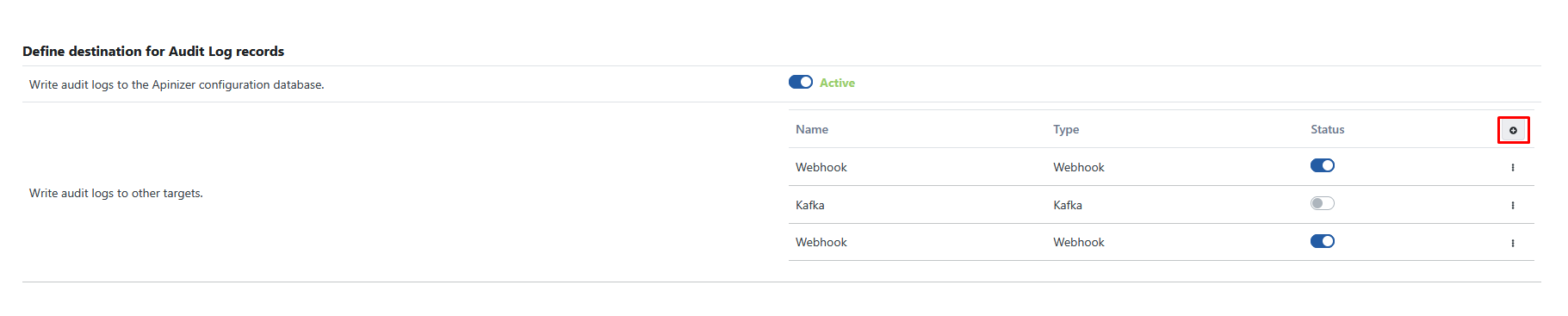 Select the previously created Syslog connection definition.
The data structure for audit logs to be sent will be as follows.
* **id:** Unique identifier of the audit event.
* **principal:** Name of the user who performed the operation (e.g., "admin").
* **auditEventDate:** Date and time when the audit event occurred.
* **state:** Type of operation performed (e.g., "CREATED", "UPDATED", "DELETED").
* **objectId:** Unique identifier of the object (API, Policy, etc.) affected by the operation.
* **objectName:** Name of the object affected by the operation (e.g., "Swagger Petstore Documentation").
* **referenceObjectJson:** Complete detailed JSON representation of the object after the operation. This field fully reflects the new state of the object and can be very long.
* **projectId:** Unique identifier of the project to which the related object belongs.
* **className:** Class/type name of the object affected by the operation within Apinizer (e.g., "ApiProxy").
Example appearance of an audit log message in syslog:
```text theme={null}
2025-06-11T08:26:11.650Z apinizer_demo Apinizer_demo {"id":"68493da280f5de2a3c29c975","principal":"admin","auditEventDate":"2025-06-11T08:26:10.710Z","state":"UPDATED","objectId":"68493bb680f5de2a3c29c609","objectName":"Swagger Petstore Documentation","referenceObjectJson":"{ \"id\": \"68493bb680f5de2a3c29c609\", \"name\": \"Swagger Petstore Documentation\", \"type\": \"REST\", ... ... }","projectId":"68493b6e80f5de2a3c29c5ee","className":"ApiProxy"}
```
Select the previously created Syslog connection definition.
The data structure for audit logs to be sent will be as follows.
* **id:** Unique identifier of the audit event.
* **principal:** Name of the user who performed the operation (e.g., "admin").
* **auditEventDate:** Date and time when the audit event occurred.
* **state:** Type of operation performed (e.g., "CREATED", "UPDATED", "DELETED").
* **objectId:** Unique identifier of the object (API, Policy, etc.) affected by the operation.
* **objectName:** Name of the object affected by the operation (e.g., "Swagger Petstore Documentation").
* **referenceObjectJson:** Complete detailed JSON representation of the object after the operation. This field fully reflects the new state of the object and can be very long.
* **projectId:** Unique identifier of the project to which the related object belongs.
* **className:** Class/type name of the object affected by the operation within Apinizer (e.g., "ApiProxy").
Example appearance of an audit log message in syslog:
```text theme={null}
2025-06-11T08:26:11.650Z apinizer_demo Apinizer_demo {"id":"68493da280f5de2a3c29c975","principal":"admin","auditEventDate":"2025-06-11T08:26:10.710Z","state":"UPDATED","objectId":"68493bb680f5de2a3c29c609","objectName":"Swagger Petstore Documentation","referenceObjectJson":"{ \"id\": \"68493bb680f5de2a3c29c609\", \"name\": \"Swagger Petstore Documentation\", \"type\": \"REST\", ... ... }","projectId":"68493b6e80f5de2a3c29c5ee","className":"ApiProxy"}
```