> ## Documentation Index
> Fetch the complete documentation index at: https://docs.apinizer.com/llms.txt
> Use this file to discover all available pages before exploring further.
# Transferring Traffic Logs to Syslog
> Transfers Apinizer traffic logs to external SIEM systems via syslog protocol and provides centralized log management.
Add a syslog connector to the gateway environment where logs will be sent as syslog. For details, see our documentation.
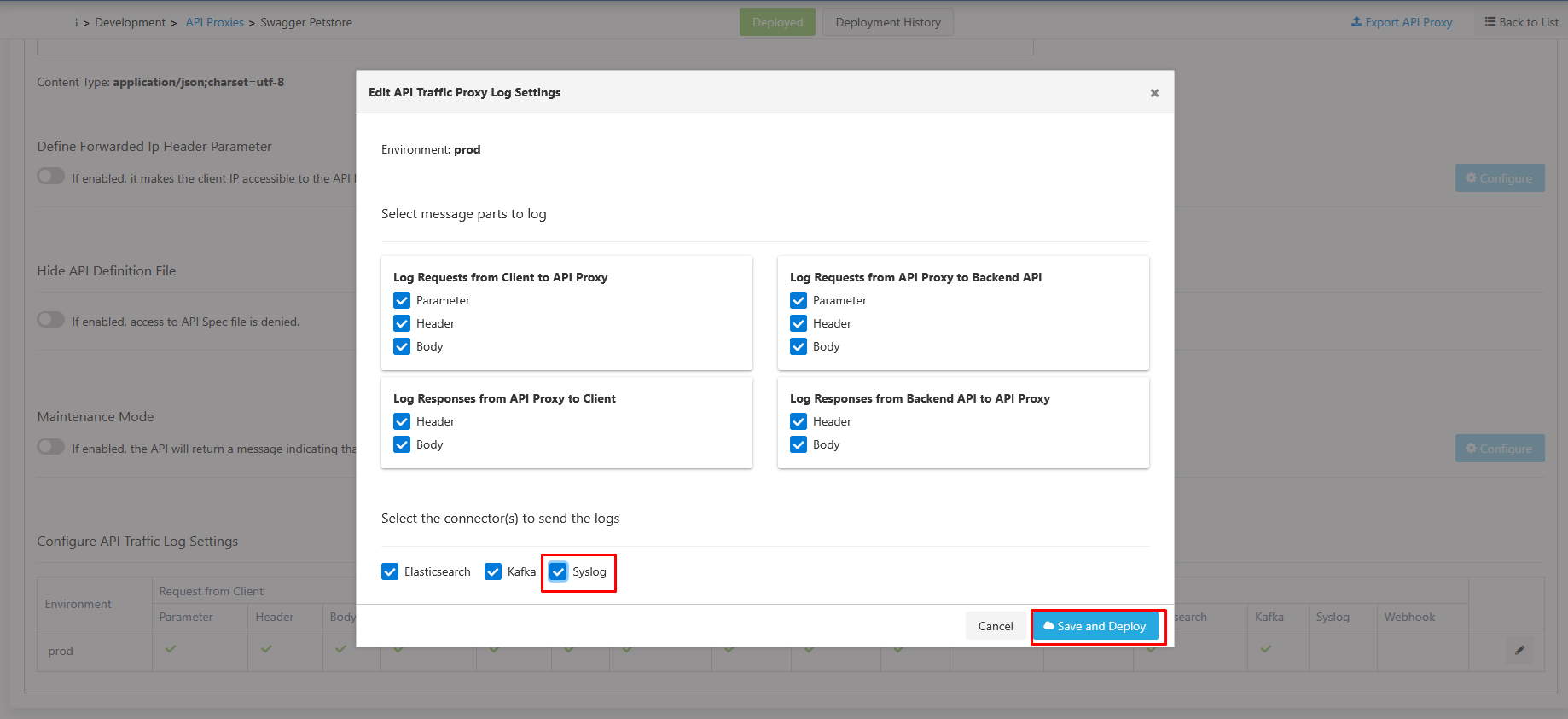 After this setting is made, this connector will be active by default for all API Proxies added.
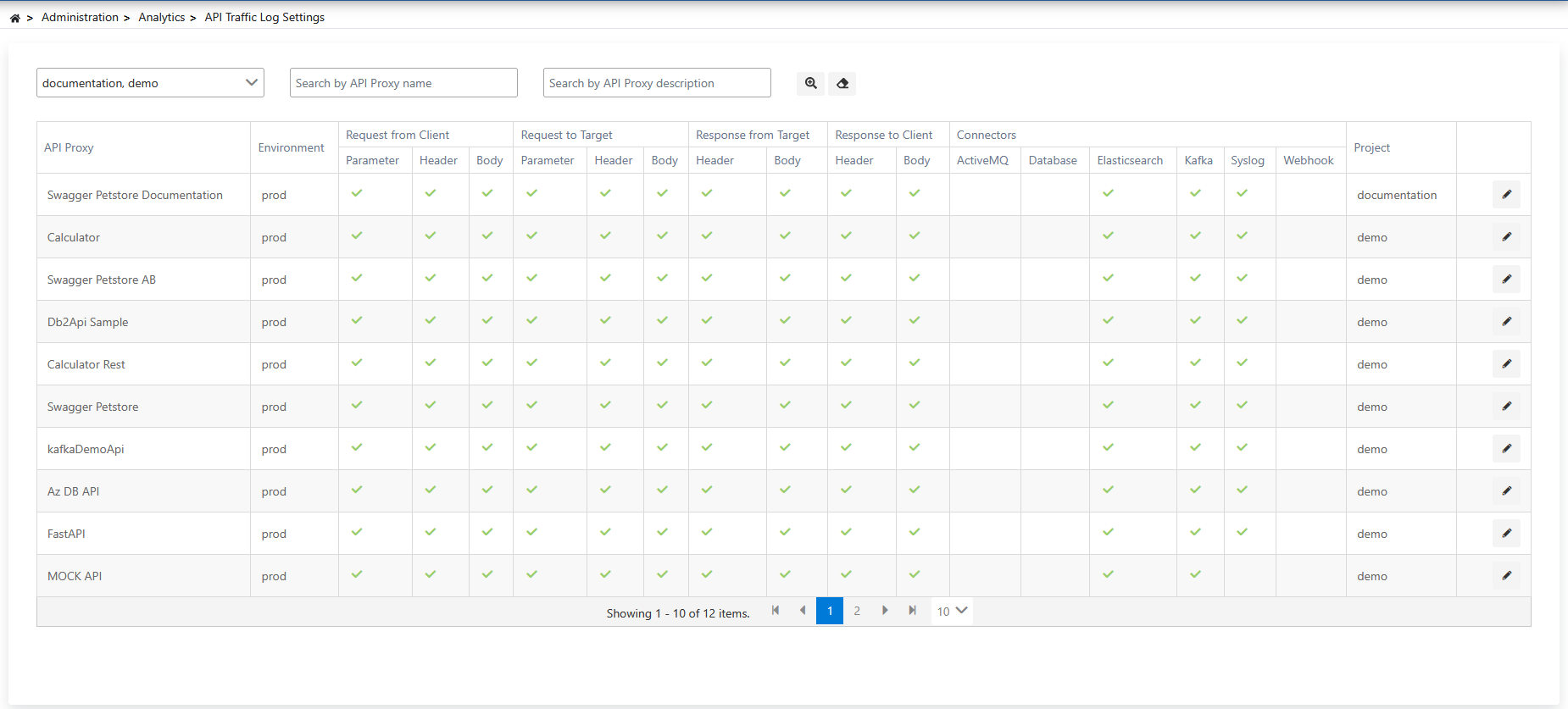
For API Proxies added before this setting, this setting must be enabled. This can be done either from the settings tab of the relevant API Proxy or from the **Administration → Analytics → API Traffic Log Settings** page.
After this setting is made, this connector will be active by default for all API Proxies added.
For API Proxies added before this setting, this setting must be enabled. This can be done either from the settings tab of the relevant API Proxy or from the **Administration → Analytics → API Traffic Log Settings** page.
 After the necessary settings are made, the API Traffic Log format sent via syslog will be as follows. Click here for the data structure documentation of API Traffic logs.
```json theme={null}
{
"@timestamp":"2025-06-11T08:19:48.810Z",
"aci":"da7082df-fbea-4352-a2a2-db72acf97f11",
"ei":"63ca7ed05c8e155862d99e11",
"pi":"68493b6e80f5de2a3c29c511",
"api":"68493bb680f5de2a3c29c611",
"apn":"Swagger Petstore Documentation",
"eat":"REST",
"aprp":"/documentation/petstore",
"apmi":"28bf6962-b1db-4339-bf15-bc3a6392639",
"apmn":"/pet/findByStatus",
"hr1ra":"XX.XXX.0.1",
"hr1hm":"GET",
"hr1pi":"/documentation/petstore/pet/findByStatus",
"uok":"anonymous",
"ra":"https://petstore.swagger.io/v2/pet/findByStatus?status=sold",
"rrc":0,
"rfc":0,
"trqpt":3,
"trspt":1,
"trt":325,
"tapt":329,
"sr1t":0,
"sr2t":4114,
"ch":false,
"sc":200,
"rt":"SUCCESS",
"fcrp":[{"k":"status","v":"sold"}],
"fcrh":[{"k":"X-Real-IP","v":"10.244.0.81"}],
"tbap":[{"k":"status","v":"sold"}],
"tbah":[{"k":"X-Real-IP","v":"10.244.0.81"}],
"fbarh":[{"k":"Connection","v":"close"}],
"fbarb":"[{\"id\":9223372036854748624,\"name\":\"Salma\",\"status\":\"sold\"}]",
"tch":[{"k":"Connection","v":"close"}],
"tcb":"[{\"id\":9223372036854748624,\"name\":\"Salma\",\"status\":\"sold\"}]"
}
```
After the necessary settings are made, the API Traffic Log format sent via syslog will be as follows. Click here for the data structure documentation of API Traffic logs.
```json theme={null}
{
"@timestamp":"2025-06-11T08:19:48.810Z",
"aci":"da7082df-fbea-4352-a2a2-db72acf97f11",
"ei":"63ca7ed05c8e155862d99e11",
"pi":"68493b6e80f5de2a3c29c511",
"api":"68493bb680f5de2a3c29c611",
"apn":"Swagger Petstore Documentation",
"eat":"REST",
"aprp":"/documentation/petstore",
"apmi":"28bf6962-b1db-4339-bf15-bc3a6392639",
"apmn":"/pet/findByStatus",
"hr1ra":"XX.XXX.0.1",
"hr1hm":"GET",
"hr1pi":"/documentation/petstore/pet/findByStatus",
"uok":"anonymous",
"ra":"https://petstore.swagger.io/v2/pet/findByStatus?status=sold",
"rrc":0,
"rfc":0,
"trqpt":3,
"trspt":1,
"trt":325,
"tapt":329,
"sr1t":0,
"sr2t":4114,
"ch":false,
"sc":200,
"rt":"SUCCESS",
"fcrp":[{"k":"status","v":"sold"}],
"fcrh":[{"k":"X-Real-IP","v":"10.244.0.81"}],
"tbap":[{"k":"status","v":"sold"}],
"tbah":[{"k":"X-Real-IP","v":"10.244.0.81"}],
"fbarh":[{"k":"Connection","v":"close"}],
"fbarb":"[{\"id\":9223372036854748624,\"name\":\"Salma\",\"status\":\"sold\"}]",
"tch":[{"k":"Connection","v":"close"}],
"tcb":"[{\"id\":9223372036854748624,\"name\":\"Salma\",\"status\":\"sold\"}]"
}
```