> ## Documentation Index
> Fetch the complete documentation index at: https://docs.apinizer.com/llms.txt
> Use this file to discover all available pages before exploring further.
# Healthcheck and Version Addresses
> You can check the health status and version information of Manager, Worker, Cache, Integration, and Portal modules in the Apinizer platform. You can perform healthcheck and version checks from within Kubernetes using internal service names or from outside Kubernetes using external access URLs. You can verify that the system is working correctly, diagnose potential issues early, and access critical information during troubleshooting processes.
## General Approach
You can perform healthcheck and version checks for Apinizer modules using two main methods:
Performed by sending requests through internal service names using the `curl` command from a pod within the cluster. This method is ideal for diagnosing intra-cluster communication problems.
If your modules are exposed externally (NodePort, LoadBalancer, Ingress), performed by sending requests directly to access URLs from your local machine or server. This method is useful for testing general accessibility and external integrations.
## Checks from Within Kubernetes
With this method, you can check the accessibility and status of Apinizer modules over the internal network within the Kubernetes cluster.
### Pods and Their Status
Check all Pods in the cluster and their status:
```bash theme={null}
kubectl get pods -A
```
This command outputs all pods in your system. In the example below, all pods are running healthily:
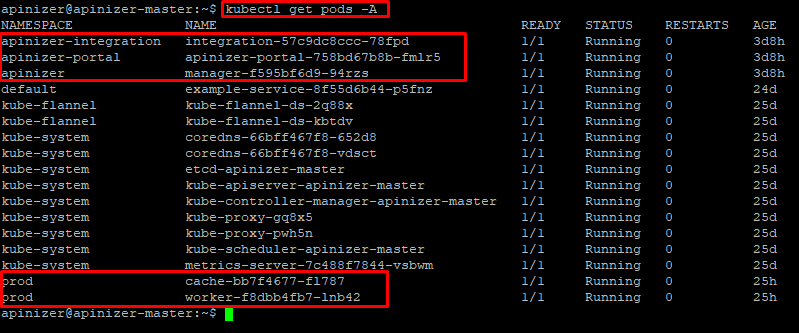 In the output, you can see that all Pods are in **Running** status and the **READY** column is `1/1`. This indicates that the pods are healthy.
### Service Information
Check the information of Services that enable communication between Pods:
```bash theme={null}
kubectl get svc -A
```
Sample output:
In the output, you can see that all Pods are in **Running** status and the **READY** column is `1/1`. This indicates that the pods are healthy.
### Service Information
Check the information of Services that enable communication between Pods:
```bash theme={null}
kubectl get svc -A
```
Sample output:
 The following table shows the service information for Apinizer modules:
| Module | Service Name | Service Type | Namespace | Internal Port | External Port (Exposed) |
| ----------- | ------------------------ | ------------ | -------------------- | ------------- | ----------------------- |
| Manager | manager | NodePort | apinizer | 8080 | 32080 |
| Worker | worker-http-service | NodePort | prod | 8091 | 30080 |
| Cache | cache-http-service | ClusterIp | prod | 8090 | - |
| Integration | integration-http-service | NodePort | apinizer-integration | 8092 | 30088 |
| Portal | apinizer-portal-service | NodePort | apinizer-portal | 8080 | 32090 |
Based on this information, URLs can be created in the following template and checked by sending curl from any pod within Kubernetes:
```bash theme={null}
http://..svc.cluster.local:/apinizer/management/health
```
### Module-Based Checks
**Healthcheck:**
```bash theme={null}
kubectl exec -it -n -- curl -X GET http://manager.apinizer.svc.cluster.local:8080/apinizer/management/health
```
**Version Information:**
```bash theme={null}
kubectl exec -it -n -- curl -X GET http://manager.apinizer.svc.cluster.local:8080/apinizer/management/version
```
**Healthcheck:**
```bash theme={null}
kubectl exec -it -n -- curl -X GET http://worker-http-service.prod.svc.cluster.local:8091/apinizer/management/health
```
**Version Information:**
```bash theme={null}
kubectl exec -it -n -- curl -X GET http://worker-http-service.prod.svc.cluster.local:8091/apinizer/management/version
```
**Healthcheck:**
```bash theme={null}
kubectl exec -it -n -- curl -X GET http://cache-http-service.prod.svc.cluster.local:8090/apinizer/management/health
```
**Version Information:**
```bash theme={null}
kubectl exec -it -n -- curl -X GET http://cache-http-service.prod.svc.cluster.local:8090/apinizer/management/version
```
**Healthcheck:**
```bash theme={null}
kubectl exec -it -n -- curl -X GET http://integration-http-service.apinizer-integration.svc.cluster.local:8092/apinizer/management/health
```
**Version Information:**
```bash theme={null}
kubectl exec -it -n -- curl -X GET http://integration-http-service.apinizer-integration.svc.cluster.local:8092/apinizer/management/version
```
**Healthcheck:**
```bash theme={null}
kubectl exec -it -n -- curl -X GET http://apinizer-portal-service.apinizer-portal.svc.cluster.local:8080/apinizer/management/health
```
**Version Information:**
```bash theme={null}
kubectl exec -it -n -- curl -X GET http://apinizer-portal-service.apinizer-portal.svc.cluster.local:8080/apinizer/management/version
```
## Checks from Outside Kubernetes
If your Apinizer modules are configured to be accessible from outside Kubernetes (for example, services of type `NodePort`, `LoadBalancer`, or through an `Ingress` Controller), you can send requests directly using an HTTP client like Postman or `curl` from your local terminal.
For Apinizer modules' services exposed externally with `NodePort` service type, access can be provided from any client through **Kubernetes Node IP addresses and Node Ports**. The following table presents the details of Apinizer services:
| Module | Service Name | Service Type | Namespace | Internal Port | External Port (Exposed) |
| ----------- | ------------------------ | ------------ | -------------------- | ------------- | ----------------------- |
| Manager | manager | NodePort | apinizer | 8080 | 32080 |
| Worker | worker-http-service | NodePort | prod | 8091 | 30080 |
| Cache | cache-http-service | ClusterIp | prod | 8090 | - |
| Integration | integration-http-service | NodePort | apinizer-integration | 8092 | 30088 |
| Portal | apinizer-portal-service | NodePort | apinizer-portal | 8080 | 32090 |
### Module-Based Checks
**Healthcheck:**
```bash theme={null}
curl "http:///apinizer/management/health"
```
**Version Information:**
```bash theme={null}
curl "http:///apinizer/management/version"
```
**Healthcheck:**
```bash theme={null}
curl "http:///apinizer/management/health"
```
**Version Information:**
```bash theme={null}
curl "http:///apinizer/management/version"
```
**Healthcheck:**
```bash theme={null}
curl "http:///apinizer/management/health"
```
**Version Information:**
```bash theme={null}
curl "http:///apinizer/management/version"
```
**Healthcheck:**
```bash theme={null}
curl "http:///apinizer/management/health"
```
**Version Information:**
```bash theme={null}
curl "http:///apinizer/management/version"
```
**Cache Module**: The Cache module is not exposed externally by default in installations (**ClusterIP** service type). Therefore, if you want to perform `health-check` and `version-check` directly from outside Kubernetes, the Cache service's port `8090` must be configured to be accessible externally.
The following table shows the service information for Apinizer modules:
| Module | Service Name | Service Type | Namespace | Internal Port | External Port (Exposed) |
| ----------- | ------------------------ | ------------ | -------------------- | ------------- | ----------------------- |
| Manager | manager | NodePort | apinizer | 8080 | 32080 |
| Worker | worker-http-service | NodePort | prod | 8091 | 30080 |
| Cache | cache-http-service | ClusterIp | prod | 8090 | - |
| Integration | integration-http-service | NodePort | apinizer-integration | 8092 | 30088 |
| Portal | apinizer-portal-service | NodePort | apinizer-portal | 8080 | 32090 |
Based on this information, URLs can be created in the following template and checked by sending curl from any pod within Kubernetes:
```bash theme={null}
http://..svc.cluster.local:/apinizer/management/health
```
### Module-Based Checks
**Healthcheck:**
```bash theme={null}
kubectl exec -it -n -- curl -X GET http://manager.apinizer.svc.cluster.local:8080/apinizer/management/health
```
**Version Information:**
```bash theme={null}
kubectl exec -it -n -- curl -X GET http://manager.apinizer.svc.cluster.local:8080/apinizer/management/version
```
**Healthcheck:**
```bash theme={null}
kubectl exec -it -n -- curl -X GET http://worker-http-service.prod.svc.cluster.local:8091/apinizer/management/health
```
**Version Information:**
```bash theme={null}
kubectl exec -it -n -- curl -X GET http://worker-http-service.prod.svc.cluster.local:8091/apinizer/management/version
```
**Healthcheck:**
```bash theme={null}
kubectl exec -it -n -- curl -X GET http://cache-http-service.prod.svc.cluster.local:8090/apinizer/management/health
```
**Version Information:**
```bash theme={null}
kubectl exec -it -n -- curl -X GET http://cache-http-service.prod.svc.cluster.local:8090/apinizer/management/version
```
**Healthcheck:**
```bash theme={null}
kubectl exec -it -n -- curl -X GET http://integration-http-service.apinizer-integration.svc.cluster.local:8092/apinizer/management/health
```
**Version Information:**
```bash theme={null}
kubectl exec -it -n -- curl -X GET http://integration-http-service.apinizer-integration.svc.cluster.local:8092/apinizer/management/version
```
**Healthcheck:**
```bash theme={null}
kubectl exec -it -n -- curl -X GET http://apinizer-portal-service.apinizer-portal.svc.cluster.local:8080/apinizer/management/health
```
**Version Information:**
```bash theme={null}
kubectl exec -it -n -- curl -X GET http://apinizer-portal-service.apinizer-portal.svc.cluster.local:8080/apinizer/management/version
```
## Checks from Outside Kubernetes
If your Apinizer modules are configured to be accessible from outside Kubernetes (for example, services of type `NodePort`, `LoadBalancer`, or through an `Ingress` Controller), you can send requests directly using an HTTP client like Postman or `curl` from your local terminal.
For Apinizer modules' services exposed externally with `NodePort` service type, access can be provided from any client through **Kubernetes Node IP addresses and Node Ports**. The following table presents the details of Apinizer services:
| Module | Service Name | Service Type | Namespace | Internal Port | External Port (Exposed) |
| ----------- | ------------------------ | ------------ | -------------------- | ------------- | ----------------------- |
| Manager | manager | NodePort | apinizer | 8080 | 32080 |
| Worker | worker-http-service | NodePort | prod | 8091 | 30080 |
| Cache | cache-http-service | ClusterIp | prod | 8090 | - |
| Integration | integration-http-service | NodePort | apinizer-integration | 8092 | 30088 |
| Portal | apinizer-portal-service | NodePort | apinizer-portal | 8080 | 32090 |
### Module-Based Checks
**Healthcheck:**
```bash theme={null}
curl "http:///apinizer/management/health"
```
**Version Information:**
```bash theme={null}
curl "http:///apinizer/management/version"
```
**Healthcheck:**
```bash theme={null}
curl "http:///apinizer/management/health"
```
**Version Information:**
```bash theme={null}
curl "http:///apinizer/management/version"
```
**Healthcheck:**
```bash theme={null}
curl "http:///apinizer/management/health"
```
**Version Information:**
```bash theme={null}
curl "http:///apinizer/management/version"
```
**Healthcheck:**
```bash theme={null}
curl "http:///apinizer/management/health"
```
**Version Information:**
```bash theme={null}
curl "http:///apinizer/management/version"
```
**Cache Module**: The Cache module is not exposed externally by default in installations (**ClusterIP** service type). Therefore, if you want to perform `health-check` and `version-check` directly from outside Kubernetes, the Cache service's port `8090` must be configured to be accessible externally.