

Test Environment
The benchmark was run across four isolated servers. Each component was deployed on a separate machine to prevent measurements from interfering with each other.Load Generator
- 6 vCPU · 12 GB RAM · 100 GB NVMe
- wrk2 load generation tool
- CentOS, single server
Upstream (Backend)
- 6 vCPU · 12 GB RAM · 100 GB NVMe
- High-capacity Go-based HTTP server (~70K RPS)
- Network RTT to load generator: ~0.5 ms
Elasticsearch
- 8 vCPU · 24 GB RAM · 200 GB NVMe
- Elasticsearch 8 — traffic log target
- Physically separate from the gateway server
API Gateway (Worker)
- 12 vCPU (Intel Broadwell @ 2.0 GHz) · 48 GB RAM · 250 GB NVMe
- Runs on Kubernetes
- Hosts Worker pods only
API Manager, MongoDB, and the Kubernetes master run on a separate server. These components have no direct impact on gateway performance; they only serve configuration data during the load test.
Gateway Resource Configurations (Tiers)
The gateway was tested under four different resource constraints on Kubernetes. Each tier represents a real-world production deployment scenario.The JVM engine is G1GC across all tiers. Heap size, Direct Memory, and GC region size are automatically determined by the entrypoint per tier (W1/W2: Heap 60%, W4/W8: Heap 65%). Backend I/O and traffic logging run on Virtual Threads (VT); HTTP dispatch uses Platform Threads (PT).
Methodology
Load Generator: wrk2
Tests were conducted with wrk2, a high-precision HTTP load generator designed to track actual request rates and eliminate coordinated omission bias. Core parameter — R=999999 Overload Method:R=999999 target rate is set far above the gateway’s maximum sustainable RPS. This means the measured value is the system’s true maximum throughput, not a pre-configured rate.
Test Parameters
Upstream Is Not a Bottleneck
The upstream server can sustain approximately 4–5× the gateway’s maximum throughput (~70,000 RPS). All observed limits originate from gateway capacity; the upstream is not a bottleneck. Network latency between the load generator and the gateway was measured at ~0.5 ms.ES Modes
- ES Off: Traffic logs are not written to Elasticsearch. Measures pure gateway overhead.
- ES On: An asynchronous traffic log is written to Elasticsearch for each request. Simulates a real production scenario.
Results
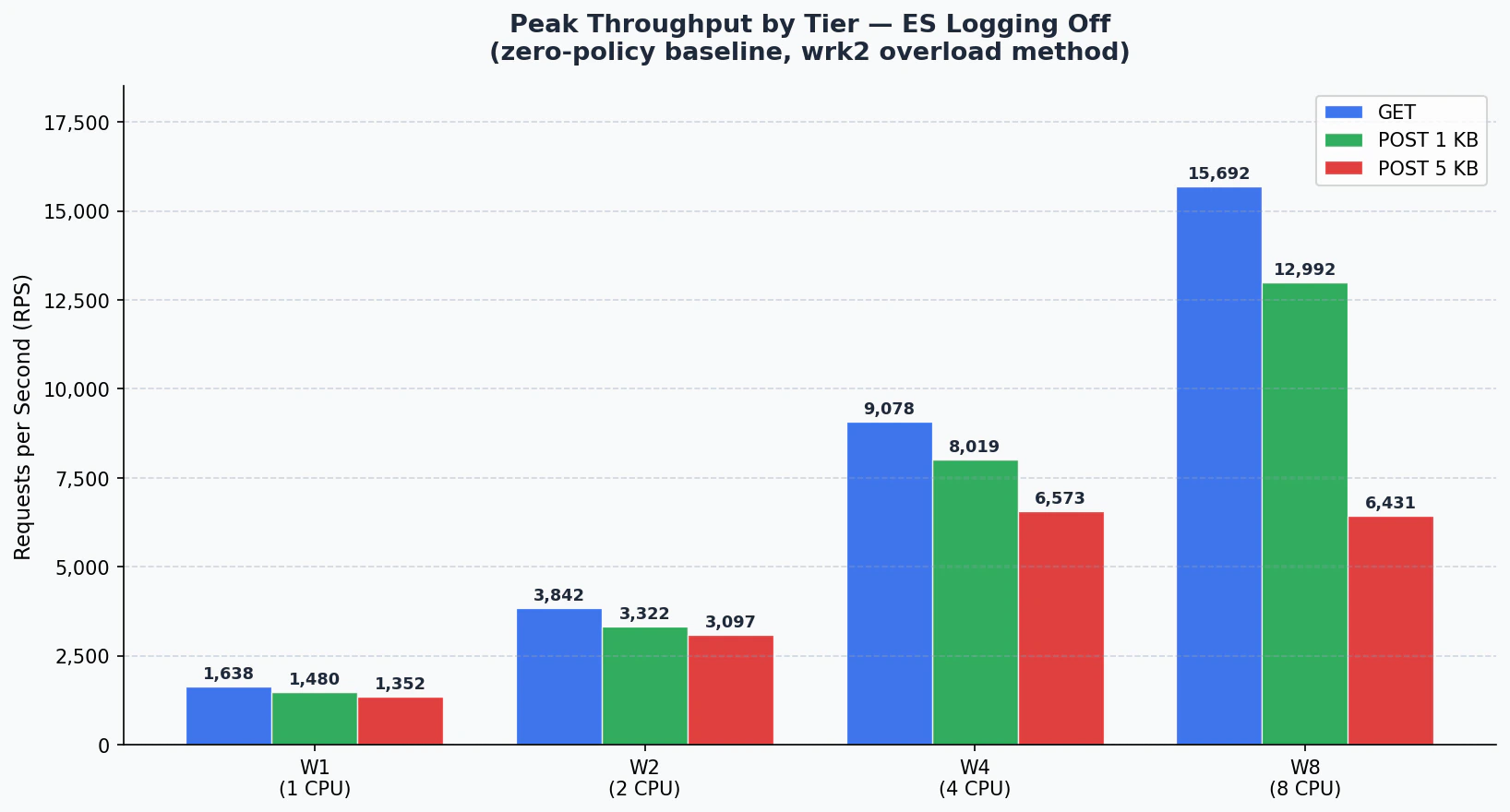
1. Peak Throughput Summary
Maximum RPS observed across all concurrency points for each tier and request type.ES Off
ES On
2. CPU Scaling Efficiency
RPS per CPU core and scaling ratio relative to W1 (ES Off, GET).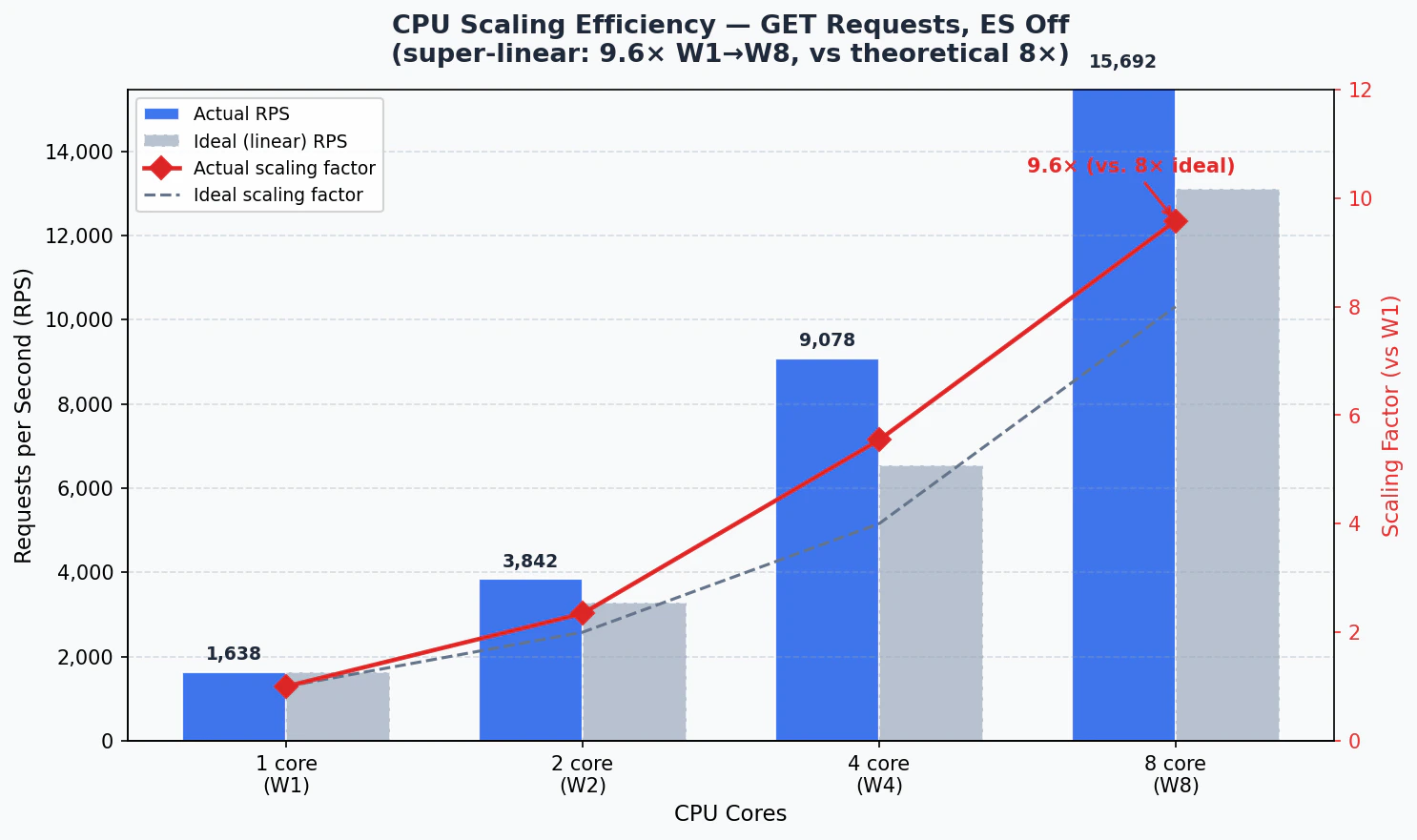
Total increase from W1 to W8 is 9.6×. Exceeding the theoretical ideal of 8× (120% efficiency) demonstrates that the gateway achieves super-linear scaling through its shared connection pool and virtual thread model.
3. ES On vs. ES Off Comparison
- GET
- POST 1KB
- POST 5KB
4. Concurrency Curves (Per Tier)
- W1 (1 CPU / 2GB)
- W2 (2 CPU / 2GB)
- W4 (4 CPU / 4GB)
- W8 (8 CPU / 8GB)
GET
POST 1KB
POST 5KB
5. JVM Diagnostics
- ES Off
- ES On
Blocked thread count remained 0 across all tiers and modes. No deadlocks or resource contention occurred.
Policy Performance Impact
Benchmark results reflect zero-policy routing. In real production scenarios, each policy adds its own cost depending on its mechanism. These costs fall into two categories: CPU load and external latency.CPU-Intensive Policies — Reduce Throughput
These policies perform computation on the gateway for each request. CPU is consumed directly and can be compensated by scaling up the tier or adding horizontal replicas.XML / XSD Schema Validation
XML / XSD Schema Validation
The request or response body is parsed and validated against a loaded XSD schema on every call. Schema complexity and message size increase CPU consumption linearly.For example, a complex XSD schema on a 50KB XML body can reduce throughput by 30–60% on its own. If the schema is simple and messages are small, the impact remains limited.
XML Transformation (XSLT)
XML Transformation (XSLT)
XSLT runs a full XML parse and template transformation cycle on the gateway for every request. A complex XSLT template alone is sufficient to double CPU consumption.Processing cost differs significantly between XSLT 1.0 and 2.0. W4 or higher tiers are recommended for large messages or frequently triggered endpoints.
JSON Schema Validation
JSON Schema Validation
The JSON equivalent of XSD validation. The JSON body is parsed and traversed against defined JSON Schema rules on each request. Schema depth (number of nested objects) and message size are the primary CPU drivers.
Encryption / Decryption (WS-Security, JWE)
Encryption / Decryption (WS-Security, JWE)
XML encryption, WS-Security body encryption, or JWE token decryption involve cryptographic operations that significantly increase CPU usage. Asymmetric encryption (RSA) carries a much higher cost than symmetric alternatives (AES).
Digital Signature and Verification (WS-Security, JOSE)
Digital Signature and Verification (WS-Security, JOSE)
Computing or verifying a signature per request requires cryptographic operations. RSA-2048 or RSA-4096 based signatures place a noticeable throughput burden compared to HMAC-based alternatives. Algorithm selection matters for high-traffic endpoints.
Content Filtering
Content Filtering
Body content is scanned against regex or custom rules, evaluating the full message on every request. As rule count grows and messages get larger, CPU cost escalates non-linearly.
Script Policy (Groovy)
Script Policy (Groovy)
Groovy scripts run on the JVM with startup compilation cost reduced through script caching. However, script complexity directly determines CPU usage. Loop-heavy, parse-intensive, or computation-heavy scripts can substantially reduce throughput.
Policies That Add External Latency — Increase Response Time
These policies connect to an external system to perform work. Gateway CPU is largely idle while waiting; response time increases by the round-trip to the external system. Scaling up CPU does not reduce this latency — the external system’s performance and network RTT are the controlling factors.LDAP Authentication
LDAP Authentication
Each request connects to an LDAP server to verify username and password. The network round-trip to the LDAP server (typically 1–10 ms) is added to every request. Without connection pooling, connection setup cost also applies per request.If the LDAP server is in the same datacenter, impact is relatively contained. Across datacenters or in cloud environments, latency can reach tens of milliseconds and throughput drops disproportionately.
OAuth2 Token Introspection / OIDC
OAuth2 Token Introspection / OIDC
The token is sent to the Authorization Server for validation on every request. Response time depends entirely on the AS’s response speed. Without token caching, this creates significant pressure on both throughput and latency.With token caching enabled, cost can be substantially reduced depending on the cache miss rate. Cache TTL should be set carefully based on business requirements.
JWT (Remote JWKS Validation)
JWT (Remote JWKS Validation)
If the signing key must be fetched from a remote JWKS endpoint, each key retrieval is a network call. When JWKS caching is enabled, this cost is largely eliminated; no additional latency occurs as long as the cache remains valid.
SAML Authentication
SAML Authentication
When SAML assertions need to be validated against an IdP (Identity Provider), an external connection is unavoidable. WS-Trust or SOAP-based IdP calls add both network latency and processing cost.
Backend Authentication (Basic / API Key / Token)
Backend Authentication (Basic / API Key / Token)
If authentication credentials forwarded to the backend service need to be renewed or validated per request (e.g., dynamic token retrieval), an additional external call is made. No cost is incurred when static credentials are used.
API Call Policy
API Call Policy
Calling another API within the policy pipeline adds the called API’s response time as latency. Multiple sequential API calls multiply latency. This cost can be minimized through conditional execution and result caching.
Low-Impact Policies
The following policies add minimal CPU and zero external latency on the gateway. Their impact on performance is generally negligible even in high-traffic environments.IP Allow / Block List
Incoming IP is compared against an in-memory list. Completes in microseconds.
Rate Limiting / Quota
Counting against local counters or shared cache. Pure in-memory operation when no external cache integration is present.
Header Manipulation
Adding, removing, or modifying specific headers are string operations; CPU cost is negligible.
Basic Authentication (Local)
When credentials are defined on the gateway without an external LDAP/directory service, validation is entirely in-memory.
Analysis
CPU Scaling: Super-Linear Efficiency
CPU Scaling: Super-Linear Efficiency
GET throughput increased 9.6× from W1 to W8. Exceeding the theoretical ideal of 8× (120% efficiency) demonstrates super-linear scaling made possible by the shared connection pool and Java virtual thread model working together.
Elasticsearch Logging Overhead
Elasticsearch Logging Overhead
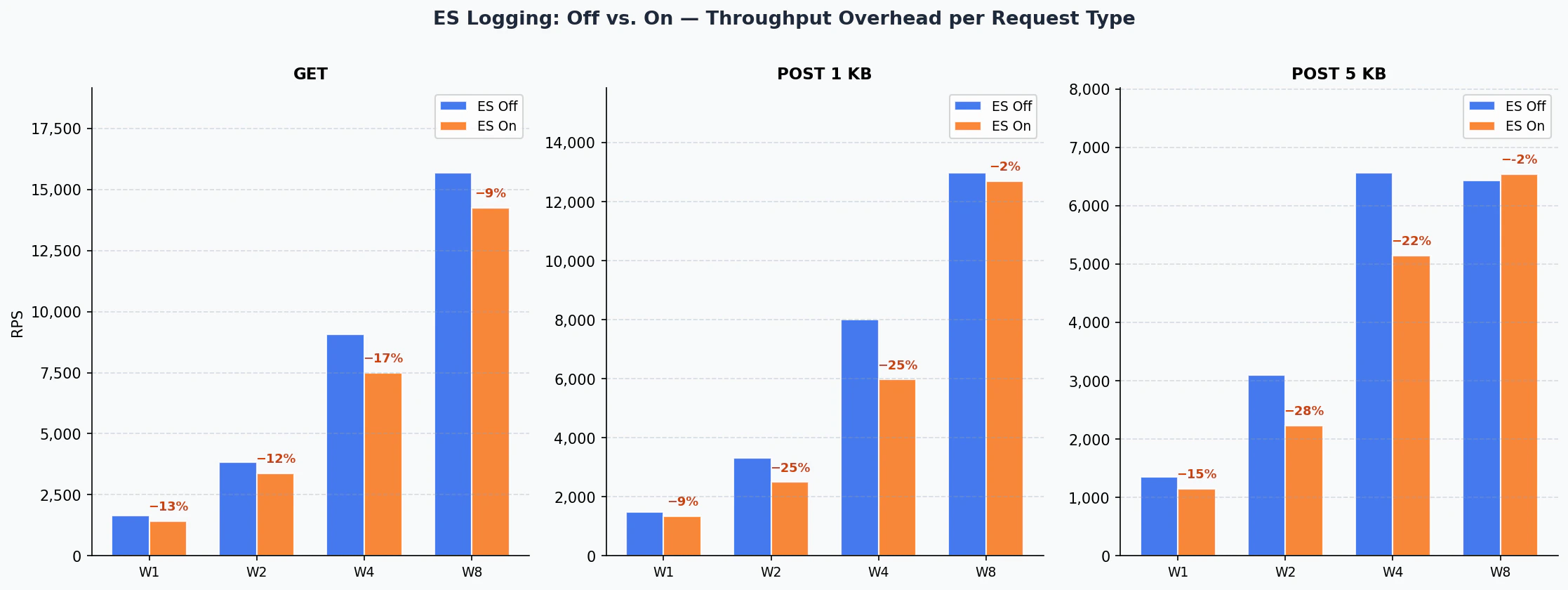
ES logging overhead decreases disproportionately as tier size grows. At W8, overhead is just 9% for GET and 2% for POST 1KB. The asynchronous processing capacity of 8 CPUs largely absorbs Elasticsearch write latency.
Architectural Recommendation for Policy Design
Architectural Recommendation for Policy Design
Limit CPU-intensive policies (XSLT, encryption, schema validation) to only the necessary endpoints using conditional execution. Back latency-adding policies (LDAP, OAuth2 introspection) with token or result caching. Applying both measures together eliminates the majority of policy cost.
Capacity Planning Guide
Capacity Planning Guide
The values below represent the zero-policy baseline (routing + ES logging only). Actual capacity with policy load will be lower.
Cache Performance
The Cache component stores API responses in memory, serving repeated requests directly without forwarding them to the backend. The results below show the maximum capacity of the cache component for GET (read) and PUT (write) operations across different resource configurations.The Cache component is Hazelcast-based and runs with the ZGC garbage collector. JVM parameters are automatically determined by the entrypoint for each tier. Test methodology is the same as the gateway benchmark (R=999999 overload, wrk2).
Cache Resource Configurations
Peak Throughput
CPU Scaling Efficiency
Total increase from W1 to W8 is 6.3× for GET and 6.6× for PUT, demonstrating near-linear scaling relative to CPU increase (8×). PUT operations reach near-parity with GET at W8, showing that write bottlenecks are eliminated at higher CPU counts.
Cache Capacity Planning
Benchmark Version: v1 · Test Date: March 27, 2026 · Methodology: R=999999 overload, 300 s × 1 run · Environment: Kubernetes (isolated pod), Hazelcast 5.5 + Java 25 ZGC
Next Steps
Capacity Planning
Review hardware requirements and sizing guidance
Deployment Topologies
Explore deployment topologies and high availability options
What Is a Policy?
Learn about policy types and the application mechanism
Message Processing and Policy Execution
Understand the gateway’s request flow and policy ordering
Benchmark Version: v8 · Test Date: March 14, 2026 · Methodology: R=999999 overload, 300 s × 3 runs · Environment: Kubernetes (isolated pod), Undertow + Java 25 Virtual Threads