

General Approach
You can perform healthcheck and version checks for Apinizer modules using two main methods:- From Within Kubernetes
- From Outside Kubernetes
Performed by sending requests through internal service names using the
curl command from a pod within the cluster. This method is ideal for diagnosing intra-cluster communication problems.Checks from Within Kubernetes
With this method, you can check the accessibility and status of Apinizer modules over the internal network within the Kubernetes cluster.Pods and Their Status
Check all Pods in the cluster and their status: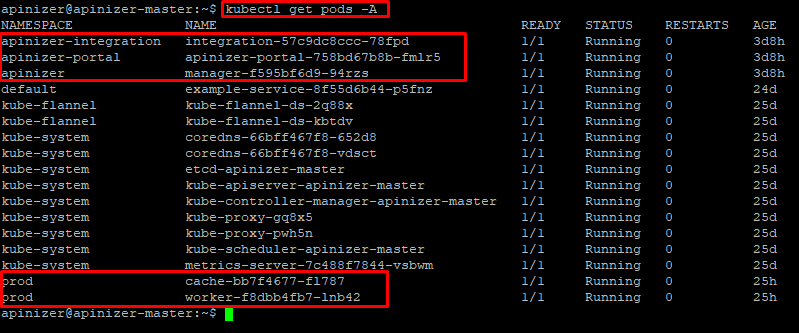
In the output, you can see that all Pods are in Running status and the READY column is
1/1. This indicates that the pods are healthy.Service Information
Check the information of Services that enable communication between Pods:
Based on this information, URLs can be created in the following template and checked by sending curl from any pod within Kubernetes:
Module-Based Checks
Manager
Manager
Healthcheck:Version Information:
Worker
Worker
Healthcheck:Version Information:
Cache
Cache
Healthcheck:Version Information:
Integration
Integration
Healthcheck:Version Information:
Portal
Portal
Healthcheck:Version Information:
Checks from Outside Kubernetes
If your Apinizer modules are configured to be accessible from outside Kubernetes (for example, services of typeNodePort, LoadBalancer, or through an Ingress Controller), you can send requests directly using an HTTP client like Postman or curl from your local terminal.
NodePort service type, access can be provided from any client through Kubernetes Node IP addresses and Node Ports. The following table presents the details of Apinizer services:
Module-Based Checks
Manager
Manager
Healthcheck:Version Information:
Worker
Worker
Healthcheck:Version Information:
Integration
Integration
Healthcheck:Version Information:
Portal
Portal
Healthcheck:Version Information: