

Introduction
API integration provides the ability to create workflows by seamlessly connecting one or more endpoints.Pre-Installation Steps
Before starting the installation of Apinizer API Integration, the following should be noted:Apinizer Installation
Learn API Manager installation
Installation Steps
API Integration Installation is done in two ways.- If Kubernetes management is done through Apinizer, you can install API Integration through API Manager.
- If Kubernetes management is not done through Apinizer, manual installation can be done to Kubernetes and then connection can be established with API Manager.
API Integration Installation
If API Integration Installation Will Be Done Through API Manager
For API Integration installation through API Manager, the following section must be active in the General Settings menu.
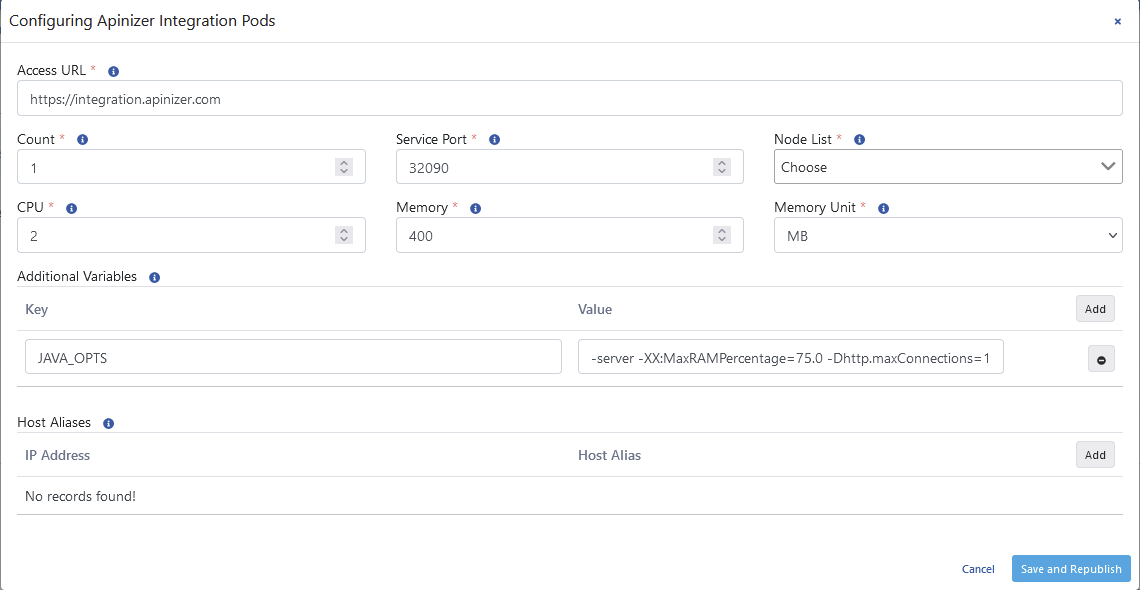
API Integration installation dialog - Configuration of required settings

Kubernetes Resources page - API Integration enablement
General Settings page - API Integration module configuration
Additional VariablesWhen configuring the Java Options setting in the Additional Variables field, the following warning should be considered:
- When
-Xmxand-Xmsparameters are used, automatic heap sizing is disabled. - When
-Xmxand-Xmsparameters are used, automatic heap sizing is disabled. - Apinizer sets JVM Heap values to use 75.0% of the memory given to the container since it runs inside the container.
- UseContainerSupport is active by default.
- Old flags
-XX:{Min|Max}RAMFractionare now deprecated. There is a new-XX:MaxRAMPercentageflag that takes a value between 0.0 and 100.0 and defaults to 75.0. Therefore, if there is a 1 GB memory limit, the JVM heap is limited to ~ 750 MB by default.
If API Integration Installation Will Not Be Done Through API Manager
A namespace is created for Integration.
Task Flows menu - API Integration task flows management
Next Steps
API Integration Overview
Get detailed information about API Integration
Multi-Region Installation
Learn Multi-Region installation
API Portal Installation
Learn API Portal installation
Apinizer Installation
Learn Apinizer installation