

Shared Data Model Concept
Shared Data Model enables you to create reusable schema definitions in API Designer’s spec first approach. By creating shared schema models that define data types in message content, you can use model inheritance and shared components with JSON Schema references. Created models can be imported and used within the Spec Design Editor.Reusable Schemas
Shared schema models are createdThe same data structure can be used in multiple APIs.
Model Inheritance
Model inheritance and referencesModel relationships with JSON Schema references.
Shared Components
Shared components are usedCommon data types are managed centrally.
Spec Design Editor Integration
Usage in Spec Design EditorCreated models can be imported into API Specs.
Shared Data Model Features
Schema Design
Schema design and property management in shared data models:Data Type Definitions
Data Type Definitions
- Basic data types (string, integer, number, boolean)
- Complex data types (object, array)
- Enum values
- Format definitions
Schema Properties
Schema Properties
- Property definitions
- Required fields
- Read-only and write-only behaviors
- Validation rules
Model References
Model References
- Model references with $ref
- Model inheritance
- Shared components
- JSON Schema references
Data Model Management
Creation and management of shared data models:Model Creation
New shared data models are created
- Defining name and description
- Creating schema structure
- Adding example values
Schema Properties
Properties are defined within the schema
- Adding and editing properties
- Determining type and format
- Validation rules
Model Import
Models are used in Spec Design Editor
- Model reference within Spec
- Shared component usage
- Reusability
Creating Shared Data Model
A new Data Model can be created by clicking the New (Create) button in the upper right of the list interface.
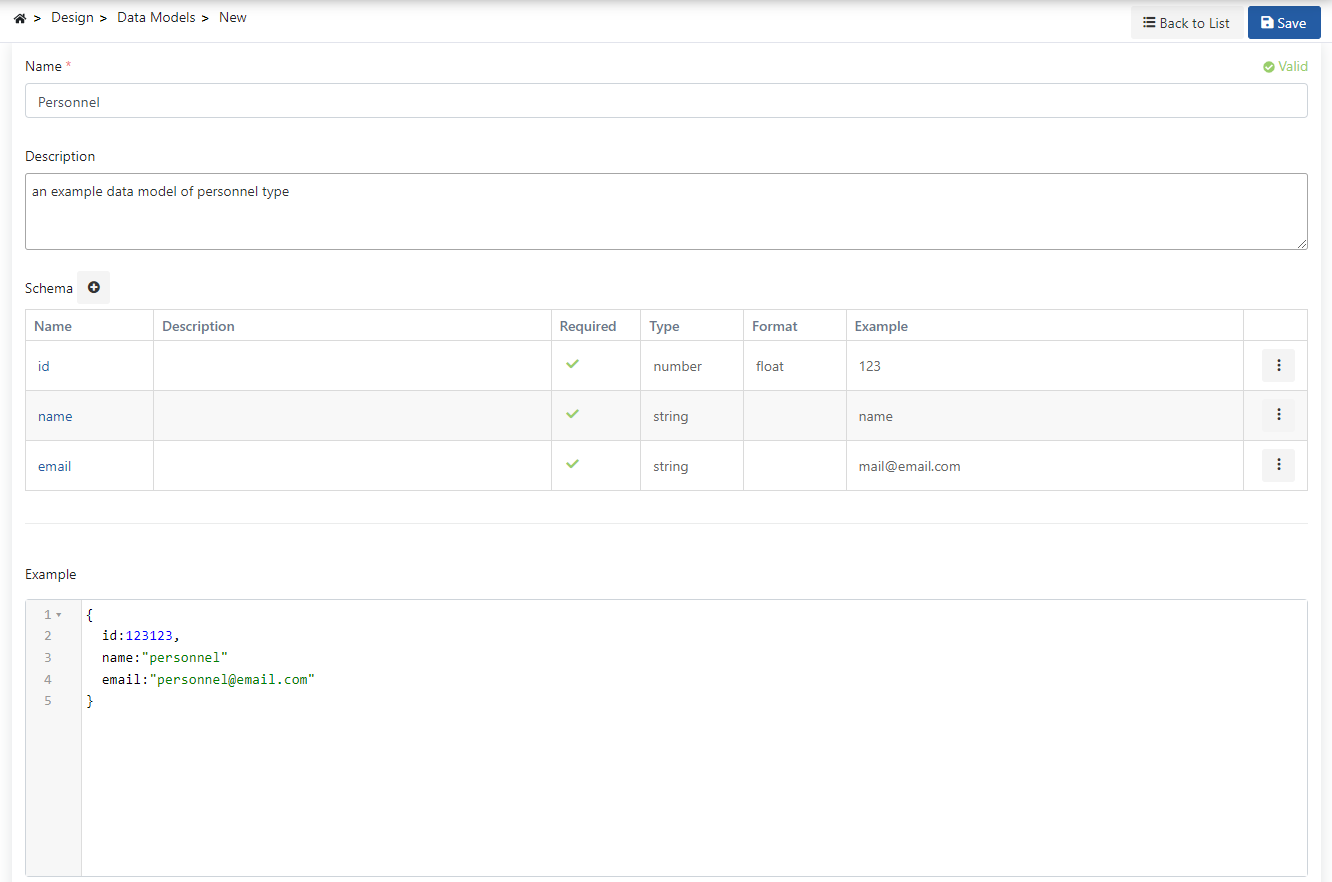
Adding Schema Property
You can define the structure of your data model by adding properties within the schema. The Schema Property addition settings are shown in the following image: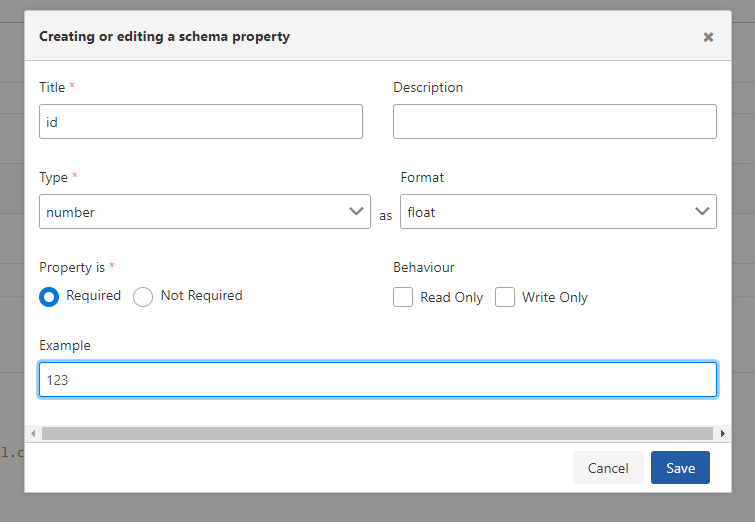
Shared Data Model Usage Scenarios
Usage scenarios of shared data models in spec first approach:Creating Reusable Schema
- Creating shared data model
- Defining schema properties
- Importing model in Spec Design Editor
- Using in multiple API Specs
- Central update and management
Model Inheritance and References
- Creating basic data models
- Establishing relationships with model references
- Model inheritance with $ref
- Using shared components
- Consistent data structures
Relationship Between Shared Data Model and Spec Design Editor
Shared Data Models work integrated with the Spec Design Editor. Workflow:1. Model Creation
Model is created on Shared Data Models pageSchema properties and structure are defined.
2. Model Definition
Schema properties and validation rules are determinedProperties, types, and formats are defined.
3. Usage in Spec
Model is imported in Spec Design EditorModel is used with $ref references.
4. Reuse
Model can be used in multiple API SpecsCentral management and consistency are ensured.
This integration between Shared Data Models and Spec Design Editor enables you to create consistent and centrally managed data structures with reusable schema definitions in spec first approach. Models are created once and can be used in multiple API Specs.
Shared Data Model Advantages
Advantages provided by reusable schema definitions:Reusability
- Same schema is used in multiple APIs
- Central schema management
- Consistent data structures
Model Inheritance
- Model references with $ref
- Model relationships and inheritance
- Shared components
Central Management
- Schema update from a single place
- Changes reflected to all APIs
- Version control
Standard Compliance
- Compliance with JSON Schema standards
- OpenAPI/Swagger compatibility
- Tool support
Next Steps
Spec Design Editor
Spec Design Editor details
API Proxy Creation
API Proxy creation
JSON Schema Validation
JSON schema validation policy
API Designer
Learn about the API Designer component