

Overview
What is its Purpose?
- Standardizes authentication of SOAP services by managing WS-Trust 1.3 compatible Security Token Service calls with centralized policy.
- Provides operational flexibility by matching environment-based username/password pools according to conditions.
- Accelerates service provider work by configuring WS-Addressing headers (Action, To, ReplyTo, etc.) from a single point.
- Reduces unnecessary STS traffic and delays with token caching and timestamp settings.
Working Principle
- Request Arrival: For each HTTP/HTTPS request arriving at the API Gateway, the source IP address of the request is identified.
- Policy Check: If the WS Security STS Token policy is active, the system checks in the following order:
- Is a Condition defined? If so, is the condition met?
- Is the policy active (active=true)?
- Is a Variable used or is Apinizer default used?
- WS Security STS Token Validation: According to
configureIssueTokensetting, either WS-Trust Issue request is sent to defined STS service endpoint or external token is obtained viaapiEndPointURL; user information and WS-Addressing headers are injected into the request. - Decision Making:
- Match Found: Token is obtained, used from cache if cache period has not expired, added to SOAP request.
- No Match: Token cannot be generated; SOAP headers of request are not modified.
- Error Handling: Customizable HTTP status code and error message are returned for requests that do not comply with the policy rule.
Features and Capabilities
Basic Features
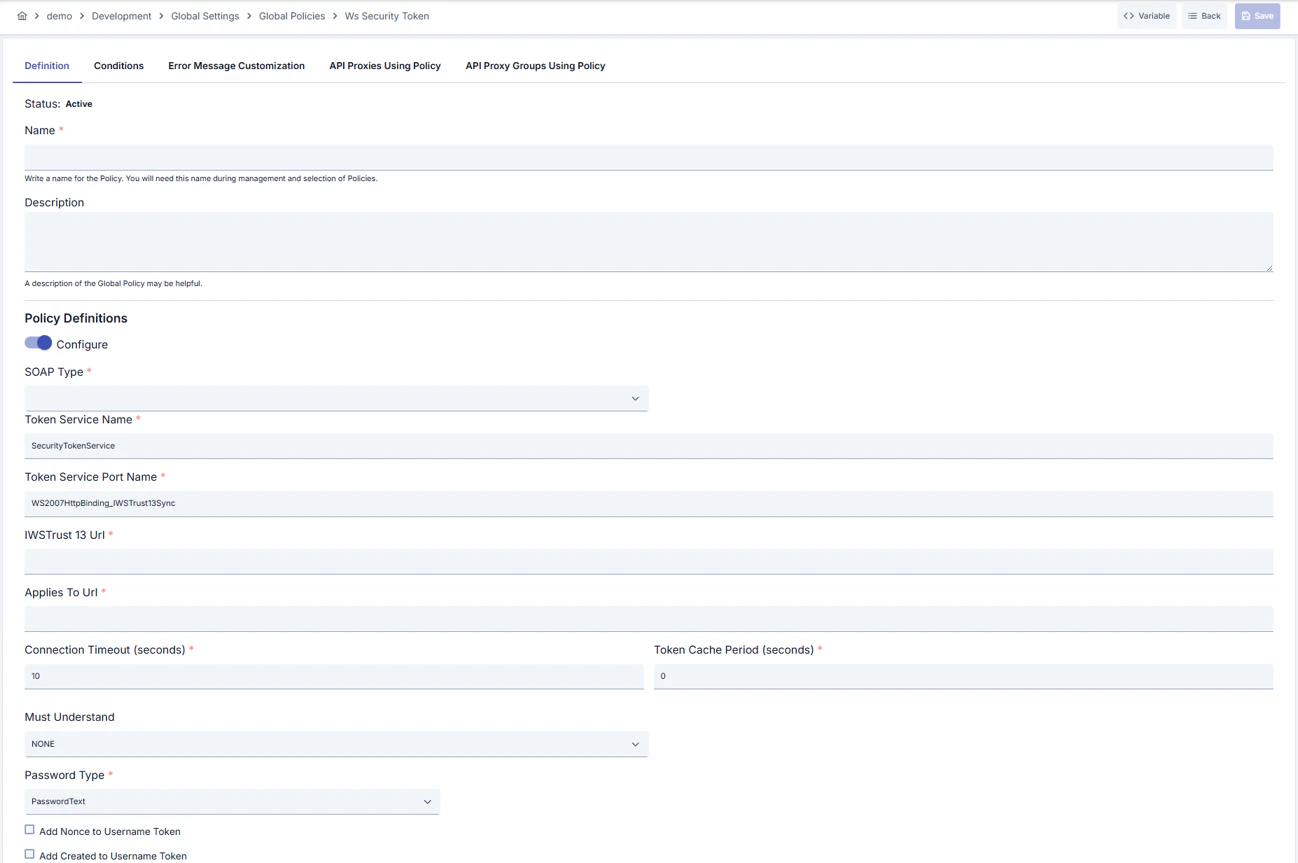
- Configuration Mode Selection: Provides options to generate STS token through Apinizer or call external Endpoint with
configureIssueToken. - SOAP Version Support: Guarantees service compatibility by selecting between SOAP 1.1 and SOAP 1.2.
- Token Service Parameters: Manages STS integration in detail with Token service name, port name, WS-Trust 1.3 URL and AppliesTo URL fields.
- Active/Passive Status Control: Easily change the active or passive status of the policy (active/passive toggle). In passive state, the policy is not applied but its configuration is preserved.
- Condition-Based Application: Determine when the policy will be applied by creating complex conditions with Query Builder (e.g., only for specific endpoints or header values).
Advanced Features
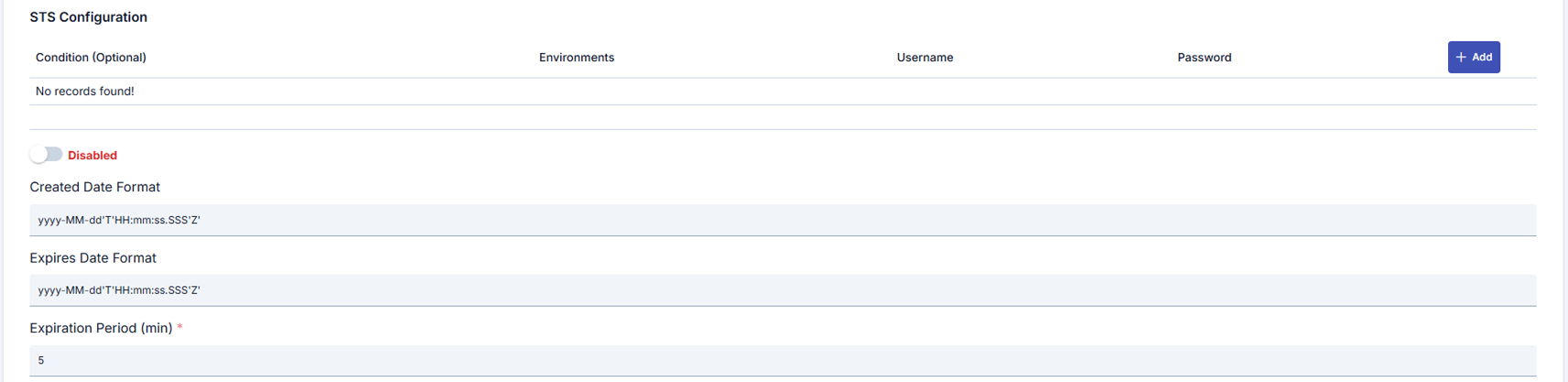
- Token Caching and Renewal: Prevents unnecessary STS calls by determining token renewal threshold with
tokenCachePeriodandexpirationPeriod. - WS-Addressing Setting Engine: Manages WSA Action, To, ReplyTo and MessageId fields in detail through
app-soap-api-method-wsa-settingscomponent. - Conditional Credential Pool: Prevents wrong credential usage in wrong environment by associating multiple username/passwords with Query Builder conditions and environment tags.
- Export/Import Feature: Export policy configuration as a ZIP file. Import to different environments (Development, Test, Production). Version control and backup capability.
- Policy Group and Proxy Group Support: Manage multiple policies within Policy Group. Bulk policy assignment to Proxy Groups. Centralized update and deploy operations.
- Deploy and Versioning: Deploy policy changes to live environment. See which API Proxies use it (Policy Usage). Proxy Group and Policy Group usage reports.
Usage Scenarios
Configuring Policy Parameters
In this step, users can create a new policy or configure existing policy parameters to define access rules. The defined parameters directly affect how the policy works (e.g., which IPs will be allowed, geographical restrictions, conditional activations, etc.). This allows the policy to be customized according to organization-specific requirements and managed centrally.Creating a New WS Security Token Policy
Configuration Steps
For the description of Conditions and Error Message Customization panels, you can review the Conditions and Error Message Customization sections on the What is Policy? page.
For a complete guide on all layers, priority order and scenario examples of the error message configuration system, see the Error Message Configuration Guide page.