

Overview
The TCP Connectivity Test performs a connection attempt from the selected Gateway Runtime environment to a specifiedhost:port, verifying network reachability. The test is executed directly on the Gateway Runtime pod, allowing you to observe real network constraints (firewall rules, DNS access, port availability) as they exist in that environment.
The environment from which the test is performed is selected in the Environment field. The connection is made from a pod belonging to the selected environment.
New Test
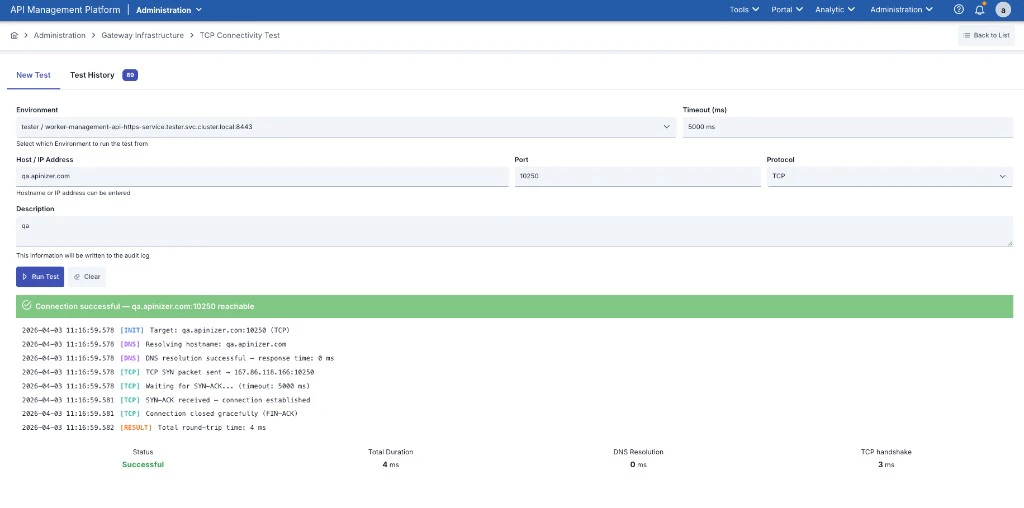
Form Fields
Running the Test
Fill in the form fields and click the Run Test button. The test cannot be started without selecting an environment, entering a host/port, or providing a description.Test Result
When the test completes, a result panel appears showing the connection status, a step-by-step log stream, and summary metrics.Connection Statuses
Step-by-Step Log
Each test produces a four-phase log:Summary Metrics
If DNS resolution succeeds but the TCP connection cannot be established, the issue is at the network layer (firewall rule, closed port, etc.).
Test History
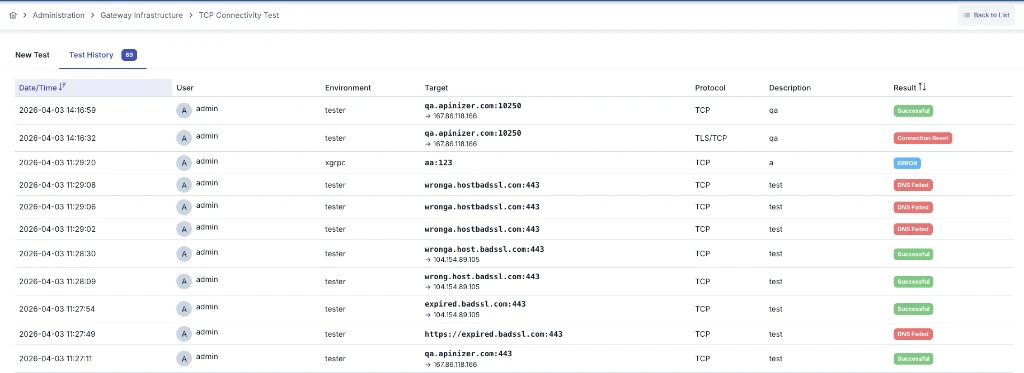
For information on cleaning up history records, see the TCP Connectivity Test History Collection Cleanup page.