

Error Message Priority Order
When an error occurs, the Gateway determines which error response to return according to the following priority order:| Priority | Source | Description |
|---|---|---|
| 1 (Highest) | Per-error custom message template | Template-based custom message builder defined for a specific error type within the policy |
| 2 | Policy-level custom message template | Template-based custom message builder defined at the policy level (for all error types) |
| 3 | Error Response Rules | Condition-based response rules — return different error responses based on request attributes (path, header, method, etc.) |
| 4 | Per-error field customization | Per-row Customized Message, Customized Error Code, Customized HTTP Status Code fields within the policy |
| 5 | Platform-wide error message customization (This page) | Customizations made from this page |
| 6 (Lowest) | Default error message | Default system error message |
#{error.defaultErrorCode}, #{request.uri}, #{message.correlationId}. For details, see What is Policy? — Error Message Customization.Customizable Fields
HTTP Status Code, Error Code and Error Message fields in the error message can be customized. Customization can be made by clicking on the relevant field’s cell on the screen.Configuration Fields
| Field | Description |
|---|---|
| HTTP Status Code (HTTP Status Code) | The default HTTP status code thrown from the policy. |
| Error Code (Error Code) | The default error code thrown from the policy. |
| Original Message (Original Message) | The default error message thrown from the policy. An info icon (info-circle) next to this field displays a tooltip describing when this error occurs when hovered. |
| Customized HTTP Status Code (Customized HTTP Status Code) | A different HTTP status code than the default that is desired to be shown to the user when the relevant error is thrown can be created. |
| Customized Error Code (Customized Error Code) | A different error code than the default that is desired to be shown to the user when the relevant error is thrown can be created. |
| Customized Message (Customized Message) | A different error message than the default that is desired to be shown to the user when the relevant error is thrown can be created. |
| Customize | A template-based custom message builder can be opened for each error row. When this button is clicked, a dialog opens where the custom message template can be enabled and configured for the specific error type. |
Per-Error Custom Message Template
The Customize button on each error row in the table allows defining a custom message template specific to that error type. This operates at Priority level 1 (highest priority) in the priority order. When the Customize button is clicked, the dialog that opens contains:| Field | Description |
|---|---|
| Enable Template-Based Message Builder | Activates/deactivates the custom message template for this error type. |
| Message Template | A free-text template is written. Placeholders such as #{error.defaultErrorCode}, #{request.uri}, #{message.correlationId} can be used. |
| Content-Type | The content type of the response is selected (JSON, XML, Plain Text). |
| HTTP Status Code | The HTTP status code to be returned when this error occurs is set. |
Error Response Rules
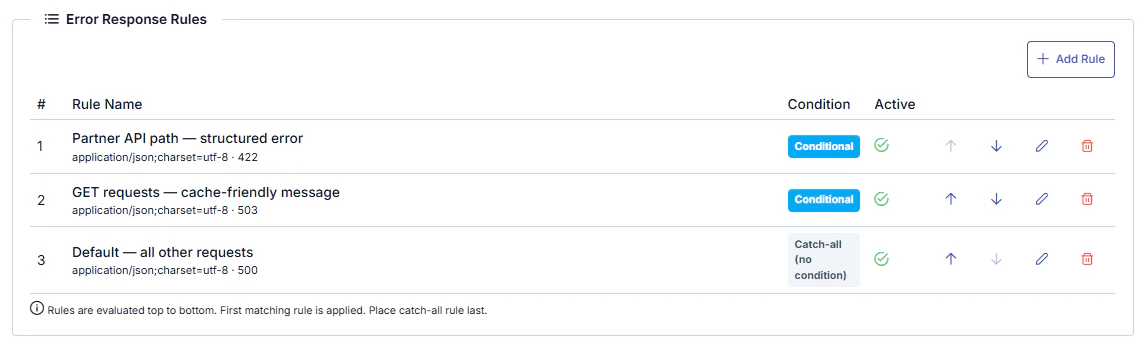
You can define multiple response rules for each error row to return different error responses based on request attributes. Rules are condition-based and match against criteria such as request path, header values, HTTP method, and more.How Rules Work
- When an error occurs, the defined rules are evaluated in order (by sequence number)
- The template of the first matching rule is applied
- If no rule matches, the next priority level is evaluated
- A rule without a condition acts as a catch-all (default rule)
Rule List
When the Customize button is clicked, the Error Response Rules table appears at the top of the dialog:| Field | Description |
|---|---|
| Order | Evaluation order of the rule (lower number = higher priority) |
| Name | Descriptive name of the rule |
| Condition | The condition under which the rule applies. Rules without conditions are shown as “Catch-all” |
| Content-Type | Content type of the error response (JSON, XML, Plain Text, etc.) |
| HTTP Status Code | HTTP status code to return when the error occurs |
| Active | Active/inactive status of the rule |
Rule Editing
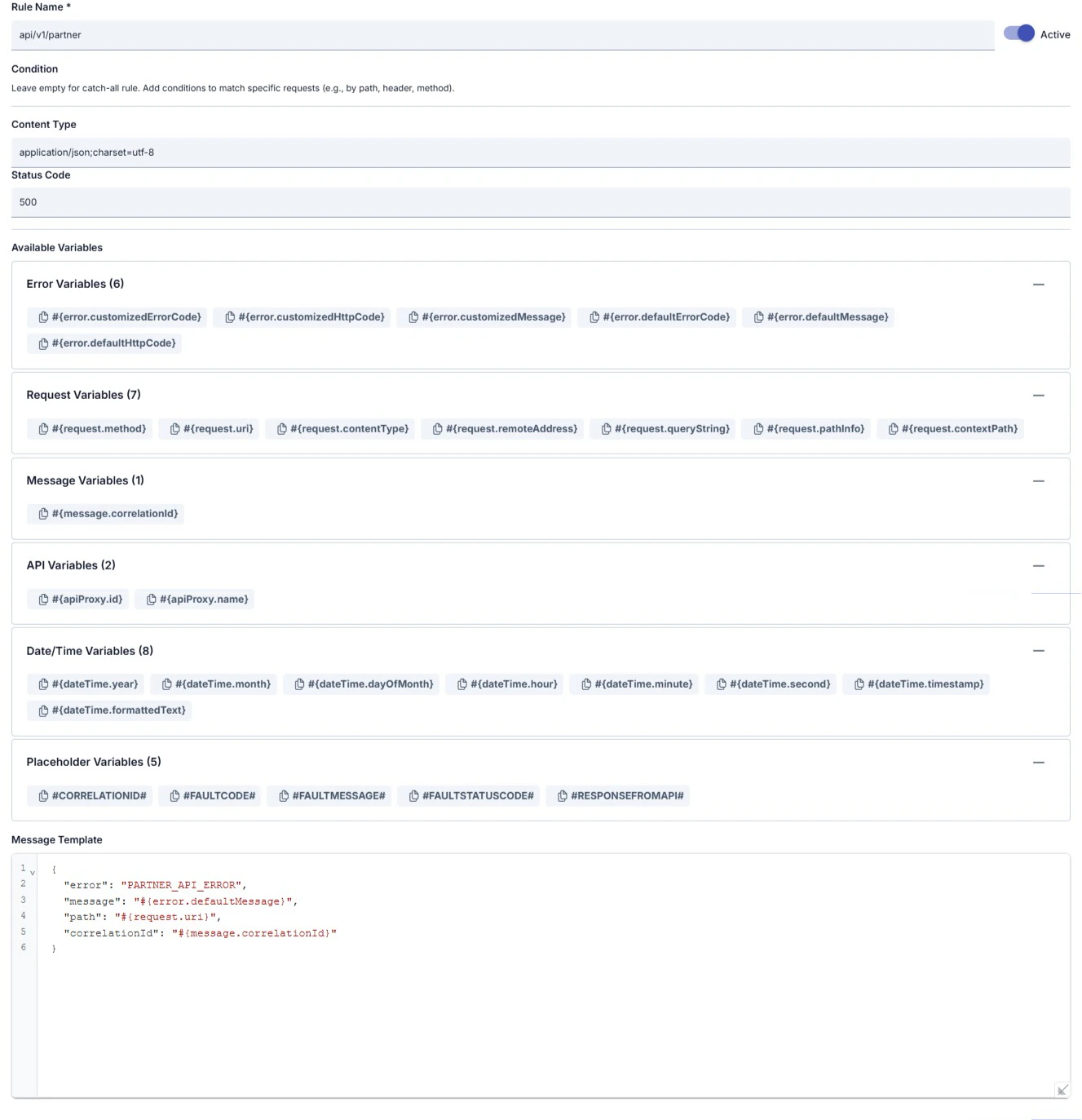
When adding a new rule or editing an existing one, the dialog contains:| Field | Description |
|---|---|
| Rule Name | Descriptive name of the rule |
| Active | Active/inactive status of the rule |
| Condition | Matching condition based on request attributes (optional). If left empty, the rule acts as a catch-all |
| Content-Type | Content type of the response |
| HTTP Status Code | HTTP status code of the response |
| Message Template | Template that generates the error response body. Placeholders and variables can be used |
Available Template Variables
The following placeholders and variables can be used in the message template:Standard Placeholders
Standard Placeholders
| Placeholder | Description |
|---|---|
#CORRELATIONID# | Request tracking ID |
#FAULTCODE# | Error code (e.g., ERR-002) |
#FAULTMESSAGE# | Error message |
#FAULTSTATUSCODE# | HTTP status code |
#RESPONSEFROMAPI# | Backend API response (if available) |
Dynamic Variables
Dynamic Variables
| Variable | Description |
|---|---|
#{error.customizedErrorCode} | Customized error code |
#{error.defaultMessage} | Default error message |
#{request.method} | HTTP method |
#{request.uri} | Request URI |
#{request.pathInfo} | Request path |
#{request.remoteAddress} | Client IP address |
#{message.correlationId} | Request tracking ID |
#{apiProxy.id} | API Proxy identifier |
#{dateTime.timestamp} | Timestamp |
#{dateTime.formattedText} | Formatted date/time |
Environment Variables
Environment Variables
${VARIABLE_NAME} format. For detailed information about environment variables, see Environment Variables.Policy and Routing Level Rules
Error Response Rules can be defined not only from this page (platform-wide) but also from the error message section within policy and routing configuration.Error Type, Error Code and Error Messages Table
API_PROXY Errors
API_PROXY Errors
| Error Type | Error Code | Error Message | HTTP Status Code |
|---|---|---|---|
| APIPROXY | ERR-001 | An Exception is occured! Exception Message is: | 500 |
| APIPROXY_NOTFOUND | ERR-002 | ApiProxy is not found for related URL( )! | 404 |
| APIPROXY_BACKEND_ADDRESS_NOTFOUND | ERR-003 | Backend address is not found or there is no suitable backend for configured conditions! | 404 |
| SCRIPT_API_NOTFOUND | ERR-004 | Script API settings are not found! | 404 |
| JOB_API_NOTFOUND | ERR-005 | TASK FLOW MANAGER API settings are not found! | 404 |
| API_METHOD_NOTFOUND | ERR-006 | Method not found or disabled! | 404 |
| CONNECTION_CONFIG_DB_NOTFOUND | ERR-011 | Database Connection Configuration not found! | 501 |
| CONNECTION_CONFIG_DB_DISABLED | ERR-012 | Database Connection Configuration disabled! | 501 |
| DATABASE_CONNECTION_EX | ERR-013 | Database connection is failed! Detailed Exception Message is: | 500 |
| DBTOAPI_DB_OPERATION_TYPE_NOTFOUND | ERR-016 | Database Operation Type Not Found! | 501 |
| DBTOAPI_DB_BATCH_ARRAY_LENGTH | ERR-017 | Data array length could not be calculated in Json Body while Batch Insert Operation! | 400 |
| DB_API_NOTFOUND | ERR-110 | DB API settings are not found! | 404 |
| APIPROXY_NOTFOUND_FORTOKEN | ERR-112 | Proxy is not found for client id ( )! | 404 |
| APICRYPT_EX | ERR-117 | Error on ApiCrypt call! Error message is: | 500 |
| APIPROXYGROUP_ACCESS_DISABLED_FROM_PROXY | ERR-134 | Direct access to ApiProxy is disabled! Access this endpoint over API Proxy Group URL! | 401 |
| APIPROXY_ENDPOINT_MISMATCH | ERR-136 | URL path parameters of Path (Used By Client) and Path (of Backend) must match! Please fix your endpoint configuration or send request in as described in configuration! | 500 |
| APIPROXY_ENDPOINT_MISSING_PATH_PARAM_DEFINITION | ERR-137 | Count of URL path parameters of Path (Used By Client) and Path (of Backend) are same but has different names! Control and fix Path (Used By Client) for parameter at Path (of Backend)! | 500 |
| CREDENTIAL_NOTFOUND_FORTOKEN | ERR-138 | Credential was not found for client id ( )! | 401 |
| CREDENTIAL_NOTVALID_FORTOKEN | ERR-139 | Client id ( ) and client secret is not valid! | 401 |
| URL_TOKEN_MANAGEMENT_TYPE_MISMATCH | ERR-140 | Endpoint URL and Token Management Type is mismatched! Please control your endpoint according to Token Management Type! | 401 |
| APIPROXY_HIDDENSPEC | ERR-141 | ApiProxy Spec is hidden! | 403 |
| NOTER_SETTINGS_NOTFOUND | ERR-183 | Noter settings are not found! | 501 |
| CONNECTOR_SETTINGS_NOTFOUND | ERR-184 | Connector setting is not found! | 501 |
| CONNECTOR_SETTINGS_DISABLED | ERR-185 | Connector status is disabled! | 501 |
| CONNECTOR_EX | ERR-186 | Connector failed! Detailed Exception Message is: | 500 |
| POLICY_ROUTING_ILLEGAL_ARGUMENT | ERR-187 | Illegal Argument! | 400 |
| POLICY_ROUTING_CLIENT_PROTOCOL | ERR-188 | There is an error in the HTTP protocol! | 400 |
KPS_API Errors
KPS_API Errors
| Error Type | Error Code | Error Message | HTTP Status Code |
|---|---|---|---|
| KPS_SETTINGS_NOTFOUND | ERR-007 | KPS settings are not found! | 501 |
| KPS_SECURITY_TOKEN_FAULT | ERR-008 | KPS service returned a fault. Please control your username, password, IP address and local date time! Fault message is: | 401 |
| KPS_SECURITY_TOKEN_NOT_VALID | ERR-009 | KPS Token can not be taken from NVI! Control your username, password, IP address and local date time! | 401 |
| KPS_EX | ERR-010 | KPS connection is failed! Error message is: | 500 |
POLICY_ROUTING Errors
POLICY_ROUTING Errors
| Error Type | Error Code | Error Message | HTTP Status Code |
|---|---|---|---|
| CIRCUITBREAKEROPEN_EX | ERR-014 | Circuit Breaker status is Open! Could not send request to target service! | 503 |
| POLICY_ROUTING_TIMEOUT | ERR-066 | Routing failed! Connection Timeout! | 408 |
| POLICY_ROUTING_UNKNOWNHOST | ERR-067 | Routing failed! Unknown Host! | 404 |
| POLICY_ROUTING_MALFORMED | ERR-068 | Routing failed! Malformed URL! | 404 |
| POLICY_ROUTING_CONNECTIONREFUSED | ERR-069 | Routing failed! Connection Refused! | 503 |
| POLICY_ROUTING_CONNECTION | ERR-070 | Target service returned error! | 503 |
| POLICY_ROUTING_PROXY_EMPTY | ERR-071 | Proxy host and/or port is empty! | 502 |
| POLICY_ROUTING_PROXY_AUTHORIZATION_EMPTY | ERR-072 | Proxy username and/or proxy password for the proxy of remote connection is empty or wrong! | 407 |
| POLICY_ROUTING_SSLHANDSHAKE | ERR-114 | Routing failed! SSLException is occured! Control your certifates! | 500 |
| CLIENTFLOWBANNER_EX | ERR-133 | Client Banner status is Open! Client is banned for a while and message could not send to backend service! | 403 |
| CIRCUITBREAKEROPEN_NO_ROUTE_EX | ERR-135 | Circuit Breaker status is Open! All Routing addresses are in OPEN State! Try sending message again later! | 503 |
| POLICY_ROUTING_ERRORHANDLINGCONDITION | ERR-145 | Error handling condition has error(s)! Control your condition! | 500 |
POLICY_REST2SOAP_TRANSFORMATION Errors
POLICY_REST2SOAP_TRANSFORMATION Errors
| Error Type | Error Code | Error Message | HTTP Status Code |
|---|---|---|---|
| POLICY_REST2SOAP_TRANSFORMATION_REQUEST | ERR-018 | Rest-Soap-Rest Request Transformation is failed! Detailed Exception Message is: | 500 |
| POLICY_REST2SOAP_TRANSFORMATION_RESPONSE | ERR-019 | Rest-Soap-Rest Response Transformation is failed! Detailed Exception Message is: | 500 |
| POLICY_PROTOCOL_TRANSFORMATION | ERR-106 | Protocol Transformation error! | 500 |
CONDITION_ERR Errors
CONDITION_ERR Errors
| Error Type | Error Code | Error Message | HTTP Status Code |
|---|---|---|---|
| CONDITION_RULE_FORMAT_NUMERIC | ERR-020 | Value () in Condition is not Numeric | 400 |
| CONDITION_RULE_FORMAT_DATE | ERR-021 | Date format of Value () in Condition is not Valid (is not in form of ) | 400 |
| CONDITION_RULE_CONFIGURATION | ERR-022 | Error while evaluation of Condition : | 500 |
| CONDITION_RULE_EX | ERR-023 | Condition can not be evaluated! Control your Condition rules configuration! | 500 |
POLICY_ALLOWEDHOUR Errors
POLICY_ALLOWEDHOUR Errors
| Error Type | Error Code | Error Message | HTTP Status Code |
|---|---|---|---|
| POLICY_RESTRICTION_ALLOWEDHOUR_FAILED | ERR-024 | Time Restriction Policy Validation failed! System time is ( ), Failed Rule is: ( )! | 403 |
| POLICY_RESTRICTION_ALLOWEDHOUR_EX | ERR-025 | Time Restriction Policy Validation failed! Detailed Exception Message is: | 500 |
| POLICY_GROUP_EX | ERR-190 | Error while executing policy group! Detailed Error Message is: | 500 |
POLICY_MINMESSAGESIZE Errors
POLICY_MINMESSAGESIZE Errors
| Error Type | Error Code | Error Message | HTTP Status Code |
|---|---|---|---|
| POLICY_RESTRICTION_MINMESSAGESIZE_FAILED | ERR-026 | Permissible Min. Size Policy Validation failed! Permissible min. size of request must be ( ) but found ( ) ! | 403 |
POLICY_MAXMESSAGESIZE Errors
POLICY_MAXMESSAGESIZE Errors
| Error Type | Error Code | Error Message | HTTP Status Code |
|---|---|---|---|
| POLICY_RESTRICTION_MAXMESSAGESIZE_FAILED | ERR-027 | Permissible Max. Size Policy Validation failed! Permissible max. size of request must be ( ) but found ( ) ! | 403 |
POLICY_IPWHITE Errors
POLICY_IPWHITE Errors
| Error Type | Error Code | Error Message | HTTP Status Code |
|---|---|---|---|
| POLICY_IPWHITE_FAILED | ERR-028 | IP( ) is BANNED, because of White Ip List rules! | 403 |
| POLICY_IPWHITE_EX | ERR-029 | White IP Filtering policy failed! Error message is: | 500 |
POLICY_IPBLACK Errors
POLICY_IPBLACK Errors
| Error Type | Error Code | Error Message | HTTP Status Code |
|---|---|---|---|
| POLICY_IPBLACK_FAILED | ERR-030 | IP( ) is BANNED, because of Black Ip List rules! | 403 |
| POLICY_IPBLACK_EX | ERR-031 | Black IP Filtering policy failed! Error message is: | 500 |
POLICY_AUTHENTICATION Errors
POLICY_AUTHENTICATION Errors
| Error Type | Error Code | Error Message | HTTP Status Code |
|---|---|---|---|
| POLICY_AUTH_EMPTYUSERNAMEORPSSWD | ERR-032 | Authentication policy failed! API Key/Username is empty | 401 |
| POLICY_AUTH_EMPTYUSERNAME | ERR-033 | Authentication policy failed! API Key/Username is empty | 401 |
| POLICY_AUTH_EMPTYPSSWD | ERR-034 | Authentication policy failed! API Key/Password is empty | 401 |
| POLICY_AUTH_USERNOTEXISTS | ERR-035 | Authentication policy failed! Invalid API Key/Username and Password pair for Authenticator ( )! | 401 |
| POLICY_AUTH_EX_API | ERR-036 | API call result is failed while Authentication. Status Code is: , Error Message is: | 500 |
| POLICY_AUTH_EX_DB | ERR-037 | Database Exception occured while Authentication. Detailed Exception Message is: | 500 |
| POLICY_AUTH_EX_LDAP | ERR-038 | Ldap Exception occured while Authentication. Detailed Exception Message is: | 500 |
| POLICY_AUTH_NOT_FOUND | ERR-039 | Authentication policy not found! | 501 |
| POLICY_AUTH_JWT3RD_EX | ERR-040 | Authentication policy failed! Detailed Exception Message is: | 500 |
| POLICY_AUTH_JWT3RD_NOT_VALID | ERR-041 | Authentication policy failed! JWT is not valid! | 401 |
| POLICY_AUTH_JWT3RD_MISSING_CONFIG | ERR-042 | Authentication policy failed! JWT Configuration is missing! | 501 |
| POLICY_AUTH_JWT_EX | ERR-043 | Authentication policy failed! Detailed Exception Message is: | 500 |
| POLICY_AUTH_JWT_NOT_VALID | ERR-044 | Authentication policy failed! JWT is not valid! | 401 |
| POLICY_AUTH_JWT_MISSING_CONFIG | ERR-045 | Authentication policy failed! JWT Configuration is missing! | 501 |
| POLICY_AUTH_OAUTH2_EX | ERR-046 | Authentication policy failed! Detailed Exception Message is: | 500 |
| POLICY_AUTH_OAUTH2_TOKEN_EXPIRED | ERR-047 | Authentication policy failed! OAuth2 Token is expired! | 401 |
| POLICY_AUTH_OAUTH2_TOKEN_NOT_VALID | ERR-048 | Authentication policy failed! OAuth2 Token is not valid! | 401 |
| POLICY_AUTH_BASIC_EX | ERR-049 | Authentication policy failed! Detailed Exception Message is: | 500 |
| POLICY_AUTH_BASE64_EX | ERR-050 | Authentication policy failed! Detailed Exception Message is: | 500 |
| POLICY_AUTH_DIGEST_EX | ERR-051 | Authentication policy failed! Detailed Exception Message is: | 500 |
| POLICY_AUTH_TYPE | ERR-113 | Authentication failed! Specified Authentication Type does not exists! | 500 |
| POLICY_AUTH_CREDENTIAL_NOTEXISTS | ERR-118 | Authentication policy failed! Invalid Credentials! | 401 |
| POLICY_AUTH_CREDENTIAL_PROXYNOTALLOWED | ERR-119 | Authentication policy failed! Credential is not allowed for this Proxy! | 401 |
| POLICY_AUTH_CREDENTIAL_METHODNOTALLOWED | ERR-120 | Authentication policy failed! Credential is not allowed for this Method/Resource of Proxy! | 401 |
| POLICY_AUTH_CREDENTIAL_IPNOTALLOWED | ERR-121 | Authentication policy failed! IP is not allowed for this Credential! | 401 |
| POLICY_AUTH_CREDENTIAL_EXPIRED | ERR-122 | Authentication policy failed! Credential has been expired! | 401 |
| POLICY_AUTH_CREDENTIAL_PSSWD | ERR-123 | Authentication policy failed! Invalid API Key/Username and Secret Key/Password pair! | 401 |
| POLICY_AUTH_CREDENTIAL_ENVNOTALLOWED | ERR-124 | Authentication policy failed! Credential is not allowed for Environment! | 401 |
| POLICY_AUTH_CONTRACT_PROXY_EXPIRED | ERR-131 | Authentication policy failed! Contract/Protocol of Proxy has been expired! | 401 |
| POLICY_AUTH_CONTRACT_CREDENTIAL_EXPIRED | ERR-132 | Authentication policy failed! Contract/Protocol of Credential has been expired! | 401 |
OIDC Authentication Errors
OIDC Authentication Errors
| Error Type | Error Code | Error Message | HTTP Status Code |
|---|---|---|---|
| POLICY_AUTH_OIDC_PROTOCOL_EX | ERR-199 | OIDC policy failed! Protocol error: | 500 |
| POLICY_AUTH_OIDC_AUTHENTICATION_EX | ERR-201 | OIDC policy failed! Authentication error: | 500 |
| POLICY_AUTH_OIDC_STOP_FLOW | ERR-202 | OIDC policy interrupted the flow! | 200 |
| POLICY_AUTH_OIDC_REDIRECT | ERR-203 | OIDC policy redirection successful! | 302 |
| POLICY_AUTH_OIDC_INVALID_TOKEN | ERR-204 | OIDC policy failed! Error message is: Invalid token | 401 |
POLICY_AUTHORIZATION Errors
POLICY_AUTHORIZATION Errors
| Error Type | Error Code | Error Message | HTTP Status Code |
|---|---|---|---|
| POLICY_AUTHORIZATION_EX | ERR-052 | Authorization policy failed! Detailed Exception Message is: | 500 |
| POLICY_AUTHORIZATION_METHOD_NOT_FOUND | ERR-053 | Authorization policy failed! Method not found! | 401 |
| POLICY_AUTHORIZATION_WRONG_SCOPE | ERR-054 | Authorization policy failed! Scope is not valid! | 401 |
POLICY_API_AUTHENTICATION Errors
POLICY_API_AUTHENTICATION Errors
| Error Type | Error Code | Error Message | HTTP Status Code |
|---|---|---|---|
| POLICY_API_AUTHENTICATION | ERR-055 | API Authentication failed! Detailed Exception Message is: | 500 |
| POLICY_API_AUTHENTICATION_NOTFOUND | ERR-056 | API Authentication is not found! | 501 |
POLICY_SCRIPT Errors
POLICY_SCRIPT Errors
| Error Type | Error Code | Error Message | HTTP Status Code |
|---|---|---|---|
| POLICY_SCRIPT_USERSTOPPEDFLOW | ERR-057 | 401 | |
| POLICY_SCRIPT | ERR-058 | Script policy failed! Detailed Exception Message is: | 500 |
POLICY_WSSECURITY Errors
POLICY_WSSECURITY Errors
| Error Type | Error Code | Error Message | HTTP Status Code |
|---|---|---|---|
| POLICY_WSSECURITY_FROMTARGET | ERR-059 | WS-Security policy failed! Detailed Exception Message is: | 500 |
| POLICY_WSSECURITY_TOTARGET | ERR-060 | WS-Security policy failed! Detailed Exception Message is: | 500 |
WS-Security Sign Errors
WS-Security Sign Errors
| Error Type | Error Code | Error Message | HTTP Status Code |
|---|---|---|---|
| WS_SECURITY_SIGN_GENERAL_ERROR | ERR-205 | WS-Security Sign policy failed! Error message is: | 500 |
WS-Security Sign Validation Errors
WS-Security Sign Validation Errors
| Error Type | Error Code | Error Message | HTTP Status Code |
|---|---|---|---|
| WS_SECURITY_SIGN_VALIDATION_GENERAL_ERROR | ERR-206 | WS-Security Sign Validation policy failed! Error message is: | 500 |
WS-Security Encrypt Errors
WS-Security Encrypt Errors
| Error Type | Error Code | Error Message | HTTP Status Code |
|---|---|---|---|
| WS_SECURITY_ENCRYPT_GENERAL_ERROR | ERR-207 | WS-Security Encrypt policy failed! Error message is: | 500 |
WS-Security Decrypt Errors
WS-Security Decrypt Errors
| Error Type | Error Code | Error Message | HTTP Status Code |
|---|---|---|---|
| WS_SECURITY_DECRYPT_GENERAL_ERROR | ERR-208 | WS-Security Decrypt policy failed! Error message is: | 500 |
WS-Security Username Errors
WS-Security Username Errors
| Error Type | Error Code | Error Message | HTTP Status Code |
|---|---|---|---|
| WS_SECURITY_USERNAME_GENERAL_ERROR | ERR-209 | WS-Security Username policy failed! Error message is: | 500 |
WS-Security Timestamp Errors
WS-Security Timestamp Errors
| Error Type | Error Code | Error Message | HTTP Status Code |
|---|---|---|---|
| WS_SECURITY_TIMESTAMP_GENERAL_ERROR | ERR-210 | WS-Security Timestamp policy failed! Error message is: | 500 |
POLICY_RESTAPI Errors
POLICY_RESTAPI Errors
| Error Type | Error Code | Error Message | HTTP Status Code |
|---|---|---|---|
| POLICY_RESTAPI_RESPONSE | ERR-061 | API Call response code () is unexpected! Expected value is between 200 and 400. API Result Body is: | 503 |
| POLICY_RESTAPI_CONNECTION | ERR-062 | API Call policy failed! Detailed Exception Message for connection is: | 500 |
| POLICY_RESTAPI | ERR-063 | API Call policy failed! Detailed Exception Message is: | 500 |
POLICY_CACHE Errors
POLICY_CACHE Errors
| Error Type | Error Code | Error Message | HTTP Status Code |
|---|---|---|---|
| CACHE_AUTHREQUIREDTOREFRESH | ERR-064 | Authentication is required to refresh cache! | 401 |
POLICY_REDACTION Errors
POLICY_REDACTION Errors
| Error Type | Error Code | Error Message | HTTP Status Code |
|---|---|---|---|
| POLICY_REDACTION | ERR-065 | Redaction policy failed! Detailed Exception Message is: | 500 |
| POLICY_REDACTION_VARIABLE_NOT_FOUND | ERR-115 | Redaction variable not found on request message! Variable Name is: | 500 |
| POLICY_REDACTION_DATA_FORMAT | ERR-116 | Redaction execution is failed! Detailed Exception Message is: | 500 |
POLICY_XMLTRANSFORMATION Errors
POLICY_XMLTRANSFORMATION Errors
| Error Type | Error Code | Error Message | HTTP Status Code |
|---|---|---|---|
| POLICY_XMLTRANSFORMATION | ERR-073 | XML Transformation policy failed! Detailed Exception Message is: | 500 |
POLICY_JSONTRANSFORMATION Errors
POLICY_JSONTRANSFORMATION Errors
| Error Type | Error Code | Error Message | HTTP Status Code |
|---|---|---|---|
| POLICY_JSONTRANSFORMATION | ERR-074 | JSON Transformation policy failed! Detailed Exception Message is: | 500 |
POLICY_APIBASEDTHROTTLING Errors
POLICY_APIBASEDTHROTTLING Errors
| Error Type | Error Code | Error Message | HTTP Status Code |
|---|---|---|---|
| POLICY_APIBASEDTHROTTLING | ERR-075 | API Based Throttling policy failed! Detailed Exception Message is: | 500 |
| POLICY_APIBASEDTHROTTLING_STOP | ERR-076 | Because of reaching Throttling limit for specified gateway, message is BLOCKED! | 403 |
| POLICY_APIBASEDTHROTTLING_CACHE_SERVICE | ERR-077 | API Based Throttling policy failed! Detailed Error Message is: | 500 |
POLICY_CLIENTBASEDTHROTTLING Errors
POLICY_CLIENTBASEDTHROTTLING Errors
| Error Type | Error Code | Error Message | HTTP Status Code |
|---|---|---|---|
| POLICY_CLIENTBASEDTHROTTLING | ERR-125 | Client Based Throttling policy failed! Detailed Exception Message is: | 500 |
| POLICY_CLIENTBASEDTHROTTLING_STOP | ERR-126 | Because of reaching Throttling limit for specified proxy and credential, message is BLOCKED! | 403 |
| POLICY_CLIENTBASEDTHROTTLING_CACHE_SERVICE | ERR-127 | Client Based Throttling policy failed! Detailed Error Message is: | 500 |
POLICY_APIBASEDQUOTA Errors
POLICY_APIBASEDQUOTA Errors
| Error Type | Error Code | Error Message | HTTP Status Code |
|---|---|---|---|
| POLICY_APIBASEDQUOTA | ERR-078 | API Based QUOTA policy failed! Detailed Exception Message is: | 500 |
| POLICY_APIBASEDQUOTA_STOP | ERR-079 | Because of reaching QUOTA limit for specified gateway, message is BLOCKED! | 403 |
| POLICY_APIBASEDQUOTA_CACHE_SERVICE | ERR-080 | API Based QUOTA policy failed! Detailed Error Message is: | 500 |
POLICY_CLIENTBASEDQUOTA Errors
POLICY_CLIENTBASEDQUOTA Errors
| Error Type | Error Code | Error Message | HTTP Status Code |
|---|---|---|---|
| POLICY_CLIENTBASEDQUOTA | ERR-128 | Client Based QUOTA policy failed! Detailed Exception Message is: | 500 |
| POLICY_CLIENTBASEDQUOTA_STOP | ERR-129 | Because of reaching QUOTA limit for specified proxy and credential, message is BLOCKED! | 403 |
| POLICY_CLIENTBASEDQUOTA_CACHE_SERVICE | ERR-130 | Client Based QUOTA policy failed! Detailed Error Message is: | 500 |
POLICY_XMLSCHEMAVALIDATION Errors
POLICY_XMLSCHEMAVALIDATION Errors
| Error Type | Error Code | Error Message | HTTP Status Code |
|---|---|---|---|
| POLICY_XMLSCHEMAVALIDATION_FAILED | ERR-081 | XML Schema Validation policy failed! Error is: ( ) | 403 |
| POLICY_XMLSCHEMAVALIDATION | ERR-082 | XML Schema Validation policy failed! Detailed Exception Message is: | 500 |
| POLICY_XMLSCHEMAVALIDATION_UNEXPECTEDBODY | ERR-083 | XML Schema Validation policy failed, due to unexpected message body! Error is: ( ) | 400 |
| POLICY_XMLSCHEMAVALIDATION_PATH | ERR-084 | While Schema Validation Policy, policy got unexpected Path ( ) result, control your Path! Error is: ( ) | 400 |
POLICY_JSONSCHEMAVALIDATION Errors
POLICY_JSONSCHEMAVALIDATION Errors
| Error Type | Error Code | Error Message | HTTP Status Code |
|---|---|---|---|
| POLICY_JSONSCHEMAVALIDATION_FAILED | ERR-085 | JSON Schema Validation policy failed! Error is: ( ) | 403 |
| POLICY_JSONSCHEMAVALIDATION | ERR-086 | JSON Schema Validation policy failed! Detailed Exception Message is: | 500 |
| POLICY_JSONSCHEMAVALIDATION_PATH | ERR-087 | While Schema Validation Policy, policy got unexpected Path ( ) result, control your Path! | 400 |
POLICY_DIGITALSIGN Errors
POLICY_DIGITALSIGN Errors
| Error Type | Error Code | Error Message | HTTP Status Code |
|---|---|---|---|
| POLICY_DIGITALSIGN | ERR-088 | Digital Signature policy failed! Detailed Exception Message is: | 500 |
POLICY_DIGITALSIGNVALIDATION Errors
POLICY_DIGITALSIGNVALIDATION Errors
| Error Type | Error Code | Error Message | HTTP Status Code |
|---|---|---|---|
| POLICY_DIGITALSIGNVALIDATION | ERR-089 | Digital Signature Validation policy failed! Detailed Exception Message is: | 500 |
| POLICY_DIGITALSIGNVALIDATION_FAILED | ERR-090 | Digital Signature Validation Error (Description of Policy Rule is: ) | 403 |
POLICY_DECRYPTION Errors
POLICY_DECRYPTION Errors
| Error Type | Error Code | Error Message | HTTP Status Code |
|---|---|---|---|
| POLICY_DECRYPTION | ERR-091 | Decryption policy failed! Detailed Exception Message is: | 500 |
POLICY_ENCRYPTION Errors
POLICY_ENCRYPTION Errors
| Error Type | Error Code | Error Message | HTTP Status Code |
|---|---|---|---|
| POLICY_ENCRYPTION | ERR-092 | Encryption policy failed! Detailed Exception Message is: | 500 |
| POLICY_ENCRYPTION_MISSING_CONFIG | ERR-093 | Encryption policy failed! Certificate or Key is not found! | 500 |
POLICY_SAML Errors
POLICY_SAML Errors
| Error Type | Error Code | Error Message | HTTP Status Code |
|---|---|---|---|
| POLICY_SAML | ERR-094 | SAML 2.0 Validation policy failed! Detailed Exception Message is: | 500 |
| POLICY_SAML_SIGNATURENOTEXISTS | ERR-095 | Saml 2.0 Assertion signature is not found! | 403 |
| POLICY_SAML_SIGNATURENOTVALID | ERR-096 | Saml 2.0 Assertion signature is not valid! | 403 |
| POLICY_SAML_KEYSTORENOTVALID | ERR-097 | Keystore could not be loaded for Saml 2.0 Validation! Detailed Exception Message is: | 403 |
| POLICY_SAML_SIGNERUNKNOWN | ERR-098 | Signature was valid, but signer is not known at Saml 2.0 Validation! | 403 |
POLICY_CONTENTFILTER Errors
POLICY_CONTENTFILTER Errors
| Error Type | Error Code | Error Message | HTTP Status Code |
|---|---|---|---|
| POLICY_CONTENTFILTER | ERR-099 | Content Filter execution is failed! Detailed Exception Message is: | 500 |
| POLICY_CONTENTFILTER_HEADER | ERR-100 | Violation detected in Content Filter! Rule Name is: | 403 |
| POLICY_CONTENTFILTER_PARAM | ERR-101 | Violation detected in Content Filter! Rule Name is: | 403 |
| POLICY_CONTENTFILTER_BODY | ERR-102 | Violation detected in Content Filter! Rule Name is: | 403 |
| POLICY_CONTENTFILTER_BODY_PATH | ERR-103 | Violation detected in Content Filter! Rule Name is: | 403 |
POLICY_ROLE_GROUP Errors
POLICY_ROLE_GROUP Errors
| Error Type | Error Code | Error Message | HTTP Status Code |
|---|---|---|---|
| POLICY_ROLE_GROUP_BASED_ACCESS | ERR-104 | Violation detected in Role Based Access Control! | 401 |
| POLICY_ROLE_GROUP_BASED_IP_CHECK_ACCESS | ERR-105 | Ip Validation Error! Your ip is not in the control list. | 401 |
POLICY_BUSINESS_RULE Errors
POLICY_BUSINESS_RULE Errors
| Error Type | Error Code | Error Message | HTTP Status Code |
|---|---|---|---|
| POLICY_BUSINESS_RULE | ERR-107 | Business Rule execution is failed! Detailed Exception Message is: | 500 |
| POLICY_BUSINESS_RULE_DATA_FORMAT | ERR-108 | Business Rule execution is failed! Detailed Exception Message is: | 500 |
| POLICY_BUSINESS_RULE_STOP | ERR-109 | Business Rule is stopped the request! | 401 |
| POLICY_BUSINESS_RULE_VARIABLE_NOT_FOUND | ERR-111 | Business Rule variable not found on request message! Variable Name is: | 500 |
POLICY_WSSECURITY_STSTOKEN Errors
POLICY_WSSECURITY_STSTOKEN Errors
| Error Type | Error Code | Error Message | HTTP Status Code |
|---|---|---|---|
| POLICY_WSSECURITY_STSTOKEN | ERR-142 | WS-Security STS Token policy failed! Detailed Exception Message is: | 500 |
| POLICY_WSSECURITY_STSTOKEN_NOTFOUND | ERR-142 | WS-Security STS Token policy failed! STS Token Username-Password is not found for related condition! | 501 |
| POLICY_WSSECURITY_STSTOKEN_NOTVALID | ERR-143 | WS-Security STS Token policy failed! STS Token is not valid! | 501 |
| POLICY_WSSECURITY_STSTOKEN_FAULT | ERR-144 | WS-Security STS Token policy failed! STS Token can not be taken! Control your username, password, IP address and local date time! Detailed response message is: | 401 |
POLICY_JOSE_IMPLEMENTATION Errors
POLICY_JOSE_IMPLEMENTATION Errors
| Error Type | Error Code | Error Message | HTTP Status Code |
|---|---|---|---|
| POLICY_JOSE_IMPLEMENTATION_JWK_EMPTY_APIPROXY_VALIDATION | ERR-146 | JWK for Sign is not set in policy! | 500 |
| POLICY_JOSE_IMPLEMENTATION_JWK_NOT_FOUND_VALIDATION | ERR-147 | JWK for Sign in policy was not found! | 500 |
| POLICY_JOSE_IMPLEMENTATION_JWK_EMPTY_APIPROXY_ENCRYPTION | ERR-148 | JWK for Encryption is not set in policy! | 500 |
| POLICY_JOSE_IMPLEMENTATION_JWK_NOT_FOUND_ENCRYPTION | ERR-149 | JWK for Encryption in policy was not found! | 500 |
| POLICY_JOSE_IMPLEMENTATION_JWK_EMPTY_CREDENTIAL_VALIDATION | ERR-150 | JWK for Sign is not set in client’s credential! | 500 |
| POLICY_JOSE_IMPLEMENTATION_JWK_NOT_FOUND_CREDENTIAL_VALIDATION | ERR-151 | JWK for Sign was not found for client’s credential! | 500 |
| POLICY_JOSE_IMPLEMENTATION_JWK_EMPTY_CREDENTIAL_ENCRYPTION | ERR-152 | JWK for Encryption is not set in client’s credential! | 500 |
| POLICY_JOSE_IMPLEMENTATION_JWK_NOT_FOUND_CREDENTIAL_ENCRYPTION | ERR-153 | JWK for Encryption was not found for client’s credential! | 500 |
| POLICY_JOSE_IMPLEMENTATION_SIGN | ERR-154 | JOSE Sign operation was failed! Detailed Exception Message is: | 500 |
| POLICY_JOSE_IMPLEMENTATION_ENCRYPTION | ERR-155 | JOSE Encryption operation was failed! Detailed Exception Message is: | 500 |
| POLICY_JOSE_IMPLEMENTATION_ENCRYPTION_NEED_SIGN | ERR-156 | JOSE Encryption can not be done without JOSE Sign operation! | 500 |
| POLICY_JOSE_IMPLEMENTATION_EX | ERR-157 | JOSE Implementation policy was failed! Detailed Exception Message is: | 500 |
| POLICY_JOSE_IMPLEMENTATION_TARGET_VALUE_NOT_FOUND | ERR-158 | Target value was not found! | 500 |
| POLICY_JOSE_IMPLEMENTATION_JWK_EXPIRED | ERR-189 | JWK was expired! | 500 |
POLICY_JOSE_VALIDATION Errors
POLICY_JOSE_VALIDATION Errors
| Error Type | Error Code | Error Message | HTTP Status Code |
|---|---|---|---|
| POLICY_JOSE_VALIDATION_JWK_EMPTY_APIPROXY_VALIDATE | ERR-159 | JWK for Signature Validation was not set in policy! | 500 |
| POLICY_JOSE_VALIDATION_JWK_NOT_FOUND_VALIDATE | ERR-160 | JWK for Signature Validation in policy was not found! | 500 |
| POLICY_JOSE_VALIDATION_JWK_EMPTY_APIPROXY_ENCRYPTION | ERR-161 | JWK for Decryption is not set in policy! | 500 |
| POLICY_JOSE_VALIDATION_JWK_NOT_FOUND_ENCRYPTION | ERR-162 | JWK for Decryption was not found! | 500 |
| POLICY_JOSE_VALIDATION_JWK_EMPTY_CREDENTIAL_SIGN | ERR-163 | JWK for Signature Validation in client’s credential is not set! | 500 |
| POLICY_JOSE_VALIDATION_JWK_NOT_FOUND_CREDENTIAL_SIGN | ERR-164 | JWK for Signature Validation in client’s credential was not found! | 500 |
| POLICY_JOSE_VALIDATION_JWK_EMPTY_CREDENTIAL_ENC | ERR-165 | JWK for Decryption in client’s credential is not set! | 500 |
| POLICY_JOSE_VALIDATION_JWK_NOT_FOUND_CREDENTIAL_ENC | ERR-166 | JWK for Decryption in client’s credential was not found! | 500 |
| POLICY_JOSE_VALIDATION_TARGET_VALUE_EMPTY | ERR-167 | Target value is not found or empty! | 500 |
| POLICY_JOSE_VALIDATION_ISSUER_EMPTY | ERR-168 | Client value was not found or empty! | 500 |
| POLICY_JOSE_VALIDATION_PARSE_JWT | ERR-169 | JWT parse operation failed! Detailed Exception Message is: | 500 |
| POLICY_JOSE_VALIDATION_DECRYPTION | ERR-170 | JWE decryption operation was failed! Detailed Exception Message is: | 500 |
| POLICY_JOSE_VALIDATION_JWT_IS_NOT_ENCRYPTED | ERR-171 | JWT is not in Encrypted format! | 500 |
| POLICY_JOSE_VALIDATION_SIGNVALIDATION | ERR-172 | JWE signature validation operation was failed! Detailed Exception Message is: | 500 |
| POLICY_JOSE_VALIDATION_JWT_IS_NOT_SIGNED | ERR-173 | JWT is not in Signed format! | 500 |
| POLICY_JOSE_VALIDATION_CLAIMVALIDATION | ERR-174 | JWT Claims were not valid! Detailed Error Message is: | 500 |
| POLICY_JOSE_VALIDATION_EX | ERR-175 | JOSE Validation policy was failed! Detailed Exception Message is: | 500 |
| POLICY_JOSE_VALIDATION_SIGNATUREINVALID | ERR-182 | Signature in message is not valid or can not be verified! | 401 |
| POLICY_JOSE_VALIDATION_JWK_EXPIRED | ERR-189 | JWK was expired! | 500 |
POLICY_MTLS_AUTHENTICATION Errors
POLICY_MTLS_AUTHENTICATION Errors
| Error Type | Error Code | Error Message | HTTP Status Code |
|---|---|---|---|
| POLICY_MTLS_AUTHENTICATION_CERTIFICATE_MISSING | ERR-176 | mTLS Authentication policy failed! Certificate(s) is missing! | 401 |
| POLICY_MTLS_AUTHENTICATION_CERTIFICATE_NOTVALID | ERR-177 | mTLS Authentication policy failed! Certificate(s) is not valid! Detailed Message is: | 401 |
| POLICY_MTLS_AUTHENTICATION_CERTIFICATE_ISSUER_MISSING | ERR-178 | mTLS Authentication policy failed! Issuer information in Certificate(s) is missing! | 401 |
| POLICY_MTLS_AUTHENTICATION_EX_MESSAGE | ERR-179 | mTLS Authentication policy failed! Detailed Exception Message is: | 500 |
| POLICY_MTLS_AUTHENTICATION_ISSUER_MTLS_MISSING | ERR-180 | mTLS Authentication policy failed! Credential’s mTLS setting is disabled! | 500 |
| POLICY_MTLS_AUTHENTICATION_ISSUER_CERT_NOT_MATCH | ERR-181 | mTLS Authentication policy failed! Certificate(s) does not match with Credential’s certificate(s) or not valid! Detailed Message is: | 500 |
POLICY_ENDPOINTRATELIMIT Errors
POLICY_ENDPOINTRATELIMIT Errors
| Error Type | Error Code | Error Message | HTTP Status Code |
|---|---|---|---|
| POLICY_ENDPOINTRATELIMIT | ERR-191 | Endpoint Rate Limit policy failed! Detailed Exception Message is: | 500 |
| POLICY_ENDPOINTRATELIMIT_STOP | ERR-192 | Because of reaching Endpoint Rate Limit for specified API Proxy, message is BLOCKED! | 429 |
| POLICY_ENDPOINTRATELIMIT_CACHE_SERVICE | ERR-193 | Endpoint Rate Limit policy failed! Detailed Error Message is: | 500 |
| POLICY_ENDPOINTRATELIMIT_TARGETNOTEXIST | ERR-194 | Endpoint has Rate Limit Policy but found target variable value () does not exist in any of Rate Limit Target Value Tables! | 500 |
POLICY_CLIENTBANNER Errors
POLICY_CLIENTBANNER Errors
| Error Type | Error Code | Error Message | HTTP Status Code |
|---|---|---|---|
| POLICY_CLIENTBANNER_BANNED | ERR-195 | Client is banned for a while! | 403 |
| POLICY_CLIENTBANNER_EX | ERR-196 | Error while executing client ban policy! Detailed Error Message is: | 500 |
| POLICY_CLIENTBANNER_IDENTITYNOTFOUND | ERR-197 | Client identity could not be found! | 401 |
Important Notes
API Proxy Responses: Error Parent Type and Error Type fields are not included in messages returned in API Proxy responses. Log Messages: These two fields (Error Parent Type and Error Type) are included in JSON messages where message traffic is recorded. For more detailed information, you can visit the [Sample Message Data Structure] page in the [Log Settings] menu.Parent Error Type Values Table
| Parent Error Type | Description |
|---|---|
| API_PROXY | Proxy Error |
| APICREATOR | API Creator Error |
| FAKE_API | Fake API Error |
| KPS_API | KPS API Error |
| CONDITION_ERR | Condition Error |
| CONDITION_EX | Condition Exception |
| POLICY_AUTHENTICATION | Error in Authentication Policy |
| POLICY_AUTHORIZATION | Error in Authorization Control Policy |
| POLICY_API_AUTHENTICATION | Error in API Authentication Policy |
| POLICY_THROTTLING_PER_CLIENT | Error in Per-Client Throttling Policy |
| POLICY_APIBASEDTHROTTLING | Error in API-Based Throttling Policy |
| POLICY_APIBASEDQUOTA | Error in API-Based Quota Policy |
| POLICY_CLIENTBASEDTHROTTLING | Error in Client-Based Throttling Policy |
| POLICY_CLIENTBASEDQUOTA | Error in Client-Based Quota Policy |
| POLICY_QUOTA_PER_CLIENT | Error in Per-Client Quota Policy |
| POLICY_SCRIPT | Error in Script Policy |
| POLICY_OAUTH2 | Error in OAuth2 Policy |
| POLICY_SAML | Error in SAML Validation Policy |
| POLICY_JOSE_IMPLEMENTATION | Error in JOSE Implementation Policy |
| POLICY_JOSE_VALIDATION | Error in JOSE Validation Policy |
| POLICY_MTLS_AUTHENTICATION | mTLS Authentication |
| POLICY_CONTENTFILTER | Error in Filter Policy |
| POLICY_IPWHITE | Error in Allowed IP List Policy |
| POLICY_IPBLACK | Error in Blocked IP List Policy |
| POLICY_ALLOWEDHOUR | Error in Time Restriction Policy |
| POLICY_MINMESSAGESIZE | Error in Minimum Message Length Policy |
| POLICY_MAXMESSAGESIZE | Error in Maximum Message Length Policy |
| POLICY_JSONSCHEMAVALIDATION | Error in JSON Schema Validation Policy |
| POLICY_XMLSCHEMAVALIDATION | Error in XML Schema Validation Policy |
| POLICY_JSONTRANSFORMATION | Error in JSON Transformation Policy |
| POLICY_XMLTRANSFORMATION | Error in XML Transformation Policy |
| POLICY_JSONRESPONSEMESSAGETRANS | Error in JSON Response Transformation Policy |
| POLICY_XMLRESPONSEMESSAGETRANS | Error in XML Response Transformation Policy |
| POLICY_REST2SOAP_TRANSFORMATION | Error in REST to SOAP Transformation Policy |
| POLICY_CACHE | Error in Cache Policy |
| POLICY_ROUTING | Error in Routing Policy |
| POLICY_REDACTION | Error in Redaction Policy |
| POLICY_CORS | Error in CORS Policy |
| POLICY_ENCRYPTION | Error in Encryption Policy |
| POLICY_DECRYPTION | Error in Decryption Policy |
| POLICY_ROLE_GROUP | Error in Group Role Policy |
| POLICY_DIGITALSIGN | Error in Digital Signature Policy |
| POLICY_DIGITALSIGNVALIDATION | Error in Digital Signature Validation Policy |
| POLICY_RESTAPI | Error in API Call Policy |
| POLICY_WSSECURITY | Error in Incoming Message WS-Security Policy |
| POLICY_WSSECURITY_STSTOKEN | Error in WS-Security STS Token Policy |
| POLICY_BUSINESS_RULE | Error in Business Rules Policy |
| POLICY_ENDPOINTRATELIMIT | Error in Endpoint Rate Limit Policy |
| POLICY_CLIENTBANNER | Error in Client Banner Policy |
| LICENSE | License |
Result Type Values Table
| Result Type | Description |
|---|---|
| BLOCKED | Blocked |
| ERROR | Error |
| SUCCESS | Successful |