

In Apinizer, it is impossible for a user to access a project without authorization, or even perform an action within
that project that is outside their authorization level. Users must have a role(s) to be able to perform actions in
any project.
This page contains detailed permission matrices for project-level roles. For the general authorization model and
system-level roles, see the Authorization Matrix page.
Creating a New Role
The image below contains the role creation settings: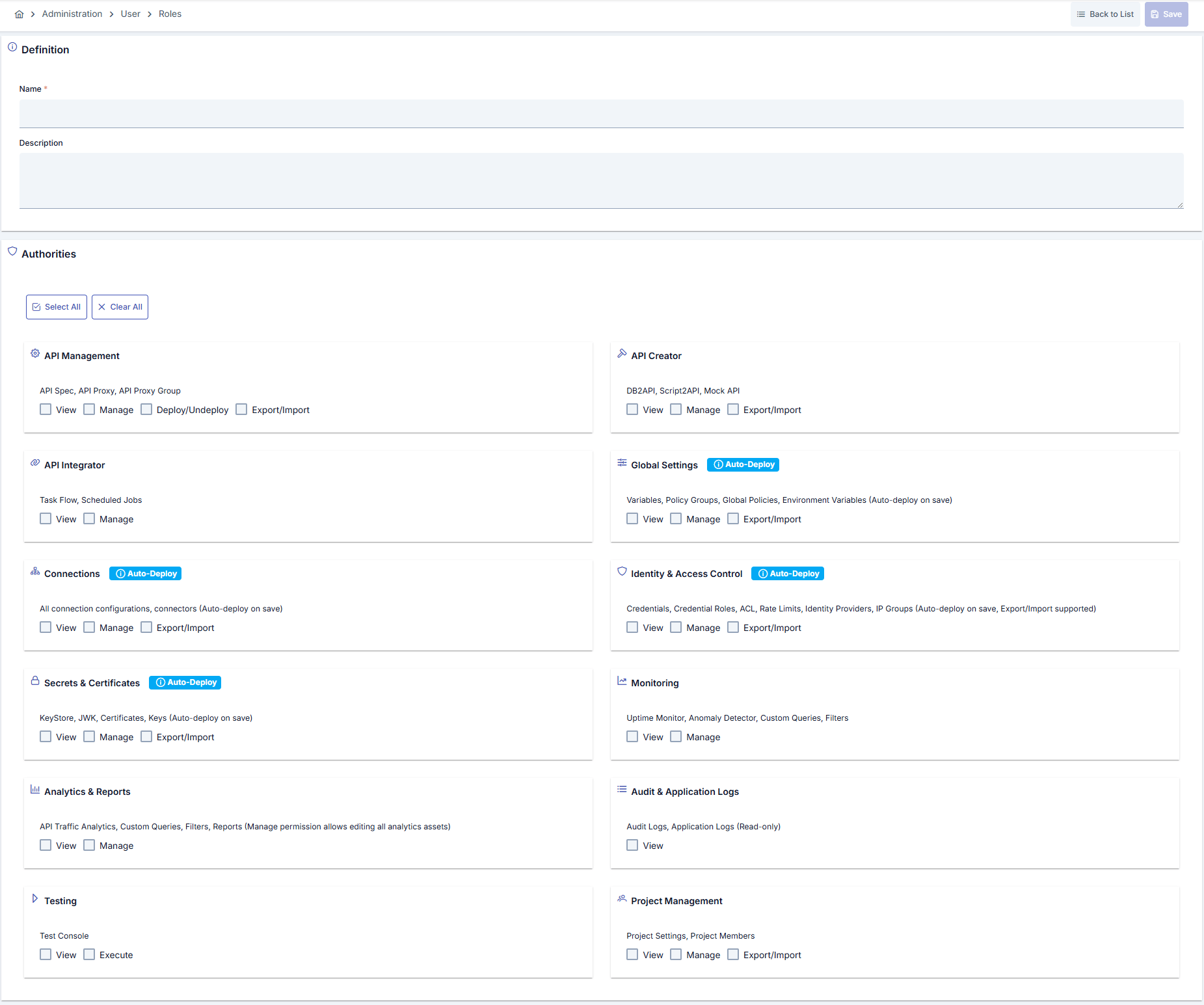
Default Roles and Permissions
Project Owner
Description: Role with all permissions in the project. Cannot be deleted or edited. Permissions: All actions in all categoriesAPI Developer
Description: Role that can manage API Proxies, deploy, and perform integration operations. Permissions:
Note: If API Management Manage permission exists, the system automatically adds API Integrator Execute, Connections Manage, Identity & Access Control Manage, and Secrets & Certificates Manage permissions.
API Manager
Description: Role that can manage APIs, perform analysis and monitoring. Permissions:API Creator
Description: Role that can perform API creation operations such as DB to API, Script to API, Mock API. Permissions:
Note: If API Creator Manage permission exists, the system automatically adds API Integrator View, Monitoring View, Analytics & Reports View, and Audit & Application Logs View permissions.
API Security
Description: Role that manages identity management, credentials, certificates, and connection security. Permissions:
Note: If Identity & Access Control Manage permission exists, the system automatically adds Monitoring View, Analytics & Reports View, and Testing View+Execute permissions.
API Analytics
Description: Role that can perform analysis and reporting operations. Permissions:
Note: If Analytics & Reports View permission exists, the system automatically adds API Integrator View permission.
API Tester
Description: Role that can perform test operations. Permissions:
Note: If Testing Execute permission exists, the system automatically adds Testing Manage, API Integrator View, Connections View, Identity & Access Control View, and Secrets & Certificates View permissions.
Automatic Permission Expansion
The system automatically adds additional permissions for roles with certain permissions. This is to meet inter-role dependencies and workflow requirements:- API Developer (if API Management Manage exists): API Integrator Execute, Connections Manage, Identity & Access Control Manage, Secrets & Certificates Manage
- API Creator (if API Creator Manage exists): API Integrator View, Monitoring View, Analytics & Reports View, Audit & Application Logs View
- API Security (if Identity & Access Control Manage exists): Monitoring View, Analytics & Reports View, Testing View+Execute
- API Analytics (if Analytics & Reports View exists): API Integrator View
- API Tester (if Testing Execute exists): Testing Manage, API Integrator View, Connections View, Identity & Access Control View, Secrets & Certificates View