

Creating a New Responsible Unit
This screen is used to define new units that will be responsible for managing API Products within the organization. A new unit is created by filling the fields on the form. When required fields are completely filled, the registration process is completed by clicking the Save button. A screenshot containing the responsible unit creation screen is shown below: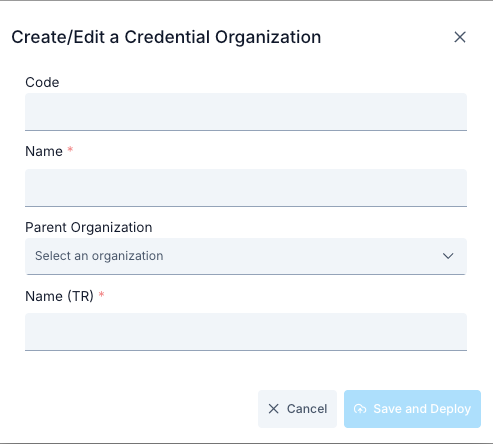
When both Turkish Language Option and English Language Option are enabled in Portal settings, the system automatically switches to Multilanguage mode.If the Multilanguage feature is enabled from Portal Settings, form fields are displayed in both English and Turkish, and separate data entry can be made for each language.
Steps for Creating a New Responsible Unit
1
Step 1: Go to List Screen
Open the Portal Management heading from the Apinizer Manager menu.
Click on API Products → Responsible Units option from the submenu.
See the table listing existing responsible units on the screen.
2
Step 2: Open New Registration Form
Click the New Responsible Unit button in the top right.
api-product-resp-unit-update modal form opens; form fields are initially empty.
3
Step 3: Enter Basic Information
Write a unique name for the unit in the Name field (example: Open API Support Team).
Enter the unit’s job description, SLA, or contact notes in the Description field (optional).
4
Step 4: Associate API Products
Open the Related API Products multi-select field.
Select API products for which this unit is responsible.
Selections are immediately displayed in the list below the form.
5
Step 5: Add Members/Contacts
If there is a Members or Contacts field on the form, open the dropdown.
Select users you want to associate with the unit.
Selected users are associated with this unit on the portal and referenced in notifications.
6
Step 6: Perform Save Check
Make sure required fields (Name and relationships if needed) are filled.
Fix any red validation warnings on the form.
If ready, click the Save button; request is sent to POST /api/api-product-responsible-units endpoint.
7
Step 7: Verify Result
See “Saved successfully” expression in toast message on successful save.
Modal closes and list screen automatically refreshes.
If newly added unit is not visible on the first page, clear the filter or reload the table.