

Settings Tab
This is the section where CORS, Cache, XML Error Message Templates, Forwarded IP Header Parameters, ProCrypt Integration, API Specification File Access Control, and Maintenance Mode settings are made for the API Proxy. These settings are used in the message processing and policy application process. Note: API traffic log fields are not managed on this tab; use the Log Settings tab on the API Proxy screen.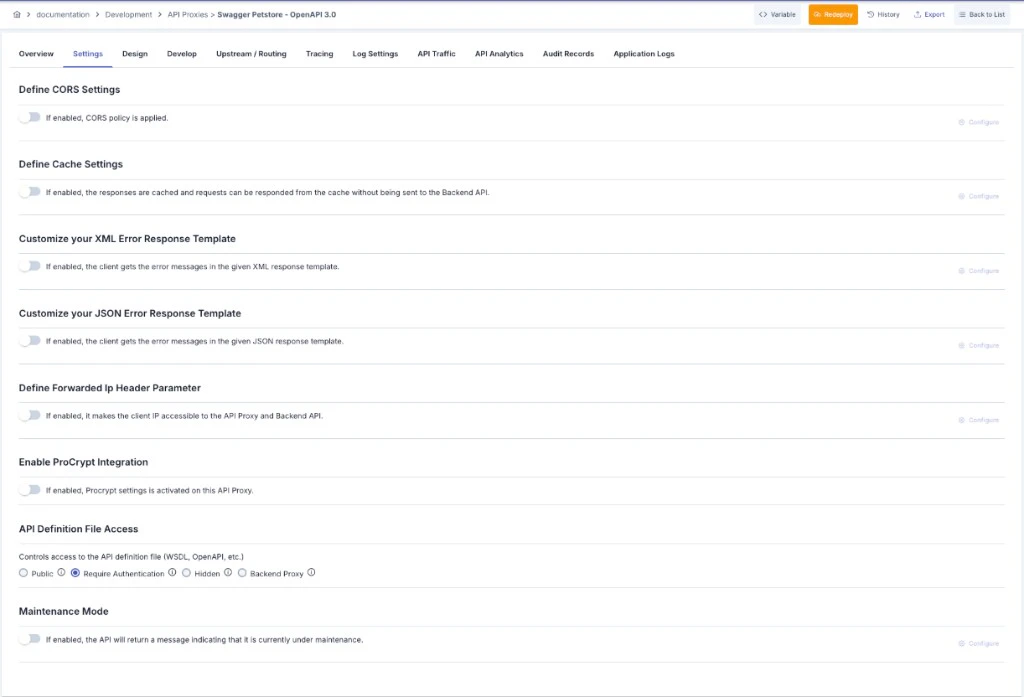
If a warning appears above the settings indicating that global settings are active, the API Proxy is bound to a Global Settings record and the options in this panel are managed from that Global Settings entry. Clicking the warning navigates to the related setting.
CORS Settings
This is the section where CORS (Cross-Origin Resource Sharing) settings are made. When this field is activated, the Configure button becomes active and opens the screen containing the related settings.
CORS Settings Fields
To add new values to the existing predefined Origin and Header values, you can visit the CORS Origin Values and CORS Headers pages.
Cache Settings
Responses returned from the API Proxy can be cached, and requests from clients can be responded from cache without sending to the Backend API. This is the section where settings related to this are managed. Variable can be used when creating cache keys.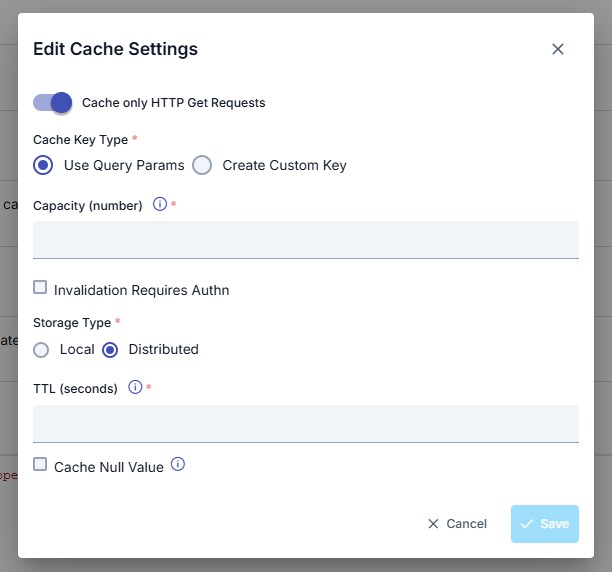
Cache Settings Fields
Customizing XML Error Response Template
For information on where error response templates fit within the multi-layered configuration system, priority order and scenario examples, see the Error Message Configuration Guide page.
XML Error Response Template Settings
Customizing JSON Error Response Template
When activated, the client displays the returned error in the given JSON response template. When this field is activated, the Configure button becomes active and opens the screen containing the related settings.JSON Error Response Template Settings
Placeholders
Values in the form#...# within response templates are used as placeholders where the relevant part of the error message will be placed.
If desired, both templates can be activated. If both templates are active, which one will be used is decided according to the following criteria:
- If the content of the Content-Type header is JSON, the JSON Error Response Template is used.
- If the content of the Content-Type header is empty and the API Proxy type is REST, the JSON Error Response Template is used.
- If these are not valid, the XML Error Response Template is used.
If the “Ignore Error Response Template In Case Of Error On Backend API” option is marked in the API Proxy’s Routing tab, the templates defined in this section are not used, and the Backend API’s error response is sent to the client as is.
Forwarded IP Header Setting
If the API Proxy is behind a Load Balancer or Proxy Server, the request from the client will be routed to the API Proxy by this layer, so the client’s IP value cannot be known by the API Proxy or Backend API. Therefore, Load Balancers or Proxy Servers can forward the original client’s IP value with a header. The Forwarded IP Header Parameters setting ensures that the client IP is accessible by the API Proxy and Backend API by specifying the name of this header, which may vary depending on software/hardware. An image of the Forwarded IP Header Settings Configuration screen is shown below: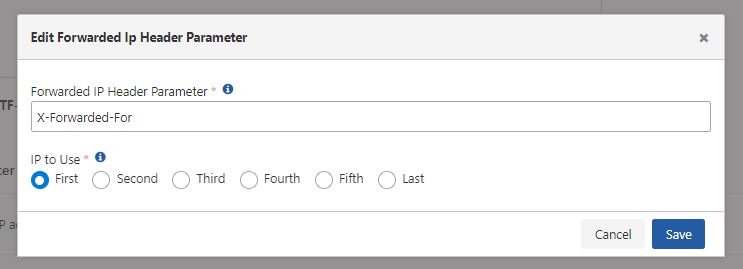
Forwarded IP Header Settings
API Specification File Access Control
You can control access to the API specification file (WSDL, OpenAPI, XSD) through the API Proxy’s external access address at four different levels. This setting has no effect on specification files visible through the Management Console.With the Require Authentication option, you can additionally enable the Validate ACL for Client toggle. In this case, only clients that have access permission for the specific API Proxy can view the specification file.
You can visit the General Information Tab page for access to API Proxy specification files.
API Maintenance Mode
When the Maintenance Mode feature is activated, the API will return a message indicating that it is currently under maintenance. The API responds with a predefined HTTP status code and message structure. An image of the Maintenance Mode Settings Configuration screen is shown below:
Maintenance Mode Settings
Next Steps
General Information Tab
API Proxy general information
Design
API Proxy design tab
Endpoint Configuration
REST endpoint configuration
SOAP Method Configuration
SOAP method configuration
API Traffic Log Settings
API Proxy traffic log settings