

Overview
What is its Purpose?
- Increase Access Security: Ensures that services provided through API Gateway are accessed only from trusted IP addresses.
- Block Unauthorized Access: Minimizes security vulnerabilities by automatically rejecting requests from sources not on the whitelist.
- Apply Geographic Restrictions: Creates geography-based security policies by accepting or blocking requests from specific countries and cities.
- Centralized IP Management: Makes the same IP sets reusable in different policies using IP groups.
- Dynamic IP Management: Provides the ability to dynamically change IP list at runtime with Variable mechanism.
Working Principle
- Request Arrival: For each HTTP/HTTPS request arriving at the API Gateway, the client’s source IP address is identified.
- Policy Check: If the IP Whitelist policy is active, the system checks in the following order:
- Is a Condition defined? If so, is the condition met?
- Is the policy active (active=true)?
- Is a Variable being used or is Apinizer default?
- IP Verification: It is checked whether the client IP address matches one of these sources:
- Manually defined IP list (ipList)
- IPs in IP Groups (ipGroupIdList)
- Geolocation settings (geoLocationDataList)
- Decision Making:
- Match Found: Request is forwarded to the next policy step or backend service.
- No Match: Request is rejected and customized error message is returned (default: 403 Forbidden).
- Error Handling: Customizable HTTP status code and error message are returned for requests that do not comply with the policy rule.
Features and Capabilities
Basic Features
- Manual IP List Management: Define IP ranges with IPv4 addresses and CIDR notation (e.g., 192.168.1.0/24). Each IP address can be added separated by commas and real-time verification is performed.
- IP Group Integration: Add predefined IP groups to the policy. Ability to select and manage multiple IP groups simultaneously. IP groups are updated centrally and automatically reflected in the policy.
- Global and Local Policy Support: Can be defined globally and used in multiple API Proxies or configured as a local policy for a specific API Proxy.
- Active/Passive Status Control: Easily change the active or passive status of the policy (active/passive toggle). In passive mode, the policy is not applied but its configuration is preserved.
- Condition-Based Application: Determine when the policy will be applied by creating complex conditions with Query Builder (e.g., only for specific endpoints or header values).
Advanced Features
- Geolocation (Geographic Location) Support: IP control by country and city through Geolocation service integration. Accept/block requests from entire country or specific cities. Ability to define multiple country and city combinations.
- Variable Mechanism: Dynamically change IP list at runtime using Variable. Get IP list from external systems (database, cache, API). Options to merge or override with Variable.
- Error Message Customization: Customize HTTP status code (default: 403). Define custom JSON or XML error messages. Configure different messages for different error scenarios.
- Export/Import Feature: Export policy configuration as a ZIP file. Import to different environments (Development, Test, Production). Version control and backup capability.
- Policy Group and Proxy Group Support: Manage multiple policies within Policy Group. Bulk policy assignment to Proxy Groups. Centralized update and deploy operations.
- Deploy and Versioning: Deploy policy changes to live environment. See which API Proxies use it (Policy Usage). Proxy Group and Policy Group usage reports.
Usage Scenarios
Configuring Policy Parameters
In this step, users can create a new policy or configure existing policy parameters to define access rules. The defined parameters directly affect how the policy works (e.g., which IPs will be allowed, geographical restrictions, conditional activations, etc.). This allows the policy to be customized according to organization-specific requirements while being centrally manageable.Creating a New Allowed IP List Policy
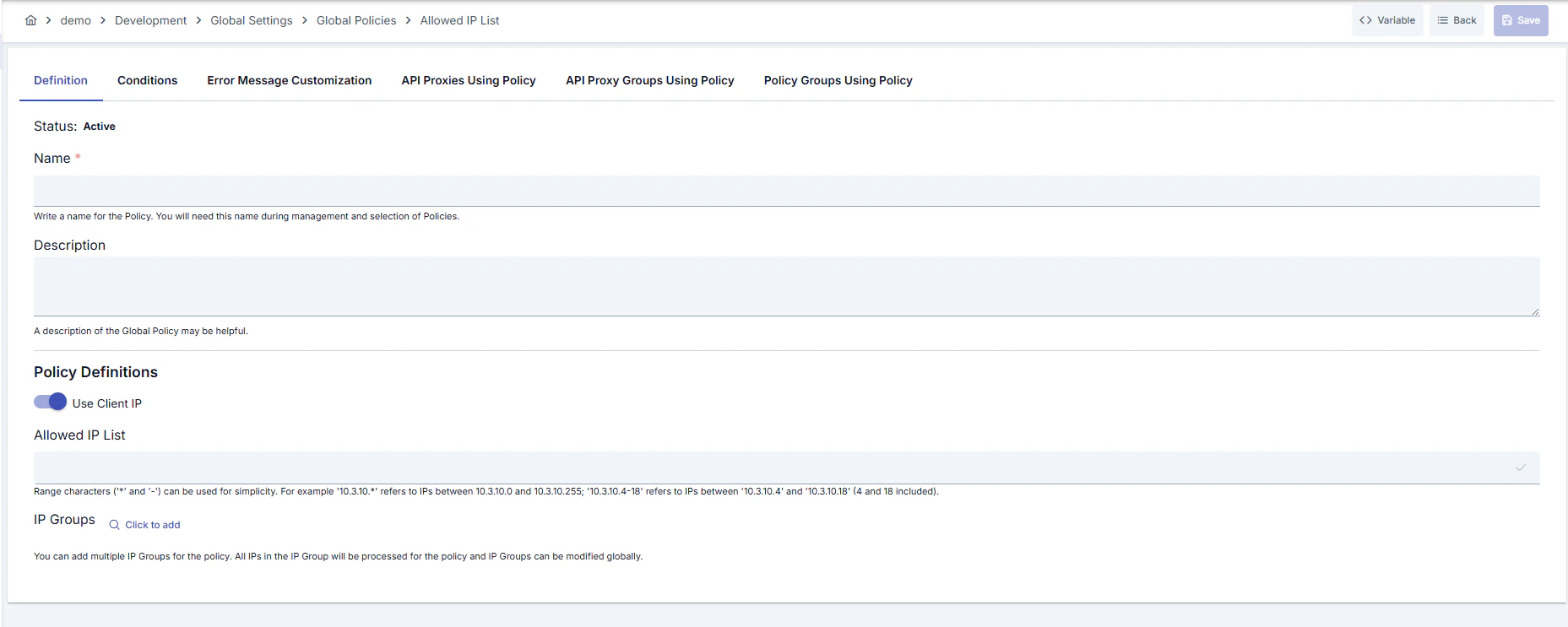
Configuration Steps
For descriptions of Conditions and Error Message Customization panels, you can review the Conditions and Error Message Customization sections on the What is Policy? page.
For a complete guide on all layers, priority order and scenario examples of the error message configuration system, see the Error Message Configuration Guide page.
Deleting the Policy
For deletion steps of this policy and operations to be applied when in use, you can refer to the Remove Policy from Flow section on the Policy Management page.Exporting/Importing the Policy
For export (Export) and import (Import) steps of this policy, you can refer to the Export/Import page.Connecting the Policy to API
For the process of how this policy will be connected to APIs, you can refer to the Connect Policy to API section on the Policy Management page.Advanced Features
Tips and Best Practices
Things to Do and Best Practices
Security Best Practices
Things to Avoid
Performance Tips
Frequently Asked Questions (FAQ)
This document is part of Apinizer product documentation. © 2025 Apinizer - All rights reserved.