

Overview
What is its Purpose?
- Temporarily removes clients from resource consumption by detecting increasing abuse or error rates.
- Executes targeted ban policies by associating each request with identity variables (header, query, JWT, etc.).
- Maintains systemic stability in
API Proxyinfrastructure with threshold window and ban duration parameters. - Enforces business rules by taking action on specific error patterns through Assertion Condition configuration.
Working Principle
- Request Arrival: For each HTTP/HTTPS request arriving at the API Gateway, the source IP address of the request is identified.
- Policy Check: If the Client Ban policy is active, the system checks in the following order:
- Is a Condition defined? If so, is the condition met?
- Is the policy active (active=true)?
- Is a Variable being used or is Apinizer default?
- Identity and Threshold Evaluation: Values from selected
clientIdentityVariableListin the request create a key; ifassertionConditionis met, requests/responses within the window are counted according tothresholdCalculationType. - Decision Making:
- Match Found: Blocking is initiated for the key exceeding threshold value for
banTimeInSecondsduration, Retry-After header is returned ifenableRetryAfterHeaderis active. - No Match: Request continues in normal flow, counters are not updated.
- Match Found: Blocking is initiated for the key exceeding threshold value for
- Error Handling: Customizable HTTP status code and error message are returned for requests that do not comply with the policy rule.
Features and Capabilities
Basic Features
- Multiple Identity Detection: Client identity is calculated through composite key by selecting multiple variables, supporting segmentation.
- Adaptable Threshold Management: Fixed or percentage-based (EnumErrorThresholdType) thresholds are defined with
thresholdWindowInSecondsandthresholdCountPerWindowparameters. - Dynamic Ban Durations: Ban duration is determined in seconds with
banTimeInSecondsfield;ignoreWhenKeyIsEmptyoption ignores empty keys. - Active/Passive Status Control: Easily change the active or passive status of the policy (active/passive toggle). In passive mode, the policy is not applied but its configuration is preserved.
- Condition-Based Application: Determine when the policy will be applied by creating complex conditions with Query Builder (e.g., only for specific endpoints or header values).
Advanced Features
- Fine Distinction with Assertion Condition: You can trigger bans based on error/response content through Assertion Query Builder. Counters are not updated when conditions are not met, preventing false positives; update conditions with versioning as rules change.
- Retry-After Header Management: When
enableRetryAfterHeaderkey is active, Retry-After is automatically added to error responses. Value matchesbanTimeInSecondsand communicates wait time to clients; standardizes retry strategy in queued systems. - Multiple Threshold Type Scenario: COUNT mode counts consecutive request count while PERCENT mode focuses on error rates. Two different key sets changing with window duration can be managed within the same policy, performance is optimized by switching modes according to your traffic profile.
- Export/Import Feature: Export policy configuration as a ZIP file and import to different environments (Development, Test, Production) for version control and backup.
- Policy Group and Proxy Group Support: Manage multiple policies within Policy Group and assign bulk policies to Proxy Groups to accelerate centralized update and deploy operations.
- Deploy and Versioning: Deploy policy changes to live environment and monitor which API Proxies use it through Policy Usage, evaluate Proxy Group and Policy Group usage reports.
Usage Scenarios
Configuring Policy Parameters
In this step, users can create a new policy or configure existing policy parameters to define access rules.Creating a New Client Ban Policy
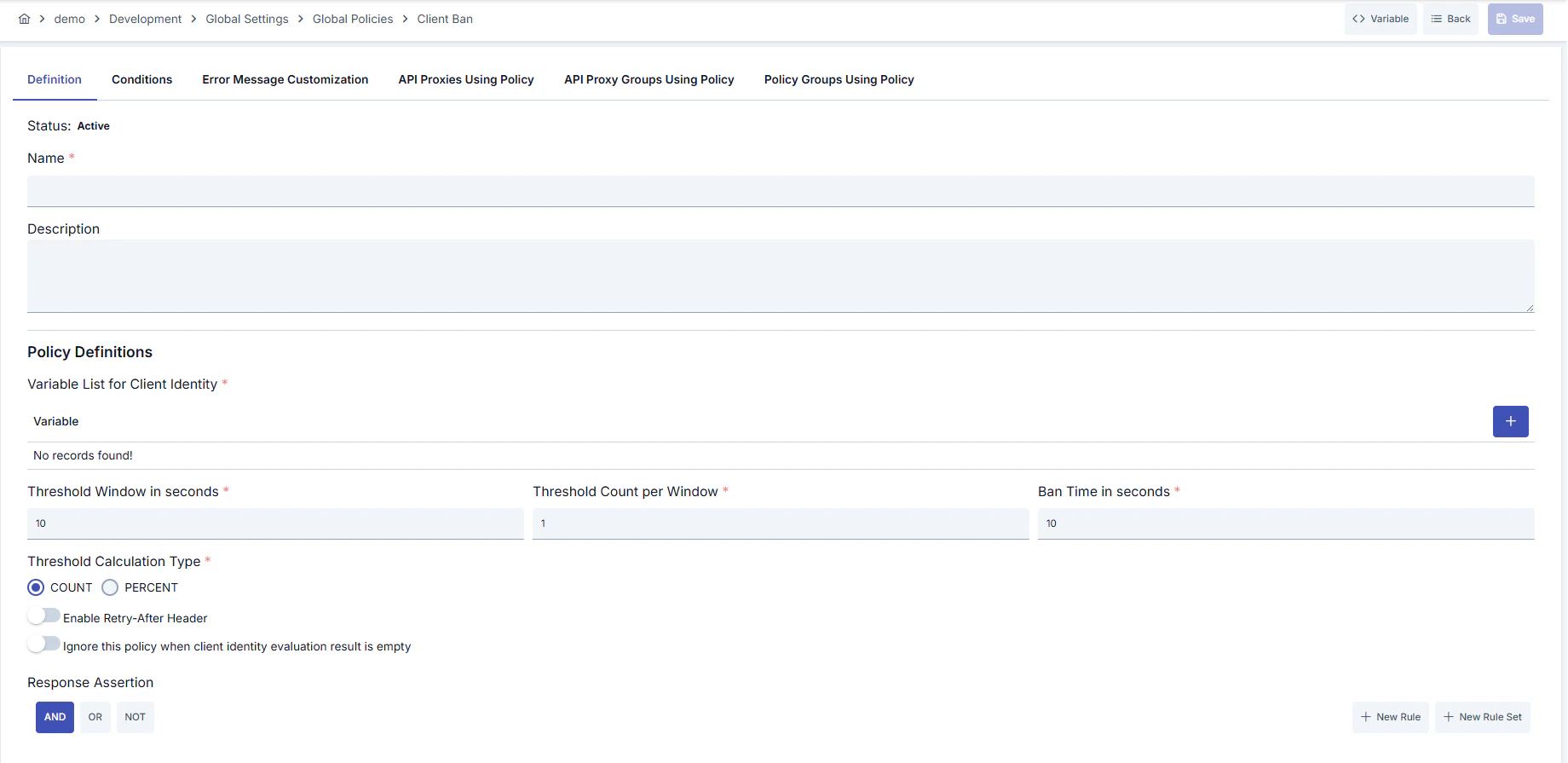
Configuration Steps
For descriptions of Conditions and Error Message Customization panels, you can review the Conditions and Error Message Customization sections on the What is Policy? page.
For a complete guide on all layers, priority order and scenario examples of the error message configuration system, see the Error Message Configuration Guide page.