

Overview
API Based Quota policy is a resource management mechanism that limits API usage over certain time periods (hour, day, week, month).What is its Purpose?
- Usage Quota Management: Controls resource consumption and provides fair usage by limiting API usage in hourly, daily, weekly, or monthly periods.
- Business Model and Pricing Support: Provides customized quota plans for different customer segments (Free: 1000 requests/month, Basic: 10K/month, Premium: 100K/month, Enterprise: Unlimited), supports subscription models.
- Cost Control and Budget Management: Makes cloud service costs predictable, monitors resource consumption per customer, prevents unexpected cost increases.
- SLA and Service Quality Guarantee: Fulfills service level agreements, guarantees access to API resources for all users, prevents resource exhaustion.
- Abuse and Misuse Prevention: Detects and prevents excessive usage, ensures fair distribution of API resources, prevents service interruptions.
Working Principle
- Request Arrival: For each HTTP/HTTPS request arriving at the API Gateway, the request’s source information (IP, user, API key, etc.) and timestamp are detected.
- Policy Check: If the API Based Quota policy is active, the system checks in the following order:
- Is a Condition defined? If so, is the condition met?
- Is the policy active (active=true)?
- Is a Variable used or is Apinizer default?
- Quota Key Creation and Counter Check: A unique quota key is created for each request (format:
quota:{policy_id}:{apply_by_value}:{period}). If Apply By parameter exists (IP address, user ID, API key), this value is included in the key. Current quota usage counter is queried from Redis cache. If Detail List is defined, it is compared with target value and the quota of the matching rule is used, otherwise default quota is applied. - Decision Making:
- If Quota Not Exceeded:
- Counter is incremented by 1 and written to cache synchronously
- Request is forwarded to backend
- Quota information is updated to database asynchronously (does not affect API response time)
- If rate limit statistics is active, remaining quota information is added to response headers (X-RateLimit-Limit, X-RateLimit-Remaining, X-RateLimit-Reset)
- If Quota Exceeded:
- HTTP 429 (Too Many Requests) error is returned, request is not processed
- Quota renewal time is specified in response header
- In case of cache error, Cache Error Handling policy comes into play (REJECT: request is rejected, ALLOW: request continues)
- Error Handling: Returns customizable HTTP status code and error message for requests that do not comply with the policy rule.
Data Storage Architecture
API Based Quota policy uses a two-tier storage strategy to ensure data consistency and persistence: Cache (Redis) - Primary Tier:- Used for real-time quota checks
- Updated synchronously on every API request
- Provides high performance and low latency
- In distributed systems, all Gateway instances share the same counters
- Used for persistent storage of long-term quota data
- Updated asynchronously to not affect API response time
- Prevents data loss when system is restarted or in case of cache error
- Provides reliable data source for reporting, analytics, and billing
- Maintains archive for quota history and usage statistics
- First, Redis cache is quickly updated (synchronous) - included in API response time
- Then database update is performed asynchronously - does not affect API response time
Features and Capabilities
Basic Features
- Quota Count Limit: Determines the maximum total number of requests allowed in a certain time period (minimum 1, integer).
- Long-Term Time Range Support: Define quota periods on Hour, Day, Week, and Month basis. Customizable time intervals with period length multiplier (e.g., 7 days, 3 months).
- Apply By Variable: Determines which criterion the quota will be applied by (user ID-based, API Key-based, customer ID-based, subscription type-based). A separate quota counter is maintained for each variable value.
- Active/Passive Status Control: Easily change the active or passive status of the policy (active/passive toggle). In passive state, the policy is not applied but its configuration is preserved.
- Conditional Application: Determine when the policy will be applied by creating complex conditions with Query Builder (e.g., only for specific endpoints or user types).
Advanced Features
- Target-Based Different Quotas (Detail List): Define special quota rules for specific target values (user levels, subscription plans, customer segments). Flexible target matches with regex support. Separate quota count and time period for each target.
- Interval Window Type Support: SLIDING (Sliding Window) - Window is applied backwards from each request time, usage in last N days/hours. FIXED (Fixed Window) - Counter is reset at certain time intervals (1st of each month, beginning of each week), more common usage.
- Cache Connection and Error Management: Set cache server connection timeout duration (seconds). Determine behavior if cache is inaccessible: REJECT (security and billing accuracy prioritized) or ALLOW (availability prioritized).
- Rate Limit Statistics: Show remaining quota information in response headers (X-RateLimit-Limit, X-RateLimit-Remaining, X-RateLimit-Reset). Enables clients and dashboards to track quota status.
- Distributed Architecture Support: Multiple Gateway instances share the same quota counters thanks to centralized Redis cache usage. Guarantees consistent quota tracking regardless of which gateway the user connects to.
- Export/Import Feature: Export policy configuration as a ZIP file. Import to different environments (Development, Test, Production). Version control and backup capability.
- Policy Group and Proxy Group Support: Manage multiple policies within Policy Group. Bulk policy assignment to Proxy Groups. Centralized update and deploy operations.
- Deploy and Versioning: Deploy policy changes to live environment. See which API Proxies use it (Policy Usage). Proxy Group and Policy Group usage reports.
Usage Scenarios
API Based Quota policy manages total request count to limit and keep API usage under control in long-term periods (hourly, daily, weekly, monthly). The following example scenarios show how this policy can be applied in different usage situations.Configuring Policy Parameters
In this step, users can create a new policy or configure existing policy parameters to define access rules.Creating New API Based Quota Policy
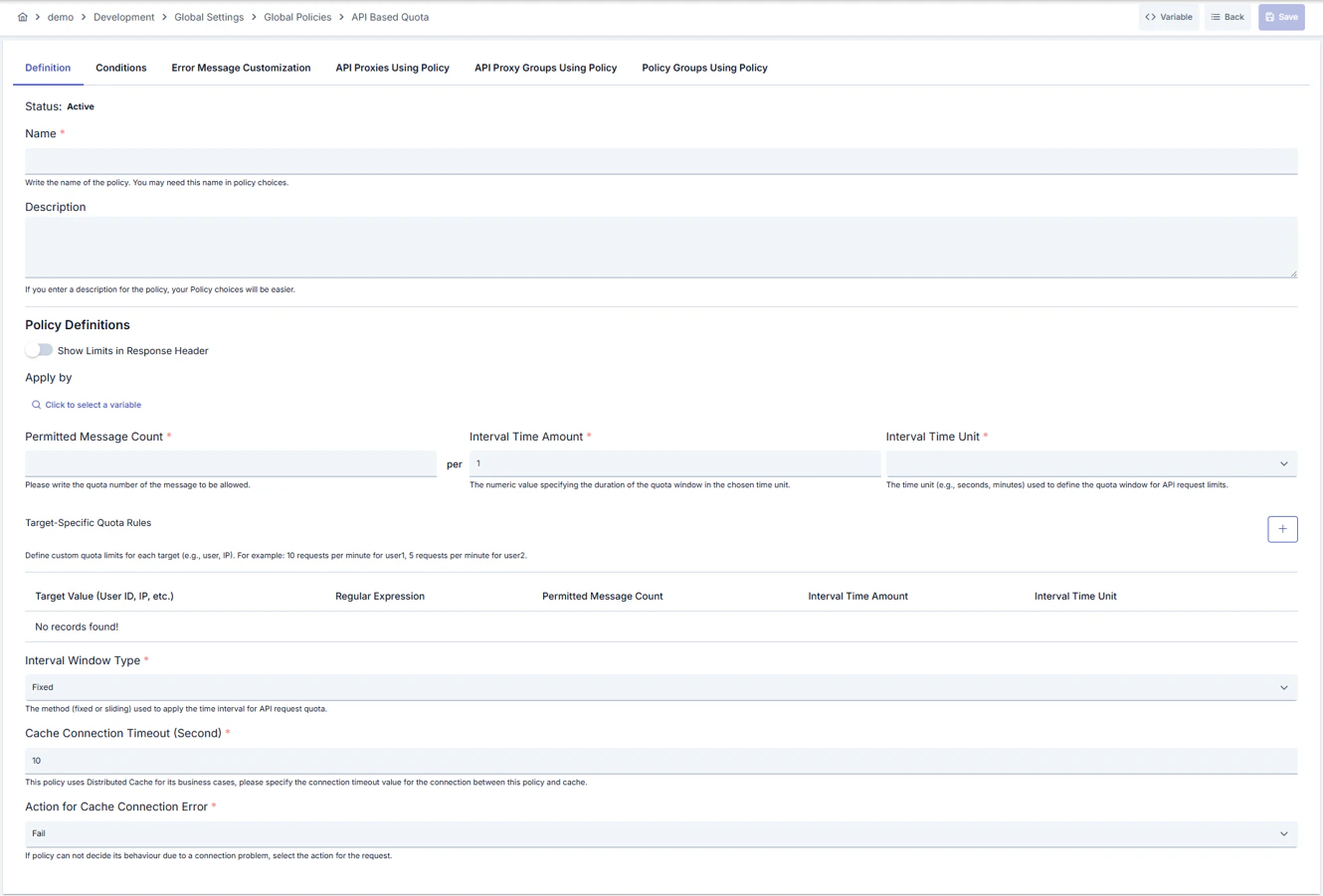
Configuration Steps
For the description of Conditions and Error Message Customization panels, you can review the Conditions and Error Message Customization (Error Message Customization) sections on the What is Policy? page.
For a complete guide on all layers, priority order and scenario examples of the error message configuration system, see the Error Message Configuration Guide page.