

Overview
API Based Throttling policy enables limiting requests coming to APIs in short time intervals (seconds, minutes). With this policy:- You can control the maximum number of requests allowed in a certain time period.
- You can define special rate limits for different targets.
- You can protect your APIs against overload.
- You can apply rate limiting on a user basis or variable basis.
Throttling: Provides short-term (seconds/minutes) rate control, uses only cache, counters reset when system is restarted, ideal for burst protection and DDoS protection.Quota: Manages long-term (hour/day/week/month) total usage limits, uses cache + database combination, provides persistent data storage, used for billing and subscription management.
What is its Purpose?
- System Protection and Resource Management: Protects backend systems against overload, prevents resource exhaustion, and ensures fair use of server capacity.
- DDoS and Bot Attack Prevention: Ensures system security against DDoS attacks, bot traffic, and malicious request bombardment.
- Business Model and SLA Support: Provides customized service levels for different user segments (Free, Premium, Enterprise), fulfills service level agreements.
- Cost Control and Performance Optimization: Optimizes cloud service costs, limits unnecessary API calls, early detection of infinite loops and incorrect implementations.
Working Principle
- Request Arrival: For each HTTP/HTTPS request arriving at the API Gateway, the request’s source information (IP, user, API key, etc.) is detected.
-
Policy Check: If the API-based Rate Limiting policy is active, the system checks in the following order:
- Is the policy active (active=true)?
- Is a Condition defined? If so, is the condition met?
- Is a Variable used or in default settings?
-
Throttling Key Creation and Counter Check: A unique throttling key is created for each request (format:
throttling:{policy_id}:{apply_by_value}:{window}). If Apply By parameter exists (IP address, username, API key, etc.), this value is included in the key. Current request counter is queried from cache. If Detail List is defined, it is compared with target value and the limit of the matching rule is used, otherwise default limit is applied. -
Decision Making:
If Limit Not Exceeded:
- Counter is incremented by 1 and written to cache synchronously.
- Request is forwarded to backend.
- If rate limit statistics is active, quota information is added to response headers (X-RateLimit-Limit, X-RateLimit-Remaining, X-RateLimit-Reset).
- HTTP 403 error is returned, flow is interrupted, goes to error line.
- Cache Error Handling policy comes into play (ALLOW: flow continues, REJECT: flow is interrupted).
- Error Handling: Returns customizable HTTP status code and error message for requests that do not comply with the policy rule.
Data Storage Strategy
API Based Throttling policy uses only cache-based storage for high performance: Cache - Single Tier:- All throttling counters are kept only in cache.
- Updated synchronously on every API request.
- Provides minimum delay and maximum performance.
- In distributed systems, all Gateway instances share the same counters.
- Throttling policy does not write to database.
- Data is temporary and automatically deleted when cache’s TTL (Time-To-Live) duration expires.
- When system is restarted, throttling counters are reset.
- This design is sufficient for short-term rate control and provides maximum performance.
Features and Capabilities
Basic Features
- Message Count Limit: Determines the maximum number of requests allowed in a certain time period (minimum 1, integer).
- Flexible Time Range Support: Define time periods on second and minute basis. Customizable time intervals with period length multiplier (e.g., 3 seconds, 5 minutes).
- Apply By Variable: Determines which criterion throttling will be applied by (IP address, username, API Key, or any header/parameter/body value you choose). A separate counter is maintained for each variable value.
- Active/Passive Status Control: Easily change the active or passive status of the policy (active/passive toggle). In passive state, the policy is not applied but its configuration waits ready for use.
- Conditional Application: Determine in which situations the policy will be applied with Condition (e.g., only for specific endpoints or header values).
Advanced Features
- Target-Based Different Limits (Detail List): Specify certain limits according to certain rules (user levels, IP ranges, API keys). Flexible target matches with regex support. Separate message count and time interval for each target.
- Interval Window Type Support: SLIDING (Sliding Window) - Window is applied forward from each request time, more precise control is provided. FIXED (Fixed Window) - Counter is reset at certain time intervals, more performant.
- Cache Connection and Error Management: Set cache server connection timeout duration (seconds). Determine behavior if cache is inaccessible: ALLOW (availability prioritized) or REJECT (security prioritized).
- Rate Limit Statistics: Show remaining quota information in response headers (X-RateLimit-Limit, X-RateLimit-Remaining, X-RateLimit-Reset). Enables clients to track their own quotas.
- Distributed Architecture Support: Multiple Gateway instances share the same counters thanks to centralized cache usage. Consistent rate limiting is provided regardless of which gateway the user connects to.
- Export/Import Feature: Export policy configuration as a ZIP file. Import to different environments (Development, Test, Production) or API Proxies.
- Policy Group and Proxy Group Support: Manage multiple policies within Policy Group and centralized update and deploy operations with policy usage in Proxy Group.
- Deploy and Versioning: Versioning with Deployment History feature in API Proxies. See which API Proxies use it with global policy or Policy Group usage.
Usage Scenarios
API Based Throttling policy controls request rates to manage API traffic and protect system resources. The following example scenarios show how this policy can be applied in different usage situations. Each scenario is explained with a configuration example corresponding to a specific need.Configuring Policy Parameters
This section contains the fields and configuration steps used for creating a new API Based Throttling policy. Policy parameters determine by which criterion requests will be limited, how the time window will be calculated, and how the system will behave in limit exceedances.Creating New API-Based Rate Limiting Policy
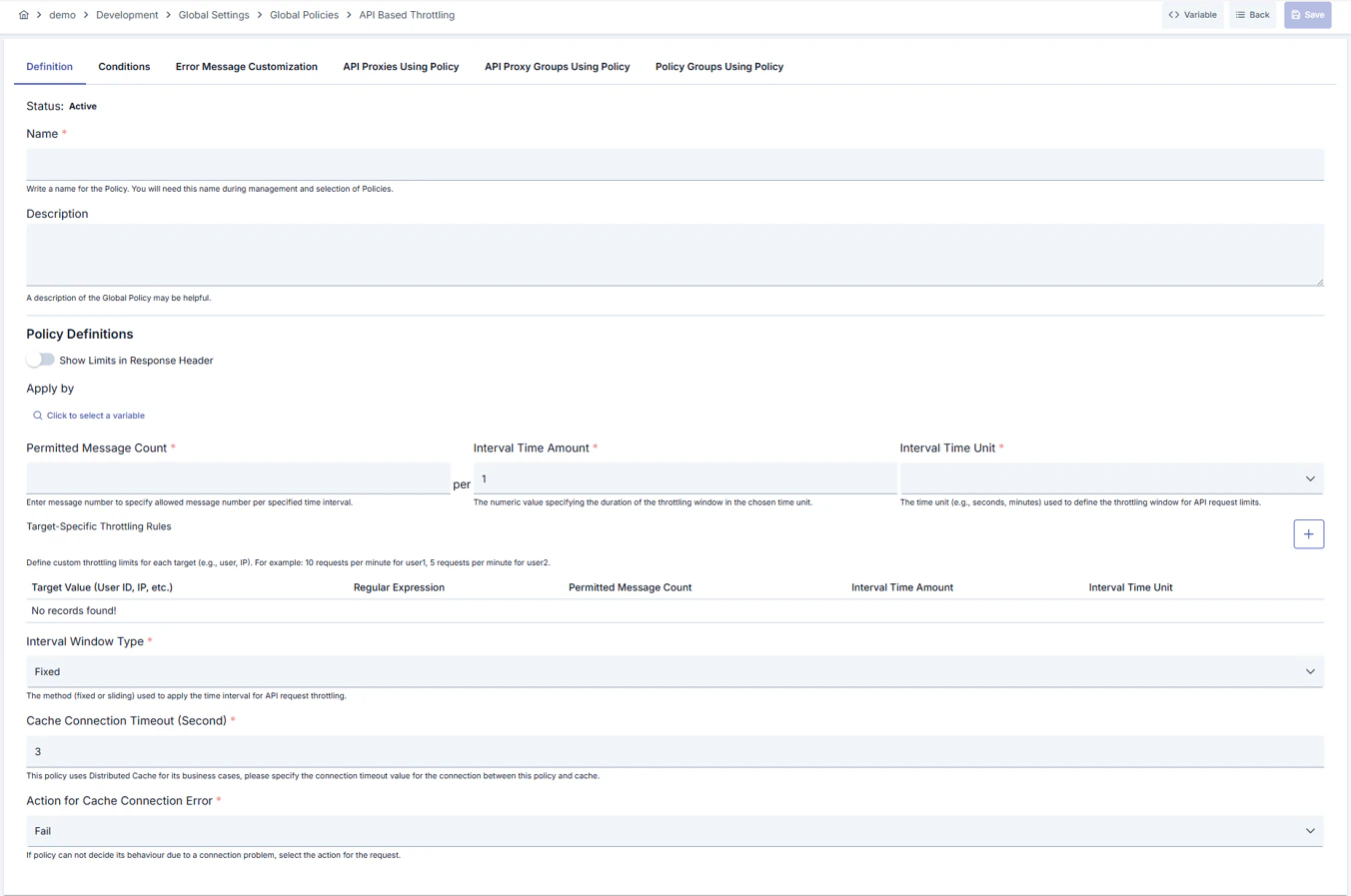
Configuration Steps
For the description of Conditions and Error Message Customization panels, you can review the Conditions and Error Message Customization (Error Message Customization) sections on the What is Policy? page.
For a complete guide on all layers, priority order and scenario examples of the error message configuration system, see the Error Message Configuration Guide page.
Deleting Policy
For the deletion steps of this policy and operations to be applied while in use, you can refer to the Removing Policy from Flow section on the Policy Management page.Exporting/Importing Policy
For the export and import steps of this policy, you can refer to the Export/Import page.Binding Policy to API
For the process of how this policy will be bound to APIs, you can refer to the Binding Policy to API section on the Policy Management page.Advanced Features
In this section, users gain more flexible, dynamic, and enterprise-level control by using the advanced management capabilities of the API Based Throttling policy. Thanks to advanced features such as variable management, target-specific rule definitions, conditional activation, and customizable error messages, policies can be dynamically adapted and optimized according to different scenarios.Tips and Best Practices
Things to Do and Best Practices
Using Throttling and Quota Policies Together
Throttling and Quota policies complement each other and provide the most effective protection when used together: Throttling (Short-Term Protection):- Second/minute-based rate control
- Instantly prevents burst attacks
- Uses only cache, maximum performance
- Affected by system restarts
- Hour/day/month-based total usage control
- Billing and subscription management
- Cache + database, persistent data
- Reporting and analytics support