

Overview
Verifies HTTP Digest credentials and provides custom headers and authorization options.What is its Purpose?
- Enforce incoming HTTP Digest authentication and prevent anonymous access by matching with Secret Manager variables stored in directory.
- Check request’s Authorization header and provide secure user identity and role transfer for upstream services.
- Reduce attack surface with optional client IP verification and Clear Auth and similar additional controls.
- Centralize role-based access decisions by integrating with internal authorization engine or external services.
- Enable policy to adapt to different environment requirements with error message and condition-based execution options.
Working Principle
- Request Arrival: For each HTTP/HTTPS request arriving at API Gateway, the request’s source IP address is detected.
- Policy Check: If Digest Authentication policy is active, the system checks in the following order:
- Is a condition defined? If so, is the condition met?
- Is the policy active (active=true)?
- Is a variable used or is Apinizer default used?
- Digest Authentication Check: Digest parameters in Authorization header are resolved, username/password/nonce/created variables are obtained from Secret Manager and RFC-compliant digest comparison is performed; if any variable is missing, request is immediately rejected.
- Decision Making:
- Match Exists: If user is defined, request continues, if Clear Auth is off, original header is preserved, if Add User to Header is active, user information is added to desired header, if authorization is on, role list is calculated.
- No Match: Default or customized error response is prepared, request transmission is stopped, authorization calls are not triggered.
- Error Handling: Customizable HTTP status code and error message are returned for requests that do not comply with policy rules.
Features and Capabilities
Basic Features
- Secret Manager Variable Management: Username, password, nonce, and created values are associated with Apinizer Secret Manager variables; variable updates are managed from single point.
- Authorization Header Processing: Sensitive identity information can be deleted before passing to upstream services after verification with Clear Auth option.
- Client IP Verification: Credential sharing attacks are prevented by ensuring requesting IP matches registered identity information with checkClientIpAddress parameter.
- Active/Passive Status Control: Easily change policy’s active or passive status (active/passive toggle). Policy is not applied in passive state but its configuration is preserved.
- Condition-Based Application: Determine when the policy will be applied by creating complex conditions with Query Builder (e.g., only for specific endpoints or header values).
Advanced Features
- Authorization Layer Integration: Role verification based on LDAP, database, or REST API can be added with AuthorizationConfiguration component, roles can be moved to header.
- Method-Based Access Restriction: Role requirement is defined according to HTTP method with enableMethodAccess, sensitive operations are separately protected.
- Secret Manager Synchronization: Automatic variable selection quickly loads username/password/nonce/created defaults specific to digest policies.
- Export/Import Feature: Export policy configuration as ZIP file. Import to different environments (Development, Test, Production). Version control and backup capability.
- Policy Group and Proxy Group Support: Manage multiple policies within Policy Group. Bulk policy assignment to Proxy Groups. Centralized updates and deploy operations.
- Deploy and Versioning: Deploy policy changes to live environment. See which API Proxies use it (Policy Usage). Proxy Group and Policy Group usage reports.
Usage Scenarios
Configuring Policy Parameters
In this step, users can create a new policy or configure existing policy parameters to define access rules.Creating New Digest Authentication Policy
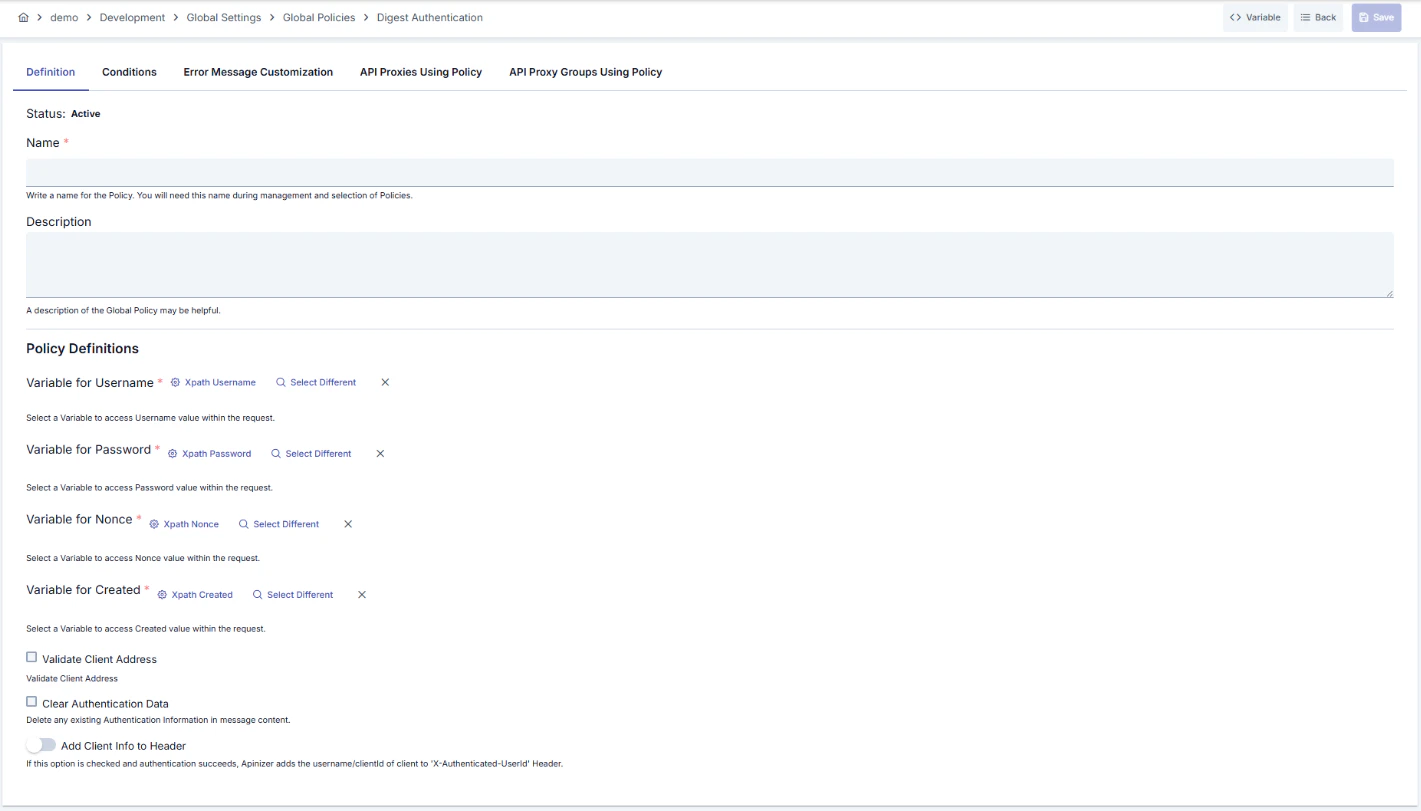
Configuration Steps
For descriptions of Conditions and Error Message Customization panels, you can review the Conditions and Error Message Customization (Error Message Customization) sections on the What is Policy? page.
For a complete guide on all layers, priority order and scenario examples of the error message configuration system, see the Error Message Configuration Guide page.