

Overview
What is its Purpose?
- Simplifies consumer integrations by repackaging API Proxy response or request as JWT in JOSE standards-compliant format.
- Secures claim data carried between application services with signature and encryption layers.
- Ensures centralized and auditable key management by working integrated with JWK vault.
- Dynamically triggered in specific endpoint, header, or environment combinations with condition engine support.
- Manages organization-specific token enrichments without code changes through additional claim map and data manipulation targets.
Working Principle
- Request Arrival: For each HTTP/HTTPS request arriving at the API Gateway, the source IP address of the request is identified.
- Policy Check: If the JOSE Application policy is active, the system checks in the following order:
- Is a Condition defined? If so, is the condition met?
- Is the policy active (active=true)?
- Is a Variable being used or is Apinizer default?
- Token Generation and Security Layer: After target field is determined, claim set is collected, additional claim map is added, signing and optional encryption is applied according to JWK selection.
- Decision Making:
- Match Found: Generated JWT is written to specified target (body, Authorization header, variable, or empty) and traffic continues.
- No Match: Policy remains disabled, request is transmitted with original content.
- Error Handling: Customizable HTTP status code and error message are returned for requests that do not comply with the policy rule.
Features and Capabilities
Basic Features
- Flexible JOSE Target: Token output can be set to body (Body), Authorization header (Authorization Header), selected variable (Choose from Variable), or empty target (Empty); facilitates response manipulations.
- JWT Claims Claim and Escape JSON String: When target is not EMPTY, which claim name the raw data is written to in the payload (jwtClaimsClaim) and whether the JSON string is escaped (escapeJsonString) can be configured.
- Ready Claim Keys: Core claim fields such as Issuer, Subject, Audience, Expiration, Issue Time, JWT ID and Type (add type to header) are managed with key/lock combinations.
- Additional Claim Map: Text, list, or numeric claims can be added and edited from the interface with type-controlled MapValue support.
- Active/Passive Status Control: Easily change the active or passive status of the policy (active/passive toggle). In passive mode, the policy is not applied but its configuration is preserved.
- Condition-Based Application: Determine when the policy will be applied by creating complex conditions with Query Builder (e.g., only for specific endpoints or header values).
Advanced Features
- Key Source Mode: Key for signature and encryption can be Embedded (JWK from Secret Manager) or Dynamic HTTP (remote key fetch via HTTP request).
- Dynamic Key Fetching: When Dynamic HTTP is selected, HTTP request (Test Console), Key Extraction Variable, Key Format (AUTO_DETECT, PUBLIC_KEY, PRIVATE_KEY, CERTIFICATE, JWK_JSON), Key Algorithm, Kid (optional), cache settings (Apply By variable, Capacity, TTL, Cache Storage Type, Respect Cache Invalidation Headers, Connection Timeout, Error Handling Type), Retry on Key Error, Invalidate Cache on Validation Error and Try It (Parse Response) button can be used for testing. Use Settings and Configure for secure connection options (Test Console).
- JWK Management Integration: In Embedded mode, JWK search, selection, update and new key generation through Secret Manager is done with single click.
- Dual-Layer Security: Token integrity and confidentiality are simultaneously ensured by applying signature and encryption combination in the same request.
- Data Manipulation Synchronization: For generated JWT/JWE, Injection Target (encoded claims target) and variable assignment for decoded claims (decoded claims target variable) enable data sharing between chain policies.
- Export/Import Feature: Export policy configuration as a ZIP file. Import to different environments (Development, Test, Production). Version control and backup capability.
- Policy Group and Proxy Group Support: Manage multiple policies within Policy Group. Bulk policy assignment to Proxy Groups. Centralized update and deploy operations.
- Deploy and Versioning: Deploy policy changes to live environment. See which API Proxies use it (Policy Usage). Proxy Group and Policy Group usage reports.
Usage Scenarios
Configuring Policy Parameters
In this step, users can create a new policy or configure existing policy parameters to define access rules. The defined parameters directly affect how the policy works (e.g., which target to write token to, conditional activations, signature/encryption source, etc.). This allows the policy to be customized according to organization-specific requirements while being centrally manageable.Creating a New JOSE Application Policy
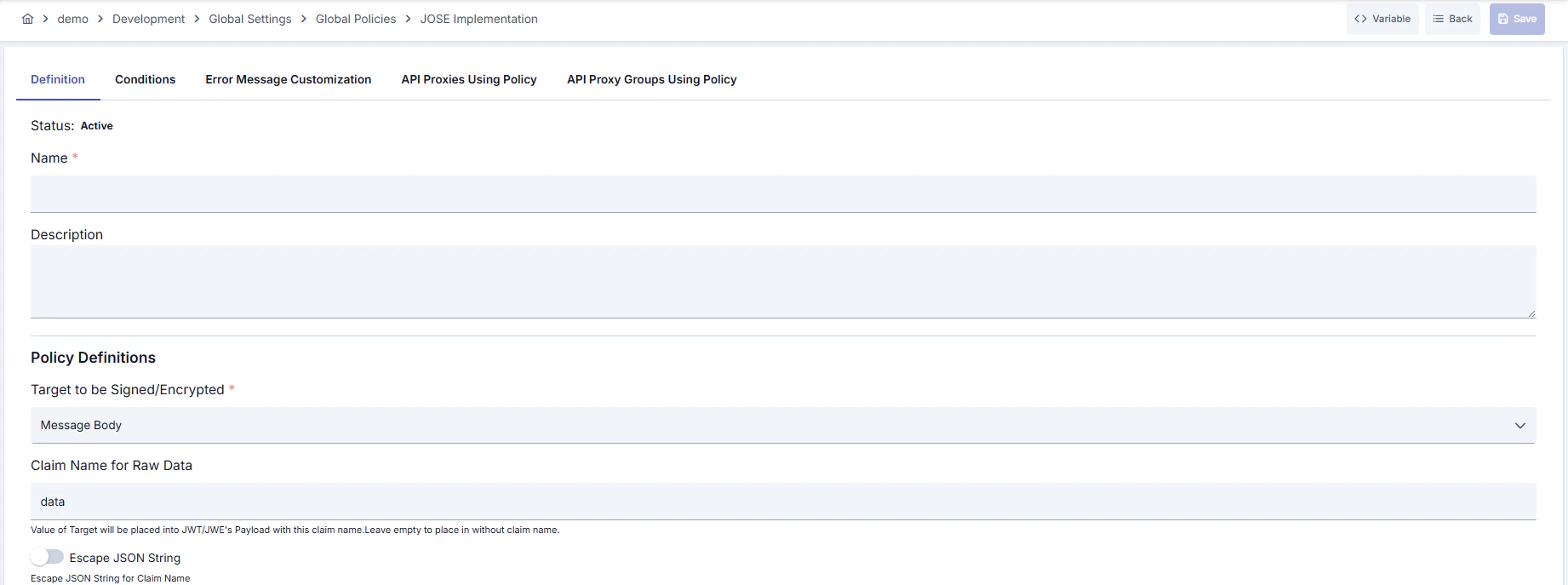
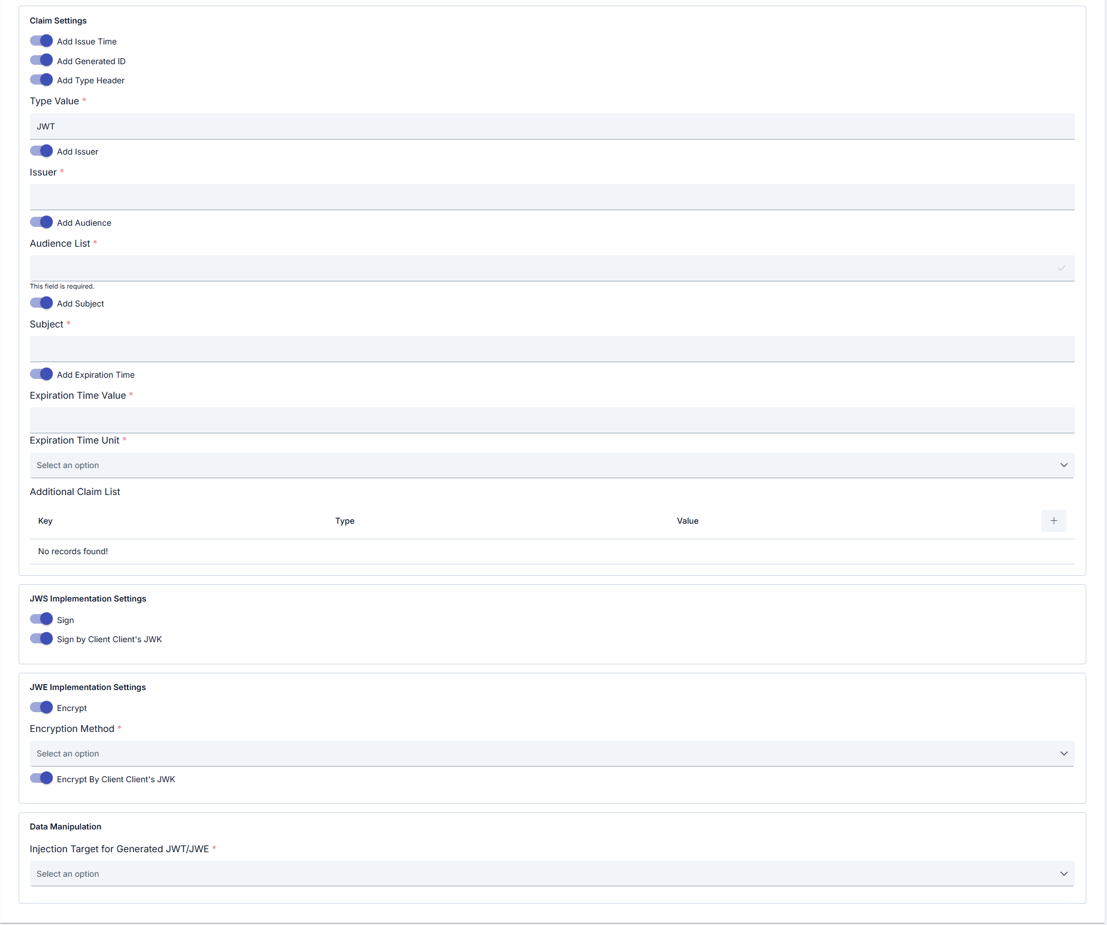
Configuration Steps
Tabs (besides Definition): Definition, Condition, Error Message Customization; in page mode API Proxies Using Policy and API Proxy Groups Using Policy tabs are also visible.
For descriptions of Conditions and Error Message Customization panels, you can review the Conditions and Error Message Customization sections on the What is Policy? page.
For a complete guide on all layers, priority order and scenario examples of the error message configuration system, see the Error Message Configuration Guide page.