

Overview
What is its Purpose?
- Designed to ensure reliability of identity information by verifying JOSE/JWT tokens entering the API Proxy flow.
- Prevents unauthorized access and protects sensitive endpoints by enforcing specified issuer, audience, and claim rules.
- Provides clean data transfer to downstream services by securely decrypting encrypted JWE contents.
- Works integrated with centralized authorization policies in downstream services by broadcasting identity and role information at header level.
Working Principle
- Request Arrival: For each HTTP/HTTPS request arriving at the API Gateway, the source IP address of the request is identified.
- Policy Check: If the JOSE Verification policy is active, the system checks in the following order:
- Is a Condition defined? If so, is the condition met?
- Is the policy active (active=true)?
- Is a Variable being used or is Apinizer default?
- JOSE Content Resolution: Token is read from specified source (body, Authorization header, or variable); if needed, decryption is performed with selected JWK and claim set is prepared for verification.
- Decision Making:
- Match Found: If signature/encryption is valid, claim and audience rules are met, and issuer ACL is approved, request continues in flow, user information is added to header if needed.
- No Match: If token cannot be resolved, signature cannot be verified, claim rules are violated, or ACL rejection occurs, request is terminated by policy.
- Error Handling: Customizable HTTP status code and error message are returned for requests that do not comply with the policy rule.
Features and Capabilities
Basic Features
- Flexible JOSE Target: Token can be read from body (Body), Authorization header (Authorization Header), or selected variable (Choose from Variable); in variable scenarios it is assigned with variable selector.
- Client Source: Source where issuer/client information is read: Header, Claims, or Variable. If Variable, Client Source Variable is required; otherwise Client Fieldname (JSON Path or claim name, e.g.
iss) is required. - Granular Claim Verification: Accepted audience list, Exact Match Claim (key-type-value), Required Claim and Prohibited Claim lists enable multi-layer verification.
- Identity and Role Broadcasting: User identity extracted from request can be added to header via Add User to Header (User Header Name required); supports centralized authorization control.
- Active/Passive Status Control: Easily change the active or passive status of the policy (active/passive toggle). In passive mode, the policy is not applied but its configuration is preserved.
- Condition-Based Application: Determine when the policy will be applied by creating complex conditions with Query Builder (e.g., only for specific endpoints or header values).
Advanced Features
- Key Source Mode: Key for signature verification and decryption can be Embedded (JWK from Secret Manager) or Dynamic HTTP (remote key fetch via HTTP request).
- Dynamic Key Fetching: When Dynamic HTTP is selected, HTTP Request Configuration (Test Console), Key Extraction Variable, Key Format, Key Algorithm, Kid, cache settings (Apply By, Capacity, TTL, Cache Storage Type, Respect Cache Invalidation Headers, Connection Timeout, Cache Error Handling Type), Retry on Key Error, Invalidate Cache on Validation Error and Parse Response (Try It) button can be used for testing. On the same HTTP request, open Settings to enable secure connection and use Configure for mTLS/SSL options; field behavior matches Test Console.
- JWK Lifecycle Management: In Embedded mode, signature and encryption keys are selected via Secret Manager or new key is created; necessary roles can define new keys.
- Issuer ACL and IP Control: Validate ACL for Issuer for issuer-based allow list; Check Client IP Address for client IP verification of the request maker (visible when policy list type is Request and validateACLforIssuer is on).
- Claim Decode and Rewrite: Strip and Decode (None, All, Partial) isolates and decodes JWT/JWE payload; if Partial, JWT Claims to Decode (jwtClaimsToDecode) is required. Decoded Claims Target (Body, Authorization Header, Choose from Variable) and optionally Decoded Claims Target Variable direct the output.
- Authorization Configuration: When policy list type is Request, policy is not global and Validate ACL for Issuer is on, Authorization Configuration component is visible; role-based access and method access are configured.
- Export/Import Feature: Export policy configuration as a ZIP file. Import to different environments (Development, Test, Production). Version control and backup capability.
- Policy Group and Proxy Group Support: Manage multiple policies within Policy Group. Bulk policy assignment to Proxy Groups. Centralized update and deploy operations.
- Deploy and Versioning: Deploy policy changes to live environment. See which API Proxies use it (Policy Usage). Proxy Group and Policy Group usage reports.
Usage Scenarios
Configuring Policy Parameters
In this step, users can create a new policy or configure existing policy parameters to define access rules. The defined parameters directly affect how the policy works (which source to read token from, claim/audience rules, signature/decryption source, ACL and authorization, etc.). This allows the policy to be customized according to organization-specific requirements while being centrally manageable.Creating a New JOSE Verification Policy
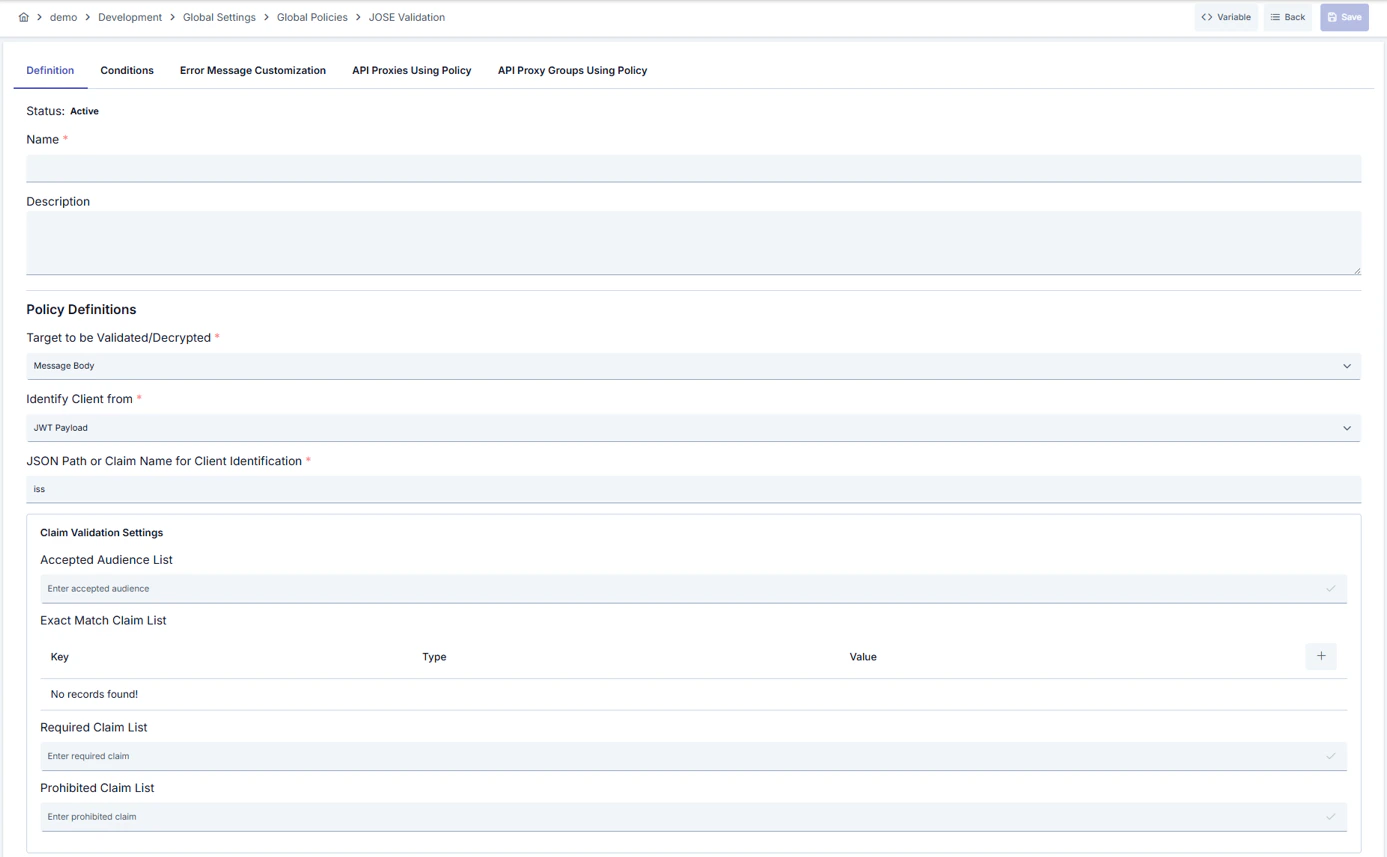
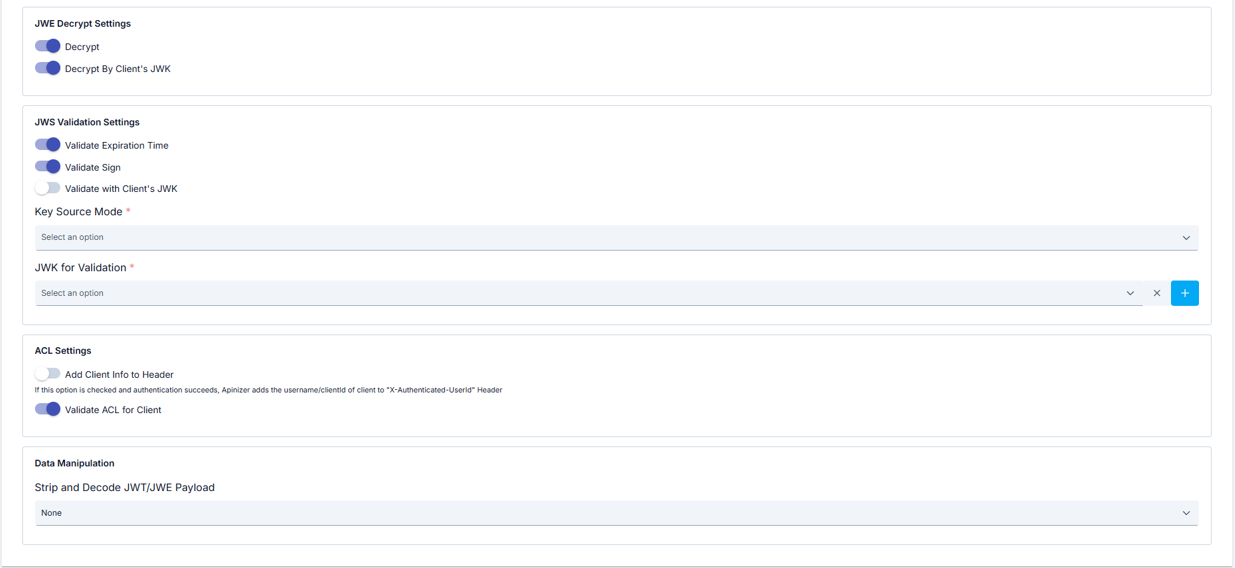
Configuration Steps
Tabs: Definition, Condition, Error Message Customization; in page mode API Proxies Using Policy and API Proxy Groups Using Policy tabs are also visible.
For descriptions of Conditions and Error Message Customization panels, you can review the Conditions and Error Message Customization sections on the What is Policy? page.
For a complete guide on all layers, priority order and scenario examples of the error message configuration system, see the Error Message Configuration Guide page.