

Overview
What is its Purpose?
- Standardize end-user authentication by routing API Proxy traffic to external OIDC providers.
- Lighten authentication load of microservices and centralize security with ID token and access token verification.
- Sustain long-term user sessions securely thanks to session, cookie, and cache management.
- Apply fine-grained authorization rules at API layer with role mapping and header injections.
Working Principle
- Request Arrival: For each HTTP/HTTPS request arriving at the API Gateway, the source IP address of the request is identified.
- Policy Check: If the OIDC Authentication policy is active, the system checks in the following order:
- Is a Condition defined? If so, is the condition met?
- Is the policy active (active=true)?
- Is a Variable being used or is Apinizer default?
- OIDC Authorization Flow: Request is routed according to selected OIDC/OAuth2 flow type; issuer/discovery metadata is fetched, PKCE and nonce/state values are generated, token is validated.
- Decision Making:
- Match Found: User information is extracted from verified token, header/cookie is updated, optional authorization service is triggered, and request is allowed.
- No Match: Authorization fails, defined error message or redirect rule is applied.
- Error Handling: Customizable HTTP status code and error message are returned for requests that do not comply with the policy rule.
Features and Capabilities
Basic Features
- Dynamic OIDC Discovery: Reduces manual configuration need by automatically discovering issuer, JWKS, and other metadata information through well-known endpoint.
- Multiple Flow Support: Manages Authorization Code, Implicit, Hybrid, and pure OAuth2 Authorization Code flows in the same policy; increases security with PKCE support.
- Token Verification Controls: Provides ID/Access token verification, signature algorithm control, user information retrieval, and API-based token verification options.
- Active/Passive Status Control: Easily change the active or passive status of the policy. In passive mode, the policy is not applied but its configuration is preserved.
- Condition-Based Application: Determine when the policy will be applied by creating complex conditions with Query Builder (e.g., only for specific endpoints or header values).
Advanced Features
- Advanced Session Management: Meets corporate security standards with session cookie name, timeout, state/nonce verification, session encryption, and compression settings.
- Role and Authorization Integration: Provides in-depth access management with role mapping, adding role to header, external authorization service, or Credential Role Service.
- Adaptable Token Carrying: Can accept token via header, cookie, or both; can make bearer format mandatory, can use custom header names.
- Export/Import Feature: Export policy configuration as a ZIP file. Import to different environments (Development, Test, Production). Version control and backup capability.
- Policy Group and Proxy Group Support: Manage multiple policies within Policy Group. Bulk policy assignment to Proxy Groups. Centralized update and deploy operations.
- Deploy and Versioning: Deploy policy changes to live environment. See which API Proxies use it (Policy Usage). Proxy Group and Policy Group usage reports.
Usage Scenarios
Configuring Policy Parameters
In this step, users can create a new policy or configure existing policy parameters to define access rules. The defined parameters directly affect how the policy works (e.g., which IPs will be allowed, geographical restrictions, conditional activations, etc.). This allows the policy to be customized according to organization-specific requirements while being centrally manageable.Creating a New OIDC Authentication Policy
The sections below walk through the OIDC (Keycloak, Okta, Azure AD, …) configuration profile in tab order, with screenshots and field tables for that profile. For how OAuth2 (External OAuth2 Provider) differs, finish these OIDC sections first, then read OIDC vs OAuth2 configuration profile — UI differences right after them (including OAuth2 Parameters and Session & HTML screenshots).Connection tab
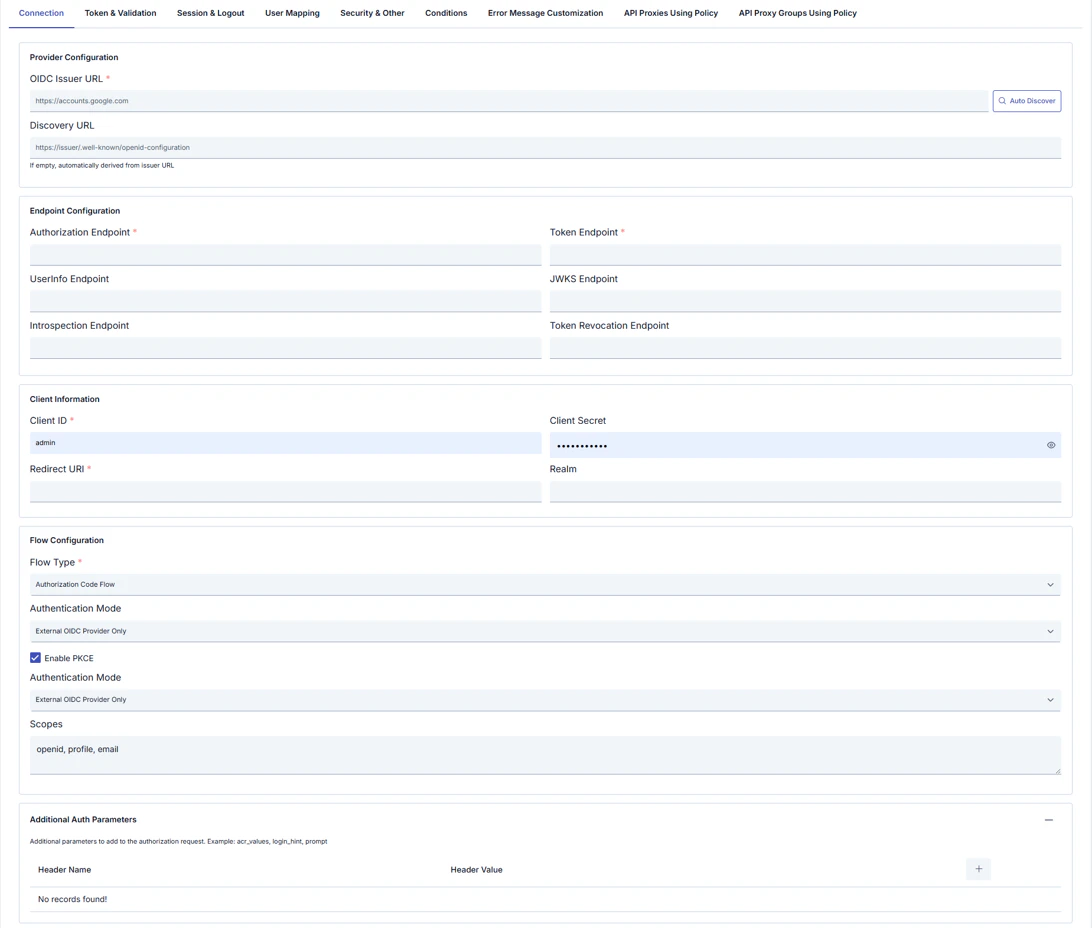
Token & Validation tab
OIDC configuration profile only. The OAuth2 profile uses the OAuth2 Parameters tab instead of this one. Defines how incoming tokens are validated, forwarded to backends, and cached (JWT checks, UserInfo, header/cookie behavior).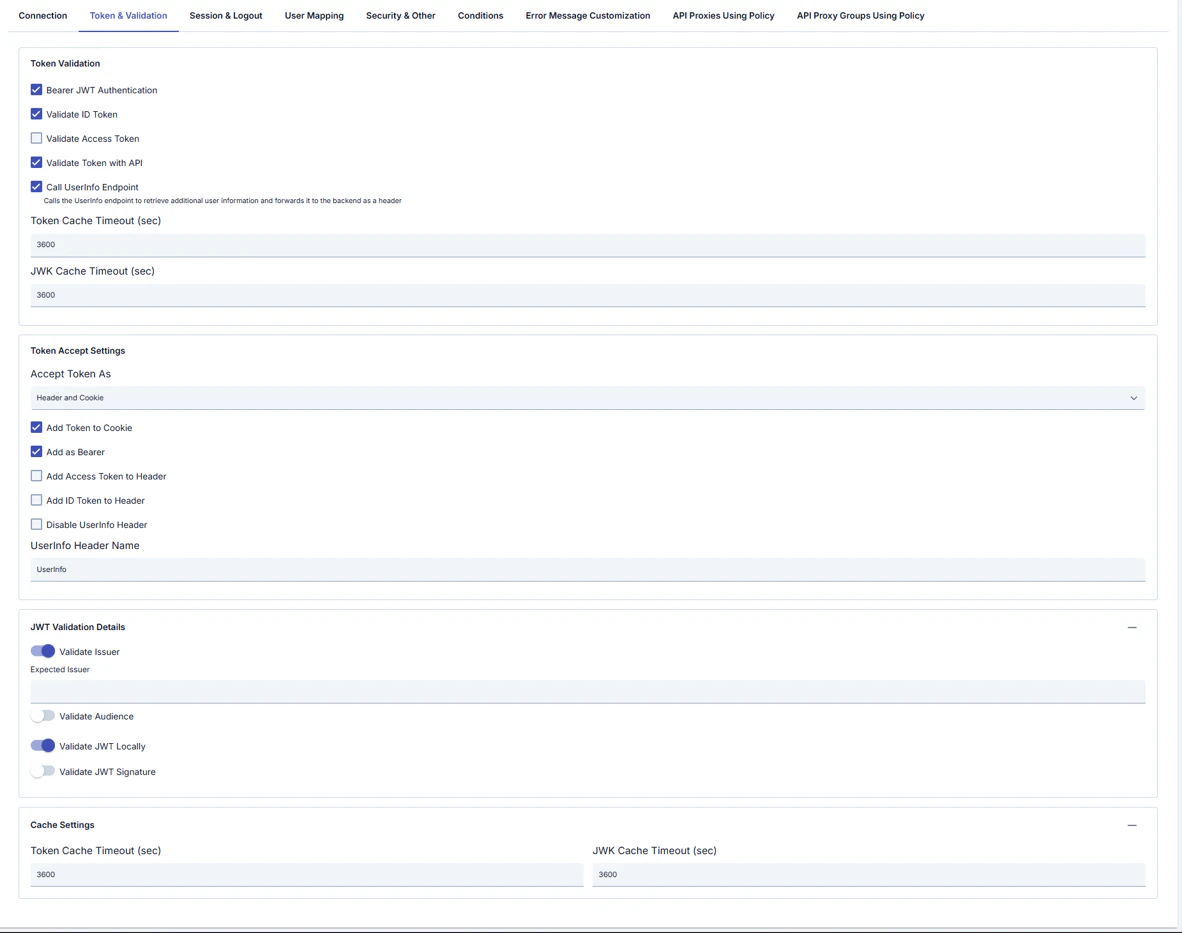
Token Accept Settings
JWT Validation Details
Cache Settings (duplicate block in UI)
Session & Logout tab
OIDC configuration profile only (full session and logout). The OAuth2 profile uses Session & HTML instead (simplified session + HTML templates). Session cookie, token cookies, and logout behavior.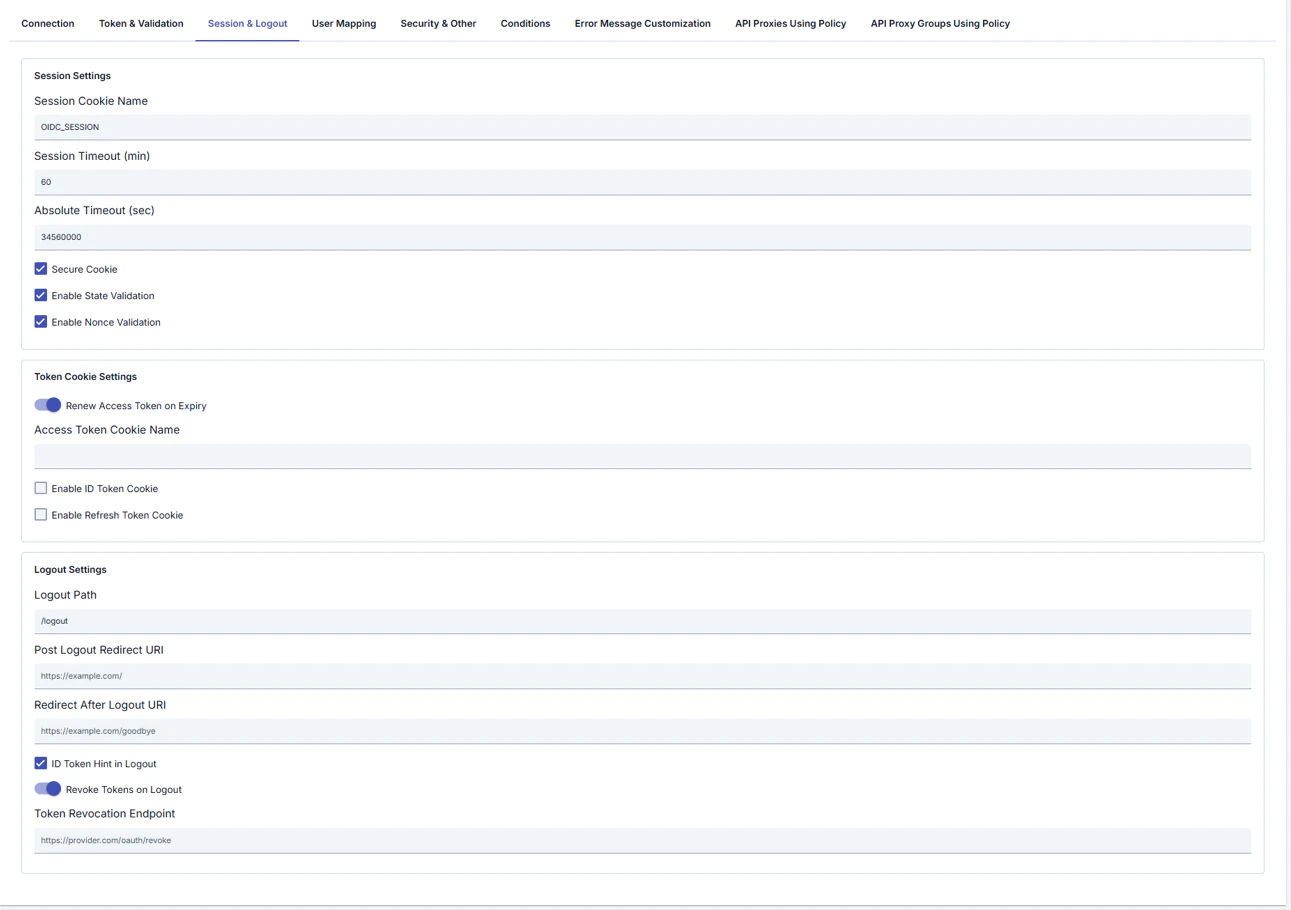
Token Cookie Settings
Logout Settings
User Mapping tab
OIDC configuration profile only. There is no User Mapping tab on the OAuth2 profile; use OAuth2 Username Extraction Path on Connection and the OAuth2 Parameters tab. Maps OIDC claims to user fields, roles, and backend headers.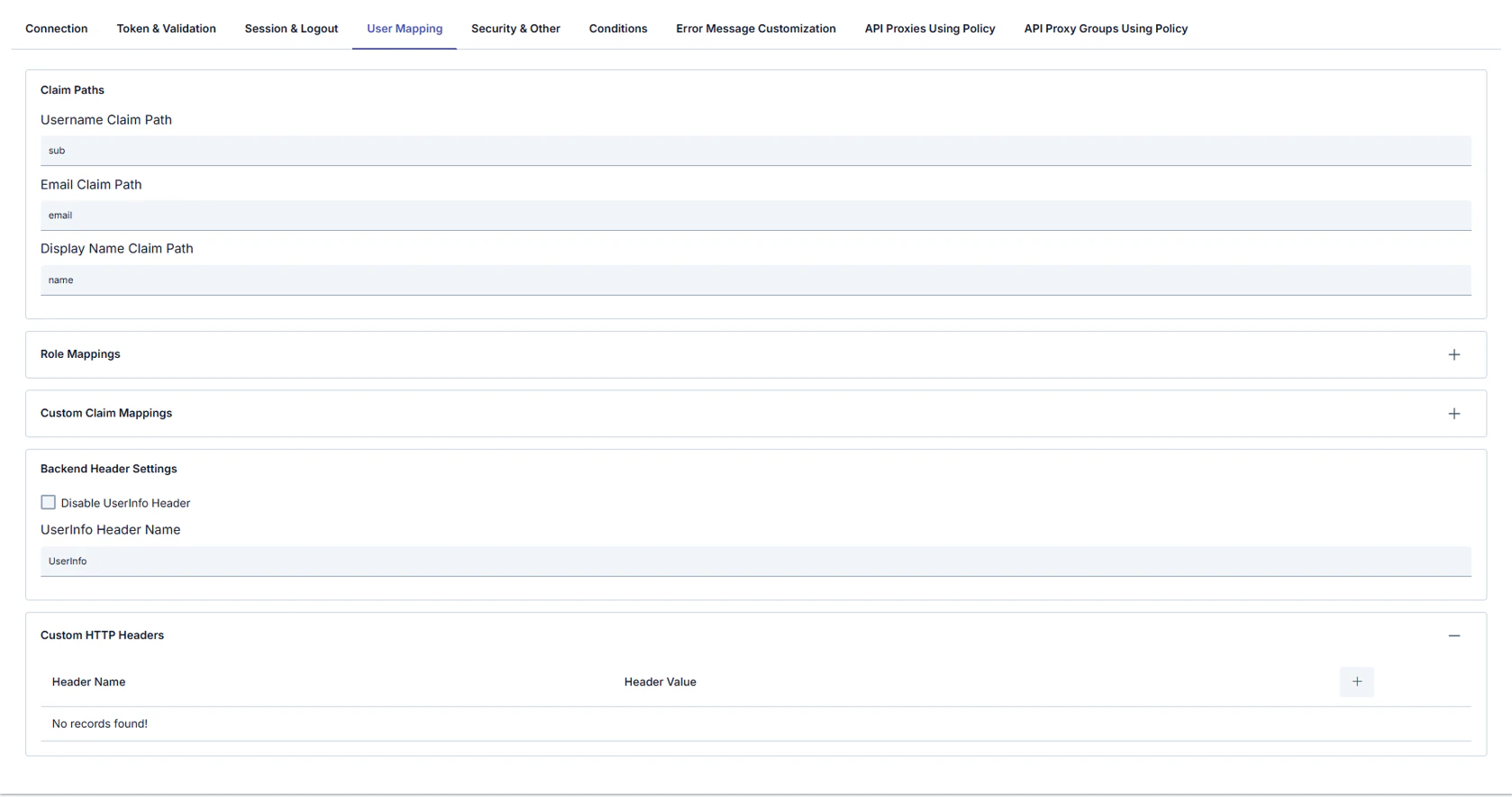
Role Mappings (table)
Custom Claim Mappings (table: Header Name / Header Value)
Backend Header Settings
Custom HTTP Headers (table: Header Name / Header Value) — additional headers sent to the backend.
Security & Other tab
TLS/mTLS to the provider, timeouts, request filtering, error redirects, and debug options.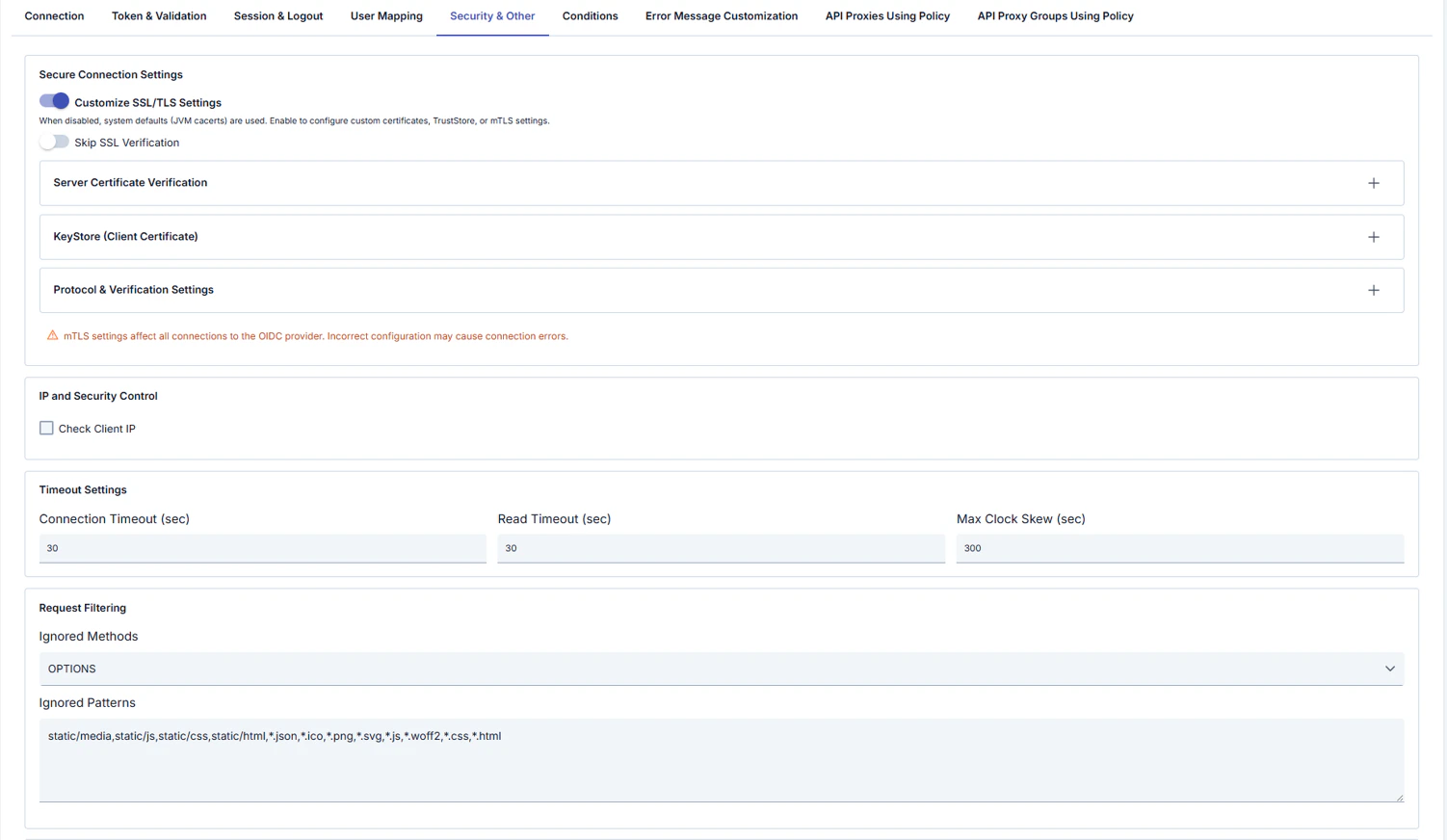
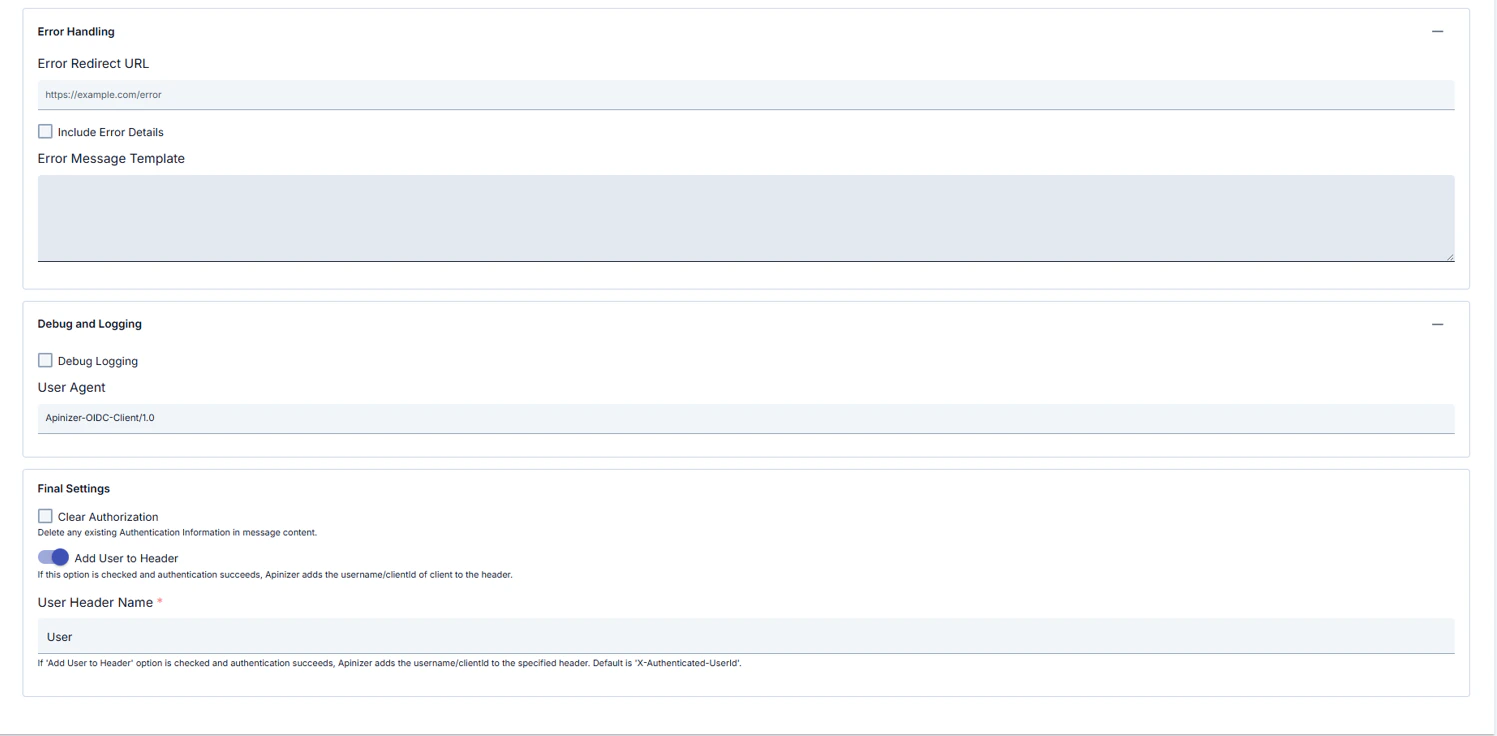
UI warning: mTLS settings affect all connections to the OIDC provider; incorrect configuration can cause connection errors.
IP and Security Control
Timeout Settings
Request Filtering
Error Handling
Debug and Logging
Other
OIDC vs OAuth2 configuration profile — UI differences
The tables above document the OIDC profile tabs in order. When Configuration Profile is set to OAuth2 (External OAuth2 Provider), Manager shows or hides different tabs and conditional fields on the same policy screen; this section summarizes that behavior. In Apinizer Manager, the Configuration Profile radio buttons (OIDC / OAuth2) control this.Summary table
Both profiles typically also include: Conditions, Error Message Customization, API Proxies Using Policy, API Proxy Groups Using Policy (logic is largely independent of profile).
Hidden or different when OAuth2 profile is selected (vs OIDC)
- Token & Validation tab: Bearer JWT, ID/access token checks, UserInfo, JWT issuer/audience/signature, token accept settings, etc.
- Full Session & Logout tab (OIDC): state/nonce, absolute timeout, token cookie names, logout path, revoke, post-logout, etc.
- User Mapping tab: claim paths, role mappings, custom claim mappings.
- On Security & Other, Check Client IP and Ignored Methods / Patterns — OIDC profile only.
Additional / different on OAuth2 profile
The following tabs and screenshots appear only when OAuth2 (External OAuth2 Provider) is selected. Tables use Header Name / Header Value pairs or template editors as appropriate.OAuth2 Parameters tab
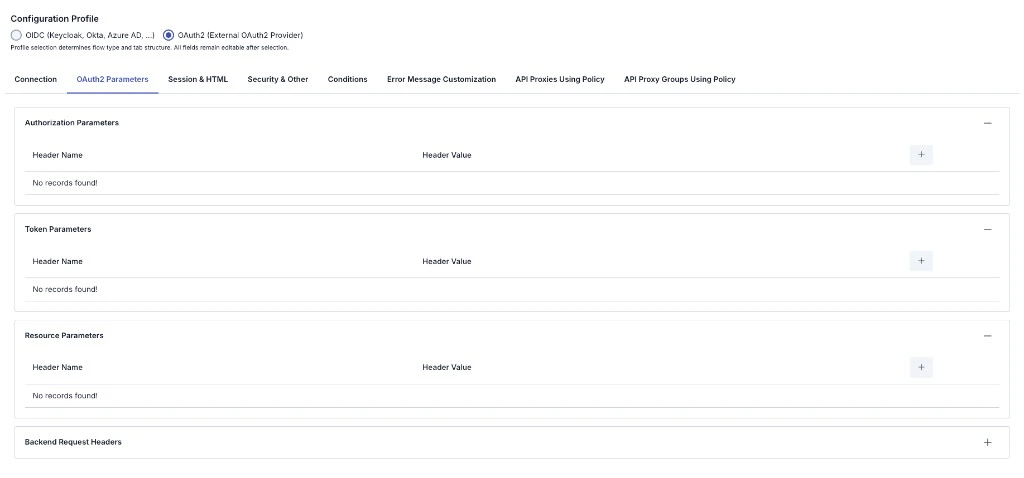
Session & HTML tab
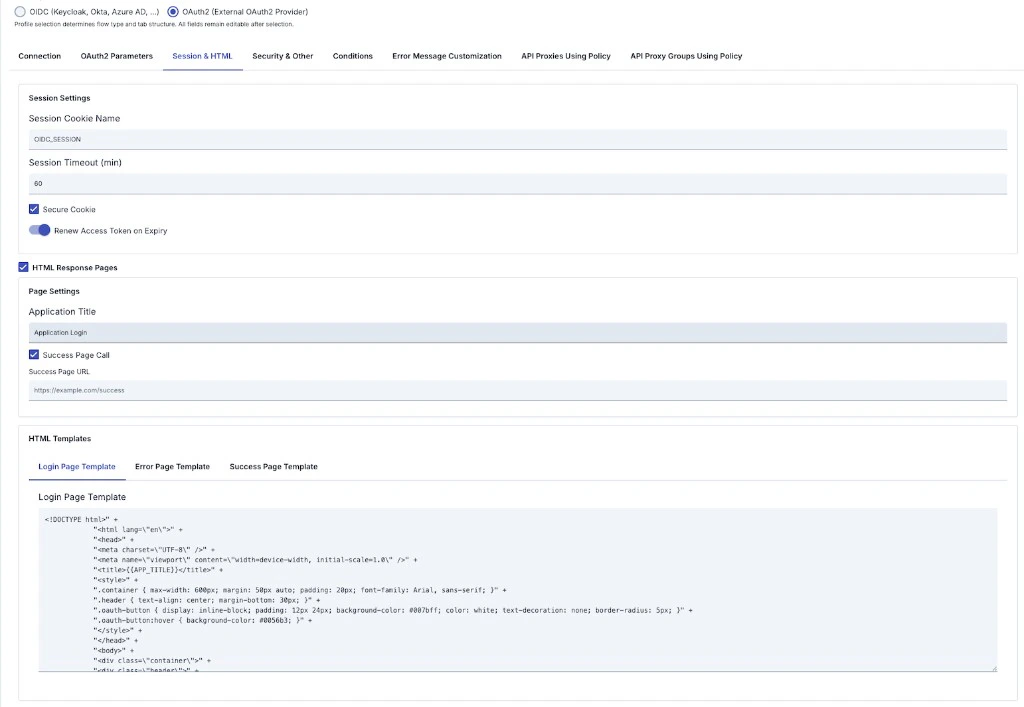
HTML Response Pages (when enabled)
Common to both profiles
- Connection is largely shared: Issuer, Discovery URL, Authorization Endpoint, Token Endpoint, Client ID, Client Secret, Redirect URI, PKCE, Scopes, Authentication Mode (endpoint and flow fields differ per summary table above).
- Security & Other: mTLS/SSL, connection/read timeout, max clock skew, error redirect, debug, user headers; Conditions and Error Message Customization remain profile-independent in behavior.
isOIDCProfile / isOAuth2Profile; fields may change between Apinizer versions.
Configuration Steps
OIDC profile recommended order: Connection → Token & Validation → Session & Logout → User Mapping → Security & Other → optional Conditions, Error Message Customization, API usage tabs. OAuth2 profile order differs: Connection → OAuth2 Parameters → Session & HTML → Security & Other → same optional tabs. This page first documents OIDC tabs in tables; OAuth2 differences are in the OIDC vs OAuth2 configuration profile — UI differences section immediately above. The steps below follow the OIDC flow first; if you use OAuth2, fill Connection using the summary table in that section, then use OAuth2 Parameters and Session & HTML instead of Steps 5–6 as written for OIDC.
For descriptions of Conditions and Error Message Customization panels, you can review the Conditions and Error Message Customization sections on the What is Policy? page.
For a complete guide on all layers, priority order and scenario examples of the error message configuration system, see the Error Message Configuration Guide page.