

Overview
API Call policy establishes service-to-service communication in microservice architectures by calling other REST APIs through API Gateway. It routes incoming requests to backend systems, processes responses, and integrates them into the API Proxy flow. This enables fetching data from external services, enriching requests, or combining responses from multiple sources.What is its Purpose?
- Route requests passing through API Gateway to another REST API to enable service-to-service communication in microservice architectures.
- Enrich incoming requests, transform them, and create combined responses by gathering data from multiple backend services (API Orchestration).
- Create a secure and manageable bridge to fetch or send data to external systems (CRM, ERP, payment gateways, etc.).
- Perform data transformation by manipulating headers, parameters, and body on request and response messages.
- Improve performance and reduce load on backend systems by caching results of frequently used API calls using cache mechanisms.
Working Principle
- Request Arrival: For each HTTP/HTTPS request arriving at API Gateway, if REST API Call policy is active, the call process is initiated.
- Policy Check: The system checks in the following order:
- Is a condition defined? If so, is the condition met?
- Is the policy active (active=true)?
- Is a variable used or is Apinizer default used?
- Request Preparation (Before Call): Before sending the request:
- Body is cleared or new content is added
- Headers and parameters are manipulated (add/remove)
- Data Manipulation rules are applied
- Cache check is performed (returns from cache if available)
- API Call: Request is sent to the defined URL with HTTP method:
- Synchronous: Response is awaited and processing continues
- Asynchronous: Process completes without waiting for response
- Response Processing (After Call - Only Synchronous): Incoming response is processed:
- Transformation is performed on body (NOT_CHANGE, REPLACE, CLEAR)
- Headers and parameters are manipulated
- Data Manipulation rules are applied
- Saved to cache (if active)
- Error Handling: Customizable HTTP status code and error message are returned for connection errors, timeouts, or unexpected responses.
Features and Capabilities
Basic Features
- Call Type Selection: Support for Synchronous (wait for response) or Asynchronous (fire-and-forget) mode. Response processing is not performed in async mode.
- HTTP Method Support: Supports all HTTP methods: GET, POST, PUT, DELETE, PATCH, HEAD, OPTIONS, TRACE.
- Timeout Management: Prevents infinite waits and protects system resources by defining maximum wait time in seconds for API calls.
- Active/Passive Status Control: Easily change policy’s active or passive status (active/passive toggle). Policy is not applied in passive state but its configuration is preserved.
- Condition-Based Application: Determine when the policy will be applied by creating complex conditions with Query Builder (e.g., only for specific endpoints or header values).
Advanced Features
- Request/Response Manipulation: Comprehensive manipulation of body, headers, and parameters in Before Call and After Call stages. Supports XML, JSON, RAW, URL-Encoded formats.
- Data Manipulation: Data transformation with ADD (add), REPLACE (replace), DELETE (delete) operations between source and target variables. Dynamic data processing using Variable system.
- Secure HTTPS and mTLS: On the request Settings tab you can set timeout and secure connection options (TrustStore, KeyStore, optional PEM certificate, protocols, hostname verifier) for TLS/mTLS to the backend; certificate and KeyStore management aligns with Secret Manager.
- Cache Mechanism: Support for Distributed or Local cache. Variable-based cache key definition, capacity and TTL settings, option to cache null responses.
- Test Helper: Automatically generate URL for API call. Select endpoint from existing API Proxies or Proxy Groups, test based on environment.
- Export/Import Feature: Export policy configuration as ZIP file. Import to different environments (Development, Test, Production). Version control and backup capability.
- Policy Group and Proxy Group Support: Manage multiple policies within Policy Group. Bulk policy assignment to Proxy Groups. Centralized updates and deploy operations.
- Deploy and Versioning: Deploy policy changes to live environment. See which API Proxies use it (Policy Usage). Proxy Group and Policy Group usage reports.
Usage Scenarios
Configuring Policy Parameters
In this step, users can create a new policy or configure existing policy parameters to define access rules. Defined parameters directly affect how the policy works (e.g., which IPs will be allowed, geographical restrictions, conditional activations, etc.). This allows the policy to be customized according to organization-specific requirements and managed centrally.Creating New API Call Policy

Configuration Steps
For descriptions of Conditions and Error Message Customization panels, you can review the Conditions and Error Message Customization (Error Message Customization) sections on the What is Policy? page.
For a complete guide on all layers, priority order and scenario examples of the error message configuration system, see the Error Message Configuration Guide page.
Deleting Policy
For deletion steps of this policy and operations to be applied when in use, you can refer to the Deleting Policy section on the What is Policy? page.Exporting/Importing Policy
For export (Export) steps of this policy and available options, you can refer to the Exporting/Importing Policy section on the What is Policy? page.Binding Policy to API
For the process of how this policy will be bound to APIs, you can refer to the Binding Policy to API section on the Policy Management page.Advanced Features
Dynamic TTL
Dynamic TTL automatically calculates the cache time-to-live (TTL) from a value in the API response instead of using a fixed value. For example, if your backend service returns anexpireAt field in the response, the cache remains valid until that date.
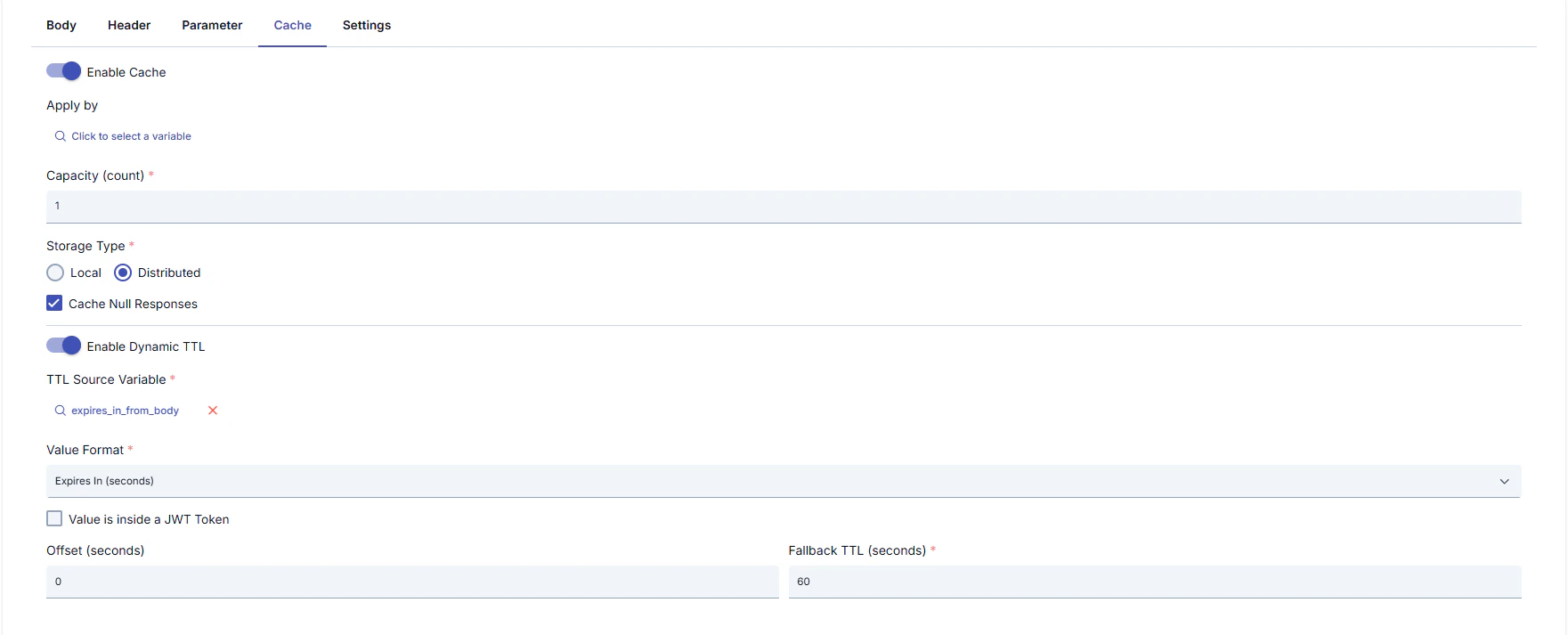
Configuration Fields
Supported Value Formats:
Additional Settings
Example Scenario
Your backend service returns the following response:- Enable Dynamic TTL: On
- TTL Source Variable: Response body → JSONPath:
$.expireAt - Value Format: ISO 8601 DateTime
- Offset:
30(30-second safety margin) - Fallback TTL:
300(5 minutes if parse fails)
expireAt field (minus 30-second offset).