

Overview
The Cache policy enables explicit cache read, write, and delete operations within your API Gateway policy chain. Unlike the embedded cache mechanism in the API Call policy, this is a standalone policy that you can insert at any point in your request or response flow to cache expensive computation results or frequently accessed data. It reduces backend load, improves response times, and decreases infrastructure costs by storing intermediate results in a distributed or local cache.What is its Purpose?
- Reduce backend load and improve response time by caching results of expensive operations.
- Store intermediate computation results or frequently accessed data (user profiles, currency rates, configuration settings).
- Implement dynamic caching strategies where cache operations are triggered conditionally based on request properties.
- Distribute cached data across multiple nodes using distributed cache or maintain local cache within a single gateway instance.
- Handle cache errors gracefully by choosing to continue flow or raise a fault.
Working Principle
The Cache policy performs one of three operations per invocation:- LOOKUP (Read): Check if a value exists in cache by key. On cache hit, write the cached value to a target variable and optionally skip remaining steps. On cache miss, continue to the next policy.
- POPULATE (Write): Extract a variable’s current value and store it in cache with a specified key and TTL (time-to-live).
- INVALIDATE (Delete): Delete a cache entry by key. Useful for cache invalidation after data updates.
- Supports variable interpolation in cache keys using
${}(environment variables) and#{}(context variables). - Can hash long keys for case-insensitive or case-sensitive equality.
- Applies a static TTL or dynamically reads TTL from a variable.
- Handles connection errors by continuing flow or raising a fault based on the
errorActionsetting.
Features and Capabilities
Basic Features
- Three Operations: LOOKUP, POPULATE, INVALIDATE with distinct configuration per operation.
- Cache Key Interpolation: Variable placeholders in cache keys are resolved at runtime. Example:
user:#{request.userId},currency:${ENV_REGION}. - Cache Selection: Choose any cache set created in Cache Management (distributed or local).
- Hash Key Option: Optionally hash the key for case-insensitive lookups or to reduce storage size on long keys.
- TTL Management: Set a static TTL or calculate it dynamically from a variable at runtime.
- Active/Passive Status Control: Toggle policy on/off while preserving configuration.
- Condition-Based Application: Apply policy only when specific conditions are met (e.g., only for certain API endpoints or client types).
Advanced Features
- Dynamic TTL: Read cache entry lifetime from a runtime variable instead of using a fixed value. Supports multiple time formats (ISO 8601, Unix epoch, duration strings, custom patterns).
- Source/Target Variable Binding: On LOOKUP, store cache hit result in any defined variable. On POPULATE, read from any source variable and store in cache.
- Error Handling Strategy: Choose
CONTINUE(ignore cache errors and proceed) orFAULT(raise error and stop). - Connection Timeout: Define maximum wait time for cache service connection.
- Export/Import Feature: Export policy configuration as ZIP file and import to different environments.
- Policy Group and Proxy Group Support: Manage multiple cache policies in Policy Groups and bulk-assign to Proxy Groups.
- Deploy and Versioning: Deploy policy changes to live environment. View Policy Usage (which API Proxies reference it).
Usage Scenarios
Configuring Policy Parameters
In this step, users can create a new policy or configure existing policy parameters to define cache operations. Defined parameters directly affect how the policy works (e.g., which cache set is used, what triggers cache operations, error handling strategy, etc.). This allows the policy to be customized according to organization-specific requirements and managed centrally.Creating New Cache Policy
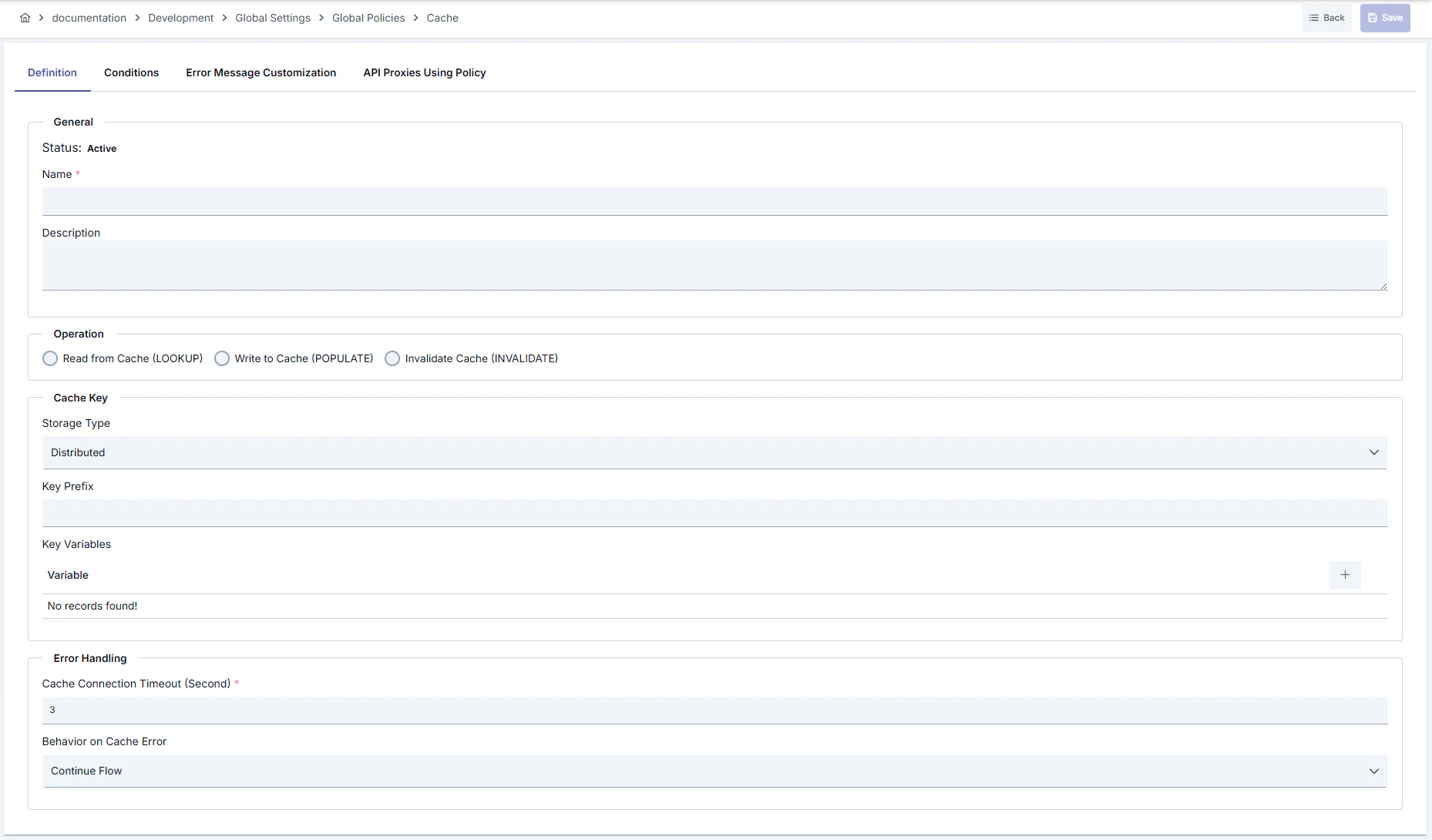
Configuration Steps
For descriptions of Conditions and Error Message Customization panels, you can review the Conditions and Error Message Customization sections on the What is Policy? page.
For a complete guide on all layers, priority order and scenario examples of the error message configuration system, see the Error Message Configuration Guide page.