

Overview
What is its Purpose?
- Assign variable values to target variables through template and form-based message building.
- Read data from sources such as body, header, and query parameters in the request or response to create new variables.
- Generate dynamic content with JEXL expressions and merge data from multiple sources.
- Perform variable assignment only in specific conditions with row-level conditional execution.
Working Principle
- Request Arrival: A MessageContext is created for each HTTP/HTTPS request arriving at the API Gateway.
- Policy Check: If the Message Builder policy is active, the system checks in the following order:
- Is a Condition defined? If so, is the condition met?
- Is the policy active (active=true)?
- Row Chain Execution: The row list is evaluated sequentially. For each row:
- Row condition is checked (if defined).
- Form mode: Value is read from the source variable.
- Template mode: Template is processed with
#{variable}syntax, JEXL expressions are evaluated. - Result is written to the target variable.
- Empty Value Handling:
- If value is empty and
Required=true, an error is thrown. - If value is empty, the default value is used.
- If value is empty and
- Error Handling: If
Continue on Erroris active, the row is skipped and processing moves to the next row. If inactive, the policy terminates with an error.
Features and Capabilities
Basic Features
- Two Build Modes: Form mode (simple variable copy) and Template mode (dynamic content creation with JEXL expression support).
- Row-Based Processing: Each row can be configured independently; source, target, condition, and default value are set separately.
- Drag-and-Drop Ordering: Row order can be easily changed with drag-and-drop.
- Active/Passive Status Control: Easily change the active or passive status of the policy. In passive mode, the policy is not applied but its configuration is preserved.
- Condition-Based Application: Conditions can be defined at both policy level and row level using Query Builder.
Advanced Features
- JEXL Expression Support: Mathematical, logical, and string operators can be used with
#{expression}syntax in Template mode. - Multiple Variable Sources: Data can be read from Body (JSON/XML path), Header, Query/Path/Form parameters, and Context Variables.
- Row-Level Error Management:
Continue on ErrorandRequiredflags can be set independently for each row. - Export/Import Feature: Export policy configuration as a ZIP file. Import to different environments (Development, Test, Production). Version control and backup capability.
- Policy Group and Proxy Group Support: Manage multiple policies within Policy Group. Bulk policy assignment to Proxy Groups. Centralized update and deploy operations.
- Deploy and Versioning: Deploy policy changes to live environment. See which API Proxies use it (Policy Usage). Proxy Group and Policy Group usage reports.
Usage Scenarios
Configuring Policy Parameters
In this section, you can create a new Message Builder policy or configure existing policy parameters to define message building rules. The screenshot below shows the Definition tab: policy status, name, and description; the Rows section and example Form and Template rows added via Add (source/target variables, default value, required, continue on error for Form; template editor and target variable for Template). Along the top, the Conditions, Error Message Customization, API Proxies Using Policy, and API Proxy Groups Using Policy tabs are also available.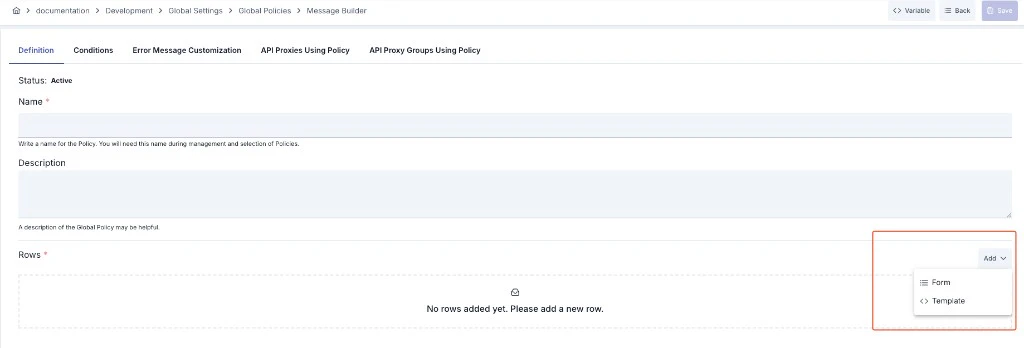
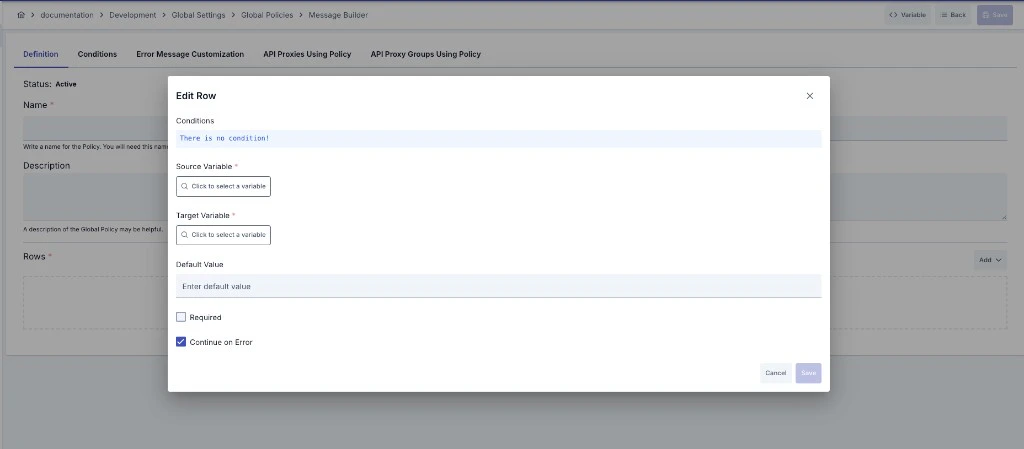
#{variableName} form, and target variable are shown; Continue on Error is also available.
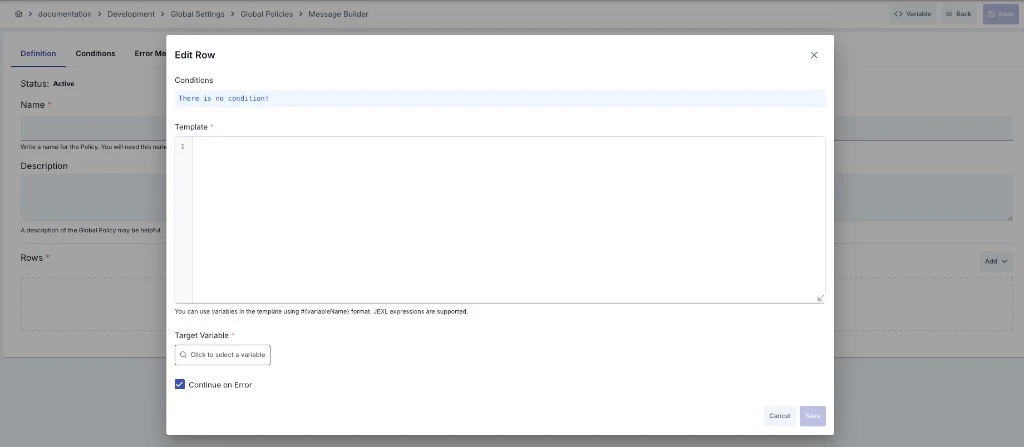
Creating a New Message Builder Policy
Configuration Steps
For descriptions of Conditions and Error Message Customization panels, you can review the Conditions and Error Message Customization sections on the What is Policy? page.
For a complete guide on all layers, priority order and scenario examples of the error message configuration system, see the Error Message Configuration Guide page.
Row Parameters
Template Syntax
In Template mode, variables and JEXL expressions are accessed using#{...} syntax:
Simple Variable Access:
JEXL Expression (Single Line):
#{...} blocks using for, while, var, if/else statements. JSON array values extracted via JSONPath from the body are automatically converted to lists and can be iterated with for (item : collection).
Array Iteration:
dtf.format() can be used to format dates with a specific timezone. By default, #{dateTime.formattedText} returns UTC time. To get time in a specific timezone:
In JEXL Script, the value of the last evaluated expression is returned. The
return keyword is not used.